Gabatarwa
This manual provides comprehensive instructions for the safe and efficient operation, installation, and maintenance of your Bennett Read KMW102 Digital Microwave. Please read all instructions carefully before using the appliance and retain this manual for future reference. Proper use of this microwave will ensure optimal performance and longevity.
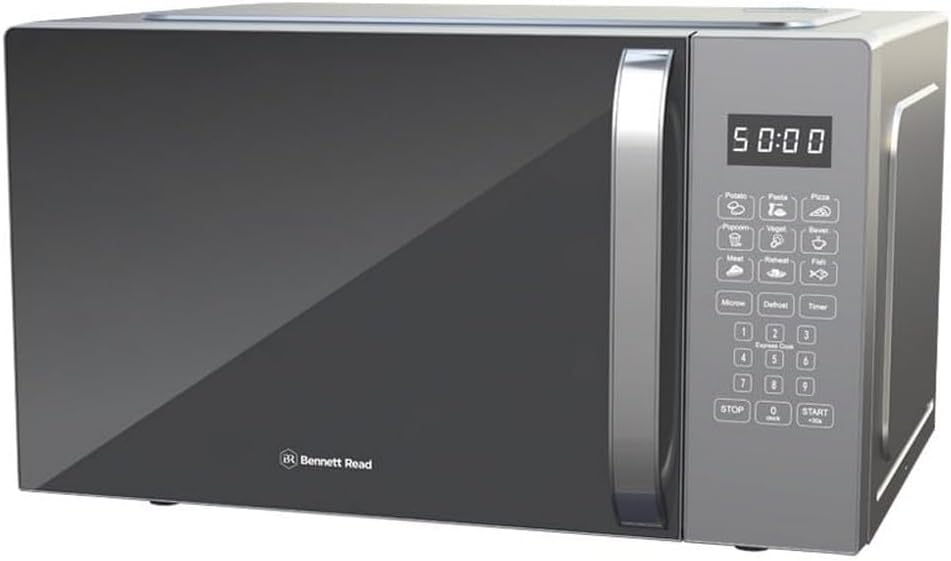
Hoto 1: Gaba view of the Bennett Read KMW102 Digital Microwave. This silver microwave features a dark mirror-finish door, a robust handle, and a digital control panel on the right side.
Muhimman Umarnin Tsaro
Lokacin amfani da na'urorin lantarki, ya kamata a bi matakan tsaro na asali, gami da masu zuwa:
- Karanta duk umarnin kafin amfani da na'urar.
- Do not operate the microwave if the cord or plug is damaged, if it is not working properly, or if it has been damaged or dropped.
- Kada a zafi ruwa ko wasu abinci a cikin kwantena da aka rufe tunda suna da alhakin fashewa.
- Sai kawai a ƙyale yara su yi amfani da tanda ba tare da kulawa ba lokacin da aka ba da isassun umarni don yaron ya sami damar yin amfani da tanda a hanya mai aminci kuma ya fahimci haɗarin amfani da bai dace ba.
- Kada kayi amfani da sunadarai masu lalata ko tururi a cikin wannan kayan aikin.
- Kada a yi amfani da wannan microwave don amfanin kasuwanci. An tsara shi ne kawai don amfanin gida.
- Ensure proper ventilation around the microwave. Do not block any ventilation openings.
- Kada kayi ƙoƙarin sarrafa wannan tanda tare da buɗe kofa saboda hakan na iya haifar da lahani ga makamashin microwave.
- Kar a sanya wani abu tsakanin fuskar tanderun da ƙofar ko ƙyale ƙasa ko sauran abin da ya fi tsafta ya taru akan saman rufewa.
- Kada a kunna tanda idan ta lalace. Yana da mahimmanci musamman ƙofar tanda ta rufe yadda yakamata kuma babu lalacewar ƙofar: (1) ƙofar (lanƙwasa), (2) hinges da latches (karye ko sassauƙa), (3) hatimin ƙofa da wuraren rufewa.
Saita da Shigarwa
Ana kwashe kaya
- Carefully remove the microwave oven and all packaging materials from the carton.
- Check the oven for any damage, such as dents or a misaligned door. Do not install if damaged.
- Remove any protective film from the surface of the cabinet and door.
- Remove the turntable, turntable ring, and shaft from the packaging. Wash these components in mild soapy water, rinse, and dry thoroughly.
Wuri
- Sanya microwave a kan lebur, barga mai tsayi wanda zai iya ɗaukar nauyinsa da kayan abinci mafi nauyi da ake iya dafawa a ciki.
- Ensure there is adequate space for ventilation. A minimum of 10 cm (4 inches) of space is required at the rear, 20 cm (8 inches) at the top, and 5 cm (2 inches) on both sides.
- Do not place the microwave near heat sources such as a conventional oven or radiator.
- Keep the microwave away from radio and TV sets to avoid interference.
Haɗin lantarki
Plug the microwave into a properly installed and grounded wall outlet. Ensure the voltage and frequency match the specifications on the rating label of the appliance. Do not use extension cords or adapters.

Image 2: The Bennett Read KMW102 Digital Microwave, showcasing its control panel with various buttons and a digital display. This image provides a clearer view na mai amfani dubawa.
Umarnin Aiki
Control Control Overview
The digital control panel features an LED display, numeric keypad, and dedicated function buttons for various cooking modes and settings. Familiarize yourself with the layout for ease of use.
Saita Agogo
- Danna maɓallin KYAUTA button sau ɗaya.
- Use the numeric keypad to enter the current time (e.g., 12:30).
- Danna maɓallin KYAUTA button sake don tabbatarwa.
Asalin Abincin Microwave
- Sanya abinci a cikin kwandon lafiyayyen microwave akan tebur.
- Rufe ƙofar da aminci.
- Shigar da lokacin girkin da ake so ta amfani da madannai na lamba.
- Danna maɓallin MATAKIN WUTA button repeatedly to select the desired power level (10 options available). The display will show P10 for 100% power, P9 for 90%, and so on.
- Danna maɓallin FARA button don fara dafa abinci.
Amfani da Ayyukan Saiti
The microwave includes one-touch preset buttons for common food items such as baked potatoes, pizzas, and frozen dinners.
- Place the food item in the microwave.
- Press the corresponding preset button (e.g., DANKARANTA, PIZZA).
- The microwave will automatically set the cooking time and power level.
- Danna maɓallin FARA maballin farawa.
Multi-Stage Dafa abinci
This function allows you to program multiple cooking stages, such as defrosting followed by cooking, in a single cycle.
- Danna maɓallin RASHI button and set the defrost time/weight.
- Then, set the desired cooking time and power level for the second stage.
- Latsa FARA. The microwave will automatically transition between stage.
Defrosting
The Speed Defrost feature allows for quick and efficient thawing of frozen foods.
- Place the frozen food in the microwave.
- Danna maɓallin RASHI maballin.
- Enter the weight of the food using the numeric keypad.
- Latsa FARA.
Kulle Yara
To prevent unsupervised operation by children, activate the child lock.
- To activate: Press and hold the TSAYA/CANCEN button for 3 seconds. A lock indicator will appear on the display.
- To deactivate: Press and hold the TSAYA/CANCEN button for 3 seconds again. The lock indicator will disappear.

Image 3: A graphic illustrating key features of the Bennett Read KMW102 Digital Microwave, including its 28-liter capacity, 900 watts of power, mirror finish, digital LED display, 8 auto-settings, multi-stage cooking, 10 power levels, speed defrost, and child lock function.
Kulawa da Tsaftacewa
Regular cleaning and maintenance will ensure the efficient operation and extend the lifespan of your microwave.
Tsabtace Waje
- Goge saman waje da laushi, damp zane. Kada a yi amfani da masu tsabtace abrasive ko sinadarai masu tsauri.
- Keep the control panel clean by wiping with a slightly damp cloth. Avoid excessive water.
Tsaftace Cikin Gida
- Clean the interior cavity after each use to prevent food splatters from drying and hardening.
- Use a mild detergent and a soft cloth. For stubborn stains, place a bowl of water with lemon juice inside and microwave for a few minutes to loosen residue, then wipe clean.
- Ensure the microwave is unplugged before cleaning the interior.
Turntable Care
- The glass turntable and roller ring can be removed for cleaning. Wash them in warm, soapy water or in the dishwasher.
- Tabbatar sun bushe gaba ɗaya kafin a mayar da su cikin microwave.
- Always ensure the turntable and roller ring are correctly positioned before operating the microwave.
Jagoran Shirya matsala
Duba teburin da ke ƙasa don ganin matsalolin da aka saba fuskanta da kuma hanyoyin magance su.
| Matsala | Dalili mai yiwuwa | Magani |
|---|---|---|
| Microwave baya farawa | Ba a toshe igiyar wuta ba; Ba a rufe ƙofar da kyau; Fuse da aka hura ko mai watsewar kewayawa ya ruɗe; An kunna kulle yaro. | Tabbatar cewa filogi yana cikin hanyar fita sosai; Rufe ƙofar lafiya; Duba fis/na'urar busar da wutar lantarki ta gida; Kashe makullin yara. |
| Abincin ba a dafa shi daidai ba | Abincin da ba a motsa ko juya shi ba; Ba daidai ba ne matakin wutar lantarki ko lokacin girki; Juyawa ba ya juyawa. | Stir or rotate food halfway through cooking; Adjust power level/time; Check turntable and roller ring for obstructions. |
| Haske baya aiki | Kwan fitila yana buƙatar sauyawa. | Tuntuɓi ƙwararrun ma'aikatan sabis don maye gurbin kwan fitila. |
| Turi mai yawa a cikin kofa | Yawan danshi a cikin abinci. | This is normal for some foods. Wipe the interior after use. |
Ƙayyadaddun samfur
- Alamar: Bennett Karanta
- Lambar Samfura: KMW102
- Launi: Azurfa
- Girman samfur: 57.6 x 43.6 x 32.6 cm
- Nauyin Abu: 16.8 kg
- Abu: Gilashi, Bakin Karfe
- Iyawa: 28 lita
- Matakan Wuta: 10
- Siffofin: Digital LED Display, 99-minute cooking timer, One-touch preset buttons, Multi-stage cooking, Speed Defrost, Child Lock
Garanti da Tallafin Abokin Ciniki
For warranty information, please refer to the documentation provided at the time of purchase. This typically includes details on coverage duration and terms. In case of technical issues, service requirements, or questions not covered in this manual, please contact Bennett Read customer support.
Please have your model number (KMW102) and proof of purchase ready when contacting support.


