પરિચય
The Linksys 5G AX1800 Mobile Hotspot is a portable device designed to provide high-speed 5G and WiFi 6 connectivity for multiple devices. With its ultra-thin design and long battery capacity, it allows you to stay connected on the go. This manual provides essential information for the proper setup, operation, maintenance, and troubleshooting of your mobile hotspot.
મુખ્ય લાક્ષણિકતાઓમાં શામેલ છે:
- Portable 5G supersonic speed and bandwidth.
- WiFi 6 speeds up to 1.8 Gbps (AX1800).
- Supports connection for 15+ devices simultaneously.
- Ultra-thin and lightweight design for maximum convenience.
- વિસ્તૃત ઉપયોગ માટે લાંબા સમય સુધી ચાલતી બેટરી.
- Powered by leading-edge 5G technology by Qualcomm.
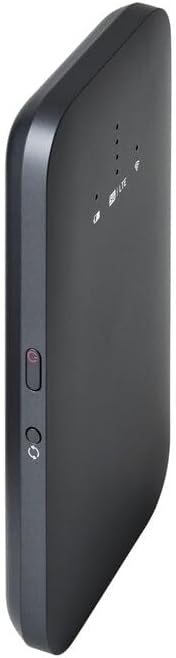
આકૃતિ 1: ફ્રન્ટ view of the Linksys 5G AX1800 Mobile Hotspot, showing LED indicators for battery, 5G/LTE, and Wi-Fi status.
સેટઅપ
1. સિમ કાર્ડ ઇન્સ્ટોલ કરો
The Linksys 5G AX1800 Mobile Hotspot requires a Nano-SIM card for 5G/LTE connectivity. Ensure the device is powered off before inserting the SIM card.
- Locate the SIM card slot cover on the side of the device.
- Gently open the cover.
- Insert the Nano-SIM card into the slot with the gold contacts facing down and the notched corner aligned correctly.
- સિમ કાર્ડ સ્લોટ કવર સુરક્ષિત રીતે બંધ કરો.

આકૃતિ 2: બાજુ view of the mobile hotspot, highlighting the SIM card slot cover.
2. ઉપકરણ ચાર્જ કરો
Before first use, fully charge the mobile hotspot. Use the provided charging cable and a compatible USB power adapter.
- Connect one end of the USB cable to the charging port on the device.
- Connect the other end to a USB power adapter or a computer's USB port.
- The battery indicator LED will show charging status. Allow several hours for a full charge.

આકૃતિ 3: નીચે view of the mobile hotspot, showing the USB-C charging port.
3. પાવર ચાલુ/બંધ
To power on the device, press and hold the power button located on the side until the LED indicators light up. To power off, press and hold the power button again until the indicators turn off.

આકૃતિ 4: બાજુ view of the mobile hotspot, indicating the location of the power button.
ઓપરેટિંગ સૂચનાઓ
૫.૧. ઉપકરણોને Wi-Fi સાથે કનેક્ટ કરવા
Once powered on, the mobile hotspot will broadcast a Wi-Fi network. You can connect up to 15+ devices simultaneously.
- તમારા ઉપકરણ (સ્માર્ટફોન, લેપટોપ, ટેબ્લેટ) પર, Wi-Fi સેટિંગ્સ ખોલો.
- માટે શોધો ઉપલબ્ધ Wi-Fi નેટવર્ક્સ.
- Select the network name (SSID) of your Linksys Mobile Hotspot. The default SSID and password are usually found on a sticker inside the device or on its packaging.
- જ્યારે પૂછવામાં આવે ત્યારે Wi-Fi પાસવર્ડ દાખલ કરો.
- Your device should now be connected to the internet via the mobile hotspot.
૪.૨. LED સૂચકોને સમજવું
The LED indicators on the front of the device provide important status information:
- બેટરી સૂચક: Shows the current battery level and charging status.
- 5G/LTE Indicator: Indicates the mobile network connection status (e.g., solid blue for 5G, solid green for LTE, blinking for searching).
- Wi-Fi સૂચક: Shows if the Wi-Fi network is active and broadcasting.
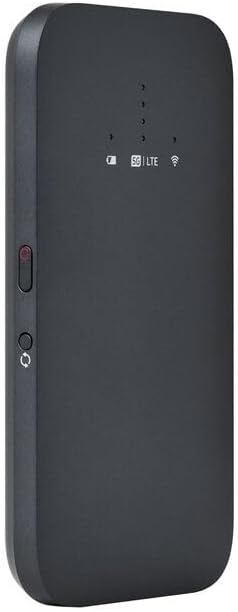
આકૃતિ 5: કોણીય આગળનો ભાગ view of the mobile hotspot, clearly showing the LED indicators for battery, 5G/LTE, and Wi-Fi.
3. ઍક્સેસ કરી રહ્યું છે Web મેનેજમેન્ટ ઇંટરફેસ
For advanced settings, such as changing the Wi-Fi name or password, managing connected devices, or checking data usage, you can access the device's web મેનેજમેન્ટ ઈન્ટરફેસ.
- Ensure your device is connected to the mobile hotspot's Wi-Fi network.
- ખોલો એ web બ્રાઉઝર (દા.ત., ક્રોમ, ફાયરફોક્સ, સફારી).
- Enter the default IP address for the hotspot (usually
192.168.1.1or192.168.0.1, refer to the device's documentation or sticker for the exact address) into the address bar and press Enter. - Log in using the default username and password (also found on the device sticker or documentation). It is highly recommended to change the default password for security.
જાળવણી
1. બેટરી કેર
- આત્યંતિક તાપમાને ઉપકરણને ખુલ્લા કરવાનું ટાળો.
- ઉપકરણને લાંબા સમય સુધી સંપૂર્ણપણે ડિસ્ચાર્જ ન રાખો.
- Use only the original or certified compatible charging accessories.
2. સફાઈ
Wipe the device with a soft, dry, lint-free cloth. Do not use liquid cleaners or aerosols directly on the device.
3. ફર્મવેર અપડેટ્સ
સમયાંતરે ફર્મવેર અપડેટ્સ માટે તપાસો web management interface. Keeping the firmware updated ensures optimal performance and security.
મુશ્કેલીનિવારણ
ઇન્ટરનેટ કનેક્શન નથી
- ખાતરી કરો કે સિમ કાર્ડ યોગ્ય રીતે દાખલ કરેલ છે અને ડેટા પ્લાન સાથે સક્રિય થયેલ છે.
- Check the 5G/LTE indicator on the device. If it's blinking or off, the device may be searching for a network or have no signal.
- Restart the mobile hotspot and your connected device.
- Verify that your data plan has not been exhausted.
ધીમી વાઇ-ફાઇ ગતિ
- Move closer to the mobile hotspot to improve signal strength.
- Reduce the number of connected devices or data-intensive activities.
- તમારા વિસ્તારમાં નેટવર્ક ભીડ છે કે નહીં તે તપાસો.
Device Not Connecting to Hotspot
- Ensure the Wi-Fi indicator on the hotspot is active.
- Wi-Fi પાસવર્ડ બે વાર તપાસો.
- Restart both the hotspot and the device you are trying to connect.
ફેક્ટરી રીસેટ
If issues persist, you may perform a factory reset. This will revert all settings to their default values, including Wi-Fi name and password. Refer to the device's specific instructions for the reset procedure, usually involving a small reset button.
વિશિષ્ટતાઓ
| લક્ષણ | વિગત |
|---|---|
| બ્રાન્ડ | લિન્કસીસ |
| મોડેલનું નામ | FGHSAX1800 |
| આઇટમ મોડલ નંબર | FGHSAX1800-AH |
| કનેક્ટિવિટી ટેકનોલોજી | 5G |
| Wi-Fi માનક | WiFi 6 (AX1800) |
| ડેટા ટ્રાન્સફર રેટ | પ્રતિ સેકન્ડ 1.8 ગીગાબિટ સુધી |
| આવર્તન બેન્ડ વર્ગ | ડ્યુઅલ-બેન્ડ |
| એન્ટેના પ્રકાર | આંતરિક |
| ખાસ લક્ષણો | એક્સેસ પોઇન્ટ મોડ |
| સમાવાયેલ ઘટકો | સિમ કાર્ડ સ્લોટ |
| ભાગtage | 12 વોલ્ટ |
| પેકેજ પરિમાણો | 14 x 7.5 x 1.55 સેમી |
| વસ્તુનું વજન | 185 ગ્રામ |
વોરંટી અને આધાર
For warranty information and technical support, please refer to the warranty card included with your product or visit the official Linksys support website. You can typically find FAQs, driver downloads, and contact information for customer service there.
Linksys Official Support: https://www.linksys.com/support