1. Introdución
Thank you for choosing the UBOTIE Wireless Keyboard and Mouse Combo. This manual provides essential information for setting up, operating, and maintaining your new peripheral devices. This combo offers a full-size QWERTY layout keyboard with round colorful keys, an integrated phone holder, and a comfortable wrist rest, paired with a quiet wireless mouse, all connected via a single 2.4GHz USB receiver.
2. Información de seguridade
- Keep the devices away from water and other liquids to prevent damage.
- Evite expoñer os dispositivos a temperaturas extremas ou á luz solar directa.
- Non intente desmontar nin reparar os dispositivos vostede mesmo. Póñase en contacto co servizo de atención ao cliente para obter axuda.
- Elimina as baterías segundo a normativa local.
3. Contido do paquete
- 1 x UBOTIE Wireless Keyboard
- 1 x UBOTIE Wireless Mouse
- 1 x 2.4GHz USB Receiver (stored inside the mouse)
- 1 x Integrated Wrist Rest
- 1 x Keycap Cleaning Brush
Note: Batteries (2x AAA for keyboard, 1x AA for mouse) are not included and must be purchased separately.

Image: UBOTIE Wireless Keyboard and Mouse Combo with wrist rest and USB receiver.
4. Configuración
4.1 Instalación da batería
- Para o rato: Abra a tapa do compartimento das pilas na parte inferior do rato. Insira unha pila AA, asegurándose de manter a polaridade correcta (+/-). Peche a tapa.
- Para o teclado: Abra a tapa do compartimento das pilas na parte inferior do teclado. Insira dúas pilas AAA, asegurándose de manter a polaridade correcta (+/-). Peche a tapa.
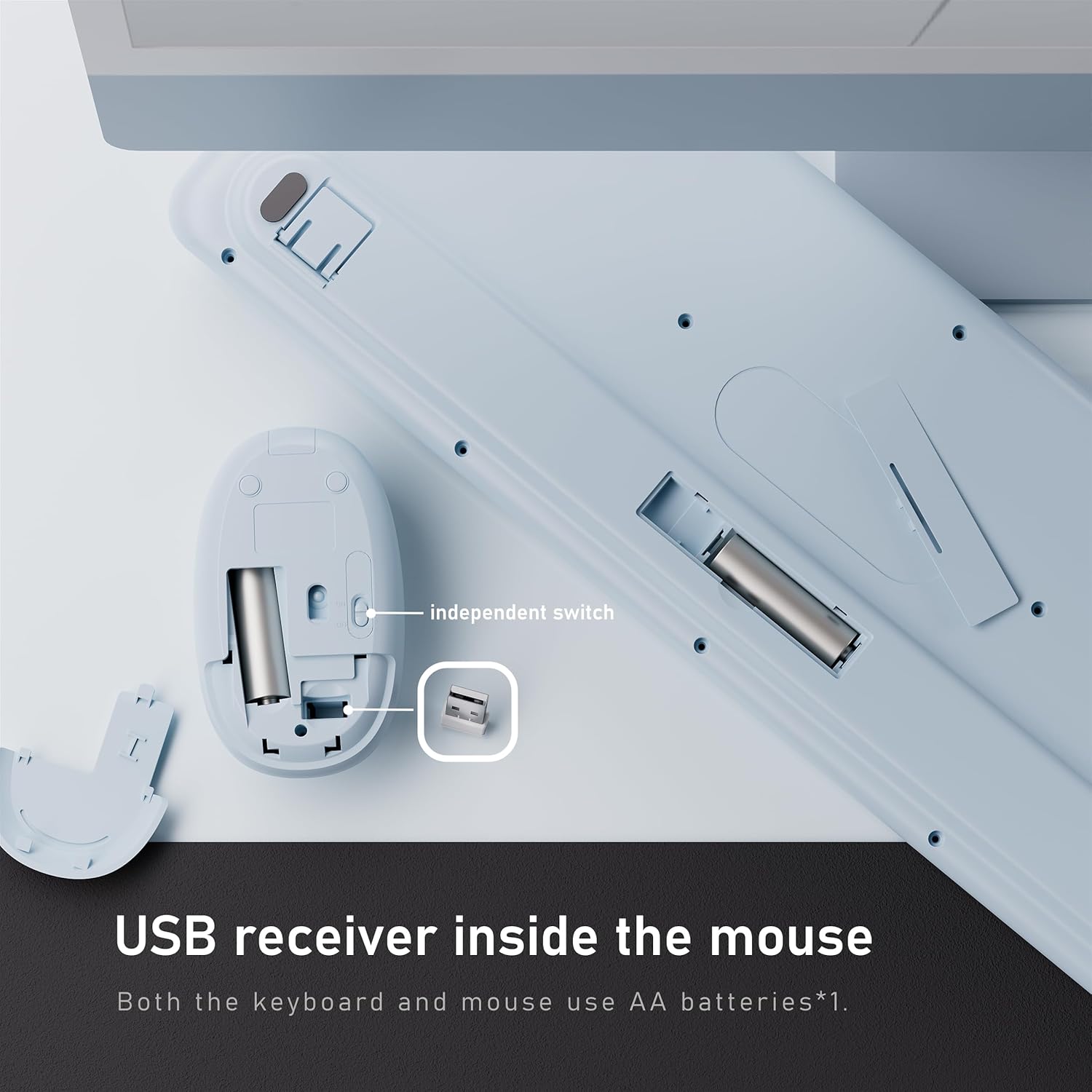
Image: Underside of the mouse showing the USB receiver storage and battery compartment. Underside of the keyboard showing its battery compartment.
4.2 Conexión do receptor USB
- Locate the 2.4GHz USB receiver stored in the battery compartment of the mouse.
- Retire o receptor USB.
- Plug the USB receiver into an available USB-A port on your computer or laptop. If your computer only has USB-C ports, use the provided USB-C adapter.
- Turn on the power switches for both the keyboard and the mouse. The devices are plug-and-play and should connect automatically.
Video: Demonstrates the plug-and-play setup of the wireless keyboard and mouse combo, highlighting the USB receiver and connection process.
5. Instrucións de funcionamento
5.1 Características do teclado
- Full-Size QWERTY Layout: Standard keyboard layout with function keys and a numeric keypad for efficient typing.
- Round Colorful Keycaps: Unique design for enhanced visual appeal and comfortable typing.
- Soporte de teléfono integrado: A slot at the top of the keyboard allows you to place your smartphone or tablet for easy viewing e multitarefa.
- Repouso para o pulso: The detachable wrist rest provides ergonomic support to reduce strain during extended typing sessions. It attaches magnetically to the keyboard.
- Interruptor de alimentación: An independent power switch is located on the keyboard to conserve battery life when not in use.

Image: The UBOTIE keyboard showcasing the integrated phone holder with a smartphone placed in it.
5.2 Características do rato
- Clics silenciosos: The mouse features low-noise buttons, ideal for quiet environments.
- DPI axustable: A DPI button allows you to adjust the mouse sensitivity for precise control.
- Deseño ergonómico: Contoured shape for comfortable grip.
- Interruptor de alimentación: An independent power switch is located on the mouse to conserve battery life.
Video: A seller-provided video demonstrating the features of the wireless keyboard and mouse, including the ergonomic design and quiet operation.
6. Mantemento
6.1 Cleaning the Keycaps
The floating keycap design allows for easy cleaning. Use the included brush or a soft, dry cloth to remove dust and debris from between the keys. For deeper cleaning, individual keycaps can be carefully removed and reattached.
6.2 Limpeza xeral
Wipe the surface of the keyboard and mouse with a soft, damp pano. Evite o uso de produtos químicos agresivos ou materiais abrasivos que poidan danar o acabado.
7 Solución de problemas
- Sen conexión: Ensure both the keyboard and mouse are powered on and have fresh batteries. Verify the USB receiver is securely plugged into your computer. Try plugging the receiver into a different USB port.
- Conexión intermitente ou con atraso: Move the devices closer to the USB receiver. Avoid placing the receiver near other wireless devices that may cause interference.
- Mouse Cursor Jumps/Sticks: Check the mouse's DPI setting and adjust if necessary. Ensure the mouse sensor is clean and used on a suitable surface.
- As teclas non responden: Check battery levels. If individual keys are stuck, gently clean around them.
- Device Not Waking from Sleep: The devices enter sleep mode after 30 minutes of inactivity to save power. Simply press any key or click the mouse to wake them up.
8. Especificacións
| Característica | Detalle |
|---|---|
| Marca | UBOTIE |
| Modelo | B0FCXTYWDF |
| Conectividade | Sen fíos de 2.4 GHz (receptor USB) |
| Disposición do teclado | Full-Size QWERTY |
| Batería de teclado | 2 pilas AAA (non incluídas) |
| Batería do rato | 1 x batería AA (non incluída) |
| Compatibilidade | Windows 11, 10, 8, 7 |
| Rango de operación | Ata 10 metros (33 pés) |
| Descrición do teclado | Membrane Computer Keyboard and Mouse With Phone Holder Wrist Rest |
| Peso do elemento | 2.48 libras (1.13 quilogramos) |
| Dimensións do paquete | 17.52 x 8.9 x 2.01 polgadas |
9. Garantía e soporte
UBOTIE products come with a standard manufacturer's warranty. For specific warranty details, please refer to the product packaging or contact UBOTIE customer support directly. If you encounter any issues or have questions about your product, please visit the official UBOTIE website or contact their customer service team for assistance.
Para máis información, visite o UBOTIE Store on Amazon.

