Introdución
This user manual provides comprehensive instructions for the HW16 Smart Watch. It covers setup, operation, maintenance, and troubleshooting to help you maximize your device's potential. The HW16 Smart Watch features a 1.72-inch full screen, Bluetooth call functionality, music system, heart rate sensor, fitness tracking, and password lock screen, compatible with both iOS and Android devices.
Configuración
1. Cargando o dispositivo
Before first use, fully charge your HW16 Smart Watch. Connect the magnetic charging cable to the charging points on the back of the watch and plug the USB end into a compatible power adapter (not included) or a computer USB port. The watch display will indicate charging status.
2. Acendido/apagado
To power on, press and hold the side button until the screen illuminates. To power off, press and hold the side button, then select the power off option on the screen.
3. Emparellamento co teu teléfono intelixente
The HW16 Smart Watch connects via Bluetooth. Download the recommended companion application (e.g., Wearfit Pro APP as mentioned in specifications) from your smartphone's app store. Ensure Bluetooth is enabled on your phone. Open the app, follow the on-screen instructions to search for and pair with your HW16 device. Confirm the pairing request on both your phone and the watch.
Instrucións de funcionamento
Navegación
The HW16 features a full touch screen. Swipe left/right, up/down to navigate through menus and features. Press the side button to return to the home screen or access the app list.
Funcionalidade de chamadas Bluetooth
Once paired with your phone, the watch supports HD-Dial calls. You can swipe to answer incoming calls, dial numbers directly from the watch, and synchronize your mobile phone call history and address book. This feature allows for hands-free communication.

Image: The HW16 Smart Watch showing its HD-Dial Call feature, including options to answer, dial, and access contacts. This image illustrates the watch's capability for direct phone calls.
Sistema de música
Control music playback on your connected smartphone directly from your watch. Play, pause, skip tracks, and adjust volume without needing to take out your phone.
Seguimento da condición física
The watch tracks various fitness metrics including steps, distance, and calories burned. Utilize the multi-sport mode for specific activity tracking.
Sensor de frecuencia cardíaca
Monitor your heart rate in real-time. Access the heart rate application on the watch to view your current heart rate and historical data.

Imaxe: A parte traseira view of the HW16 Smart Watch, highlighting the optical heart rate sensor. This sensor uses light to detect blood flow and measure heart rate.
Password Lock Screen
Enhance your privacy and security by setting a password lock for your watch. This prevents unauthorized access to your data.

Image: The HW16 Smart Watch screen showing a numerical keypad for entering a password. This feature provides enhanced security for the device.
Funcións de vixilancia da saúde
The HW16 Smart Watch offers comprehensive health data detection, including:
- Frecuencia cardíaca: Continuous monitoring of your heart rate.
- Osíxeno no sangue: Measurement of blood oxygen saturation levels.
- Presión arterial: Estimation of blood pressure (for reference only, not medical device).
- Monitorización do sono: Rexistra os patróns de sono, incluíndo o sono profundo, o sono lixeiro e as horas de vixilia.
- Stress Test: Provides insights into stress levels.
- Adestramento de respiración: Exercicios de respiración guiados para a relaxación.
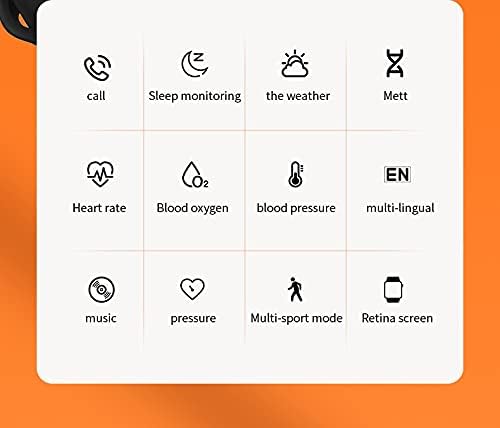
Image: A grid of icons illustrating the various functions of the HW16 Smart Watch, including call, sleep monitoring, weather, Mett, heart rate, blood oxygen, blood pressure, multi-lingual support, music, pressure, multi-sport mode, and Retina screen.
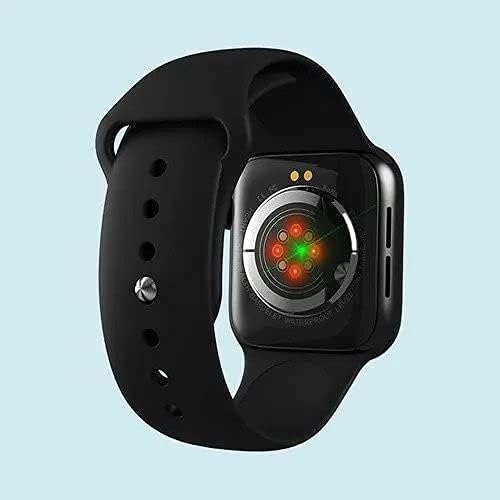
Image: This image showcases the health data detection capabilities of the HW16 Smart Watch, including a MET graph and a custom component display for personalized shortcuts.
Especificacións
| Característica | Detalle |
|---|---|
| Nome do modelo | HW16 |
| Tamaño de visualización | 1.72 polgadas |
| Resolución | 320*385 |
| Tecnoloxía de conectividade | Bluetooth 5.2 |
| Material do corpo | Zinc alloy + IML injection process |
| Material da correa | Silicona líquida |
| Capacidade da batería | 250 mAh |
| OS compatible | iOS 10.0 e superior / Android 5.0 e superior |
| Dimensións | 43.4 mm * 38 mm * 11 mm |
| Tamaño da pulseira | 260 mm * 20 mm * 2.5 mm |
| Características especiais | Camera (remote control), Heart Rate Sensor, Fitness Tracker, Password Lock Screen, Music System |
| Impermeable | Yes (implied by "Waterproof" keyword, but no specific IP rating provided) |
| Idiomas admitidos | Chinese, English, Arabic, French, German, Spanish, Portuguese, Russian, Thai, Polish, Italian, Japanese, Traditional, Czech, Turkish, Greek, Latin, Romanian, Vietnamese, Danish... |

Image: The HW16 Smart Watch, black casing with a blue strap, displayed on a watch stand. The screen shows time, steps, and various app icons.

Image: The HW16 Smart Watch worn on a wrist, displaying its main menu with various circular app icons for different functions.
Mantemento
- Limpeza: Limpe o reloxo e a correa regularmente cun pano suave eamp pano. Evite o uso de produtos químicos agresivos ou materiais abrasivos.
- Resistencia á auga: While the watch is waterproof (as per keywords), avoid prolonged submersion or exposure to hot water/steam. Dry the watch thoroughly if it gets wet.
- Cargando: Use only the provided charging cable. Do not force the charger into the port.
- Almacenamento: Garda o reloxo nun lugar fresco e seco cando non o uses.
Resolución de problemas
O reloxo non se acende
Asegúrate de que o reloxo estea completamente cargado. Conéctao ao cargador durante polo menos 30 minutos antes de tentar acendelo de novo.
Non se pode emparellar co teléfono
- Asegúrate de que o Bluetooth estea activado no teléfono e no reloxo.
- Asegúrate de que o reloxo estea dentro do alcance Bluetooth do teu teléfono.
- Reinicia tanto o teléfono como o reloxo.
- Clear previous Bluetooth connections on your phone and try pairing again.
- Ensure the companion app is installed and running.
Datos sanitarios inexactos
Ensure the watch is worn snugly on your wrist, not too loose or too tight. Clean the sensor on the back of the watch regularly. Note that health data is for reference only and not intended for medical diagnosis.
A pantalla non responde
Try restarting the watch. If the issue persists, ensure the screen is clean and dry. If the problem continues, contact customer support.
Garantía e Soporte
For warranty information and customer support, please refer to the documentation included with your purchase or visit the official SmartWatch brand websitio. Garda o comprobante de compra para reclamacións de garantía.


