1. Introdución
Grazas pola compraasing the Kimiso-E92 (KMS-206) Portable Bluetooth Speaker. This manual provides essential information for the safe and efficient operation of your device. Please read it thoroughly before use and retain it for future reference.
The Kimiso-E92 (KMS-206) is a portable speaker designed for convenience and quality audio. It features wireless Bluetooth connectivity, support for USB and SD card playback, and an FM radio function. Its compact design includes a carrying strap for easy transport.
2. Información de seguridade
- Non expoñas o altofalante á auga, á humidade nin a temperaturas extremas.
- Evite deixar caer ou someter o altofalante a fortes impactos.
- Do not attempt to disassemble or repair the speaker yourself. Contact qualified service personnel.
- Manteña o altofalante lonxe de fontes de calor e da luz solar directa.
- Use only the provided charging cable or a certified 5V USB charger.
- Limpa o altofalante cun pano suave e seco. Non empregues produtos de limpeza abrasivos.
3. Contido do paquete
Comprobe se o paquete contén os seguintes elementos:
- 1 x Kimiso-E92 (KMS-206) Portable Bluetooth Speaker
- 1 x correa de transporte
- 1 x cable de carga USB
4. Produto rematadoview
Familiarízate cos compoñentes e controis do altofalante.
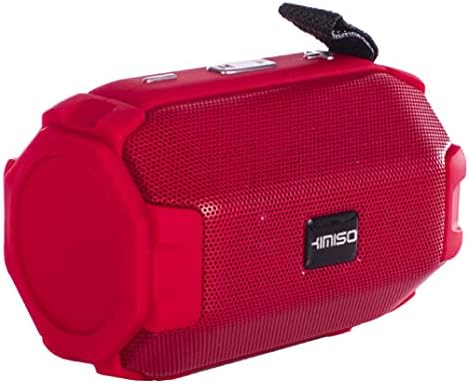
Figure 1: Kimiso-E92 (KMS-206) Portable Bluetooth Speaker (Red)
This image displays the red version of the Kimiso-E92 (KMS-206) portable speaker. It features a cylindrical shape with a mesh grille covering the front speaker, control buttons located on the top panel, and a black carrying strap attached to one end.

Figure 2: Kimiso-E92 (KMS-206) Portable Bluetooth Speaker (Black, Front View)
This image shows a direct front view of the Kimiso-E92 (KMS-206) portable speaker in black. The prominent feature is the speaker grille with the 'KIMISO' brand logo centrally placed. The textured surface of the speaker is also visible.
5. Configuración
5.1. Cargando o altofalante
- Conecta o extremo pequeno do cable de carga USB fornecido ao porto de carga do altofalante.
- Connect the larger end of the USB cable to a 5V USB power adapter (not included) or a computer's USB port.
- The charging indicator light will illuminate, typically red, during charging.
- Once fully charged (approximately 2 hours), the indicator light may change color or turn off.
- Desconecte o cable de carga.
5.2. Acendido/apagado
- To power on, press and hold the Power button for a few seconds until you hear an audible prompt or see an indicator light.
- To power off, press and hold the Power button again until the speaker shuts down.
6. Instrucións de funcionamento
6.1. Emparellamento Bluetooth
- Ensure the speaker is powered on and in Bluetooth mode (it usually defaults to Bluetooth mode upon power-on). An indicator light will typically flash, indicating it's ready for pairing.
- No teu dispositivo móbil (teléfono intelixente, tableta, portátil), activa o Bluetooth e busca os dispositivos dispoñibles.
- Select "KMS-206" or a similar name from the list of found devices.
- Once paired, the speaker will emit an audible confirmation, and the indicator light will typically stop flashing and remain solid.
- You can now play audio from your device through the speaker. The effective range for Bluetooth connection is approximately 10 meters.
6.2. Reprodución USB
- Inserir unha unidade flash USB que conteña son MP3 files no porto USB do altofalante.
- The speaker should automatically switch to USB mode and begin playing the audio files.
- Use the speaker's control buttons to navigate tracks (next/previous) and adjust volume.
6.3. Reprodución de tarxeta SD
- Insert a Secure Digital (SD) card containing MP3 audio files into the SD card slot on the speaker.
- The speaker should automatically switch to SD card mode and begin playing the audio files.
- Use the speaker's control buttons to navigate tracks (next/previous) and adjust volume.
6.4. Radio FM
- Press the Mode button (if available) to switch to FM radio mode.
- In FM mode, press the Play/Pause button to automatically scan and save available radio stations.
- Use the Next/Previous track buttons to switch between saved stations.
6.5. Controis
The speaker features intuitive button controls for various functions:
- Botón de encendido: Mantén premido para activar/desactivar.
- Botón de modo: Short press to switch between Bluetooth, USB, SD Card, and FM Radio modes.
- Botón Reproducir/Pausa: Short press to play or pause audio. In FM mode, press to auto-scan stations.
- Botón para baixar o volume / pista anterior: Prema curta para a canción/emisora anterior. Prema longa para baixar o volume.
- Botón para subir o volume / seguinte canción: Prema curta para a seguinte canción/emisora. Prema longa para aumentar o volume.
7. Mantemento
- Manteña o altofalante limpo limpo cun pano suave e seco.
- Evite o uso de produtos de limpeza líquidos ou solventes.
- Garde o altofalante nun lugar fresco e seco cando non o use durante períodos prolongados.
- Cargue a batería regularmente, mesmo se non a usa con frecuencia, para manter o estado da batería.
8 Solución de problemas
| Problema | Causa posible | Solución |
|---|---|---|
| O altofalante non se acende. | A batería está esgotada. | Cargue o altofalante durante polo menos 2 horas. |
| Non se escoita son do altofalante. | O volume é demasiado baixo; o dispositivo non está emparellado; o modo incorrecto. | Increase volume; re-pair Bluetooth; switch to correct mode (BT, USB, SD). |
| O dispositivo Bluetooth non pode atopar o altofalante. | Speaker not in pairing mode; device too far. | Ensure speaker is on and in Bluetooth mode; move device closer (within 10m). |
| A tarxeta USB/SD non se reproduce. | Incorrecto file formato; tarxeta/unidade non inserida correctamente; danada files. | Garantir files are MP3; re-insert card/drive; try another card/drive. |
| Mala recepción de radio FM. | Debil sinal. | Move speaker to a different location; re-scan stations. |
9. Especificacións
| Modelo: | KMS-206 |
| Versión Bluetooth: | 5.1 + EDR (A2DP) |
| Distancia de conexión sen fíos: | Ata 10 metros |
| Canle de audio: | Estéreo 2.0 |
| Potencia de saída: | 10 W |
| Resposta en frecuencia: | 20Hz - 20KHz |
| Capacidade da batería: | 1500 mAh |
| Vol. De entradatage: | USB 5V |
| Tempo de funcionamento: | 4-6 horas |
| Tempo de carga: | Aproximadamente 2 horas |
| Modos admitidos: | USB, TF (SD Card), Bluetooth, FM Radio |
| Método de control: | Botón |
| Dispositivos compatibles: | Notebook, Smartphone, Tablet |
| Tipo de altofalante: | Subwoofer |
| Diámetro do subwoofer: | 5.25 polgadas |
| Wattage (pico): | 20 vatios |
10. Garantía e soporte
Para obter información sobre a garantía ou asistencia técnica, consulte a documentación proporcionada no momento da compra ou póñase en contacto co seu vendedor. Garde o comprobante de compra para calquera reclamación de garantía.


