1. Introdución
Welcome to your Garmin Approach S62 Premium GPS Golf Watch. This manual provides detailed instructions for setting up, operating, maintaining, and troubleshooting your device. Please read this manual thoroughly to ensure optimal performance and longevity of your watch.
2. Que hai na caixa
- Garmin Approach S62 Premium GPS Golf Watch
- Cable de carga/datos
- Documentación
- Wearable4U Power Bank (E-Bank)
- Wearable4U Wall Charger
- Wearable4U Car Charger

Image: Contents of the Wearable4U bundle, including the Garmin Approach S62 watch, power bank, wall charger, and car charger.
3. Dispositivo rematadoview
The Garmin Approach S62 is a premium GPS golf watch designed to provide essential golf course information and smart features directly on your wrist. It features a large, easy-to-read color touchscreen display.

Image: The Garmin Approach S62 watch displaying the time, steps count, and current date.

Image: The Garmin Approach S62 watch displaying detailed golf course information for a specific hole, including distances to the green.
4. Configuración
4.1. Cargando o dispositivo
Before first use, fully charge your Approach S62. Connect the charging clip to the watch and plug the USB cable into a power source. A full charge typically takes approximately 2 hours.
4.2. Acendido/apagado
- Para acender: Press and hold the power button (usually the top right button) until the Garmin logo appears.
- Para apagar: Press and hold the power button until the power options menu appears, then select 'Power Off'.
4.3. Configuración inicial e emparellamento
Upon first power-on, the watch will guide you through initial setup steps, including language selection and personal data input. To unlock full smart features, pair your watch with the Garmin Golf app on your smartphone via Bluetooth. Follow the on-screen instructions on both the watch and the app.
5. Instrucións de funcionamento
5.1. Golf Features
The Approach S62 is preloaded with over 41,000 golf courses worldwide. Once you start a round, the watch automatically detects your location and displays course information.
5.1.1. Virtual Caddie
The Virtual Caddie feature suggests a club based on your typical hitting distance for each club, considering wind speed and direction. It also indicates where to aim on the course map.

Image: The Garmin Approach S62 watch showing the Virtual Caddie feature, suggesting a club and aim point for a shot.
5.1.2. Hazard View
Quickly scroll through each hazard on the map to view distances to the front and back of bunkers, water hazards, and other obstacles.
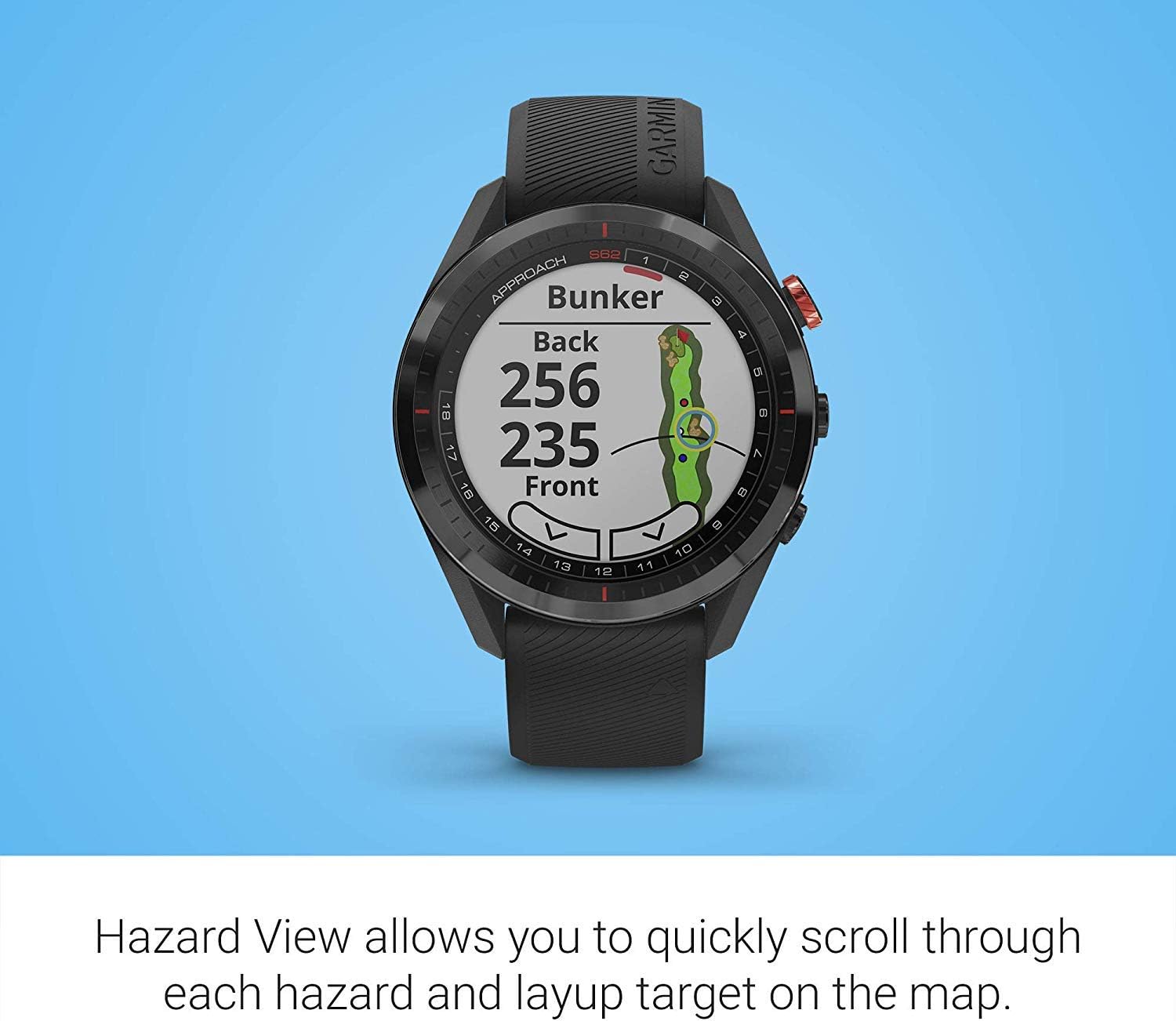
Image: The Garmin Approach S62 watch displaying the Hazard View, showing distances to the front and back of a bunker.
5.1.3. PlaysLike Distance
This feature adjusts yardage measurements to account for uphill and downhill shots, providing a more accurate distance to the target.
5.1.4. Verde View
O Verde View feature allows you to manually position the pin for the day, providing precise distances to the front, middle, and back of the green, as well as to hazards and doglegs.

Image: The Garmin Approach S62 watch displaying the Green View, showing the green layout and allowing for manual pin positioning.
5.1.5. Course Selection and Scoring
The watch automatically detects nearby courses. Select your course and begin your round. The watch can track your score, shots, and other statistics, which can be reviewed on the watch or in the Garmin Golf app.
5.2. Funcións intelixentes
5.2.1. Garmin Pay
Garmin Pay is a contactless payment solution that allows you to make convenient payments directly from your watch. Set up your cards in the Garmin Connect app.
5.2.2. Notificacións
Receive smart notifications for calls, texts, and app alerts directly on your watch when paired with your smartphone.
5.3. Customizing Your Watch
You can customize watch faces, widgets, and settings through the watch menu or the Garmin Connect app to suit your preferences.
6. Mantemento
6.1. Limpeza do dispositivo
Limpa o reloxo regularmente cun pano suave eamp pano. Evita produtos químicos agresivos ou materiais abrasivos. Asegúrate de que os contactos de carga estean limpos e secos antes de cargalos.
6.2. Coidado da batería
To maximize battery life, avoid exposing the watch to extreme temperatures. Charge the device regularly, but avoid leaving it fully discharged for extended periods. The battery life is approximately 20 hours in GPS mode.
6.3. Actualizacións de software
Keep your watch's software updated to ensure optimal performance and access to the latest features. Updates can be performed via the Garmin Connect app or Garmin Express on a computer.
7 Solución de problemas
7.1. Problemas comúns
- O reloxo non se acende: Ensure the watch is fully charged. Try connecting it to a power source.
- O GPS non capta sinal: Asegúrate de estar nunha zona aberta con clara view of the sky. Allow several minutes for the watch to acquire satellites.
- Problemas de conexión Bluetooth: Asegúrate de que o Bluetooth estea activado tanto no reloxo como no teléfono intelixente. Tenta reiniciar ambos os dispositivos e volver emparellalos a través da aplicación Garmin Connect.
- Inaccurate distances: Ensure the course map is up-to-date. Perform a software update if available.
- A pantalla táctil non responde: Try restarting the device. If the issue persists, contact Garmin support.
8. Especificacións
| Característica | Detalle |
|---|---|
| Peso do elemento | 1.25 libras |
| Dimensións do produto | 1.85 x 0.58 x 1.85 polgadas |
| Número de modelo do artigo | wa001 |
| Baterías | 2 pilas de iones de litio necesarias |
| Tamaño de visualización | 3 polgadas |
| Duración da batería (modo GPS) | 20 horas |
| Comando de voz | Pantalla táctil |
| Tecnoloxía de conectividade | Bluetooth intelixente e ANT+ |
| Tipo de mapa | América do Norte |
| Tipo de montaxe | Soporte de pulso |
| Tipo de visualización | Memoria transflectiva visible en luz solar, en píxeles (MIP) |
9. Garantía e soporte
For warranty information, please refer to the documentation included with your product or visit the official Garmin websitio. Para obter asistencia técnica, rexistro de produtos e recursos adicionais, visite garmin.com/asistencia.
10. Vídeo oficial do produto
Video: Official product video demonstrating key features and benefits of the Garmin Approach S62 Premium GPS Golf Watch.


