1. Introdución
This manual provides detailed instructions for the safe and efficient operation of your Samsung Glyde U940 mobile phone. Please read this manual thoroughly before using your device to ensure proper functionality and to understand all features.
2. Contido do paquete
Verifique que o paquete do produto contén os seguintes elementos:
- Samsung Glyde U940 Mobile Phone
- Batería estándar
- Travel Adapter/Charger
- Manual de usuario (este documento)
- Nota: Os accesorios específicos poden variar segundo a rexión ou o establecemento.
3. Dispositivo rematadoview
The Samsung Glyde U940 features a large touch-sensitive display and a slide-out QWERTY keyboard for versatile input.
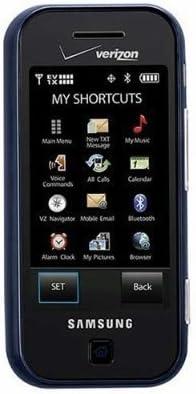
Figura 3.1: Fronte view of the Samsung Glyde U940, showing the 2.8-inch display and navigation buttons. The screen displays "MY SHORTCUTS" with icons for various functions like Main Menu, New TXT Message, My Music, Voice Commands, All Calls, Calendar, Mobile Email, Bluetooth, Alarm Clock, My Pictures, and Browser. "SET" and "Back" buttons are visible below the screen.
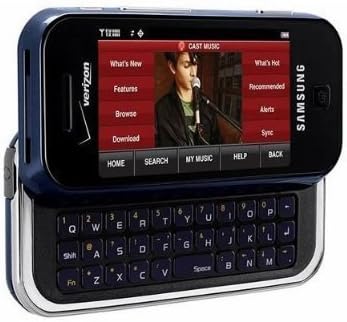
Figura 3.2: Samsung Glyde U940 with its full QWERTY keyboard extended. The phone is oriented horizontally, displaying a media interface on the screen with options like "What's New", "Features", "Browse", "Download", "What's Hot", "Recommended", "Alerts", and "Sync". Navigation buttons for "HOME", "SEARCH", "MY MUSIC", "HELP", and "BACK" are visible below the screen.
Características principais:
- Large 2.8" Display
- Slide-out QWERTY Keyboard
- Interfaz de pantalla táctil
- Full HTML Browser
- 2.0 MP Camera and Camcorder
4. Configuración
4.1. Instalación da batería
- Localiza a tapa da batería na parte traseira do teléfono.
- Gently remove the battery cover by sliding or lifting it.
- Align the battery's gold contacts with the contacts in the battery compartment.
- Insira a batería firmemente no seu lugar.
- Replace the battery cover, ensuring it clicks securely.
4.2. Cargando a batería
- Connect the travel adapter to the charging port on your phone.
- Plug the other end of the travel adapter into a standard electrical outlet.
- Deixa que o teléfono se cargue completamente antes do primeiro uso. O indicador da batería na pantalla mostrará o estado de carga.
- Desconecte o cargador unha vez que a batería estea completamente cargada.
4.3. Acendido/apagado
- Para acender: Manteña premida a tecla de acendido/fin ata que a pantalla se ilumine.
- Para apagar: Press and hold the Power/End key until the power-off options appear, then select "Power off".
5. Instrucións de funcionamento
5.1. Usando a pantalla táctil
The Samsung Glyde U940 features a resistive touch screen. Use your fingertip or a stylus (if provided) to interact with the display.
- Toca: Lightly touch the screen once to select an item or open an application.
- Arrastre: Touch and hold an item, then move your finger across the screen to reposition it.
- Desprácese: Slide your finger up or down on the screen to navigate through lists or web páxinas.
5.2. Using the QWERTY Keyboard
Slide the screen horizontally to reveal the full QWERTY keyboard. This keyboard is ideal for typing messages, emails, and web enderezos.
- Press individual keys to input characters.
- Usa o Cambio key for uppercase letters and symbols.
- O Fn key provides access to additional functions or symbols.
5.3. Realización e recepción de chamadas
- Facendo unha chamada: From the home screen, tap the Phone icon or dial the number using the keypad and press the Call key.
- Recibindo unha chamada: When a call comes in, tap the "Answer" button on the screen.
- Finalizando unha chamada: Tap the "End" button on the screen or press the Power/End key.
5.4. Mensaxería (SMS/MMS)
To send a text or multimedia message:
- From the main menu, select "Messages" or "New TXT Message".
- Introduza o número de teléfono do destinatario ou seleccione un dos seus contactos.
- Type your message using either the touch screen or the QWERTY keyboard.
- To add multimedia (pictures, videos, audio), select the attachment option.
- Toca "Enviar".
5.5. Camera and Camcorder Functions
The Glyde U940 is equipped with a 2.0 MP camera.
- Facendo fotos: Open the Camera application, frame your shot, and press the dedicated camera button or tap the capture icon on the screen.
- Gravación de vídeos: Switch to camcorder mode within the Camera application, press the record button to start, and press again to stop.
- Access your captured media in the "My Pictures" or "Gallery" application.
5.6. Web Navegador
Utilize the full HTML browser to access the internet.
- From the main menu, select "Browser".
- Introduza o desexado web enderezo no URL bar.
- Use the touch screen to navigate pages, zoom in/out, and click links.
6. Mantemento
6.1. Coidado da batería
- Evite expor a batería a temperaturas extremas.
- Non fures nin danes a batería.
- For optimal battery life, avoid frequent partial discharges and charges.
- If the phone will not be used for an extended period, store it with a partially charged battery.
6.2. Limpeza do dispositivo
- Use a soft, lint-free cloth to clean the screen and exterior of the phone.
- Non empregue produtos químicos agresivos, sprays de limpeza nin materiais abrasivos.
- Ensure no moisture enters openings such as the charging port or headphone jack.
6.3. Actualizacións de software
Periodically check for available software updates to improve performance and add new features. Consult your service provider or the Samsung websitio para os procedementos de actualización.
7 Solución de problemas
This section addresses common issues you might encounter with your Samsung Glyde U940.
| Problema | Posible Solución |
|---|---|
| O teléfono non se acende. | Asegúrate de que a batería estea instalada correctamente e completamente cargada. Conecta o cargador e tenta acender. |
| Touch screen is unresponsive or erratic. |
|
| A batería esgotarase rapidamente. |
|
| Non se poden facer nin recibir chamadas. | Check network signal strength. Ensure "Airplane Mode" is not enabled. Contact your service provider if network issues persist. |
| QWERTY keyboard input is incorrect. | Ensure the keyboard is fully extended and locked into position. Restart the device if keys are unresponsive. |
8. Especificacións
| Característica | Detalle |
|---|---|
| Número de modelo | U940 |
| Mostrar | 2.8 Inches, Touch Screen |
| Método de entrada | Touch Screen, Slide-out QWERTY Keyboard |
| Cámara | 2.0 MP (Camera and Camcorder) |
| Navegador | Full HTML Browser |
| Peso do elemento | 11.2 onzas |
| Dimensións | 8.1 x 5.4 x 2.2 polgadas (dimensións do paquete) |
| Conectividade | Wireless, USB 2.0 |
| Fabricante | Samsung |
9. Garantía e soporte
Para obter información sobre a garantía, consulte a tarxeta de garantía incluída co produto ou visite o sitio web oficial de Samsung. website. For technical support, contact your service provider or Samsung customer service.
Atención ao cliente de Samsung: www.samsung.com/us/support/


