1. Ro-ràdh
Thank you for choosing the LFF DAB/FM Digital Radio YT81107. This manual provides essential information for the safe and efficient use of your new radio. Please read these instructions carefully before operating the device and retain them for future reference.
Fiosrachadh Sàbhailteachd
- Na cuir an aonad fosgailte do uisge no taiseachd gus casg a chur air teine no clisgeadh dealain.
- Na fosgail an casing. Thoir aire do luchd-obrach teisteanasach airson a h-uile seirbheis.
- Cleachd an inneal-atharrachaidh cumhachd no bataraidhean sònraichte a-mhàin.
- Seachain teòthachd anabarrach, solas dìreach na grèine, agus àrainneachdan duslach.
2. Toradh thallview
The LFF DAB/FM Digital Radio YT81107 offers versatile listening options with DAB+ and FM radio, Bluetooth connectivity, and convenient features like a dual alarm and sleep timer. Its compact design and dual power options make it suitable for various environments.
Prìomh fheartan
- DAB+ and FM Digital Radio Tuner
- Bluetooth Connectivity for Audio Streaming
- Taisbeanadh LCD làn-dath
- 60 Preset Stations (30 DAB+, 30 FM)
- Gnìomh Cloc-rabhaidh Dùbailte
- Ùine cadail a ghabhas atharrachadh
- Jack headphone 3.5mm
- AC Power Adapter or Battery Operated (4x AA batteries, not included)

Figear 2.1: Aghaidh view of the LFF DAB/FM Digital Radio highlighting its main features.
Smachdan agus co-phàirtean
Familiarize yourself with the buttons and ports on your radio:

Figear 2.2: Aghaidh agus mullach view of the radio with labeled controls.
- Putan Cumhachd / Modh: Turns the radio on/off and switches between modes (DAB, FM, Bluetooth).
- Putan Clàr-taice/Fiosrachaidh: A’ faighinn cothrom air roghainnean clàr-taice no a’ taisbeanadh fiosrachadh mu stèiseanan.
- Putan-rabhaidh: A’ suidheachadh agus a’ riaghladh innealan-rabhaidh.
- Putanan Ro-shuidhichte (1-5): Quickly access saved favorite stations.
- Volume Knob/Select: Rotates to adjust volume or navigate menus; press to confirm selection.
- Tuning/Scroll Buttons: A’ seòladh tro stèiseanan no roghainnean clàr-taice.
- Taisbeanadh: Full-color LCD screen.
- Neach-labhairt: Toradh claisneachd amalaichte.
- Antena: Antenna teileasgopach a ghabhas leudachadh airson gabhail rèidio.
- DC ANN AN Port: Airson an inneal-atharrachaidh cumhachd AC a cheangal.
- Seabhag Jack: Toradh 3.5mm airson èisteachd prìobhaideach.
- Roinn Bataraidh: Located on the back for 4x AA batteries.
3. Suidhich
A 'toirt cumhachd don Radio
Your radio can be powered by the included AC adapter or by batteries for portable use.
- Cumhachd AC: Connect the supplied AC adapter to the DC IN port on the back of the radio and plug it into a standard wall outlet.
- Cumhachd Bataraidh: Open the battery compartment on the back and insert 4x 1.5V AA (LR6) batteries (not included), ensuring correct polarity. Close the compartment securely.

Figure 3.1: Power options and physical dimensions of the radio.
Atharrachadh antenna
Airson gabhail rèidio as fheàrr, leudaich an antenna teileasgopach gu h-iomlan. Atharraich a shuidheachadh airson càileachd an t-soidhne as fheàrr.
4. Stiùireadh Obrachaidh
Turning On/Off and Mode Selection
- Brùth an Cumhachd / Modh putan gus an rèidio a thionndadh air no dheth.
- While on, press the Cumhachd / Modh button repeatedly to cycle through available modes: DAB, FM, and Bluetooth.
DAB/FM Radio Operation
Ensure the antenna is fully extended for best reception.

Figure 4.1: Radio reception ranges and preset capacity.
- Sganadh fèin-ghluasadach: Ann am modh DAB no FM, brùth is gleidh an Clàr / Fiosrachadh button to initiate an automatic scan for available stations. The radio will store them automatically.
- Tuning Stiùireadh: Cleachd an Tuning/Scroll putanan gus an tricead atharrachadh le làimh.
- A’ taghadh stèiseanan: Rothaich an Volume Knob/Select to browse through available stations. Press the knob to select a station.
- Sàbhaladh Presets: To save a station, tune to the desired station, then press and hold one of the Putanan Ro-shuidhichte (1-5) until the display confirms it's saved. You can save up to 30 DAB+ and 30 FM stations.
- A ’cuimhneachadh presets: Brùth goirid air aon de na Putanan Ro-shuidhichte (1-5) gus stèisean a chaidh a shàbhaladh a thoirt air ais.
Modh Bluetooth
Connect your smartphone, tablet, or other Bluetooth-enabled device to stream audio wirelessly.
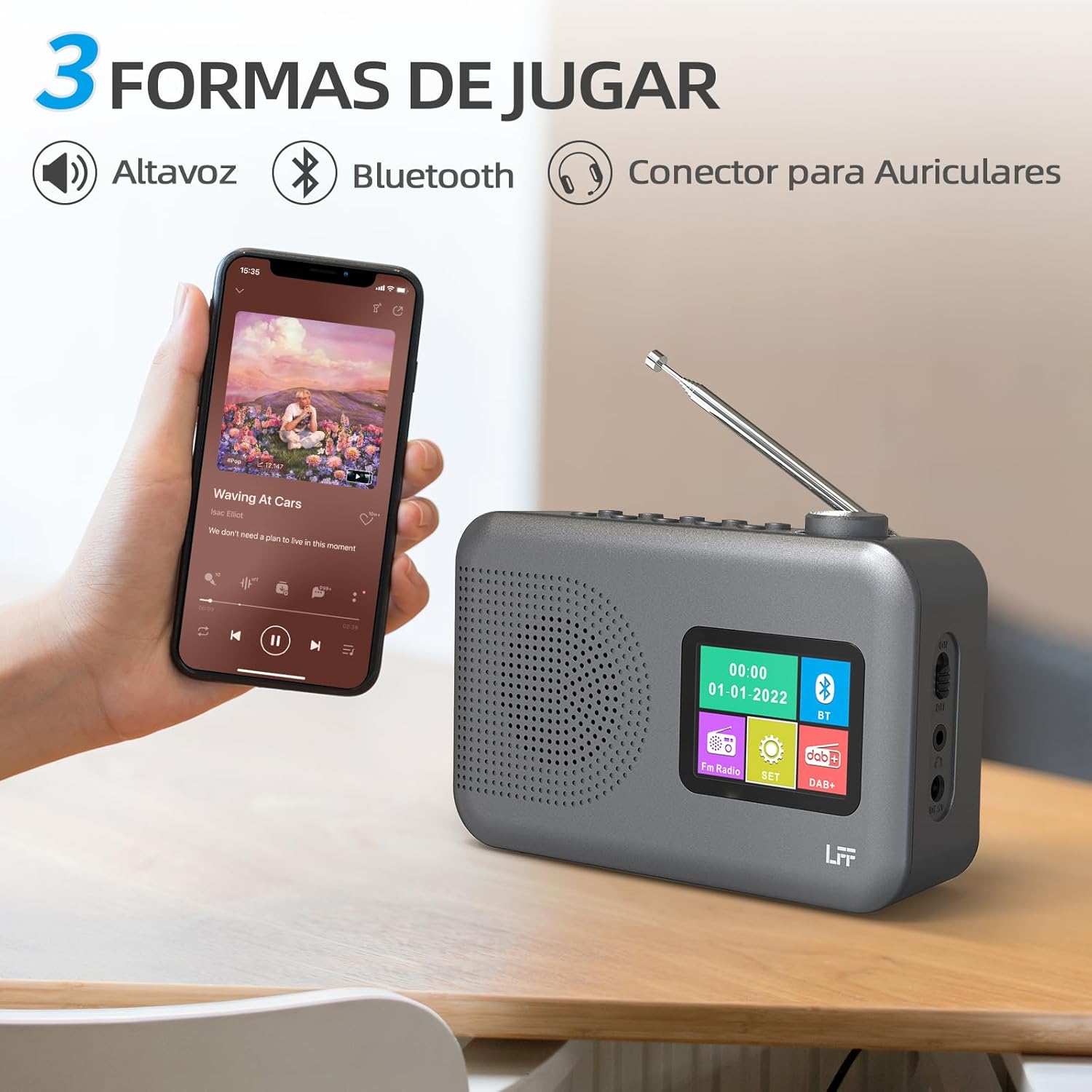
Figure 4.2: Bluetooth connectivity and audio playback options.
- Switch the radio to Bluetooth mode using the Cumhachd / Modh putan. Seallaidh an taisbeanadh “Bluetooth Pairing” no rudeigin coltach ris.
- On your device, enable Bluetooth and search for "LFF YT81107" (or similar).
- Select the radio to pair. Once connected, you can play audio from your device through the radio's speaker.
- Adjust volume using the radio's Knob Volume or your connected device.
Gnìomh gleoc rabhaidh
Set up to two independent alarms.
- Brùth an Alarm putan gus roghainnean an rabhaidh a chuir a-steach.
- Cleachd an Tuning/Scroll putanan agus Volume Knob/Select to set the alarm time, source (DAB, FM, or buzzer), and frequency (daily, weekdays, weekends, once).
- Brùth an Alarm button again to confirm and activate the alarm.
- When an alarm sounds, press any button (except Power) to snooze, or press the Cumhachd / Modh putan gus a chuir dheth.
Ùine cadail
Leigidh an timer cadail leis an rèidio tionndadh dheth gu fèin-ghluasadach às dèidh ùine shuidhichte.

Figure 4.3: Sleep timer function in use.
- Brùth an Clàr / Fiosrachadh putan gus faighinn chun phrìomh chlàr.
- Navigate to the "Sleep Timer" option using the Tuning/Scroll putanan agus brùth air an Volume Knob/Select.
- Select your desired duration (15, 30, 45, 60, 90, or 120 minutes) and confirm. The radio will automatically turn off after the selected time.
Cleachdadh Fòn-cluaise
For private listening, connect standard 3.5mm headphones to the headphone jack on the side of the radio. The internal speaker will be muted automatically.
Note: This radio does not support Bluetooth headphones. The 3.5mm headphone jack is for wired headphones only.
5. Cumail suas
- Glanadh: Sguab an rèidio le clò bog, tioram. Na cleachd innealan-glanaidh sgrìobach no fuasglaidhean.
- Ath-nuadhachadh bataraidh: If using batteries, replace all four AA batteries when the low battery indicator appears on the display or when performance degrades. Ensure proper disposal of old batteries.
- Stòradh: Ma bhios tu a’ stòradh an rèidio airson ùine mhòr, thoir a-mach na bataraidhean gus casg a chur air aodion.
6. A ’dèanamh trioblaid
| Trioblaid | Adhbhar a dh’fhaodadh a bhith ann | Fuasgladh |
|---|---|---|
| Gun chumhachd | Chan eil an inneal-atharrachaidh AC ceangailte no lochtach; bataraidhean air an leigeil ma sgaoil no air an cur a-steach gu ceàrr. | Check AC adapter connection and power outlet. Replace batteries or ensure correct polarity. |
| Fàilteachas rèidio truagh | Antenna gun a bhith air a shìneadh a-mach; raon comharra lag; bacadh. | Leudaich an antenna teileasgopach gu h-iomlan agus atharraich e. Feuch ris an rèidio a ghluasad gu àite eadar-dhealaichte. |
| Bluetooth nach eil a 'ceangal | Radio not in Bluetooth mode; device not in pairing mode; radio already connected to another device. | Ensure radio is in Bluetooth mode. Put your device in pairing mode. Disconnect from other Bluetooth devices. |
| Alarm nach eil ri fuaim | Alarm not activated; volume too low; incorrect alarm settings. | Check alarm settings and ensure it is enabled. Increase volume. Verify alarm time and source. |
7. Sònrachaidhean
| Feart | Mion-fhiosrachadh |
|---|---|
| Modail Àireamh | YT81107 |
| Brand | LFF |
| Teicneòlas Tiùnaidh | DAB+, FM |
| Còmhlan Rèidio le taic | DAB+ (174.928 - 239.2 MHz), FM (87.5 - 108 MHz) |
| Ceangalachd | Bluetooth, 3.5mm Headphone Jack |
| Stòr cumhachd | AC Adapter (included), 4x 1.5V AA (LR6) Batteries (not included) |
| Meudan (L x W x H) | 16.1 cm x 5.9 cm x 10.9 cm |
| Dath | Glas |
| Feartan sònraichte | DAB Radio, DAB Plus Radio, DAB+ Radio, FM Radio, Color Display, Bluetooth, Dual Alarm, Sleep Timer |
| Innealan co-fhreagarrach | Headphones, MP3 Player, Smartphone, Laptop, Speaker, Tablet |
8. Barantas agus Taic
LFF is committed to providing high-quality products. If you encounter any quality issues with your LFF DAB/FM Digital Radio YT81107, please contact us directly. Our customer support team is available to assist you and resolve any problems you may experience.
Feuch an toir thu sùil air na sgrìobhainnean ceannach agad airson teirmichean barantais sònraichte agus fiosrachadh conaltraidh.


