1. Ro-ràdh
This manual provides detailed instructions for the LFF DAB Plus Digital FM Radio. It covers setup, operation, maintenance, and troubleshooting to ensure optimal performance and user experience. Please read this manual thoroughly before using the device.

Aghaidh view of the LFF DAB Plus Digital FM Radio, showing the speaker grille, color display, and extended antenna.
2. Pasgan-susbaint
Thoir sùil air a’ phacaid airson nan nithean a leanas:
- 1 x LFF DAB Plus Digital FM Radio
- Adaptor Cumhachd 1 x AC
- 1 x Stiùireadh tòiseachaidh luath
3. Toradh thallview
Dèan eòlas ort fhèin air pàirtean agus smachdan an rèidio.
3.1 Prìomh fheartan

This diagram illustrates the radio's key functions: DAB+ radio, 60 station presets, FM radio, sleep timer, headphone jack, Bluetooth connectivity, full-color screen, and dual alarm capability.
3.2 Smachdan agus Puirt

Bàrr is taobh view of the radio, showing control buttons and knobs on the top panel, and the 3.5mm headphone jack located on the side.
Refer to the diagram above for the location of the following:
- Putan Cumhachd: Tionndaidh an rèidio air / dheth.
- Putan Modh: Bidh e ag atharrachadh eadar modhan DAB+, FM, agus Bluetooth.
- Cnap-gleusaidh/Taghaidh: Rotates to tune stations or navigate menus, press to select.
- Knob Volume: Ag atharrachadh an ìre fuaim.
- Putanan ro-shuidhichte: For saving and recalling favorite stations.
- Alarm/Sleep Timer Button: Accesses alarm and sleep timer settings.
- Taisbeanadh dath: A’ sealltainn fiosrachadh mu stèiseanan, an t-àm, agus roghainnean clàr-taice.
- Jack headphone (3.5mm): Airson èisteachd prìobhaideach.
- DC ANN AN Port: Airson an inneal-atharrachaidh cumhachd AC a cheangal.
- Antenna teileasgopach: Airson glacadh rèidio nas fheàrr.
4. Suidhich
4.1 A’ cur cumhachd air adhart
The radio can be powered by the included AC adapter or by batteries.
- Cumhachd AC: Connect the AC power adapter to the DC IN port on the back of the radio and plug it into a wall outlet.
- Cumhachd Bataraidh: Open the battery compartment on the back of the radio and insert 4 x 1.5V AA (LR6) batteries, ensuring correct polarity.
Air ais view of the radio, detailing the battery compartment for 4x AA batteries, the AC adapter input (5V/1000mA), and the 360° rotatable antenna. Product dimensions are also indicated.
4.2 Atharrachadh Antenna
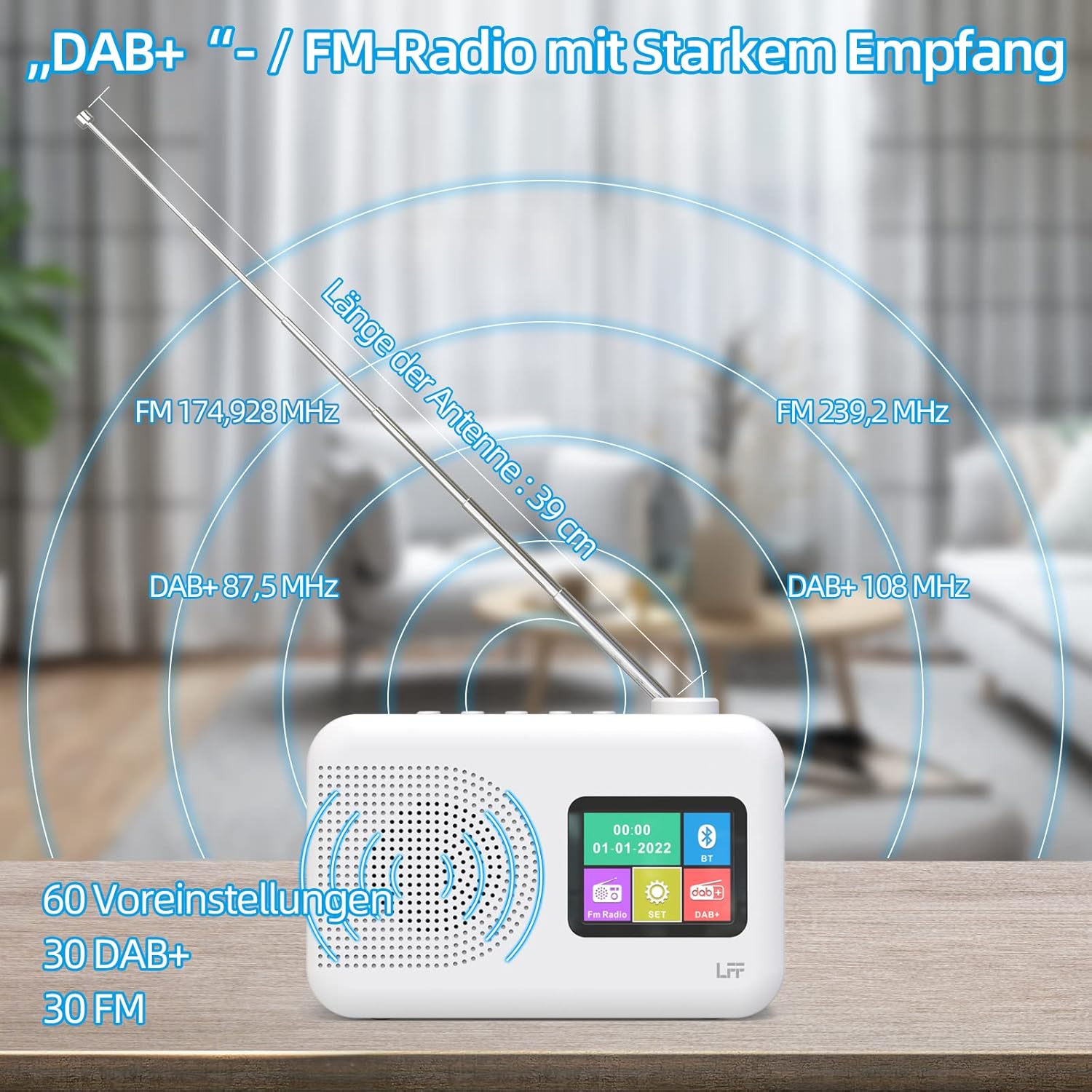
Extend the telescopic antenna fully (approximately 39 cm) and adjust its angle for optimal reception, especially for DAB+ and FM stations.

This diagram illustrates the radio's strong DAB+ and FM reception capabilities with the fully extended 39cm antenna, showing frequency ranges and the capacity for 60 total presets (30 DAB+, 30 FM).
4.3 Sganadh Tùsail (DAB+)
- Tionndaidh air an rèidio.
- Ensure the mode is set to DAB+. If not, press the Modh putan airson tionndadh.
- The radio will automatically perform a full scan for available DAB+ stations. This may take a few minutes.
- Once the scan is complete, the radio will display a list of found stations.
5. Stiùireadh Obrachaidh
5.1 Modh Rèidio DAB+
- Brùth an Modh putan gus modh DAB+ a thaghadh.
- Rothaich an Fonn/Tagh knob to browse through the available stations.
- Brùth an Fonn/Tagh cnap gus stèisean a thaghadh.
- Sàbhaladh Presets: Gus stèisean a shàbhaladh, brùth is cum sìos Ro-shuidhichte button until the display confirms. To recall, briefly press the corresponding Ro-shuidhichte button. Up to 30 DAB+ stations can be saved.
Modh Rèidio 5.2 FM
- Brùth an Modh putan gus modh FM a thaghadh.
- Rothaich an Fonn/Tagh cnap gus tricead a thionndadh le làimh.
- Brùth agus cùm an Fonn/Tagh knob for a few seconds to auto-scan for the next available station.
- Sàbhaladh Presets: Similar to DAB+ mode, press and hold a Ro-shuidhichte button to save, and briefly press to recall. Up to 30 FM stations can be saved.
5.3 Modh Bluetooth

This diagram illustrates the three primary playback options for the radio: through its internal speaker, via Bluetooth connection to an external device, or using headphones connected to the headphone jack.
- Brùth an Modh button to select Bluetooth mode. The display will show "Bluetooth Pairing" or similar.
- On your external device (e.g., smartphone), enable Bluetooth and search for available devices.
- Select "LFF Radio" (or similar name) from the list to pair.
- Aon uair ‘s gu bheil e paidhir, faodaidh tu claisneachd a chluich bhon inneal agad tro neach-labhairt an rèidio.
- Thoir an aire: This radio acts as a Bluetooth receiver. It does not support connecting to Bluetooth headphones or other Bluetooth speakers.
5.4 Uaine cadail
Leigidh an timer cadail leis an rèidio tionndadh dheth gu fèin-ghluasadach às dèidh ùine shuidhichte.

This image depicts the sleep timer function, offering selectable durations of 15, 30, 45, 60, 90, and 120 minutes before the radio automatically powers off.
- Brùth an Alarm/Sleep Timer button repeatedly to cycle through sleep timer options (15 min, 30 min, 45 min, 60 min, 90 min, 120 min, OFF).
- Select your desired duration. The radio will turn off automatically after this time.
Cloc Alarm 5.5
Tha gnìomh rabhaidh dùbailte aig an rèidio.
- Brùth agus cùm an Alarm/Sleep Timer putan gus roghainnean an rabhaidh a chuir a-steach.
- Cleachd an Fonn/Tagh knob to set the alarm time, alarm source (DAB+, FM, or buzzer), and volume.
- Brùth an Fonn/Tagh knob to confirm each setting.
- Repeat the process for the second alarm if needed.
5.6 Cleachdadh Chluas-cinn
Plug 3.5mm headphones into the headphone jack on the side of the radio for private listening. The internal speaker will automatically mute.
6. Cumail suas
6.1 Glanadh
- Wipe the radio's surface with a soft, dry cloth.
- Na cleachd innealan-glanaidh sgrìobach, cèir no fuasglaidhean oir dh’ fhaodadh iad milleadh a dhèanamh air a’ chrìochnachadh.
6.2 Ath-nuadhachadh bataraidh
When using battery power, replace all four AA batteries when the low battery indicator appears on the display or when performance degrades.
- Ensure the radio is turned off and disconnected from AC power.
- Fosgail an còmhdach roinn bataraidh air a’ chùl.
- Thoir air falbh seann bataraidhean agus cuir às dhaibh gu ceart.
- Insert new 4 x 1.5V AA (LR6) batteries, observing correct polarity (+/-).
- Dùin an còmhdach roinn bataraidh gu tèarainte.
6.3 Film Dìon Sgrion
The radio's display comes with a transparent protective film. For optimal clarity, gently peel off this film before first use.
7. A ’dèanamh trioblaid
Ma thachras tu ri duilgheadasan, thoir sùil air na duilgheadasan agus na fuasglaidhean cumanta a leanas:
| Trioblaid | Adhbhar a dh’fhaodadh a bhith ann | Fuasgladh |
|---|---|---|
| Gun chumhachd | AC adapter not connected, batteries depleted or incorrectly inserted. | Check AC adapter connection. Replace batteries or ensure correct polarity. |
| Fàilteachas rèidio truagh | Antenna gun a bhith air a shìneadh a-mach, raon comharra lag, bacadh. | Fully extend and adjust the telescopic antenna. Move the radio to a different location. Avoid sources of interference. |
| Bluetooth nach eil a 'ceangal | Radio not in Bluetooth mode, device too far, already paired with another device. | Ensure radio is in Bluetooth mode. Keep devices within range. Disconnect from other devices. |
| Gun fhuaim | Tha an fhuaim ro ìosal, fònaichean-cluaise ceangailte, 's e 'balbh' a tha air a chur an gnìomh. | Increase volume. Disconnect headphones. Check if mute is active. |
8. Sònrachaidhean
- Brand: LFF
- Modail: DAB Plus Digital FM Radio
- Dath: Geal
- Teicneòlas ceangail: Bluetooth
- Meudan (L x W x H): 16.1 cm x 5.9 cm x 10.9 cm
- Teicneòlas Tiùnaidh: DAB
- Stòr cumhachd: AC Adapter (5V/1000mA) or 4 x 1.5V AA (LR6) Batteries
- Còmhlan Rèidio le taic: DAB+, FM
- Raon tricead DAB+: 174.928 - 239.2 MHz
- Raon Àireamhachd FM: 87.5 - 108 MHz
- Presets: 30 DAB+, 30 FM
- Fad antenna: 39 cm (extendable)
- Feartan sònraichte: DAB Plus Radio, Sleep Timer, Dual Alarm, Headphone Jack, Color Display
- Co-phàirtean air an toirt a-steach: DAB Digital Radio, AC Power Adapter, Quick Start Guide
9. Barantas agus Taic
For any quality-related issues or technical support, please contact the seller directly. We are committed to resolving any problems you may encounter with your LFF DAB Plus Digital FM Radio.


