1. Stiùireadh Sàbhailteachd
Leugh na stiùiridhean seo gu faiceallach mus stàlaich thu agus mus cleachd thu iad. Cùm an leabhar-làimhe seo airson fiosrachadh san àm ri teachd.
- Dèan cinnteach gu bheil an solar cumhachd air a dhì-cheangal mus tèid a stàladh no a chumail suas.
- This product is designed for indoor use unless otherwise specified.
- Do not expose the LED strip to direct water or excessive humidity unless it is specifically rated for such conditions (IP65 rating indicates protection against water jets, but not submersion).
- Do not cut the LED strip unless marked with designated cutting points. Cutting elsewhere may damage the strip.
- Cleachd an inneal-atharrachaidh cumhachd a tha air a thoirt seachad a-mhàin. Dh’fhaodadh cleachdadh inneal-atharrachaidh neo-fhreagarrach milleadh no teine adhbhrachadh.
- Avoid bending the LED strip sharply, as this can damage the internal circuitry.
- Cùm a-mach à ruigsinn chloinne.
2. Pasgan-susbaint
Dèan cinnteach gu bheil na pàirtean uile anns a’ phacaid:
- 1x Avide RGB LED Strip (5 meters)
- Adaptor Cumhachd 1 x (12V)
- 1x Smachd Iomallach

Image: The Avide RGB LED Strip Light Kit, showing the coiled 5-meter LED strip, the included remote control, and the power adapter. Key specifications like 330 lumen/m, 7.2W/meter, 1650 lumen total, and IP65 rating are visible on the packaging.
3. Suidhich
- Ullaich an uachdar: Ensure the surface where the LED strip will be mounted is clean, dry, and smooth. Dust or uneven surfaces can affect the adhesive.
- Unroll the LED Strip: Carefully unroll the entire 5-meter LED strip. Avoid kinking or twisting the strip.
- Connect the Strip to the Controller: Connect the 4-pin connector of the LED strip to the corresponding 4-pin port on the RGB controller (usually a small white box attached to the adapter cable). Ensure the arrows on both connectors align.
- Ceangail an adapter cumhachd: Plug the DC output of the 12V power adapter into the input port of the RGB controller.
- Stàladh an stiall LED: Peel off the protective backing from the adhesive tape on the back of the LED strip. Carefully press the strip onto the desired surface, applying even pressure along its length.
- Cuir a-steach cumhachd: Once the strip is securely mounted and all connections are made, plug the power adapter into a standard electrical outlet.
4. Stiùireadh Obrachaidh
Use the included remote control to operate the LED strip:
- AIR / OFF: Brùth an ON putan gus na solais a thionndadh air, agus an AIRSON putan gus an tionndadh dheth.
- Taghadh dath: Press the colored buttons (R, G, B, W, and other color swatches) to select a static color.
- Atharrachadh soilleireachd: Cleachd an soilleireachd suas (▲) agus soilleireachd sìos (▼) buttons to adjust the intensity of the selected color or mode.
- Modhan fiùghantach:
- Flash: Cycles through colors rapidly.
- STROBE: A’ lasadh aon dath.
- FADE: A’ gluasad gu rèidh eadar dathan.
- SMACH: Provides a gradual, continuous color change.
Ensure the remote control is pointed towards the IR receiver on the LED strip controller for optimal response.
5. Cumail suas
- Glanadh: Disconnect power before cleaning. Gently wipe the LED strip with a dry, soft cloth. Do not use harsh chemicals or abrasive cleaners.
- Stòradh: If storing the LED strip, ensure it is clean and dry. Coil it loosely to prevent damage to the internal wiring. Store in a cool, dry place.
- Sgrùdadh: Periodically inspect the strip and connections for any signs of damage or wear.
6. A ’dèanamh trioblaid
- LED strip does not light up:
- Check if the power adapter is securely plugged into both the wall outlet and the controller.
- Ensure the 4-pin connector between the strip and controller is correctly aligned and fully inserted.
- Dèan cinnteach gu bheil bataraidhean an smachd iomallach ag obair agus air an cur a-steach gu ceart.
- Brùth am putan ON air an smachd iomallach.
- Chan eil an smachd iomallach ag obair:
- Dèan cinnteach nach eil bacadh sam bith eadar an smachd iomallach agus an glacadair IR air an rianadair.
- Cuir bataraidh an smachd iomallach an àite ma tha sin riatanach.
- Ensure the remote is pointed directly at the IR receiver.
- Tha na dathan ceàrr no neo-chunbhalach:
- Check the 4-pin connector for proper alignment. Misalignment can cause incorrect color display.
- Ensure the strip is not damaged.
7. Sònrachaidhean
| Feart | Sònrachadh |
|---|---|
| Modail | Avide RGB LED Strip Light Kit |
| Input Voltage | 12V |
| Caitheamh cumhachd | 7.2 Watts per meter |
| Caitheamh cumhachd iomlan | 36 Watts (5m x 7.2W/m) |
| Fad | 5 meatairean |
| Luminous Flux | 330 lumen/meter (1650 lumen total) |
| Rangachadh IP | IP65 |
| Clas Èifeachdas Cumhachd | A+ |
| Meudan Bathar (Pasgan) | 27 x 21.5 x 8 cm |
| Cuideam nì | 400 gram |
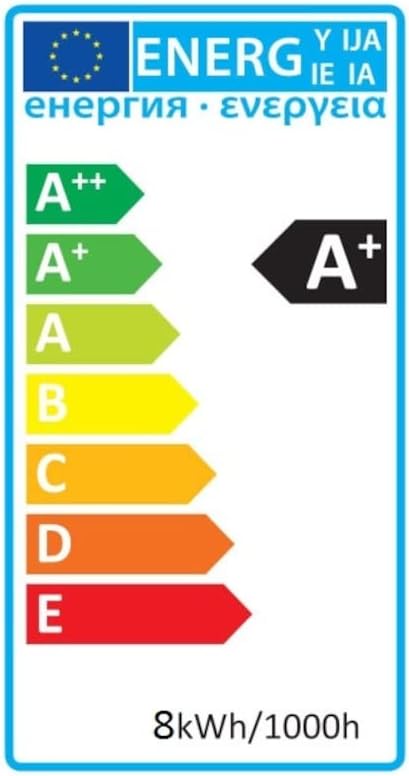
Image: Energy efficiency label indicating an A+ rating for the LED strip, with an energy consumption of 8kWh/1000h.
8. Barantas agus Taic
For warranty information, technical support, or service inquiries, please refer to the documentation provided at the point of purchase or contact your retailer. Keep your proof of purchase for warranty claims.


