Ro-ràdh
This manual provides detailed instructions for the setup, operation, maintenance, and troubleshooting of your AOC E2261FWH 21.5-inch monitor. Please read this manual thoroughly before using your monitor to ensure proper installation and optimal performance.
The AOC E2261FWH monitor features a 21.5-inch display with a narrow screen border, a 50,000,000:1 Dynamic Contrast Ratio, and Clear Vision technology for enhanced image quality. It is designed for energy efficiency with LED backlighting.
1. Suidhich
1.1 A’ dì-phapadh
Carefully remove all components from the packaging. Ensure all items listed in the packing list are present. Retain the packaging materials for future transport or storage.
1.2 A’ cur an t-Seasaimh ri chèile
- Cuir am monitor aghaidh sìos air uachdar bog, glan gus casg a chur air sgrìoban.
- Ceangail bonn an t-seasamh ri amhach an t-seasamh, ga dhaingneachadh leis an sgriubha a tha air a thoirt seachad.
- Align the assembled stand with the mounting slot on the back of the monitor and gently push until it clicks into place.
1.3 càball ceangail
Mus ceangail thu càbaill sam bith, dèan cinnteach gu bheil an monitor agus an coimpiutair agad dheth.
- Càball cumhachd: Connect one end of the power cable to the monitor's power input and the other end to a grounded electrical outlet.
- Càball HDMI: For digital video and audio, connect an HDMI cable from your computer's HDMI output to the monitor's HDMI input.
- Càball VGA: Airson bhidio analogach, ceangail càball VGA bho thoradh VGA a’ choimpiutair agad gu cuir a-steach VGA an monitor.

Figear 1: Aghaidh view of the AOC E2261FWH monitor, showing the display and stand.
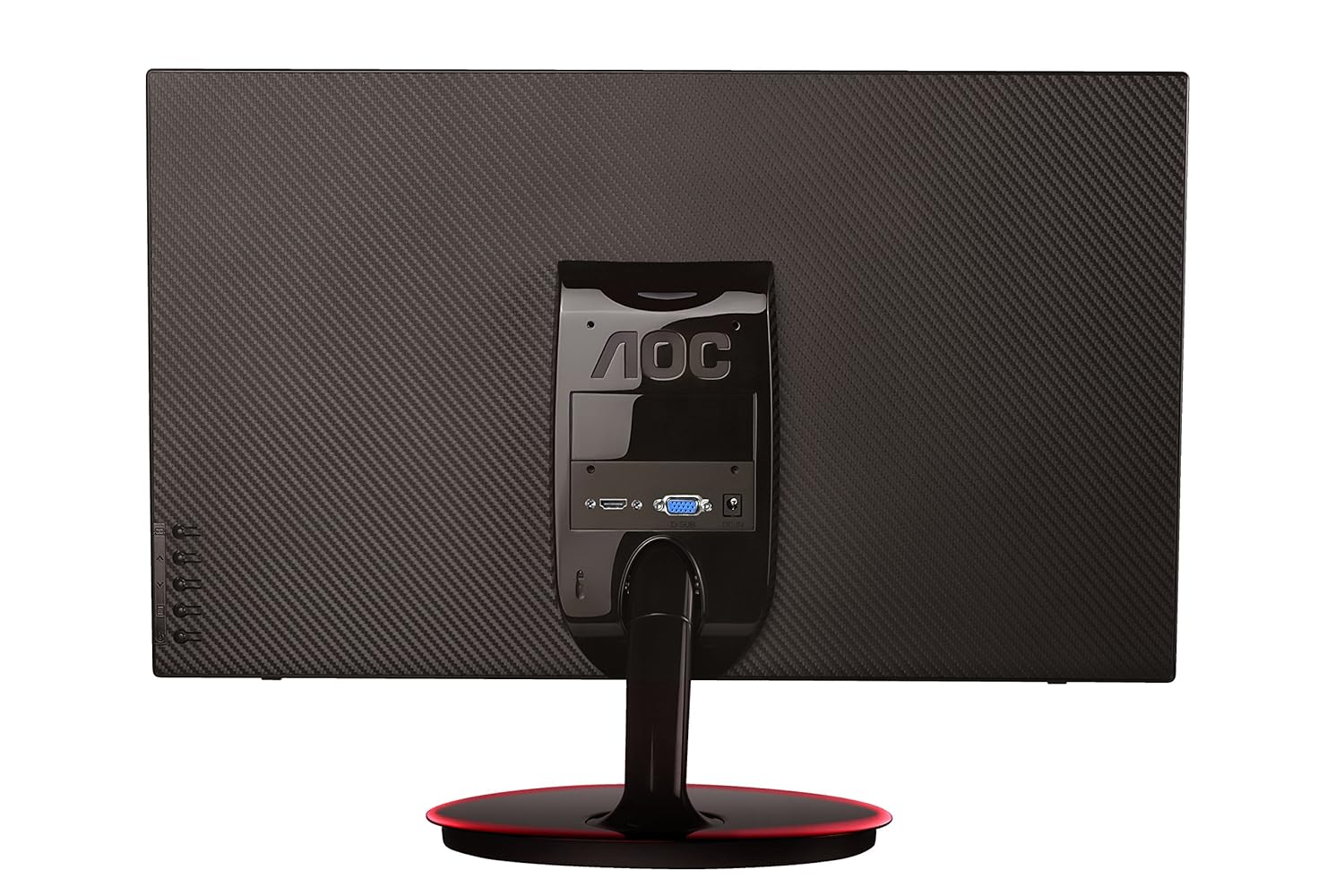
Figear 2: Cùl view of the AOC E2261FWH monitor, highlighting the power, HDMI, and VGA input ports.
1.4 Cumhachd-Air Tòiseachaidh
After connecting all necessary cables, power on your computer, then press the power button on the monitor. The monitor should automatically detect the input signal. If not, you may need to manually select the input source using the OSD menu.
2. Ag obrachadh an Monitor
2.1 Cumhachd air / dheth
Press the power button located on the monitor's bezel to turn the monitor on or off. The power indicator light will illuminate when the monitor is on.
2.2 Clàr-taice Taisbeanaidh Air-sgrion (OSD)
The OSD menu allows you to adjust various monitor settings. Use the control buttons (usually located on the bottom right or rear of the monitor) to navigate the menu.
- Putan Clàr-taice: A 'fosgladh a' chlàr OSD.
- Putanan saighead: Seòl tro roghainnean clàr-taice.
- Putan Cuir a-steach/Tagh: A’ dearbhadh taghadh no a’ dol a-steach do fho-chlàr-taice.
- Putan fàgail: A’ fàgail a’ chlàr-taice no an OSD làithreach.
2.3 Ag atharrachadh nan roghainnean
Am measg nan roghainnean atharrachail cumanta tha:
- Gile / coimeas: Atharraich an soilleireachd iomlan agus an diofar eadar raointean soilleir is dorcha.
- Roghainnean dath: Atharraich teòthachd dath, gamma, agus ìrean RGB fa leth.
- Taghadh a-steach: Gluais le làimh eadar stòran cuir-a-steach HDMI agus VGA.
- Sealladh soilleir: Enable or disable Clear Vision technology to enhance image clarity for standard definition content.
- Modh Dealbh: Select from preset display modes (e.g., Standard, Text, Internet, Game, Movie, Sports).
3. Cumail suas
3.1 Glanadh an monitor
- Cuir dheth an monitor an-còmhnaidh agus tarraing a-mach an càball cumhachd mus glan thu e.
- Cleachd clò bog gun lint gu h-aotrom dampair a nighe le uisge no le inneal-glanaidh sgrion tlàth, neo-sgrìobach.
- Na spraeadh inneal-glanaidh gu dìreach air an sgrion. Cuir air a’ chlò e an toiseach.
- Seachain a bhith a’ cleachdadh beinséin, tanaiche, innealan-glanaidh stèidhichte air ammonia, no stuthan sgrìobach, oir faodaidh iad sin milleadh a dhèanamh air an sgrion no air a’ choimpiutair.asing.
3.2 Cùram Coitcheann
- Seachain a bhith a’ cur an monitor ann an solas dìreach no faisg air stòran teas.
- Dèan cinnteach gu bheil fionnarachadh iomchaidh timcheall air an sgrìn.
- Na cuir nithean troma air an sgrìn no na càbaill aige.
- Protect the monitor from excessive dust and moisture.
4. A ’dèanamh trioblaid
Ma thachras tu ri duilgheadasan leis an sgrìn agad, thoir sùil air na duilgheadasan agus na fuasglaidhean cumanta a leanas:
| Trioblaid | Adhbhar a dh’fhaodadh a bhith ann | Fuasgladh |
|---|---|---|
| Gun chumhachd | Power cable not connected; Power outlet faulty; Monitor off. | Check power cable connections; Try a different outlet; Press the monitor's power button. |
| Gun Chomharra | Càball bhidio gun cheangal; Stòr cuir-a-steach ceàrr air a thaghadh; Coimpiutair gun chumhachd. | Ensure video cable (HDMI/VGA) is securely connected; Select the correct input source via OSD; Power on your computer. |
| Tha an ìomhaigh doilleir/saobhadh | Incorrect resolution; Loose video cable; Monitor settings. | Set your computer's display resolution to 1920 x 1080; Reconnect the video cable; Adjust OSD settings like phase, clock, brightness, and contrast. |
| Colors are Incorrect | Color settings in OSD; Faulty video cable. | Adjust color settings in the OSD menu; Try a different video cable. |
Ma mhaireas an duilgheadas às dèidh dhut na fuasglaidhean seo fheuchainn, cuir fios gu taic luchd-cleachdaidh AOC.
5. Sònrachaidhean
| Feart | Mion-fhiosrachadh |
|---|---|
| Brand | AOC |
| Modail | E2261FWH |
| Meud sgrion | 21.5 òirlich |
| Fuasgladh sgrion | 1920 x 1080 |
| Co-mheas taobh | 16:9 |
| Àm Freagairt | 5 milliseconds |
| Co-mheas dinamic eadar-dhealaichte | 50,000,000: 1 (àbhaisteach) |
| Puirt a-steach | 1 x HDMI, 1 x VGA |
| Frequency Range (H) | 30-83 KHz |
| Frequency Range (V) | 55-76 Hz |
| Caitheamh cumhachd | 22 watts (àbhaisteach) |
| Cuideam nì | 3.51 kg (timcheall air) |
6. Barantas agus Taic
6.1 Fiosrachadh Barantais
AOC monitors are covered by a limited warranty. For specific warranty terms and conditions applicable to your region, please refer to the warranty card included with your product or visit the official AOC weblàrach. Cùm do chuidhteas ceannach mar dhearbhadh ceannach airson tagraidhean barantais.
6.2 Taic teachdaiche
For technical assistance, product inquiries, or service requests, please contact AOC customer support. You can typically find contact information (phone numbers, email, or support portals) on the official AOC weblàrach-lìn no anns na sgrìobhainnean a chaidh a thoirt seachad leis an sgrìn agad.
Oifigear AOC Weblàrach: www.aoc.com


