1. Ynlieding
This manual provides detailed instructions for the installation, operation, and maintenance of your Ctronics CTIPC-790C-EU 5MP PTZ Wi-Fi Security Camera. Please read this manual thoroughly before using the product to ensure proper function and safety. This camera is designed for both indoor and outdoor surveillance, offering high-resolution video, advanced detection features, and flexible connectivity.

figuer 1: Front view of the Ctronics 5MP PTZ Wi-Fi Security Camera. This image displays the camera's dome shape, lens, and LED illuminators.
2. Package Ynhâld
Kontrolearje oft alle hjirûnder neamde items yn jo pakket opnommen binne. As der items ûntbrekke of beskeadige binne, nim dan kontakt op mei de klanttsjinst.
- Ctronics CTIPC-790C-EU 5MP PTZ Wi-Fi Security Camera
- Stromadapter
- Oplaadkabel
- Instruction Manual
- Befestigingsbeugel
- Montage Screws
3. Produkt Overview
The Ctronics CTIPC-790C-EU camera offers advanced surveillance capabilities:
- 5MP Ultra HD-resolúsje: Provides clear 2560x1920 pixel video and images, offering more detail than 1080P or 4MP cameras.
- Dual-Band Wi-Fi (2.4/5GHz): Supports both 2.4GHz for extended range and better penetration, and 5GHz for faster transmission and reduced interference.
- PTZ-funksjonaliteit: Pan 355° and Tilt 90° for comprehensive area coverage.
- AI Human Detection & Auto Tracking: Intelligent technology reduces false alarms by up to 95% and automatically tracks detected human movement.
- Kleur Night Vision: Achieves full-color night vision up to 25 meters or infrared night vision up to 30 meters for clear visibility in low-light conditions.
- Twa-wei audio: Built-in microphone and speaker for remote communication.
- IP66 Waarbestindich: Durable construction suitable for outdoor use in various weather conditions.
- Fleksibele opslachopsjes: Supports continuous 24/7 recording to a microSD card (up to 128GB), cloud storage, or FTP.

Figure 2: This image illustrates the superior clarity of 5MP resolution compared to 2MP, highlighting finer details in a vehicle.
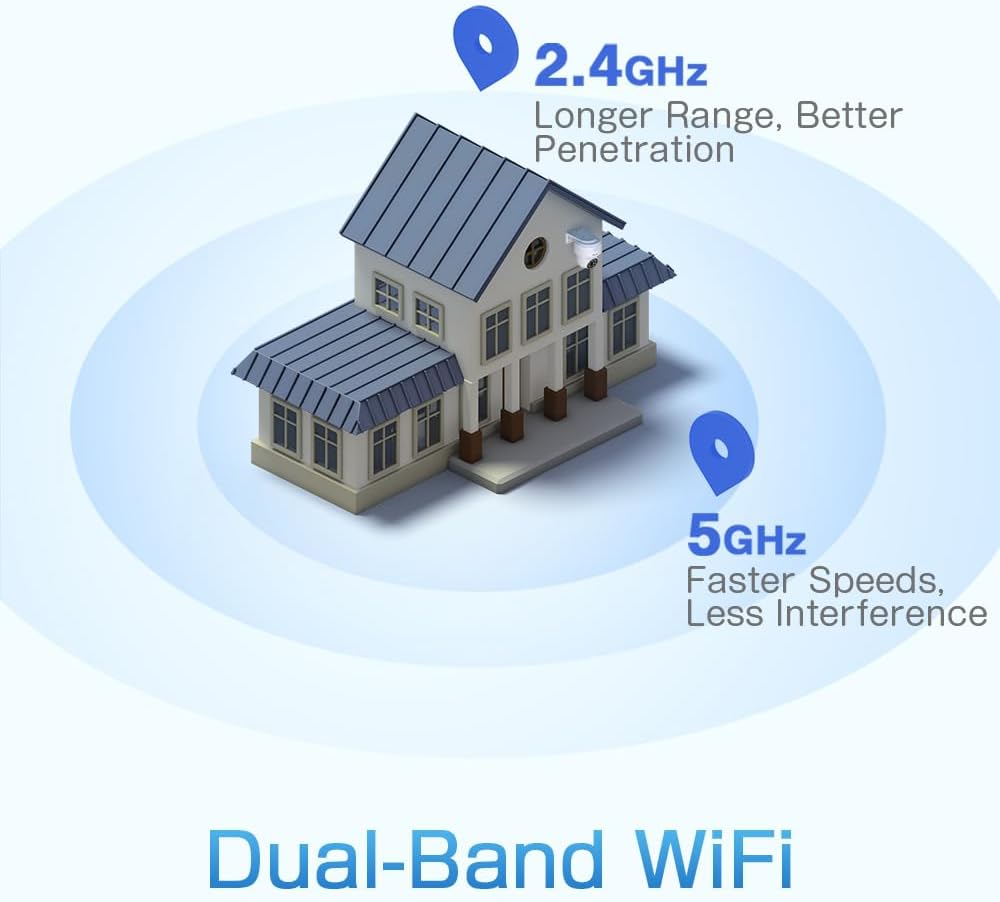
Figure 3: A diagram depicting a house with Wi-Fi signals. The 2.4GHz signal offers longer range and better penetration, while the 5GHz signal provides faster speeds and less interference.
4. Opsette
4.1 Fysike ynstallaasje
The camera can be mounted on a wall or ceiling. Ensure the mounting location provides a clear field of view en is binnen Wi-Fi-berik.
- Kies in lokaasje: Select a suitable indoor or outdoor location. The camera is IP66 waterproof, making it resistant to dust and water jets.
- Montage:
- Wall Mount: Use the provided mounting bracket and screws to secure the camera to a wall.
- Plafond Mount: The camera can also be mounted directly to a ceiling.
- Hoek oanpasse: After mounting, adjust the camera's orientation as needed.

Figure 4: This image displays two installation methods: wall mounting using a bracket and ceiling mounting.

Figure 5: This image illustrates both ceiling and wall installation options, emphasizing the camera's IP66 waterproof rating by showing it under simulated rain.
4.2 Stromferbining
Connect the provided power adapter to the camera's power input and then plug it into a standard electrical outlet. Ensure the connection is secure.
4.3 Netwurkferbining
The camera supports both 2.4GHz and 5GHz Wi-Fi networks. For initial setup, it is recommended to place the camera near your Wi-Fi router.
- Download app: Download the Ctronics Pro or CamHi Pro app from your smartphone's app store (available for iOS and Android). For PC, use HiP2P Client software.
- Registrearje akkount: Iepenje de app en registrearje in nij akkount of meld jo oan as jo al ien hawwe.
- Kamera taheakje: Folgje de ynstruksjes yn 'e app om jo kamera ta te foegjen. Dit omfettet meastal it scannen fan in QR-koade op 'e kamera of it manuell ynfieren fan syn ID.
- Ferbine mei Wi-Fi: Select your desired 2.4GHz or 5GHz Wi-Fi network and enter the password. The camera will connect to the network.
5. Bedriuwsinstruksjes
5.1 Live View en PTZ-kontrôle
Once connected, you can access the live video feed through the Ctronics app or PC software.
- Live feed: Tik op de kamera yn 'e app om view de real-time fideostream.
- Pan / Tilt: Use the directional controls within the app to rotate the camera horizontally (pan 355°) and vertically (tilt 90°).
- Zoom: Digital zoom is available through the app.
- Foarynstelde posysjes: Set up to 8 preset positions for quick navigation to specific areas.
5.2 AI Human Detection & Auto Tracking
The camera's intelligent detection system can identify human shapes and track their movement.
- Deteksje ynskeakelje: In the app settings, enable AI Human Detection.
- Adjust Sensitivity & Area: Customize the detection sensitivity and define specific detection zones to minimize false alarms.
- Auto Tracking: When enabled, the camera will automatically follow detected human movement within its field of view.
- Alerts: Receive instant notifications via the app or email when motion is detected. The camera can also trigger customizable sound and light alarms.

Figure 6: This image shows the camera detecting a person at night, with an alarm notification displayed on a smartphone, illustrating the human detection and auto-tracking features.
5.3 Nachtfisy
The camera offers enhanced night vision capabilities:
- Folsleine kleur nachtfisy: When spotlights are activated, the camera can provide full-color video in low-light conditions up to 25 meters.
- Infrared Night Vision: In complete darkness, the camera automatically switches to infrared mode, providing clear black and white video up to 30 meters.

Figure 7: An image showing the camera mounted outdoors at night, with its spotlights illuminated to provide full-color night vision. A smartphone displays the live feed.
5.4 Twa-wei audio
Brûk de twa-wei audiofunksje om te kommunisearjen mei persoanen tichtby de kamera.
- Sprekke: Press and hold the microphone icon in the app to speak through the camera's speaker.
- Harkje: Enable the speaker icon to listen to audio from the camera's microphone.
5.5 Opname en opslach
The camera supports various recording and storage methods:
- MicroSD kaart: Insert a microSD card (up to 128GB, not included) into the designated slot for local 24/7 continuous recording.
- Cloud Storage: Subscribe to a cloud storage service (if available) for off-site video backup.
- FTP: Configure FTP settings in the app to upload recordings to an FTP server.

Figure 8: This image illustrates the camera's 24/7 recording capability and various recording modes, including a timeline view on a smartphone and a filmstrip showing recorded events.
6. Underhâld
6.1 Cleaning
Regularly clean the camera lens and housing to ensure optimal image quality and performance.
- Brûk in sêft, damp cloth to wipe the camera's exterior.
- Brûk foar de lens in spesjale lensreinigingsdoek en -oplossing om krassen te foarkommen.
- Brûk gjin hurde gemikaliën as abrasive skjinmakkers.
6.2 Firmware Updates
Periodically check for firmware updates through the Ctronics app. Keeping your camera's firmware updated ensures access to the latest features and security enhancements.
7. Probleemoplossing
As jo problemen hawwe mei jo kamera, sjoch dan nei de folgjende mienskiplike oplossingen:
| Probleem | Mooglike oplossing |
|---|---|
| Kamera makket gjin ferbining mei Wi-Fi |
|
| Min ôfbyldingskwaliteit |
|
| Gjin warskôgings foar bewegingsdeteksje |
|
| MicroSD-kaart nimt net op |
|
For further assistance, please contact Ctronics customer support.
8. Spesifikaasjes
Key technical specifications for the Ctronics CTIPC-790C-EU camera:
| Eigenskip | Spesifikaasje |
|---|---|
| Model Namme | CTIPC-790C-EU |
| Resolúsje | 5MP (2560x1920) |
| Wireless Technology | Wi-Fi (2.4GHz/5GHz) |
| Panhoeke | 355 graden |
| Tilt Angle | 90 graden |
| Night Vision Range | 25 Meters (Color), 30 Meters (IR) |
| Wetter Resistance Level | IP66 (wetterdicht) |
| Opslach opsjes | MicroSD (up to 128GB), Cloud, FTP |
| Power Boarne | Elektryske kabel (12 Volt, 12 Watt) |
| Mounting Type | Wall Mount, Screw-in |
| Materiaal | Acrylonitril Butadien Styrene (ABS) |
| Kompatibele apparaten | Kompjûter, smartphone, tablet |
| Bestjoeringssysteem Support | Android, iOS, Windows, Mac OS |
9. Garânsje en stipe
Ctronics products are designed for reliability and performance. For warranty information and technical support, please refer to the official Ctronics webside of nim direkt kontakt op mei harren klanttsjinst. Bewarje jo oankeapbewiis as bewiis fan oankeap foar garânsjeclaims.
- Online stipe: Visit the Ctronics official webside foar FAQ's, hantliedingen foar probleemoplossing en softwaredownloads.
- E-post stipe: Contact Ctronics customer service via email for technical assistance.


