Introduction
The Razer BlackShark V3 X HyperSpeed is a wireless esports gaming headset designed for high-performance audio and clear communication across multiple platforms. This manual provides essential information for setting up, operating, maintaining, and troubleshooting your headset.
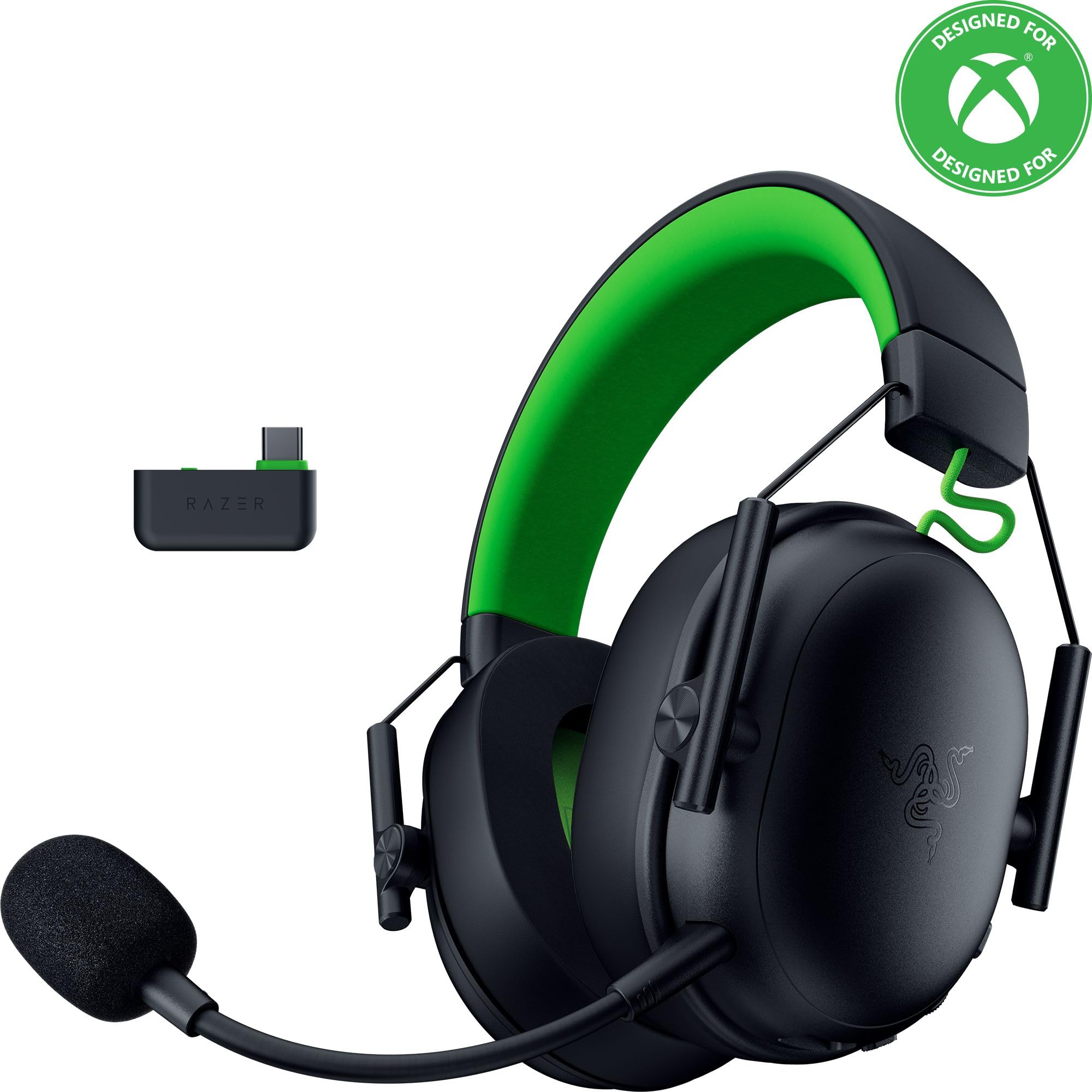
Image: The Razer BlackShark V3 X HyperSpeed Wireless Gaming Headset, showcasing son design et son microphone détachable.
Qu'y a-t-il dans la boîte
Assurez-vous que tous les éléments suivants sont présents dans votre colis :
- Casque de jeu sans fil Razer BlackShark V3 X HyperSpeed
- Clé USB Type C Razer HyperSpeed Wireless
- Micro cardioïde Razer HyperClear détachable de 9.9 mm
- USB Type A to Type C Cable (for charging and wired connection)
- Câble adaptateur USB Type A vers Type C
- Manuel de l'utilisateur (ce document)

Image: The Razer BlackShark V3 X HyperSpeed headset on a stand next to its retail packaging, illustrating the product and its box.
Installation
1. Charger le casque
Before initial use, fully charge your headset using the provided USB Type A to Type C cable. Connect the USB-C end to the headset's charging port and the USB-A end to a powered USB port.
2. Fixation du microphone
Insert the detachable Razer HyperClear Cardioid 9.9mm Mic into the microphone port located on the left earcup. Ensure it is securely connected.

Image: Close-up of the Razer BlackShark V3 X HyperSpeed headset showing the detachable HyperClear Cardioid microphone attached.
3. Options de connectivité
The headset supports three modes of connectivity: 2.4 GHz HyperSpeed Wireless, Bluetooth, and wired USB-C.
- 2.4 GHz HyperSpeed Wireless (PC, Mac, PS5, Nintendo Switch, Xbox Series X|S, Xbox One):
Insert the USB Type C Razer HyperSpeed Wireless Dongle into an available USB-C port on your device. If your device only has USB-A ports, use the provided USB Type A to Type C Adapter Cable. Ensure the switch on the dongle is set to 'USB' for PC/Mac/PS5/Switch or 'XBOX' for Xbox consoles. The headset will automatically connect. - Bluetooth (Smartphones, Tablets, Handheld Gaming Devices):
With the headset powered on, press and hold the power button until the LED indicator blinks blue, indicating pairing mode. On your device, search for and select "Razer BlackShark V3 X HyperSpeed" from the list of available Bluetooth devices. - USB-C filaire :
Connect the headset directly to your device using the USB Type A to Type C Cable. This mode provides audio and microphone functionality without relying on battery power.

Image: The Razer BlackShark V3 X HyperSpeed headset alongside its USB-C wireless dongle, illustrating the wireless connectivity component.

Image: A visual representation of the headset's three connectivity modes: 2.4 GHz Wireless, Bluetooth, and USB, highlighting its versatility.
Utilisation du casque
1. Contrôles surview
Le casque est doté de commandes intuitives situées sur les oreillettes :
- Bouton d'alimentation : Press and hold to power on/off. Single press to switch between 2.4 GHz HyperSpeed Wireless and Bluetooth modes.
- Bouton de désactivation du micro : Appuyez pour désactiver ou réactiver le microphone.
- Molette de volume : Adjusts the overall audio volume.
- Mic Monitoring Wheel: Adjusts the volume of your own voice heard through the headset (sidetone).

Image : Côté view of the Razer BlackShark V3 X HyperSpeed headset, highlighting the location of the power button, volume wheel, and mic mute button.
2. Qualité audio et fonctionnalités
- Pilotes Razer TriForce 50 mm Gen-2 : Experience powerful, clear audio with enhanced positional accuracy for competitive gaming.
- Razer HyperClear Cardioid 9.9mm Mic: The detachable microphone features a unidirectional pickup pattern to focus on your voice and minimize background noise.
- Son surround: Enjoy immersive surround sound with Windows Sonic on Xbox and 7.1 Surround Sound on PC for precise audio cues.

Image : Une explosion view of the Razer TriForce 50mm Drivers Gen-2, illustrating their internal components for powerful and clear audio.

Image: The Razer BlackShark V3 X HyperSpeed headset surrounded by sound waves, representing its advanced surround sound capabilities for Xbox and PC.
3. Confort et design
Weighing just 270g, the headset is designed for extended gaming sessions with plush memory foam cushions and a fatigue-free design.

Image: The Razer BlackShark V3 X HyperSpeed headset with an icon representing its ultra-lightweight design, emphasizing comfort for long gaming sessions.
4. Vidéo officielle du produit
Video: An official product video from Razer showcasing the BlackShark V3 headset line, highlighting its features and design for esports performance.
Entretien
1. Nettoyage
- Utilisez un chiffon doux et sec pour nettoyer les surfaces du casque.
- Pour les oreillettes, essuyez délicatement avec le produit.amp Nettoyer avec un chiffon et du savon doux si nécessaire, puis sécher soigneusement. Éviter l'humidité excessive.
- N'utilisez pas de produits chimiques agressifs ou de matériaux abrasifs.
2. Stockage
- Rangez le casque dans un endroit frais et sec, à l'abri de la lumière directe du soleil et des températures extrêmes.
- When not in use, consider placing it on a headset stand to maintain its shape and prevent damage.
Dépannage
Pas de son/Mauvaise qualité audio
- Vérifier le volume : Ensure the volume wheel on the headset is turned up.
- Connectivité : Verify the headset is correctly connected via 2.4 GHz dongle, Bluetooth, or USB-C. For 2.4 GHz, ensure the dongle switch is set to the correct platform (USB/XBOX).
- Réglages de l'appareil: Confirm the headset is selected as the default audio output device in your computer's or console's sound settings.
- Réparation: For wireless connections, try re-pairing the headset with your device.
Microphone ne fonctionne pas
- Cochez Muet : Ensure the mic mute button on the headset is not activated.
- Mic Connection: Verify the detachable microphone is securely inserted into the port.
- Réglages de l'appareil: Confirm the headset microphone is selected as the default input device in your computer's or console's sound settings.
- Surveillance du micro : Adjust the mic monitoring wheel to hear your own voice, confirming mic functionality.
Problèmes de connectivité
- Ingérence: Éloignez-vous des autres appareils sans fil susceptibles de provoquer des interférences.
- Gamme: Ensure you are within the effective range of the wireless dongle or Bluetooth connection.
- Dongle Switch: Double-check that the switch on the USB-C dongle is set to the correct position (USB for PC/Mac/PS5/Switch, XBOX for Xbox).
Autonomie de la batterie plus courte que prévu
- Chargement : Assurez-vous que le casque est complètement chargé avant utilisation.
- Usage: High volume levels or continuous use of certain features can reduce battery life.
Caractéristiques
| Nom du modèle | BlackShark V3 X HyperSpeed |
| Numéro de modèle | RZ04-05420200-R3U1 |
| Technologie de connectivité | Bluetooth, USB, 2.4 GHz Wireless |
| Type de pilote audio | Dynamic Driver (Razer TriForce 50mm Drivers Gen-2) |
| Réponse en fréquence | 12 Hz - 28 kHz |
| Sensibilité | 106 dB |
| Microphone | Micro cardioïde Razer HyperClear détachable de 9.9 mm |
| Contrôle du bruit | Isolation acoustique |
| Appareils compatibles | Xbox Series X|S, Xbox One, PS5, PS4, PC, Mac, Nintendo Switch, Smartphones, Tablets |
| Poids de l'article | 270 grams (without mic) |
| Piles | 1 batterie lithium-ion (incluse) |
| Version Bluetooth | 5.3 |
Garantie et assistance
Pour obtenir des informations sur la garantie, une assistance technique ou toute autre aide, veuillez consulter le site d'assistance officiel de Razer. webConsultez le site. Conservez votre preuve d'achat pour toute réclamation au titre de la garantie.
Support en ligne: www.razer.com/support