1. Introduction
This manual provides detailed instructions for the installation, operation, and maintenance of your Leadfan Android Car Stereo, specifically designed for Toyota Sienna models from 2011 to 2014 equipped with the original JBL sound system. Please read this manual thoroughly before installation and use to ensure proper function and safety.
2. Produit terminéview
The Leadfan Android Car Stereo is an advanced head unit featuring a 9-inch IPS touch screen, 4-core CPU, 2GB RAM, and 32GB ROM. It offers seamless integration with your vehicle's existing JBL system and provides a range of modern functionalities for enhanced driving experience.
Caractéristiques principales :
- Apple CarPlay et Android Auto sans fil
- Écran tactile IPS de 9 pouces (résolution 1280*720)
- Built-in GPS Navigation (Online/Offline Maps)
- Bluetooth 5.1 for Hands-Free Calling & Audio Streaming
- 5G WiFi Connectivity & Hotspot Support
- Fonctionnalité d'écran partagé
- Lien miroir pour appareils iOS/Android
- Radio FM/RDS
- Assistance aux commandes au volant (SWC)
- Includes IP68 AHD Rear Camera
- Plug & Play Wiring Harness
Contenu de la boîte :
- 9-inch IPS Touchscreen Android Radio Headunit
- Radio Kit Frame for Toyota Sienna 2011-2014
- AHD Backup Camera + Reversing Camera Input Cable
- Antenne GPS
- WiFi & Bluetooth Signal Booster Cable
- Plug and Play Power Harness
- Décodeur CanBus
- Microphone externe
- Câbles USB (x2)
- Câble RCA
- Manuel d'utilisation
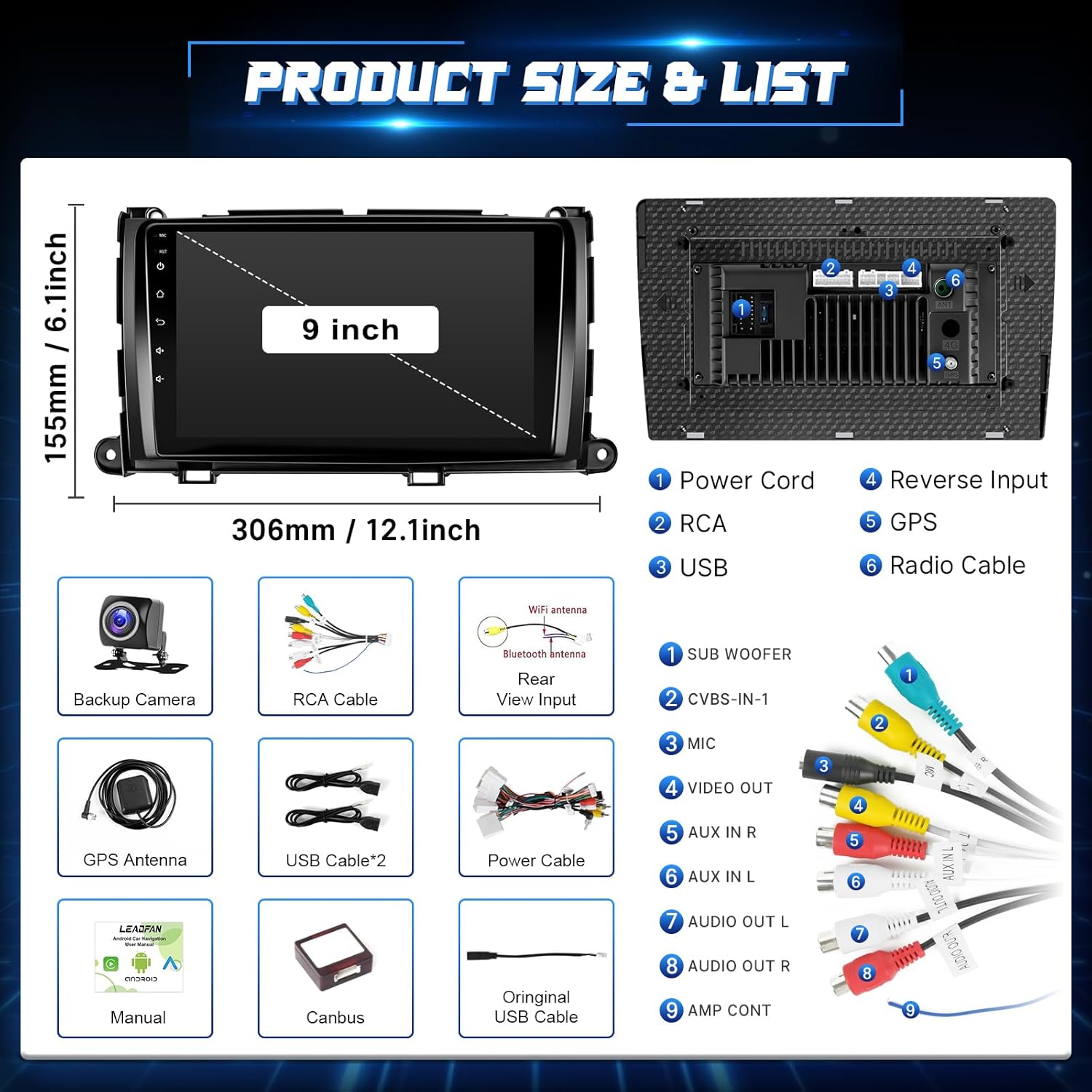
Image: Product dimensions and a detailed list of included components such as the head unit, backup camera, GPS antenna, USB cables, power cable, Canbus, and user manual.
3. Consignes de sécurité
- Assurez-vous toujours que le véhicule est éteint et que la batterie est débranchée avant d'effectuer toute installation ou tout câblage.
- Une installation incorrecte peut endommager le véhicule ou entraîner des blessures. En cas de doute, faites appel à un professionnel.
- N’utilisez pas l’appareil d’une manière qui vous distrait de la conduite. La sécurité routière doit toujours être votre priorité.
- Tenez l'appareil à l'écart de l'eau et des sources de chaleur excessive.
4. Guide d'installation
This head unit is designed for a plug-and-play installation for Toyota Sienna 2011-2014 models with the original JBL system. It includes a custom frame and wiring harness to simplify the process.
Vérification avant l'installation :
- Verify your car model, year, and the shape of your vehicle's center console to ensure compatibility.
- Confirm your vehicle has the original JBL sound system.
Étapes générales d'installation :
- Déconnecter la batterie : Par mesure de sécurité, débranchez la borne négative de votre batterie de voiture.
- Retirer l'autoradio d'origine : Retirez soigneusement les panneaux de garniture et les vis fixant l'autoradio d'origine.
- Connecter le faisceau de câbles : Connect the provided plug-and-play wiring harness to your vehicle's existing connectors and to the new head unit. Ensure all connections are secure.
- Installer l'antenne GPS : Installez l'antenne GPS dans un endroit dégagé. view du ciel, généralement sur le tableau de bord ou sous le pare-brise.
- Install Rear Camera (Optional but Recommended): Route the camera cable from the rear of the vehicle to the head unit. Connect the camera's power to the reverse light circuit and the video signal to the 'Reverse Input' on the head unit.
- Installer le nouvel autoradio : Secure the new head unit into the dashboard using the provided frame and screws.
- Rebranchez la batterie : Rebranchez la batterie de la voiture et testez l'appareil.

Image: Visual comparison showing the original Toyota Sienna dashboard radio and the new Leadfan Android Car Stereo installed, highlighting compatibility with JBL systems.

Image: Detailed wiring diagram for connecting the backup camera, including connections to the reverse trigger and power supply.
5. Configuration initiale
Upon first power-on, the system may guide you through initial setup steps such as language selection, time zone, and Wi-Fi connection. Follow the on-screen prompts.
- Connexion Wi-Fi : Navigate to Settings > Network & Internet > Wi-Fi to connect to an available network. This is essential for online maps, app downloads, and certain CarPlay/Android Auto functionalities.
- Date et heure : Ensure the date and time are correctly set, either manually or by enabling network time synchronization.
6. Mode d'emploi
6.1. CarPlay sans fil et Android Auto
Connect your iPhone or Android device wirelessly for a seamless in-car experience.
- Activer le Bluetooth et le Wi-Fi : Sur votre smartphone, assurez-vous que le Bluetooth et le Wi-Fi sont activés.
- Associer l'appareil : On the car stereo, go to the CarPlay/Android Auto application. Follow the on-screen instructions to pair your phone via Bluetooth.
- Connexion automatique : Once paired, the system will automatically connect via Wi-Fi for full CarPlay/Android Auto functionality.

Image: Displays the user interfaces for Apple CarPlay, Android Auto, and Mirror Link, illustrating their respective connection methods (USB/WiFi/Bluetooth).
6.2. Duplication d'écran
Project your mobile phone's screen onto the head unit for a larger display of content.
- Access Mirror Link App: Ouvrez l'application Mirror Link sur l'autoradio.
- Suivez les invites : The app will provide instructions for connecting your iOS or Android device, typically involving Wi-Fi or a USB connection.

Image: Shows the Mirror Link feature, detailing connection options for Android (WiFi, USB) and Apple (WiFi, Bluetooth) devices, with a phone screen mirrored to the head unit.
6.3. Navigation GPS
The unit supports both offline and online navigation.
- Cartes hors ligne : North American offline maps are pre-installed. Access them via the Navigation app without an internet connection.
- Cartes en ligne : Connect to Wi-Fi (via hotspot or local network) to use online navigation apps like Google Maps, Waze, etc., which can be downloaded from the Application Store.

Image: Highlights GPS navigation with online and offline map options, Wi-Fi functionality, the Android 11 operating system, and the 4-core CPU architecture.
6.4. Fonctionnalité Bluetooth
Profitez des appels mains libres et de la diffusion audio sans fil.
- Jumelage : Go to the Bluetooth app on the stereo, enable Bluetooth on your phone, and search for the head unit. Select it to pair.
- Appels mains libres : Once paired, you can make and receive calls directly from the stereo screen using the built-in microphone or the external microphone.
- Streaming audio: Diffusez la musique de votre téléphone via les haut-parleurs de la voiture.
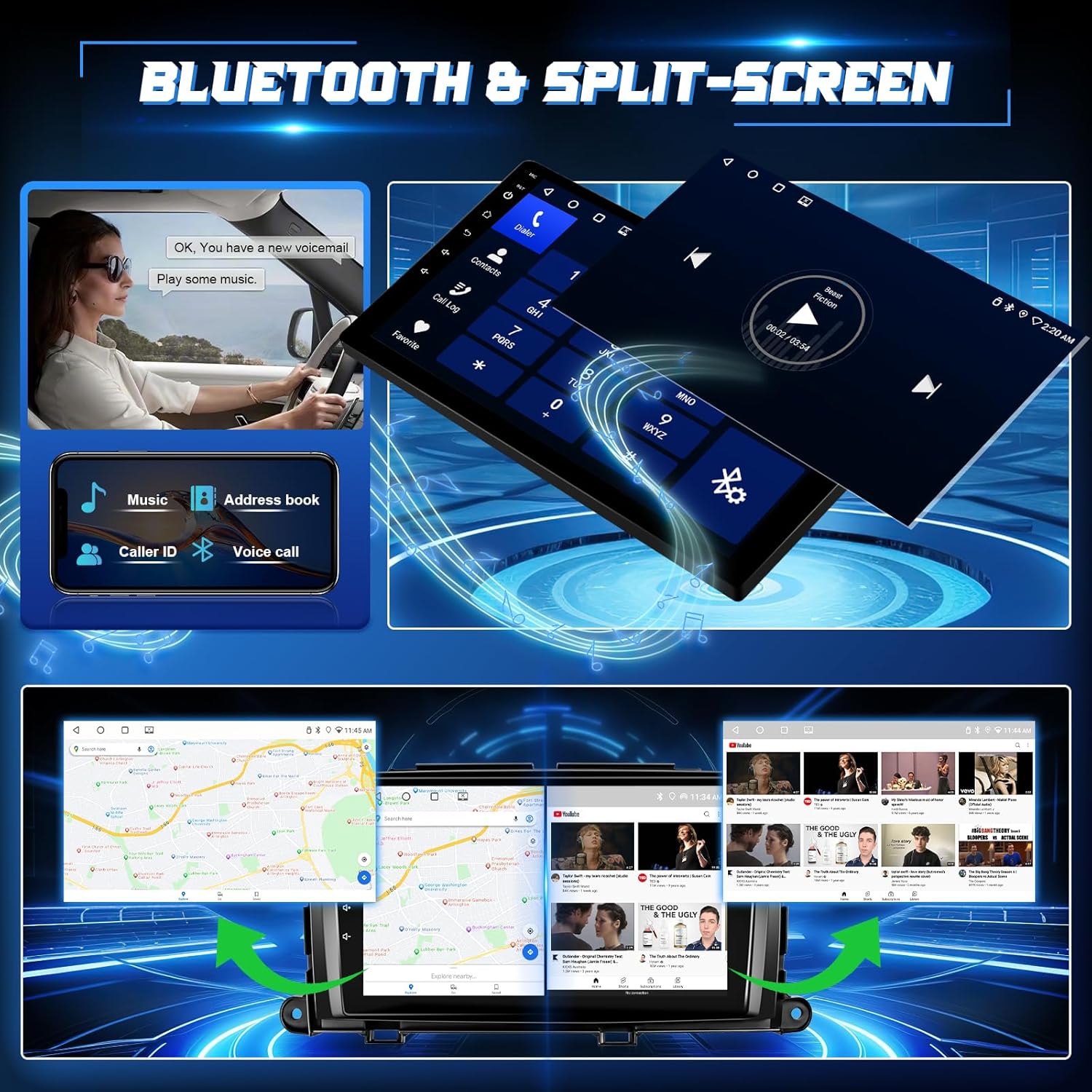
Image: Illustrates Bluetooth 5.1 features for hands-free calling and music playback, along with the split-screen capability showing two applications running simultaneously.
6.5. FM Radio & EQ Settings
Access your favorite radio stations and customize audio output.
- Radio FM: Open the FM Radio app. You can manually search for stations or use the automatic scan function to find and save presets.
- Paramètres d'égalisation : The unit features a 32-band equalizer. Access the EQ settings to adjust audio frequencies, balance, and fader to optimize sound quality.
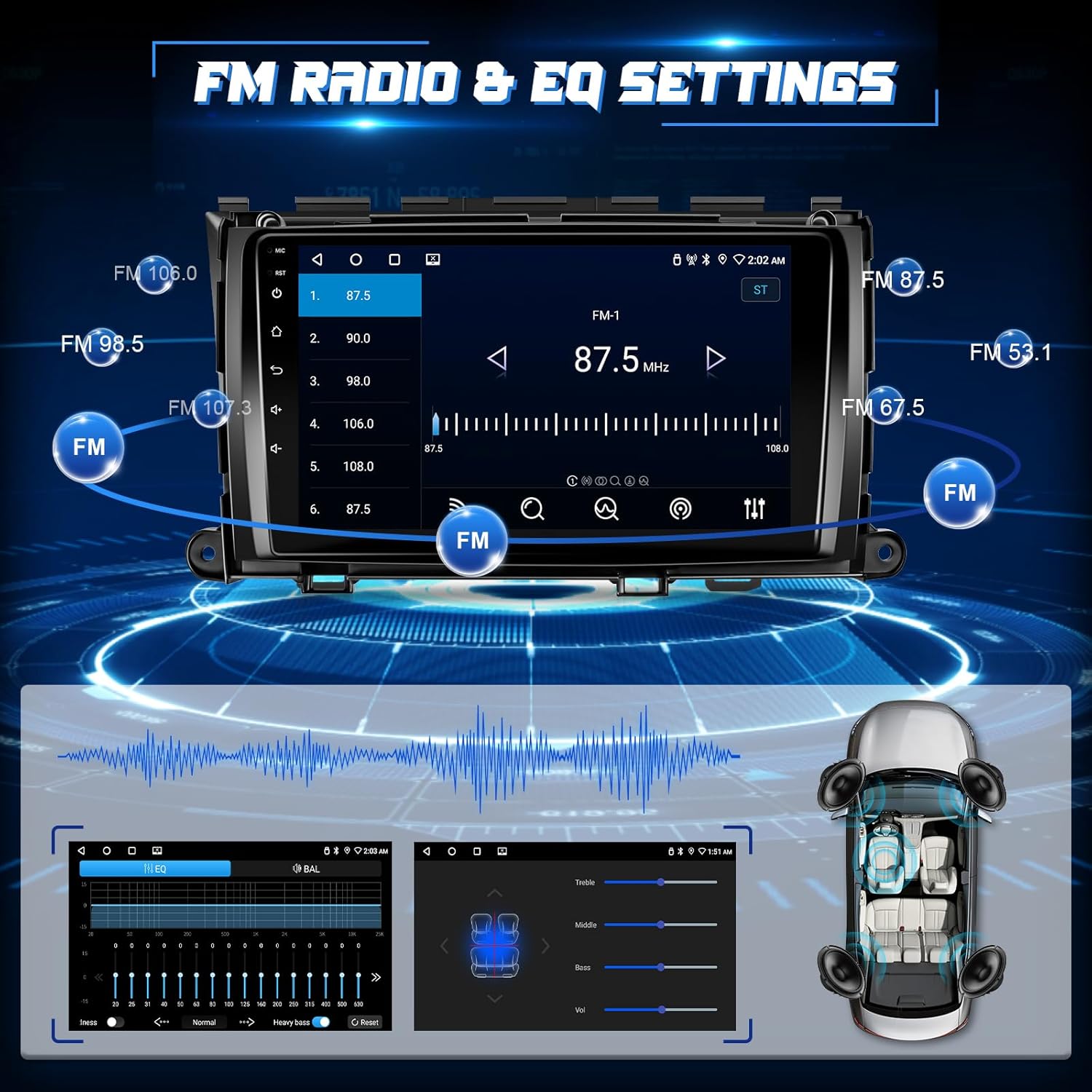
Image: Shows the FM radio interface with frequency display and preset options, alongside the audio equalizer settings for fine-tuning sound output.
6.6. Fonctionnalité d'écran partagé
Exécutez deux applications simultanément sur l'écran de 9 pouces.
- Activate Split-Screen: While an app is open, press and hold the recent apps button or drag an app to one side of the screen (method may vary slightly based on Android version).
- Sélectionnez la deuxième application : Choose another app from the recent apps list or app drawer to occupy the other half of the screen.

Image: Demonstrates the split-screen feature, displaying navigation on one side and a media player or phone interface on the other.
6.7. Reverse Image & Steering Wheel Control (SWC)
Améliorez la sécurité et le confort grâce à ces fonctionnalités intégrées.
- Caméra de recul : When the vehicle is shifted into reverse, the IP68 AHD rear camera automatically displays a 1280*720P image with a 170-degree ultra-wide angle on the touch screen.
- Commande au volant : The unit supports your original car's steering wheel controls. Use the SWC harness to configure buttons for hands-free calling, music switching, and volume control. Access the SWC learning function in the settings to map your vehicle's buttons.

Image: Features the reverse camera display with parking guidelines and an interface for mapping steering wheel control buttons for various functions.
7. Entretien
- Nettoyage: Utilisez un chiffon doux et sec pour nettoyer l'écran et l'appareil. Évitez les nettoyants abrasifs et les solvants.
- Mises à jour logicielles : Vérifiez régulièrement les mises à jour logicielles via les paramètres système (connexion Wi-Fi requise) afin de garantir des performances optimales et l'accès aux nouvelles fonctionnalités.
- Données de sauvegarde : If you store important data on the unit, consider backing it up regularly.
8. Dépannage
En cas de problème, veuillez consulter la liste des problèmes courants et leurs solutions ci-dessous :
| Problème | Solution possible |
|---|---|
| L'unité ne s'allume pas | Check power connections and vehicle's fuse box. Ensure the car battery is properly connected. |
| Pas de son | Verify speaker wiring, volume settings, and ensure the unit is not muted. Check ampConnexions de l'amplificateur, le cas échéant. |
| Signal GPS perdu ou imprécis | Assurez-vous que l'antenne GPS est correctement installée et qu'elle est dégagée. view du ciel. Vérifiez la connexion de l'antenne. |
| Bluetooth/Wi-Fi connection issues | Restart both the head unit and your mobile device. Ensure Bluetooth/Wi-Fi is enabled on both. Re-pair devices if necessary. |
| La caméra arrière ne s'affiche pas. | Check camera wiring, especially the reverse trigger connection. Ensure the camera is receiving power. |
| Les commandes au volant ne fonctionnent pas | Ensure the SWC harness is correctly connected. Access the SWC learning function in settings to re-map buttons. |
For further technical or installation assistance, please contact Leadfan customer support. You can typically find their contact information by navigating to the seller's page on the platform where you purchased the product and clicking 'Ask a question'.

Image: Illustrates the steps to contact customer service by clicking on the seller's name and then 'Ask a question' on the product page.
9. Spécifications
| Fonctionnalité | Détail |
|---|---|
| Numéro de modèle | B0FC2L6R4B |
| Véhicules compatibles | Toyota Sienna 2011, 2012, 2013, 2014 (with Original JBL & Large Screen) |
| Système opérateur | Android 11 (or similar Android version) |
| Processeur | 4-CORE |
| BÉLIER | 2 Go |
| ROM | 32 Go |
| Taille de l'écran | 9 pouces |
| Type d'affichage | Écran tactile IPS |
| Résolution | 1280*720 |
| Connectivité | Wireless CarPlay, Wireless Android Auto, Bluetooth 5.1, 5G WiFi, USB, RCA |
| Mode de sortie audio | Stéréo |
| Canal de son surround | 5.0 |
| Encodage vidéo | H.264, H.265/HEVC, MPEG-4 |
| Poids de l'article | 3.23 livres |
| Dimensions du colis | 14.76 x 11.06 x 4.41 pouces |
10. Garantie et assistance
For warranty information and customer support, please refer to the documentation included with your product or contact the seller directly through the platform of purchase. The manufacturer, Leedfan, is committed to providing customer assistance for any technical or installation queries.


