1. Introduction
This manual provides detailed instructions for the installation, operation, and maintenance of your Leadfan 10.1 Inch Android 11 Car Stereo. This system is designed to upgrade the in-car entertainment and navigation experience for compatible Lexus IS series vehicles. Please read this manual thoroughly before installation and use to ensure proper function and safety.

Image 1.1: Leadfan 10.1 Inch Android 11 Car Stereo for Lexus IS250, IS300, IS350 (2006-2012).
2. Produit terminéview et fonctionnalités clés
The Leadfan Android 11 Car Stereo offers a comprehensive upgrade to your vehicle's infotainment system. Key features include:
- Système opérateur: Android 11 with 4-Core CPU, 2GB RAM, and 32GB ROM.
- Afficher: 10.1-inch IPS touchscreen with 1024x600 resolution.
- Connectivité : Wireless Apple CarPlay, Android Auto, wired/wireless Mirror Link, Bluetooth 5.1, Wi-Fi hotspot.
- Navigation: Built-in GPS module with preloaded offline map data, supporting online navigation apps.
- Audio: FM Radio, 10-band EQ, DSP for enhanced sound.
- Prise en charge de la caméra: Arrière view camera input with 170° viewangle de vue.
- Contrôle: Steering Wheel Control (SWC) compatibility, voice control.
- Multitâche : Split-screen function for simultaneous application use.
- Ports supplémentaires : 2 USB ports, AUX audio and video input, external microphone jack.
3. Compatibilité
This car stereo is specifically designed for the following Lexus IS series models:
- Lexus IS250, IS300, IS350 (2006-2012) without original factory screen.
- Lexus IS250, IS300, IS350 (2006-mid 2009) with original factory screen.
Remarque importante : Cette unité est PAS compatible with Lexus IS models from mid-2009 to 2012 that have an original factory screen, factory premium audio systems, or a white climate control frame.

Image 3.1: Visual guide for Lexus IS series compatibility, showing installable and non-installable configurations.
4. Contenu du colis
Veuillez vérifier que tous les éléments énumérés ci-dessous sont inclus dans votre colis :
- 10.1 inch IPS Touchscreen Android Radio Headunit
- Radio Kit Frame for Lexus IS250 IS300 IS350 (2006-2012)
- Caméra de recul
- Câble d'entrée pour caméra de recul
- Antenne GPS
- WiFi & Bluetooth Signal Booster Cable
- Plug and Play Power Harness
- Décodeur CanBus
- Microphone externe
- Manuel d'utilisation
- Câbles USB (x2)
- Câble RCA
- Installation Kit (brackets)
- OBD Cable (optional, if included)

Image 4.1: Contents of the product package and main unit dimensions.
5. Guide d'installation (Configuration)
L'installation par un professionnel est recommandée. Assurez-vous que la batterie du véhicule est débranchée avant de commencer l'installation. Consultez le manuel d'entretien de votre véhicule pour les instructions spécifiques de démontage du tableau de bord.
5.1 Étapes générales d'installation :
- Retirez soigneusement l'autoradio d'origine et les garnitures du tableau de bord.
- Connect the provided power harness to the car's wiring and the new head unit.
- Connect the GPS antenna, Wi-Fi/Bluetooth antenna, and any other necessary cables (USB, RCA, external microphone).
- If installing the backup camera, route the camera cable to the rear of the vehicle and connect it to the head unit's reverse input. Ensure the camera's power is connected to the vehicle's reverse light circuit.
- Mount the new head unit into the dashboard using the provided installation kit.
- Rebranchez la batterie du véhicule et testez toutes les fonctions avant de remonter la garniture du tableau de bord.

Image 5.1: Comparison of wiring complexity between the Leadfan unit and traditional aftermarket radios.

Image 5.2 : Example of the integrated installation effect of the Leadfan unit compared to a universal model.
6. Mode d'emploi
6.1 Configuration initiale
Upon first power-on, the system may guide you through initial setup steps, including language selection, time zone, and Wi-Fi connection. Follow the on-screen prompts.
6.2 CarPlay sans fil et Android Auto
Connect your smartphone wirelessly via Bluetooth and Wi-Fi, or via USB cable, to access Apple CarPlay or Android Auto. This allows for seamless integration of phone functions like navigation, music, calls, and messages directly on the stereo display. Voice control is supported for hands-free operation.
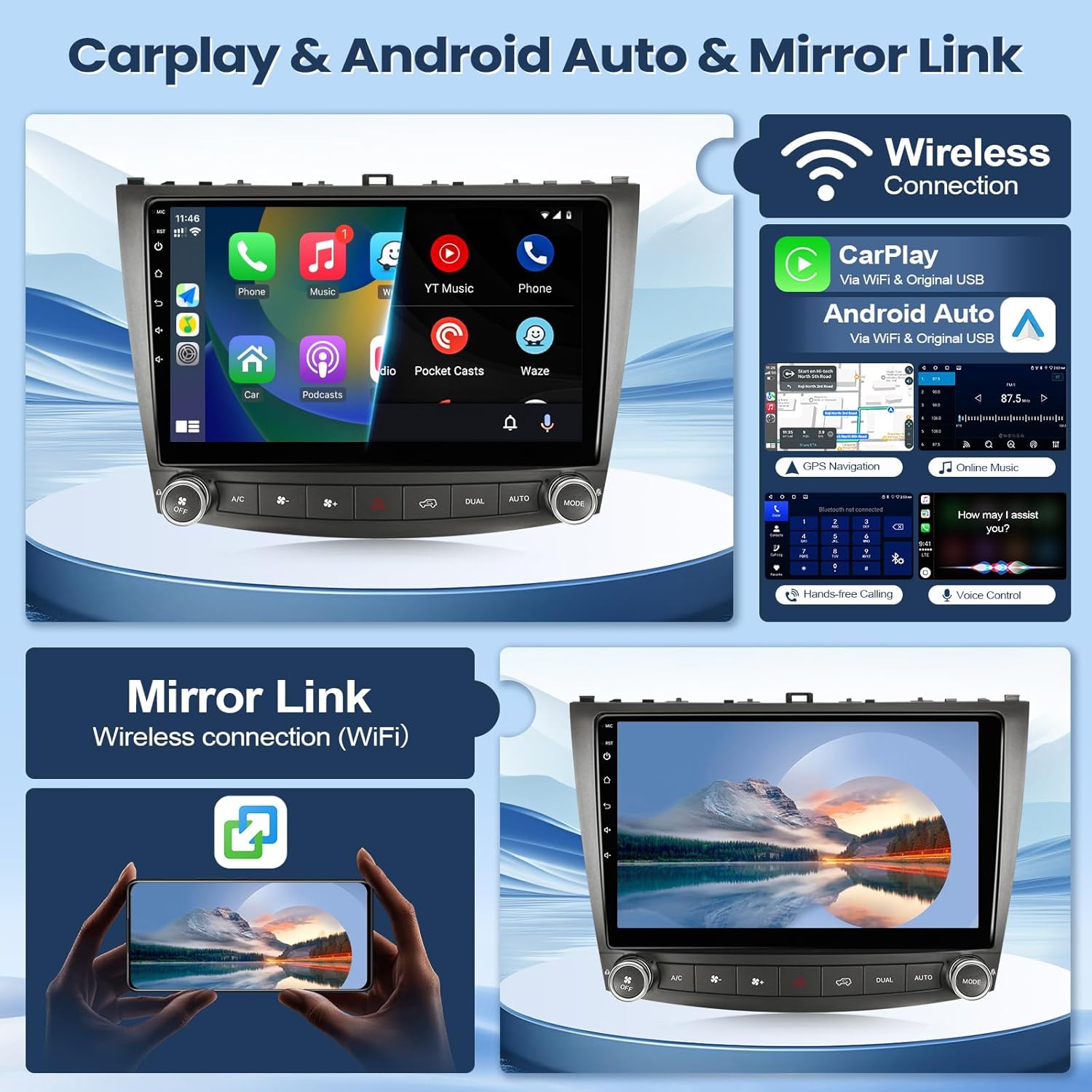
Image 6.1 : Terminéview of Wireless CarPlay, Android Auto, and Mirror Link functionalities.
6.3 Navigation GPS et Wi-Fi
The unit features a built-in GPS module with preloaded offline maps. You can also connect to a Wi-Fi hotspot (e.g., from your smartphone) to download online navigation applications and other apps from the Play Store.

Image 6.2: Display of GPS navigation and available Wi-Fi connectivity options.
6.4Bluetooth 5.1
Pair your mobile phone via Bluetooth for hands-free calling and audio streaming. The system supports answering/making calls directly from the unit, with clear audio through the built-in or external microphone.
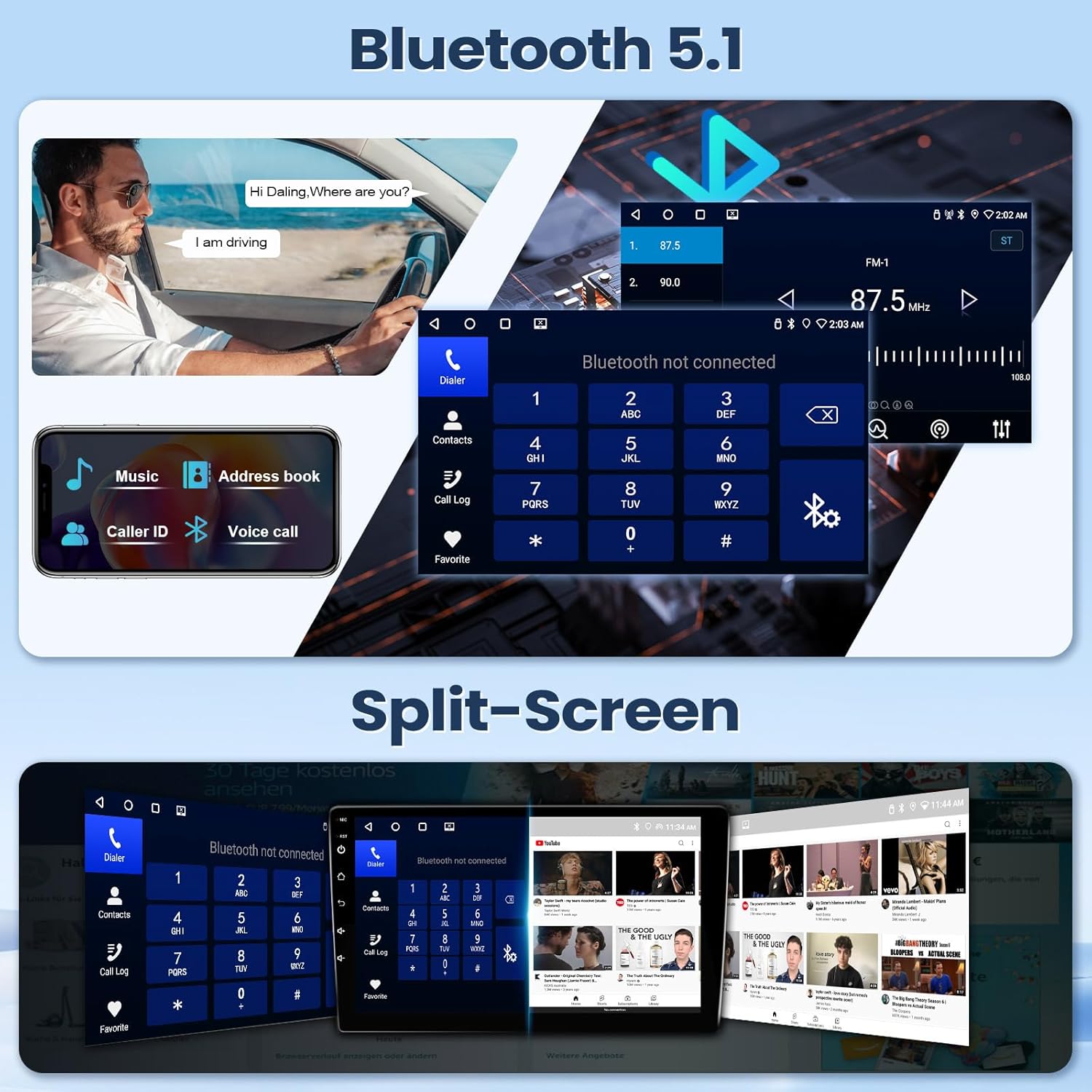
Image 6.3: Bluetooth 5.1 interface for calls and music, alongside the split-screen feature.
6.5 Radio FM
Access FM radio stations with automatic and manual search functions. Save your favorite stations for quick access.

Image 6.4: Audio equalization (EQ) and Digital Sound Processor (DSP) settings, and the FM radio interface.
6.6 Fonction d'écran partagé
Utilisez la fonction d'écran partagé pour exécuter deux applications simultanément, par exemple la navigation d'un côté et la lecture de musique de l'autre.
6.7 Entrée caméra de recul
When the vehicle is shifted into reverse, the system automatically displays the feed from the connected backup camera, providing a wide viewing angle for safer maneuvering.
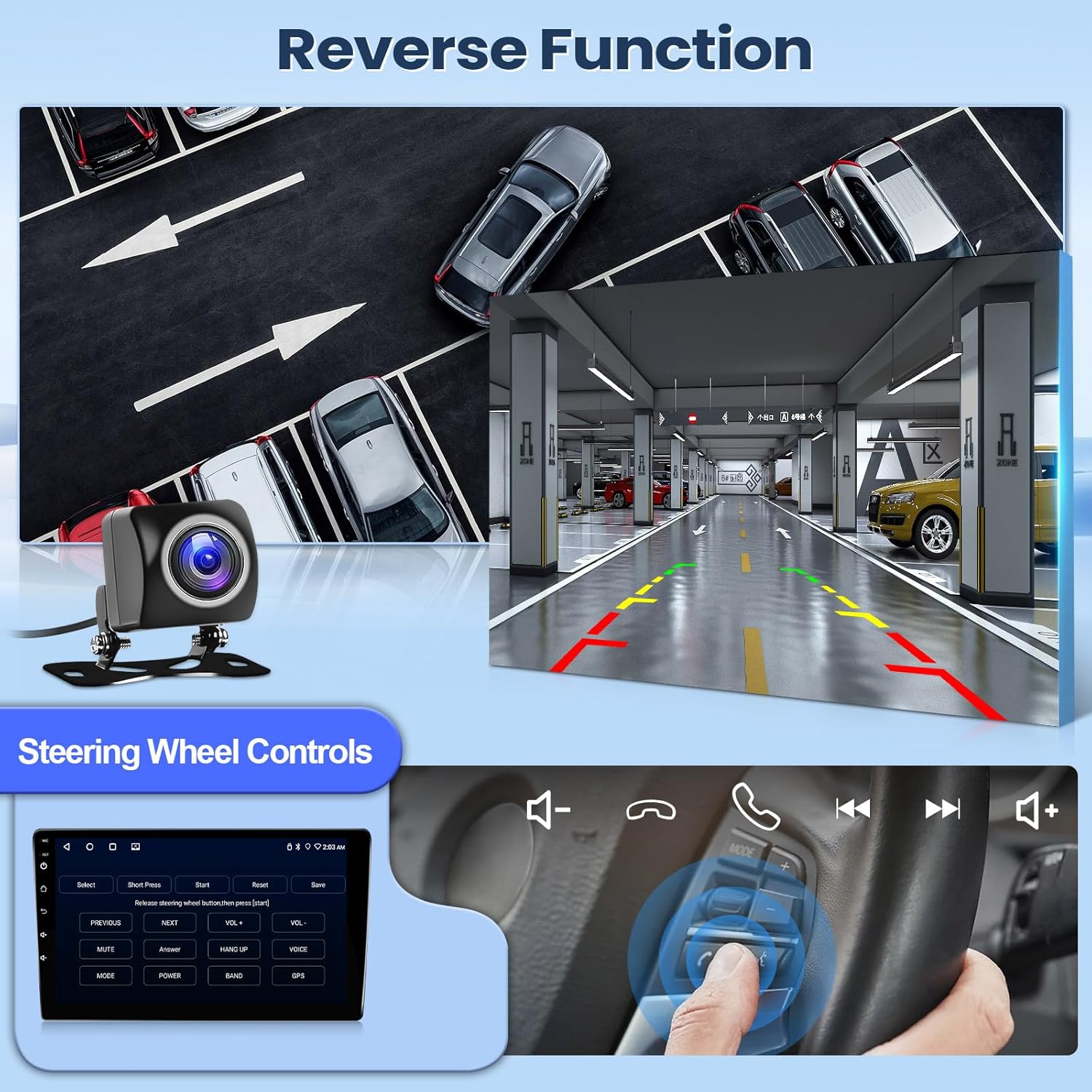
Image 6.5: Demonstration of the reverse camera display and steering wheel control functionality.
6.8 Commande au volant (SWC)
L'appareil est compatible avec les commandes au volant existantes de votre véhicule, vous permettant de gérer l'audio, les appels et d'autres fonctions sans lâcher le volant.
7. Entretien
Pour garantir la longévité et les performances optimales de votre autoradio, suivez ces conseils d'entretien :
- Nettoyage: Utilisez un chiffon doux et sec pour nettoyer l'écran et l'appareil. Pour les taches tenaces, frottez légèrement.ampNettoyez le chiffon avec de l'eau ou un nettoyant adapté aux écrans. Évitez les matériaux abrasifs et les produits chimiques agressifs.
- Température: Évitez d'exposer l'appareil à des températures extrêmes pendant des périodes prolongées.
- Mises à jour logicielles : Vérifiez et installez régulièrement les mises à jour logicielles disponibles afin d'améliorer les performances et d'ajouter de nouvelles fonctionnalités.
- Connexions de câble : Assurez-vous que tous les câbles sont bien branchés. Des connexions desserrées peuvent entraîner des problèmes intermittents.
8. Dépannage
If you encounter issues with your Leadfan car stereo, refer to the following common troubleshooting steps:
- Pas d'alimentation : Vérifiez toutes les connexions électriques et les fusibles. Assurez-vous que la batterie du véhicule est chargée.
- Pas de son : Verify speaker connections. Check volume levels and audio settings (EQ, balance, fader). Ensure the correct audio source is selected.
- Écran tactile non réactif : Essayez de redémarrer l'appareil. Si le problème persiste, une réinitialisation d'usine peut être nécessaire (attention : cette opération effacera toutes les données utilisateur).
- GPS non fonctionnel : Assurez-vous que l'antenne GPS est correctement installée et qu'elle est dégagée. view du ciel. Vérifiez les paramètres GPS de l'appareil.
- Problèmes de connexion Bluetooth : Assurez-vous que le Bluetooth est activé sur la chaîne stéréo et sur votre téléphone. Supprimez les appareils précédemment appairés et essayez de vous reconnecter.
- CarPlay/Android Auto ne se connecte pas : Verify your phone's compatibility and ensure the app is updated. Try both wired and wireless connections. Check USB cable integrity if using a wired connection.
- Caméra de recul non affichée : Vérifiez l'alimentation et les connexions vidéo de la caméra. Assurez-vous que le fil de déclenchement de la marche arrière est correctement connecté au circuit des feux de recul du véhicule.
Si ces étapes ne résolvent pas le problème, veuillez contacter le service client pour obtenir de l'aide supplémentaire.
9. Spécifications
| Dimensions du produit | 11.02 x 4.45 x 14.68 pouces |
| Poids de l'article | 3.96 livres (1.8 kilogramme) |
| Numéro de modèle | 2+32G CarPlay for Lexus 2006-2012 |
| Système opérateur | Android 11 |
| Processeur | 4 cœurs |
| BÉLIER | 2 Go |
| ROM | 32 Go |
| Taille de l'écran | 10.1 pouces (Diagonale d'écran visible : 9" / 23 cm) |
| Résolution de l'écran | 1024x600 IPS HD Touch Screen |
| Technologie de connectivité | Wired (Original USB Cable), Wireless (Bluetooth & Wi-Fi) |
| Version Bluetooth | 5.1 |
| Caractéristiques spéciales | Apple CarPlay, Android Auto, Mirrorlink, GPS Module, IP68 AHD backup camera, Steering Wheel Control, Hands-Free Calling, Voice Control, Split-screen, FM, DSP, RDS, AUX, EQ, RAC Audio/Video Output, CanBus, 2 USB ports, External Mic Jack |
| Mode de sortie audio | Stéréo |
| Encodage vidéo | H.264, H.265/HEVC, MPEG-4, etc. |
10. Garantie et assistance
Leadfan provides professional technical support and high-quality customer service for this product. We offer lifetime technical support.
If you have any questions regarding installation, wiring, operation, or any other aspect of your Leadfan car stereo, please contact customer service or technical support through your purchase platform. Look for the "sold by Leedfan" link and click "ask a question" to reach our support team.


