1. Introduction
The Western Digital 10TB WD Purple Pro Surveillance Internal Hard Drive (model WD102PURP) is engineered for advanced, AI-enabled surveillance systems. This 3.5-inch SATA 6 Gb/s HDD features a 512 MB cache and is designed for 24/7 operation in high-definition security environments. It supports high-capacity storage with enhanced performance and workload capabilities for next-generation recorders, video analytics appliances, and deep-learning servers.

Illustration 1.1 : Avant view of the WD Purple Pro 10TB Surveillance Hard Drive.
2. Principales caractéristiques
- Haute capacité : Offers 10TB of storage, suitable for extended video retention in surveillance systems.
- Optimized for Surveillance: Designed for 24/7, always-on, high-definition surveillance systems.
- AllFrame AI Technology: Helps reduce frame loss, improves overall video playback, and supports up to 32 AI streams per drive for deep learning analytics.
- Niveau de charge de travail élevé : Rated for 550TB per year, ensuring durability and reliability in demanding environments.
- Enterprise-Class Reliability: Provides robust performance and data integrity, especially in larger-scale systems with operational vibration.
- Western Digital Device Analytics (WDDA): Proactive health management for enhanced system stability.
3. Configuration et installation
This section outlines the general steps for installing the WD Purple Pro hard drive into a compatible surveillance system (e.g., NVR, DVR, or server). Always refer to your system's specific manual for detailed installation instructions.
3.1 Précautions de sécurité
- Ensure the system is powered off and unplugged before installation.
- Wear an anti-static wrist strap to prevent electrostatic discharge (ESD) damage to the drive and system components.
- Manipulez le disque dur par ses bords ; évitez de toucher le circuit imprimé ou les broches du connecteur.
3.2 Étapes d'installation physique
- Open System Enclosure: Carefully open your NVR/DVR or server enclosure according to its manufacturer's instructions.
- Localiser la baie de garage : Identifiez une baie de lecteur 3.5 pouces disponible.
- Monter le disque dur : Slide the WD Purple Pro drive into the drive bay. Secure it using the provided screws from your system's enclosure. Ensure the drive is firmly seated to prevent vibration.
- Connecter les câbles :
- Connect a SATA data cable from the hard drive to an available SATA port on your system's motherboard or controller card.
- Connect a SATA power cable from your system's power supply to the hard drive.
- Enceinte fermée : Once cables are securely connected and the drive is mounted, close the system enclosure.
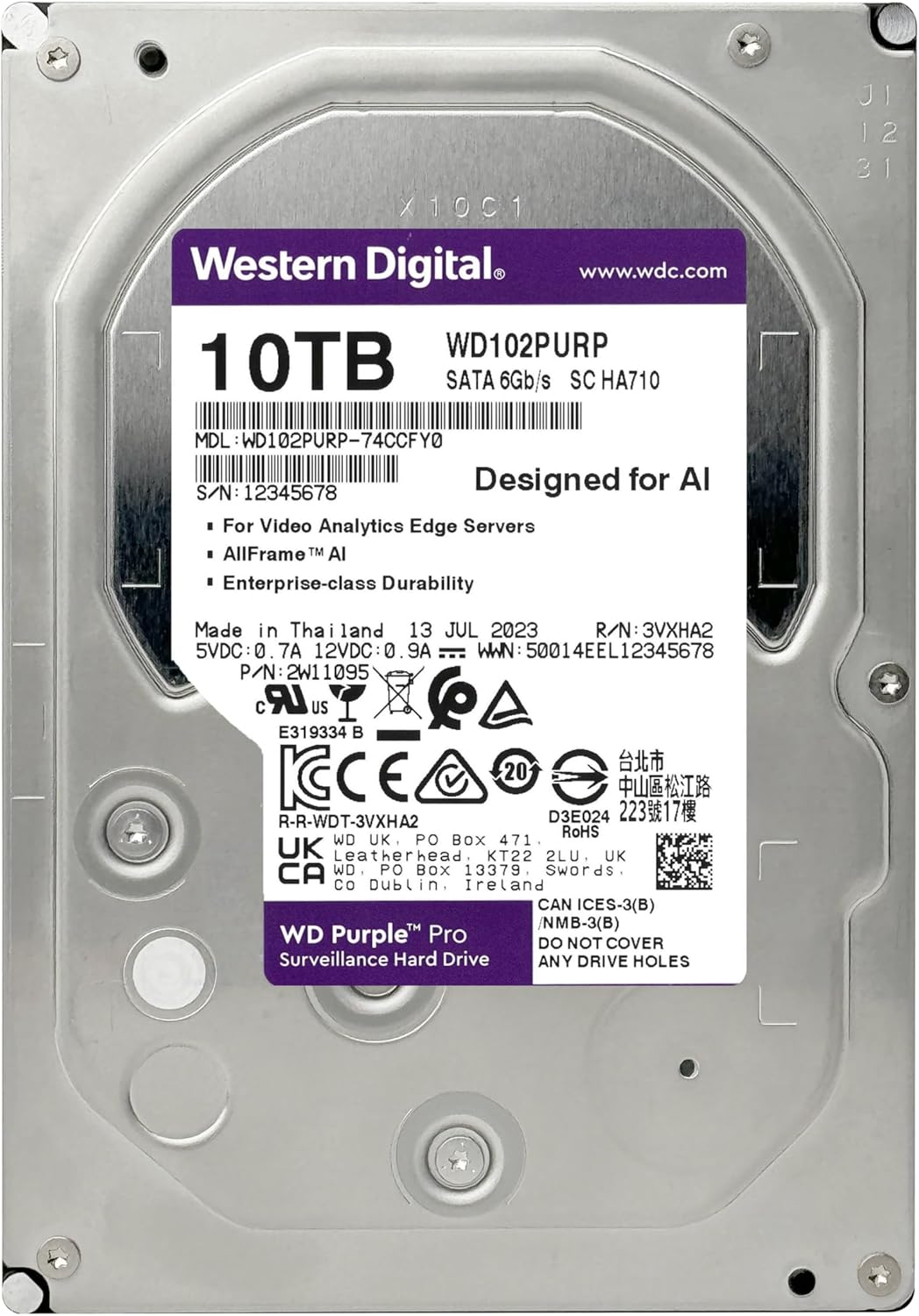
Image 3.1: Back label of the WD Purple Pro 10TB Hard Drive, indicating model and serial information.
3.3 Configuration initiale du système
- Mise sous tension : Plug in and power on your surveillance system.
- Access System Settings: Access your NVR/DVR's operating system or BIOS/UEFI settings to ensure the hard drive is detected.
- Initialisation et formatage : The system will likely prompt you to initialize and format the new hard drive. Follow the on-screen instructions. This process prepares the drive for recording.
- Configurer l'enregistrement : Set up recording schedules, motion detection, and other surveillance parameters within your system's software.
4. Mode d'emploi
The WD Purple Pro drive operates continuously within your surveillance system, managing video streams and data storage. Its operation is largely automated once configured.
- Enregistrement continu: The drive is designed for 24/7 recording from multiple high-definition cameras.
- AI Stream Support: Leveraging AllFrame AI, the drive efficiently handles concurrent AI streams for advanced analytics without compromising video integrity.
- Gestion des données : Your surveillance system's software will manage how video data is written, stored, and overwritten on the drive.
- Lecture vidéo: Accéder aux photos enregistréestage through your NVR/DVR interface. The drive's performance ensures smooth playback.
5. Entretien
While WD Purple Pro drives are built for reliability, regular system maintenance is crucial for optimal performance and longevity.
- Surveillance du système : Regularly check your surveillance system's health status, including hard drive status. Many NVR/DVRs provide alerts for drive issues.
- Mises à jour du micrologiciel : Keep your NVR/DVR firmware updated. These updates often include improvements for hard drive compatibility and performance.
- Contrôle de l'environnement : Ensure your system operates within recommended temperature and humidity ranges to prevent premature drive failure.
- Gestion de l'alimentation: Use a reliable power supply and consider an uninterruptible power supply (UPS) to protect against power fluctuations and sudden shutdowns.
- Data Backup (Optional): For critical data, consider implementing a backup strategy, although surveillance footage is typically managed by the NVR/DVR's overwrite policy.
6. Dépannage
Cette section aborde les problèmes courants que vous pourriez rencontrer avec votre disque dur.
6.1 Lecteur non détecté
- Vérifiez les câbles : Ensure both SATA data and power cables are securely connected to the drive and the system.
- Vérifiez l'alimentation : Confirm the system's power supply is functioning correctly.
- Paramètres BIOS/UEFI : Check your system's BIOS/UEFI to see if the drive is recognized. Ensure SATA ports are enabled.
- Compatibilité du système : Confirm your NVR/DVR system supports 10TB drives and the SATA 6 Gb/s interface.
6.2 Poor Video Playback or Frame Loss
- System Workload: Ensure your NVR/DVR is not overloaded with too many cameras or high-resolution streams beyond its capacity.
- Santé au volant : Use WDDA or your system's diagnostic tools to check the drive's health status.
- Micrologiciel : Update your NVR/DVR firmware to the latest version.
6.3 Unusual Noises from Drive
- Vibration: Ensure the drive is securely mounted in its bay. Loose mounting can cause rattling.
- Vérification diagnostique : If the noise is a clicking, grinding, or repetitive sound, it may indicate a drive failure. Immediately back up any critical data (if possible) and contact Western Digital support.
7. Spécifications
| Fonctionnalité | Spécification |
|---|---|
| Numéro de modèle | WD102PURP |
| Capacité | 10 To |
| Facteur de forme | 3.5 pouces |
| Interface | SATA 6 Gb/s |
| Cache | 512 Mo |
| Vitesse de rotation | 7200 tr/min |
| Évaluation de la charge de travail | 550 TB / année |
| Dimensions (L x l x H) | 5.91 x 5.91 x 7.87 pouces |
| Poids de l'article | 1.65 livres |
| Vol d'exploitationtage | 28 volts (Note: This value is as provided in product data; typical HDDs use 5V/12V.) |
8. Garantie et assistance
Western Digital products come with a limited warranty. For specific warranty terms and conditions, please refer to the warranty information included with your product or visit the official Western Digital website.
For technical support, troubleshooting assistance, or to inquire about warranty claims, please visit the Western Digital support portal:
When contacting support, have your product model number (WD102PURP) and serial number ready. The serial number is typically located on a label on the drive itself (refer to Image 3.1).


