1. Consignes de sécurité importantes
Please read these instructions carefully before using the Goldair Remote Wall Fan. Failure to follow these safety guidelines may result in electric shock, fire, or injury.
- Alimentation: Ensure the fan is connected to a power supply that matches the voltage spécifié sur l'étiquette signalétique.
- Placement: Do not place the fan near curtains, drapes, or any objects that may be drawn into the fan blades.
- Enfants: Cet appareil n'est pas destiné à être utilisé par des personnes (y compris des enfants) ayant des capacités physiques, sensorielles ou mentales réduites, ou manquant d'expérience et de connaissances, à moins qu'elles ne soient surveillées ou aient reçu des instructions concernant l'utilisation de l'appareil par une personne responsable de leur sécurité. Les enfants doivent être surveillés pour s'assurer qu'ils ne jouent pas avec l'appareil.
- Nettoyage: Débranchez toujours le ventilateur de la prise de courant avant de le nettoyer ou d'effectuer toute opération d'entretien.
- Dommage: N’utilisez pas le ventilateur si le cordon ou la fiche est endommagé(e). Si le cordon d’alimentation est endommagé, il doit être remplacé par le fabricant, son service après-vente ou une personne qualifiée afin d’éviter tout danger.
- Eau: Do not immerse the fan in water or other liquids. Do not use the fan in wet or damp environnements.
- Ventilation: Ensure adequate ventilation around the fan during operation.
- Démontage: Do not attempt to repair or disassemble the fan yourself. Contact qualified service personnel for repairs.
2. Produit terminéview
The Goldair Remote Wall Fan (GWFR-160) is designed to provide efficient cooling with convenient remote control operation. It features a modern design and 90-degree oscillation.
2.1 Composants
- Fan Head (with blades and grille)
- Support de montage mural
- Télécommande
- Cordon d'alimentation
- Matériel de montage (vis, chevilles)
2.2 Caractéristiques
- 40 cm fan size
- Remote controlled operation
- Full 90-degree oscillation
- Paramètres de vitesse multiples
- Fonction minuterie
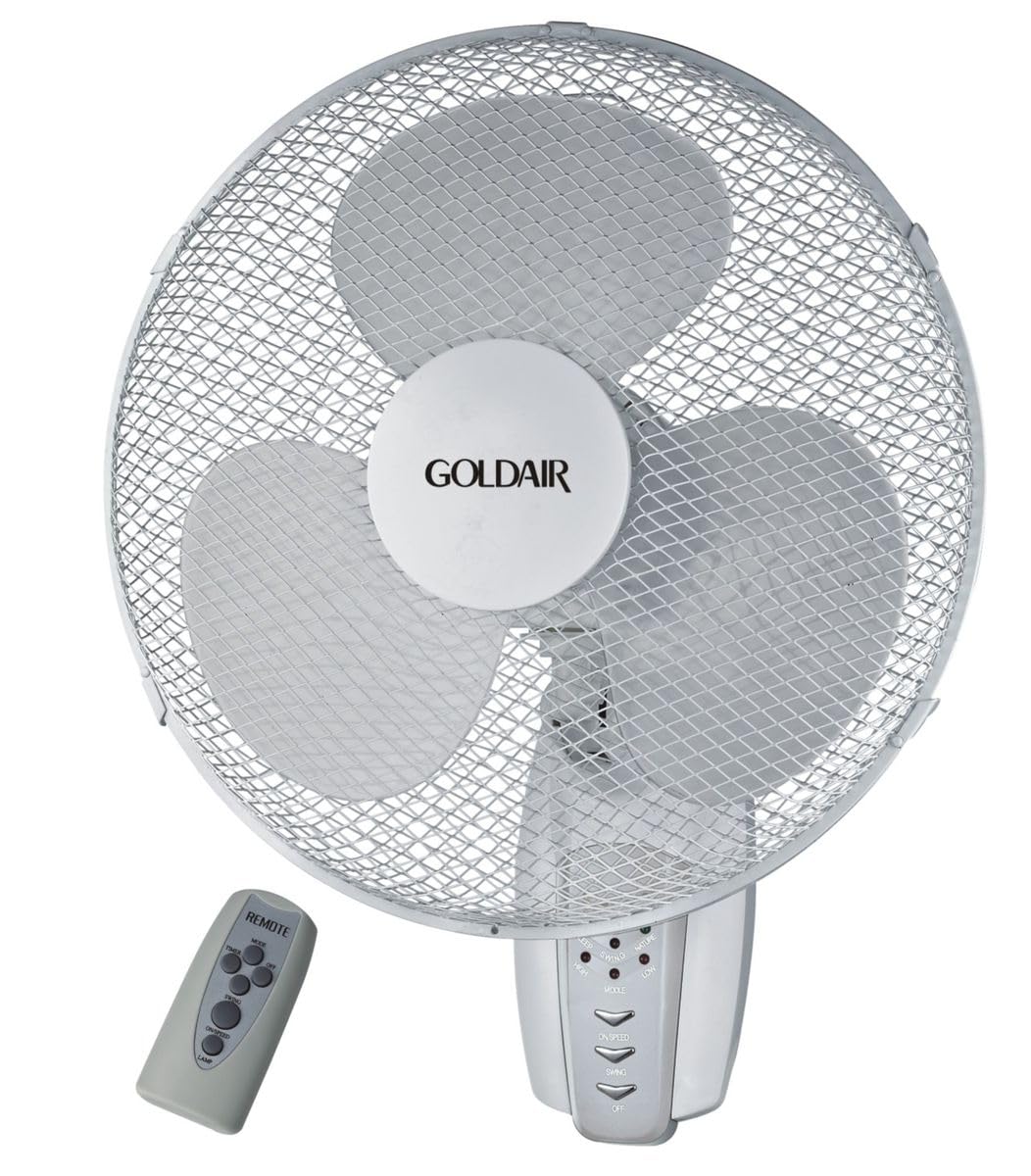
Figure 1 : Face avant view of the Goldair Remote Wall Fan GWFR-160. This image shows the fan head, grille, and the central control panel.
3. Configuration et installation
Before installation, ensure you have the necessary tools: drill, screwdriver, and a pencil.
3.1 Choisir un emplacement
- Select a sturdy wall surface capable of supporting the fan's weight (approximately 5 kg).
- Ensure the location is within reach of a power outlet and allows for optimal airflow distribution.
- Avoid areas with excessive moisture or direct sunlight.
3.2 Montage mural
- Hold the wall mounting bracket against the desired wall location and mark the drill holes with a pencil.
- Drill pilot holes into the marked positions. Use an appropriate drill bit size for the provided wall plugs.
- Insérez les chevilles dans les trous percés.
- Align the mounting bracket with the holes and secure it to the wall using the provided screws. Ensure the bracket is firmly attached.
- Carefully lift the fan unit and align the mounting slots on the back of the fan with the hooks or slots on the wall bracket.
- Slide the fan down onto the bracket until it locks securely into place.
3.3 Connexion d'alimentation
Once the fan is securely mounted, plug the power cord into a standard electrical outlet. Ensure the outlet is easily accessible.
4. Mode d'emploi
The Goldair Remote Wall Fan can be operated using either the control panel on the fan unit or the supplied remote control.
4.1 Fonctionnement de la télécommande
Before first use, insert 2x AAA batteries (not included) into the remote control, observing polarity.
- Bouton marche/arrêt : Appuyez pour allumer ou éteindre le ventilateur.
- Bouton VITESSE : Press repeatedly to cycle through fan speeds (e.g., Low, Medium, High).
- Bouton MODE : Select different fan modes (e.g., Normal, Natural, Sleep).
- Bouton OSC : Press to activate or deactivate the oscillation function (90-degree swing).
- Bouton MINUTERIE : Set the fan to operate for a specific duration (e.g., 1 hour, 2 hours, up to 7.5 hours).
4.2 Panneau de commande manuel
The control panel on the fan unit typically mirrors the functions of the remote control. Refer to the icons on the panel for specific button functions.
5. Entretien et nettoyage
Regular cleaning will help maintain the fan's performance and extend its lifespan. Always unplug the fan before cleaning.
5.1 Nettoyage du ventilateur
- Débrancher: Débranchez le ventilateur de l'alimentation électrique.
- Extérieur: Essuyez les surfaces extérieures du ventilateur avec un chiffon doux et sec.amp chiffon. N'utilisez pas de nettoyants abrasifs ou de solvants.
- Grille et lames : To clean the fan blades, you may need to carefully remove the front grille. Consult the diagram in the packaging for grille removal instructions. Use a soft brush or vacuum cleaner to remove dust from the blades and grilles.
- Remonter: Reattach the front grille securely before plugging the fan back in.
5.2 Stockage
When not in use for extended periods, store the fan in its original packaging or cover it to protect it from dust. Store in a cool, dry place.
6. Dépannage
If you encounter issues with your Goldair Remote Wall Fan, refer to the following common problems and solutions:
| Problème | Cause possible | Solution |
|---|---|---|
| Le ventilateur ne s'allume pas. | Pas d'alimentation électrique. Les piles de la télécommande sont épuisées. | Vérifiez que le cordon d'alimentation est bien branché dans une prise de courant fonctionnelle. Remplacez les piles de la télécommande. |
| Faible flux d'air. | La vitesse du ventilateur est trop faible. Grille or blades are dusty. | Increase fan speed setting. Clean the fan grille and blades as per maintenance instructions. |
| Le ventilateur est bruyant. | Pièces détachées. Ventilateur mal fixé. | Check for any loose components. Ensure the fan is securely mounted to the wall bracket. |
| La télécommande ne fonctionne pas. | Les piles sont déchargées ou mal insérées. Obstruction entre la télécommande et le ventilateur. | Remplacez les piles en veillant à respecter la polarité. Remove any obstacles blocking the signal. Ensure you are within range. |
Si le problème persiste après avoir essayé ces solutions, veuillez contacter le service client de Goldair.
7. Spécifications
| Marque | Goldair |
| Numéro de modèle | GWFR-160 |
| Couleur | Blanc |
| Taille du ventilateur | 40 cm |
| Matériel | Métal |
| Caractéristiques spéciales | Remote Controlled, 90-degree Oscillation |
| Poids de l'article | 5 kg |
| Dimensions du produit | 42D x 15L x 43H centimètres |
| Source d'énergie | Électrique avec fil |
| Type de montage | Support mural |
8. Garantie et assistance
Pour obtenir des informations sur la garantie et l'assistance clientèle, veuillez consulter la carte de garantie fournie avec votre produit ou visiter le site officiel de Goldair. webConsultez le site. Conservez votre reçu d'achat comme preuve d'achat.
Goldair Officiel Website: www.goldair.co.za (Remarque : Ceci est un espace réservé URL, please refer to your product documentation for the correct regional website.)
Contacter le support : For technical assistance or service inquiries, please contact Goldair customer service through their official channels.