Introduction
This manual provides comprehensive instructions for the installation, operation, maintenance, and troubleshooting of your Leadfan Car Stereo Radio. This unit is designed specifically for Honda Civic models from 2006 to 2011, offering advanced features such as wireless CarPlay, Android Auto, GPS navigation, Bluetooth connectivity, and a high-definition touch screen. Please read this manual thoroughly before installation and use to ensure proper functionality and safety.

Image: The Leadfan Car Stereo Radio unit, showing the 10.1-inch display, custom bezel for Honda Civic, and included accessories such as wiring harnesses, a backup camera, and a GPS module.
Contenu du colis
Veuillez vérifier que tous les articles listés ci-dessous sont inclus dans votre colis. Si un article est manquant ou endommagé, veuillez contacter le service client.
- 1 x Leadfan Car Android Player (Main Unit)
- 1 x faisceaux d'alimentation
- 1 x antenne GPS
- Câble 1 x RCA
- 1 x CAM-IN (Rearview Camera Cable)
- 1 x USB Cable (2 pieces)
- 1 x Manuel d'utilisation
- 1 x caméra de recul AHD

Image: A visual representation of all components included in the Leadfan Car Stereo package, such as the main unit, various cables (power, RCA, USB, camera), GPS module, and backup camera.
Configuration et installation
This section outlines the steps for installing your new car stereo. Professional installation is recommended if you are unfamiliar with car audio wiring.
Compatibilité des véhicules
This unit is specifically designed for Honda Civic models manufactured between 2006 and 2011. The included custom bezel and wiring harness ensure a seamless fit and plug-and-play installation without the need for additional accessories.

Image: A comparison showing the car's dashboard before and after the installation of the Leadfan Car Stereo, highlighting the integrated and factory-like appearance.
Connexions de câblage
- Faisceau d'alimentation : Connect the main power harness to your vehicle's existing wiring. Ensure all connections are secure and correctly matched (ACC, B+, GND, ILL, etc.).
- Câbles RCA : Connect the RCA cables for audio output (front, rear, subwoofer) and auxiliary input as needed.
- Câbles USB : Route the USB cables to a convenient location for connecting external devices or USB drives.
- Antenne GPS: Installez l'antenne GPS dans un endroit dégagé. view du ciel, généralement sur le tableau de bord ou sous le pare-brise, et connectez-le à l'unité.
- Arrièreview Caméra: Connectez l'arrièreview camera cable (CAM-IN) to the unit and route the camera wiring to the rear of the vehicle. Ensure the camera receives power and the reverse trigger wire is connected to activate the camera automatically when reversing.
- WiFi/Bluetooth Antennas: Ensure the WiFi and Bluetooth antennas are properly connected for optimal signal reception.
Configuration de la commande au volant (SWC)
After connecting the SWC wires from the vehicle's harness to the stereo, you will need to program the steering wheel buttons through the unit's settings menu. Navigate to the 'Steering Wheel Control' or 'SWC Learning' section in the system settings and follow the on-screen instructions to assign functions to each button.

Image: The user interface for setting up steering wheel controls, showing options to learn and assign functions to physical buttons. Also displays the automatic reverse camera view avec des règles de stationnement.
Mode d'emploi
This section details the primary functions and features of your Leadfan Car Stereo.
Interface principale et navigation
The 10.1-inch HD touch screen provides an intuitive interface. Swipe left or right to access different application pages. Tap on icons to launch applications such as Phone, Music, Maps, Messages, and more.
CarPlay sans fil et Android Auto
The unit supports wireless Apple CarPlay and Android Auto, allowing seamless integration with your smartphone. This enables access to navigation, music, calls, and messages directly from the stereo's display.
- Connexion: Ensure Bluetooth is enabled on your phone and the car stereo. Pair your phone with the stereo via Bluetooth. Once paired, the system should prompt you to enable CarPlay or Android Auto.
- Caractéristiques: Access Siri or Google Assistant for voice commands, use Apple Maps or Google Maps for navigation, stream music from your preferred apps, and manage calls and messages hands-free.
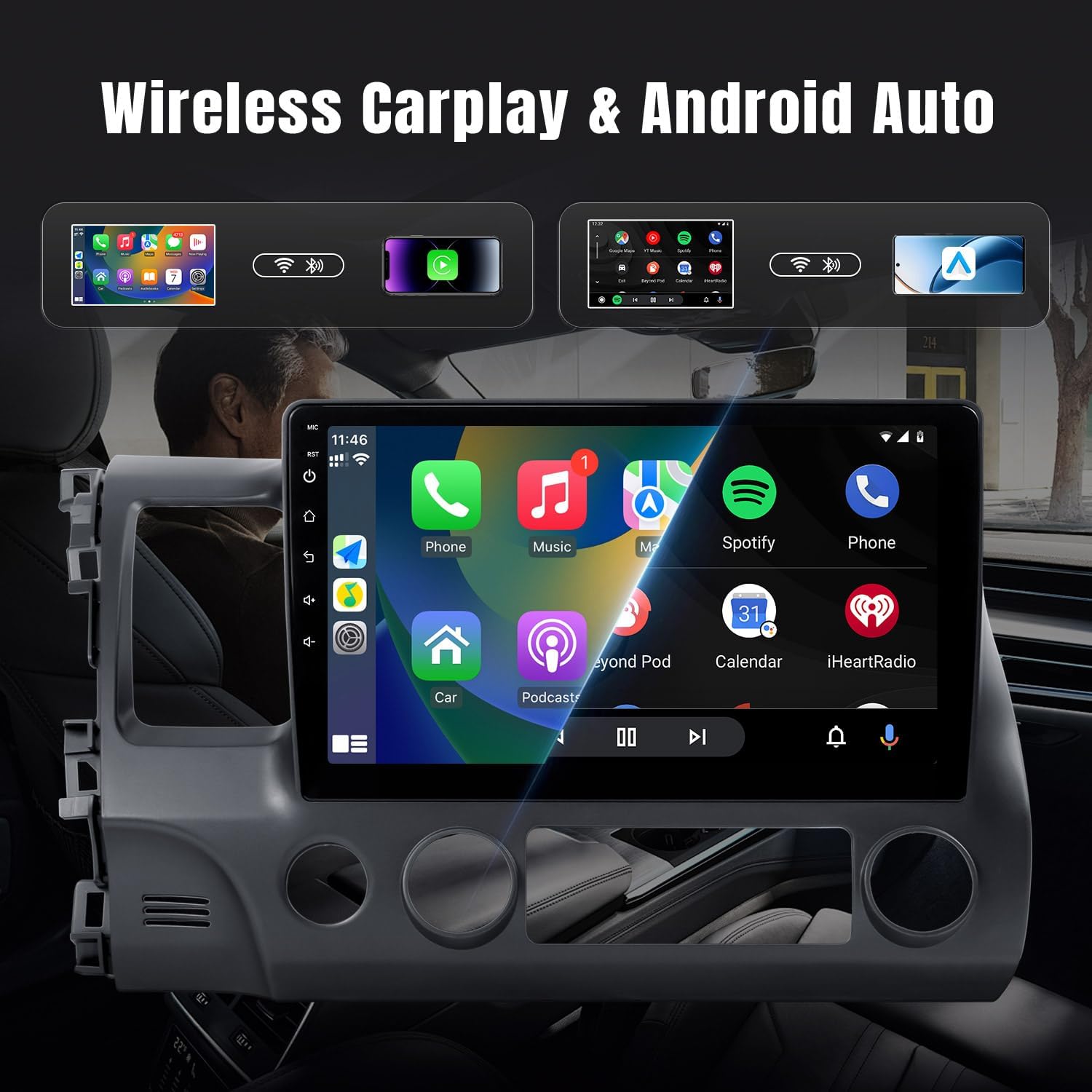
Image: The car stereo display showing the Apple CarPlay interface with various applications like Phone, Music, Maps, and Messages, demonstrating the seamless smartphone integration.

Image: An illustration demonstrating wireless CarPlay and Android Auto functionality, showing an iPhone and an Android phone wirelessly connected to the car stereo, enabling voice commands and app access.
Connectivité Bluetooth (5.0)
The built-in Bluetooth 5.0 module supports hands-free calling and wireless music playback.
- Jumelage : Accédez aux paramètres Bluetooth de votre chaîne stéréo et de votre téléphone. Rechercher available devices on your phone and select 'Leadfan Car Stereo' (or similar name) to pair.
- Appels mains libres : Once paired, you can make and receive calls directly from the stereo's screen. The built-in microphone ensures clear communication.
- Streaming audio: Diffusez sans fil la musique de votre téléphone via les haut-parleurs de la voiture.

Image: The Bluetooth interface of the car stereo, displaying options for dialing, call records, contacts, and music playback, with a song currently playing.
Navigation GPS
The stereo comes with a built-in GPS receiver and pre-installed offline maps (e.g., HereWeGo). You can also use online maps when connected to Wi-Fi.
- Cartes hors ligne : Launch the pre-installed navigation app to use offline maps. Ensure maps for your region are downloaded.
- Cartes en ligne : Connect the unit to a Wi-Fi hotspot (e.g., from your phone) to use online navigation apps like Google Maps, Waze, etc., downloaded from the Play Store.

Image: The GPS navigation screen on the car stereo, showing a map with a route, estimated arrival time, and distance. Icons for various navigation applications are also visible.

Image : Une fente view demonstrating both GPS navigation and Wi-Fi connectivity, showing the map interface on one side and various streaming and social media applications accessible via Wi-Fi on the other.
Radio FM
The unit features a high-quality FM radio with limitless preset station storage.
- Tuning: Use the touch screen to manually tune to stations or perform an automatic scan to find and save available stations.
- Présélections: Enregistrez vos stations préférées pour y accéder rapidement.
Fonction inverse
Lorsque le véhicule est enclenché en marche arrière, l'écran affichera automatiquement le view from the connected rearview camera, improving safety during parking and maneuvering.
Connexion Wi-Fi
Connect the stereo to a Wi-Fi network or a mobile hotspot to access online features, download apps from the Play Store (e.g., YouTube, Spotify, Pandora), and browse the internet.
Entretien
Un entretien régulier garantit la longévité et les performances optimales de votre autoradio.
- Nettoyage de l'écran : Utilisez un chiffon doux non pelucheux pour essuyer délicatement l'écran tactile. Pour les traces tenaces, frottez légèrement avec un chiffon doux.ampNettoyez le chiffon avec de l'eau ou un nettoyant adapté aux écrans. Évitez les matériaux abrasifs et les produits chimiques agressifs.
- Mises à jour logicielles : Periodically check for system software updates through the unit's settings menu (if available). Updates can improve performance, add new features, and fix bugs.
- Soins généraux: Évitez d'exposer l'appareil à des températures extrêmes, à la lumière directe du soleil pendant des périodes prolongées ou à une humidité excessive. Assurez une ventilation adéquate autour de l'appareil.
Dépannage
Cette section aborde les problèmes courants que vous pourriez rencontrer. Pour tout problème non mentionné ici, veuillez contacter le service client.
| Problème | Cause possible | Solution |
|---|---|---|
| Pas de courant | Câblage incorrect ; fusible grillé ; problème de batterie du véhicule. | Check power harness connections (ACC, B+). Inspect vehicle fuses. Ensure car battery is charged. |
| Pas de son | Câbles des haut-parleurs déconnectés ; Volume trop faible ; Fonction muet activée ; Paramètres de sortie audio incorrects. | Verify speaker wire connections. Increase volume. Check if mute is enabled. Adjust audio settings. |
| GPS hors service / Signal faible | GPS antenna not connected or poorly placed; Offline maps not downloaded; No internet for online maps. | Assurez-vous que l'antenne GPS est correctement connectée et que le signal est dégagé. view of the sky. Download necessary offline maps. Connect to Wi-Fi for online maps. |
| Problèmes de connectivité Bluetooth | Bluetooth non activé ; procédure d’appairage incorrecte ; interférences. | Ensure Bluetooth is on for both devices. Delete previous pairings and re-pair. Move away from other electronic devices. |
| CarPlay/Android Auto ne se connecte pas | Bluetooth/Wi-Fi issues; Phone compatibility; App not running. | Check Bluetooth and Wi-Fi connections. Ensure your phone's OS is compatible. Restart phone and stereo. |
| Screen Lag / Unresponsive Touch | Trop d'applications en cours d'exécution ; surcharge du système ; bug logiciel. | Close unnecessary applications. Restart the unit. Perform a factory reset if issues persist (backup data first). |
| Caméra arrière non affichée | Camera not powered; CAM-IN cable loose; Reverse trigger wire not connected. | Check camera power supply. Secure CAM-IN connection. Ensure reverse trigger wire is correctly wired to the vehicle's reverse light signal. |
Caractéristiques
Key technical specifications for the Leadfan Car Stereo Radio:
- Numéro de modèle : 2G+32G+carplay for Honda Civic 2006-2011
- Taille de l'écran : 10.1 pouces
- Système opérateur: Android 12
- BÉLIER: 2 Go
- ROM: 32 Go
- Technologie de connectivité: Bluetooth (5.0), USB, Wi-Fi
- Caractéristiques spéciales : Touchscreen, Wireless CarPlay, Android Auto, GPS Navigation, FM Radio, Backup Camera Support, Steering Wheel Control
- Dimensions du produit : 9.64 x 7.08 x 15.35 pouces
- Poids de l'article : 4.38 livres
- Mode de sortie audio : Stéréo
- Type de montage : Dashboard Mount (specific to Honda Civic 2006-2011)
Garantie et assistance
Informations sur la garantie
This Leadfan Car Stereo Radio comes with a Garantie d'un an à compter de la date d'achat, couvrant les défauts de fabrication. De plus, une Remplacement sous 12 mois Cette option est disponible pendant cette période pour les émissions admissibles.
Politique de retour
A 60-Day No Worry Return period is provided, allowing you to return the product if you are not satisfied.
Assistance clientèle
For any questions, technical assistance, or warranty claims, please contact Leadfan customer service. We aim to provide a quick reply within 24 hours. Lifetime after-sales consultation and technical support are available.
You can typically reach Leadfan support via the Amazon messaging system or through the contact information provided on the official Leadfan store page on Amazon.


