1. Introduction
This user manual provides essential information for the installation, operation, and maintenance of your Palit GeForce RTX 4060 StormX 8GB graphics card. Please read this manual thoroughly before installing and using the product to ensure proper functionality and to prevent damage.
2. Contenu du colis
Vérifiez que tous les éléments sont présents dans l'emballage de votre produit :
- Palit GeForce RTX 4060 8GB Storm X Graphics Card
- Guide d'installation rapide (si inclus)
- Driver CD/DVD (if included, otherwise download latest drivers online)
3. Configuration et installation
3.1 Liste de contrôle de pré-installation
- Assurez-vous que votre bloc d'alimentation (PSU) respecte la puissance minimale requise.tage requirement (typically 550W or higher for an RTX 4060, check specific PSU recommendations).
- Confirm your motherboard has an available PCI Express x16 slot.
- Éteignez votre ordinateur et débranchez le câble d'alimentation avant de continuer.
- Mettez-vous à la terre pour dissiper toute électricité statique.
3.2 Installation du matériel
- Ouvrez le boîtier de votre ordinateur.
- Repérez un emplacement PCI Express x16 disponible sur votre carte mère.
- Retirez tous les caches des emplacements d'extension qui gênent l'installation.
- Alignez soigneusement la carte graphique avec le port PCIe et appuyez fermement jusqu'à ce qu'elle soit bien en place. Assurez-vous que le clip de fixation est bien verrouillé.
- Fixez la carte graphique au boîtier à l'aide de vis.
- Connect the required 8-pin PCIe power connector from your power supply to the graphics card.
- Fermez le boîtier de votre ordinateur.

Figure 1 : Face avant view of the Palit GeForce RTX 4060 StormX 8GB graphics card, showing the single fan cooling solution.
3.3 Installation du pilote
- Connectez le câble d'affichage (HDMI ou DisplayPort) de votre carte graphique à votre moniteur.
- Allumez votre ordinateur.
- Once the operating system loads, download the latest NVIDIA drivers for the GeForce RTX 4060 from the official NVIDIA website (www.nvidia.com/drivers).
- Suivez les instructions à l'écran pour terminer l'installation du pilote. Un redémarrage du système peut être nécessaire.
4. Utilisation de la carte graphique
4.1 Connexions d'affichage
The Palit GeForce RTX 4060 StormX 8GB supports multiple display outputs. Connect your monitor(s) using the available ports:
- HDMI: For high-definition audio and video output.
- DisplayPort : Pour les écrans haute résolution et à fréquence de rafraîchissement élevée.
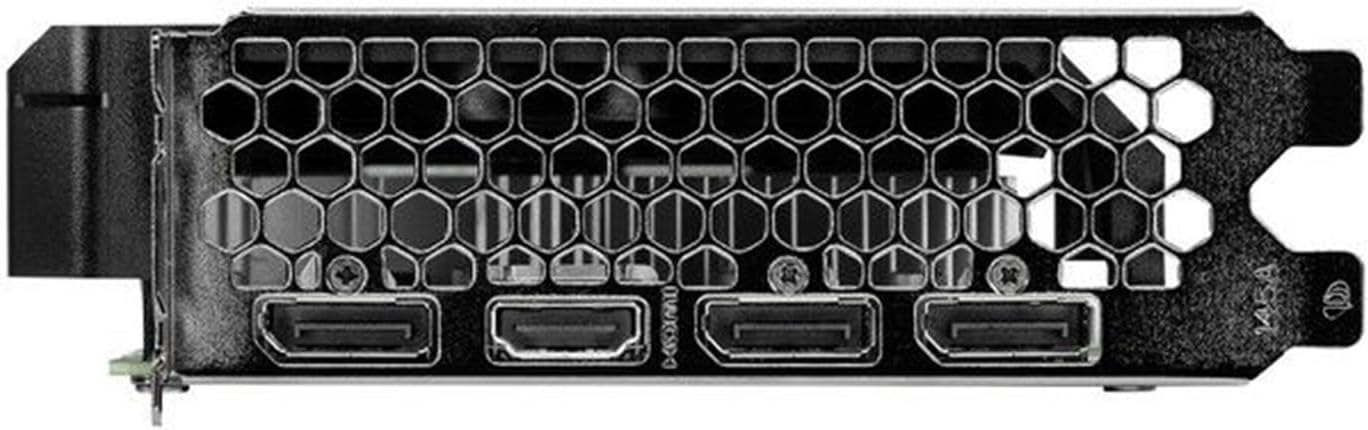
Figure 2: Rear I/O panel showing the HDMI and DisplayPort outputs.
4.2 Principales caractéristiques
- NVIDIA G-SYNC : Enjoy smooth, tear-free gameplay at high refresh rates when paired with a compatible G-SYNC monitor.
- DLSS 3 & Ray Tracing: Experience enhanced visual fidelity and performance in supported games with NVIDIA's Deep Learning Super Sampling and real-time ray tracing technologies.
- Technologie 0 dB : The fan remains off during light workloads, ensuring silent operation. Fan activation occurs only under heavier loads to maintain optimal temperatures.
- ThunderMaster Utility: Palit's proprietary software allows you to monitor GPU status, adjust fan speeds, and manage overclocking settings for personalized performance. Download from the official Palit website.
- Mini-ITX Form Factor Support: With a compact length of 17cm, this card is suitable for small form factor PC builds, offering powerful performance in a space-saving design.
5. Entretien
Un entretien régulier contribue à assurer la longévité et les performances optimales de votre carte graphique.
- Élimination de la poussière : Periodically clean dust from the graphics card heatsink and fan using compressed air. Ensure the computer is powered off and unplugged before cleaning. Hold the fan blades gently to prevent over-spinning during cleaning.
- Mises à jour du pilote: Keep your graphics drivers updated by regularly checking the official NVIDIA website for the latest versions. Driver updates often include performance improvements, bug fixes, and support for new games.
- Surveillance de la température : Use monitoring software (like Palit ThunderMaster or other third-party tools) to keep an eye on GPU temperatures, especially during heavy loads, to ensure it operates within safe limits.
6. Dépannage
Si vous rencontrez des problèmes avec votre carte graphique, reportez-vous aux étapes de dépannage courantes suivantes :
- Aucune sortie d'affichage :
- Assurez-vous que le câble d'affichage est correctement connecté à la fois à la carte graphique et au moniteur.
- Vérifiez que le moniteur est allumé et réglé sur la source d'entrée correcte.
- Check if the graphics card is properly seated in the PCIe slot and the 8-pin power connector is firmly attached.
- Try connecting to a different display output port on the card or a different monitor if available.
- Problèmes de pilote :
- Perform a clean installation of the latest drivers from the NVIDIA website. Use the 'Custom' installation option and select 'Perform a clean installation'.
- Si le problème persiste, essayez de revenir à une version stable précédente du pilote.
- Performances médiocres/Plantages :
- Assurez-vous que votre système respecte les exigences minimales des applications ou des jeux que vous utilisez.
- Monitor GPU temperatures to rule out overheating.
- Vérifiez si des applications en arrière-plan consomment des ressources système.
- Verify your power supply unit is sufficient and providing stable power.
- Bruit du ventilateur:
- Assurez-vous qu'aucun câble ni obstacle ne gêne la rotation des pales du ventilateur.
- Clean any dust buildup on the fan and heatsink.
- Use the ThunderMaster utility to adjust fan curves if desired, but avoid setting fan speeds too low under load.
If these steps do not resolve your issue, please contact Palit customer support or your retailer for further assistance.
7. Spécifications
| Fonctionnalité | Spécification |
|---|---|
| Processeur graphique | NVIDIA GeForce RTX 4060 |
| Noyaux CUDA | 3072 |
| Horloge de suralimentation | 2460 MHz |
| Taille de la mémoire | 8 Go GDDR6 |
| Interface mémoire | 128 bits |
| Vitesse de la mémoire | 17 Gbit/s |
| Type de bus | PCI Express 4.0 x16 |
| Sorties d'affichage | 1 ports HDMI, 3 ports DisplayPort |
| Résolution numérique maximale | 8K Ultra HD |
| Connecteur d'alimentation | 1x 8 broches |
| TDP | 115 W |
| Refroidissement | Active (Single Fan) |
| Dimensions (L x l x H) | 12.6 x 7.09 x 2.36 pouces (environ 320 x 180 x 60 mm) |
| Numéro de modèle de l'article | NE64060019P1-1070F |
8. Garantie et assistance
Palit products are manufactured to the highest quality standards. This product is covered by a limited warranty provided by Palit or your retailer. Please refer to the warranty information provided with your purchase or visit the official Palit website pour les termes et conditions détaillés.
For technical support, driver downloads, or further assistance, please visit the official Palit website à www.palit.com or contact your local retailer.


