Manuel d'utilisation de l'autoradio AWESAFE Android 12
Model: B0C2TY19LB
Marque : AWESAFE
Introduction
This manual provides detailed instructions for the installation, operation, and maintenance of your AWESAFE Android 12 Car Radio. Please read this manual thoroughly before use to ensure proper functionality and safety.
Produit terminéview
The AWESAFE Android 12 Car Radio is a multimedia system designed for various VW and Seat models, offering advanced features such as CarPlay, Android Auto, GPS navigation, Bluetooth connectivity, Wi-Fi, FM/RDS radio, and an integrated Equalizer (EQ).
Caractéristiques principales
Système opérateur: Android 12
Mémoire: 1 Go de RAM + 32 Go de stockage
Connectivité : CarPlay sans fil, Android Auto sans fil, Bluetooth, Wi-Fi
Please verify that all components listed below are present in your package.
Image: All accessories included with the AWESAFE Android 12 Car Radio.
Autoradio AWESAFE Android 12
Power Connector Harness
Ensemble de câbles RCA
Antenne GPS
Microphone externe
USB Cables (4-PIN and 6-PIN)
Décodeur CANBUS
Removal Tools (Plastic pry tool, screwdriver)
Manuel d'instructions
Radio Antenna / Original Car USB Adapter
Configuration et installation
Important: L'installation par un professionnel est recommandée. Débranchez la batterie du véhicule avant toute intervention électrique.
Guide d'installation étape par étape
This video provides a visual guide for the installation process.
1. Retrait de la radio d'origine
Use the provided plastic pry tool to carefully remove the trim panels around the existing car radio. Unscrew any retaining screws and gently pull out the old unit.
2. Connecting Wiring Harnesses
Connect the main power harness, RCA cables, USB cables, and GPS antenna to the corresponding ports on the new AWESAFE unit. Ensure all connections are secure.
3. Installing External Components
Positionnez l'antenne GPS dans un endroit dégagé. view of the sky (e.g., dashboard corner). Install the external microphone for hands-free calling.
4. Testing the Unit
Before fully reassembling the dashboard, temporarily connect the battery and power on the unit to verify all functions (radio, navigation, Bluetooth, steering wheel controls) are working correctly.
5. Remontage
Carefully slide the new AWESAFE unit into the dashboard opening. Secure it with screws and reattach all trim panels.
Mode d'emploi
Fonctionnement de base
The unit features a 7-inch touchscreen display and physical buttons for common functions.
Image : Avant view of the AWESAFE Android 12 Car Radio with labeled buttons.
Marche/Arrêt : Press and hold the power button (usually integrated with the volume knob).
Contrôle du volume : Tournez le bouton de volume.
Radio: Press the "RADIO" button to access FM/RDS radio.
Médias: Press the "MEDIA" button to select audio/video sources (USB, Bluetooth).
Navigation: Press the "NAV" button to launch the GPS application.
Téléphone: Press the "PHONE" button for Bluetooth calling functions.
Installation: Press the "SETUP" button to access system settings.
CarPlay et Android Auto
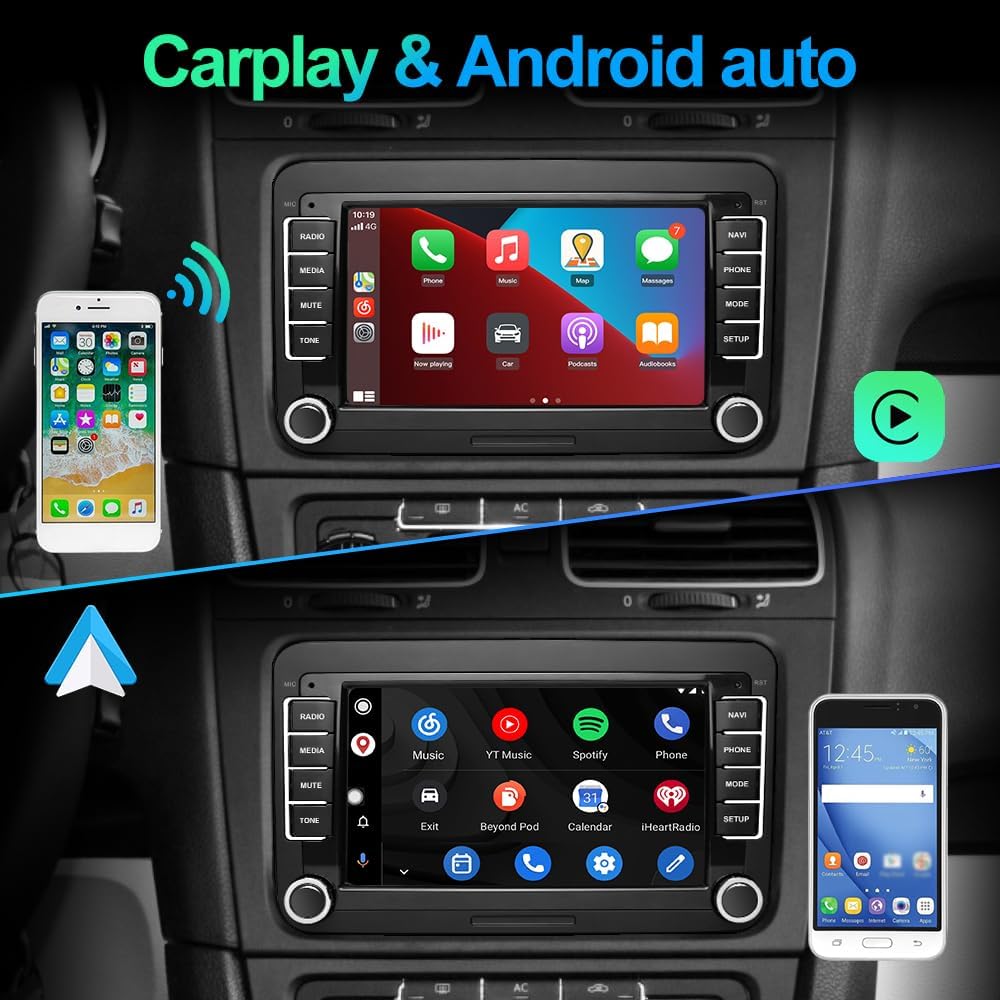
Connect your smartphone wirelessly via Bluetooth and Wi-Fi to activate CarPlay or Android Auto. This allows seamless integration of your phone's apps, navigation, and media.
Image: CarPlay and Android Auto interfaces on the car radio.
Fonction Mirrorlink
The Mirrorlink feature allows you to mirror your iOS or Android smartphone screen directly onto the car radio display.
Image: Mirrorlink functionality via USB or Wi-Fi.
Commandes au volant (SWC)
The unit is compatible with your vehicle's original steering wheel buttons. Refer to the system settings for programming and customizing SWC functions.
Image : Interface d'apprentissage des commandes au volant.
Navigation GPS
Utilize the integrated GPS for accurate navigation. The system supports various mapping applications.
Connectivité Bluetooth
Associez votre smartphone via Bluetooth pour des appels mains libres et un streaming audio.
Paramètres DSP et EQ
Adjust the audio output using the Digital Sound Processor (DSP) and Equalizer (EQ) functions to customize your listening experience.
Entretien
Nettoyage de l'écran : Utilisez un chiffon doux non pelucheux pour nettoyer l'écran tactile. Évitez les nettoyants abrasifs.
Mises à jour logicielles : Periodically check for software updates through the system settings or the AWESAFE official website pour garantir des performances optimales et l'accès aux nouvelles fonctionnalités.
Soins généraux: Protégez l'appareil de la poussière et de l'humidité. Évitez de l'exposer à des températures extrêmes.
Dépannage
Problème
Cause possible
Solution
L'unité ne s'allume pas
Mauvaise connexion électrique, fusible grillé.
Vérifiez les câbles d'alimentation et les fusibles du véhicule. Assurez-vous d'une installation correcte.
Pas de son
Volume trop faible, source audio incorrecte, connexions des haut-parleurs desserrées.
Augmentez le volume, sélectionnez la source audio appropriée, vérifiez le câblage des haut-parleurs.
Le GPS ne fonctionne pas
Antenne GPS non connectée ou mal positionnée.
Assurez-vous que l'antenne GPS est correctement connectée et que le signal est dégagé. view du ciel.
Problèmes de connexion Bluetooth
Device not paired, Bluetooth off on phone or unit.
Vérifiez que le Bluetooth est activé sur les deux appareils et réappairez-les si nécessaire.
Caractéristiques
Fonctionnalité
Détail
Marque
IMPRESSIONNANT
Technologie de connectivité
Bluetooth, Wi-Fi
Type de contrôleur
Androïde
Appareils compatibles
Smartphone
Nombre total de ports HDMI
1
Mode de sortie audio
Stéréo
Configuration des canaux de son surround
5.1
Encodage vidéo
H.264, H.265/HEVC, MPEG-4, etc.
Couleur
Noir
Nombre de canaux
2
Taille de l'écran
7 pouces
Dimensions (environ)
21.5 cm (largeur) x 13 cm (hauteur)
Image: Dimensions and rear view of the car radio.
Garantie et assistance
For warranty information and technical support, please refer to the contact details provided in the product packaging or visit the official AWESAFE website.
Manuel d'utilisation du système d'infodivertissement automobile AWESAFE Manuel d'utilisation complet du système d'infodivertissement automobile AWESAFE, détaillant le fonctionnement de fonctionnalités telles que CarPlay, Android Auto, Bluetooth, la radio, la musique, la vidéo, les paramètres et le dépannage.
Autoradio XT SLD714 : guide d'installation, FAQ et assistance Guide complet pour l'autoradio XT SLD714 par AWESAFE, couvrant l'interface hôte, les connexions des accessoires, l'arrièreview FAQ sur la configuration de la caméra, le câble d'alimentation et le dépannage. Assistance à l'installation et politique de protection des clients incluses.
Manuel d'utilisation du système de navigation GPS AWESAFE Manuel d'utilisation complet des appareils de navigation GPS AWESAFE, couvrant la configuration, le fonctionnement, les fonctionnalités et le dépannage. Apprenez à utiliser votre GPS pour une navigation efficace et explorez ses fonctionnalités multimédia.