1. Introduction
This manual provides essential instructions for the proper setup, operation, and maintenance of your TODO Under Desk Treadmill Remote Control. This remote is designed as a replacement for the original remote control of the TODO Under Desk Treadmill, specifically compatible with Model AD-4000.
Please read this manual thoroughly before using the remote control to ensure safe and efficient operation.
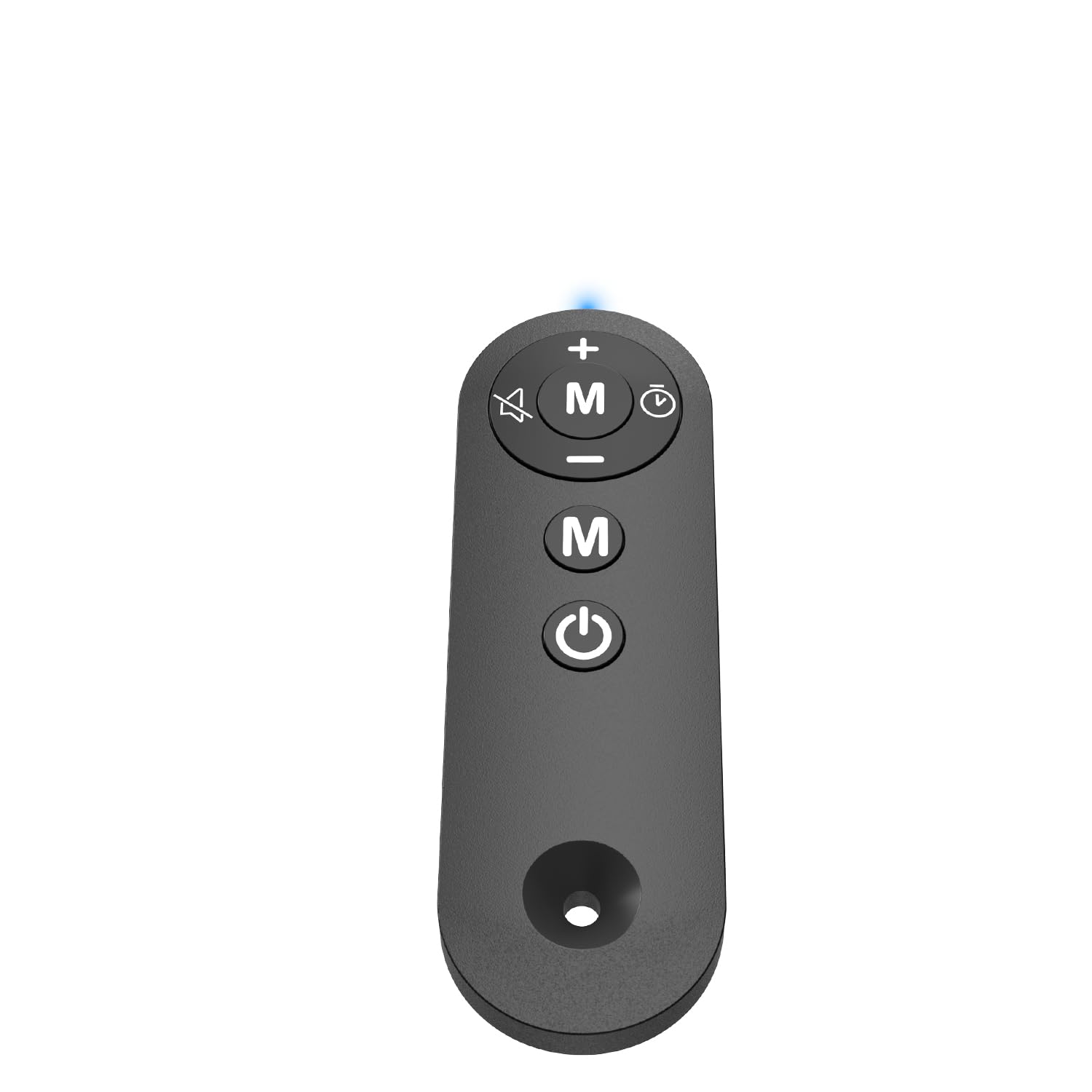
Figure 1: TODO Under Desk Treadmill Remote Control
2. Produit terminéview
The TODO Remote Control is a compact and portable device designed for convenient operation of your compatible under-desk treadmill. It features intuitive buttons for speed adjustment, mode selection, and power control.
2.1. Fonctionnalités de la télécommande
- Matériel: Acrylonitrile Butadiene Styrene (ABS) for durability.
- Connectivité : Infrared (IR) technology for reliable communication with the treadmill.
- Boutons sensibles : Responsive controls for precise adjustments.
- Conception portable : Léger et facile à manipuler.
Vidéo 1 : Terminéview of the Treadmill Remote Control. This video demonstrates the physical features and button layout of the remote control.
3. Installation
3.1. Installation de la batterie
La télécommande nécessite deux piles AAA (non fournies). Pour installer les piles :
- Localisez le couvercle du compartiment à piles à l'arrière de la télécommande.
- Faites glisser le couvercle pour l'ouvrir.
- Insérez deux piles AAA en respectant la polarité (+ et -).
- Fermez soigneusement le couvercle du compartiment à piles.
Video 2: Treadmill Remote Control Replacement. This video illustrates the process of opening the battery compartment and inserting batteries.
3.2. Utilisation initiale
Before first use, remove the insulating plastic sheet located on the side of the remote control. Once removed, the indicator light in front of the remote should illuminate with a blue light, confirming the remote is ready for use.
Video 3: Treadmill Remote Control Replacement. This video demonstrates the removal of the insulating plastic sheet and the remote's activation.
4. Mode d'emploi
Point the remote control directly at the treadmill's receiver for optimal performance. The remote allows you to control various functions of your TODO Under Desk Treadmill.
4.1. Fonctions des boutons
- Bouton d'alimentation (Marche/Arrêt) : Appuyez pour allumer ou éteindre le tapis roulant.
- Bouton « + » : Augmente la vitesse du tapis roulant.
- '-' Bouton: Diminue la vitesse du tapis roulant.
- Bouton « M » (Mode) : Cycles through different operating modes or programs on the treadmill.
Video 4: Walking Pad Remote Replacement. This video demonstrates the functionality of the remote control buttons with a compatible treadmill.
5. Spécifications
| Marque | FAIRE |
| Nom du modèle | TÉLÉCOMMANDE |
| Dimensions du produit | 1.97"P x 0.79"L x 0.28"H |
| Poids de l'article | 0.07 livres |
| Matériel | Acrylonitrile butadiène styrène (ABS) |
| Technologie de connectivité | Infrarouge |
| Source d'énergie | Fonctionne avec des piles (2 x AAA, non incluses) |
| Composants inclus | Télécommande |
6. Dépannage
6.1. La télécommande ne répond pas
- Vérifier la batterie : Vérifiez que les piles sont correctement installées et suffisamment chargées. Remplacez-les si nécessaire.
- Remove Insulating Strip: Verify that the plastic insulating strip has been completely removed from the battery compartment.
- Ligne de mire: Ensure there is a clear line of sight between the remote control and the treadmill's receiver. Obstructions can block the infrared signal.
- Compatibilité: Confirm that your treadmill is a TODO brand, specifically Model AD-4000. This remote is designed for this specific model.
6.2. Indicator Light Not On
- Vérifiez l'installation et la charge de la batterie.
- Ensure the insulating plastic sheet is removed.
7. Entretien
Pour assurer la longévité et le bon fonctionnement de votre télécommande :
- Gardez la télécommande propre et sèche. Essuyez-la avec un chiffon doux et sec.amp chiffon si nécessaire.
- Évitez de faire tomber la télécommande ou de la soumettre à des chocs violents.
- Conserver dans un endroit frais et sec, à l'abri de la lumière directe du soleil et des températures extrêmes.
- Si la télécommande n'est pas utilisée pendant une période prolongée, retirez les piles pour éviter les fuites.
8. Garantie et assistance
For warranty information or technical support, please refer to the documentation provided with your TODO Under Desk Treadmill or contact TODO customer service directly. Contact information can typically be found on the manufacturer's websur le site ou sur l'emballage d'origine du produit.

Figure 2: TODO Brand Logo