مقدمه
This user manual provides comprehensive instructions for the Camiysn K1 RGB LED Backlit Gaming Keyboard and Mouse Combo. Please read this manual carefully before using the product to ensure proper setup, operation, and maintenance. This combo is designed for use with personal computers and laptops, offering a full-size keyboard with RGB backlighting and a high-resolution gaming mouse.
محصول تمام شده استview
ویژگی های صفحه کلید:
- چیدمان در اندازه کامل: 104 keys with standard layout, including F-keys and a number pad.
- طراحی ارگونومیک: Scientific high and low keycap layout for natural hand fit and reduced fatigue.
- نور پس زمینه LED RGB: Features 8 light colors, 5 light modes, and adjustable brightness/speed. Double-shot injection moulding ensures durable, fade-resistant key legends with good light transmission.
- کلیدهای شناور: Removable keycaps for easy cleaning and comfortable typing.
- ثبات: Non-slip pads on the bottom prevent movement during use.
ویژگی های ماوس:
- DPI قابل تنظیم: 6 levels of speed (600/800/1200/1600/2400/3200 DPI) for various scenarios.
- 7-Color Breathing LED: Dynamic LED backlighting with a color-lock function (press side button + middle button).
- انتقال سریع: Ensures fast and accurate movement.
ویژگی های عمومی:
- اتصال سیمی: USB 2.0 cable with gold-plated interface and anti-interference magnet ring for stable data transmission.
- ماندگاری: Constructed with ABS engineering plastic to resist wear and tear.
- سازگاری گسترده: Supports Windows XP/Vista/Win7/Win8/Win10, MAC, and Linux operating systems.

Image: The Camiysn K1 keyboard featuring a clear housing design, highlighting the internal RGB LED backlighting.
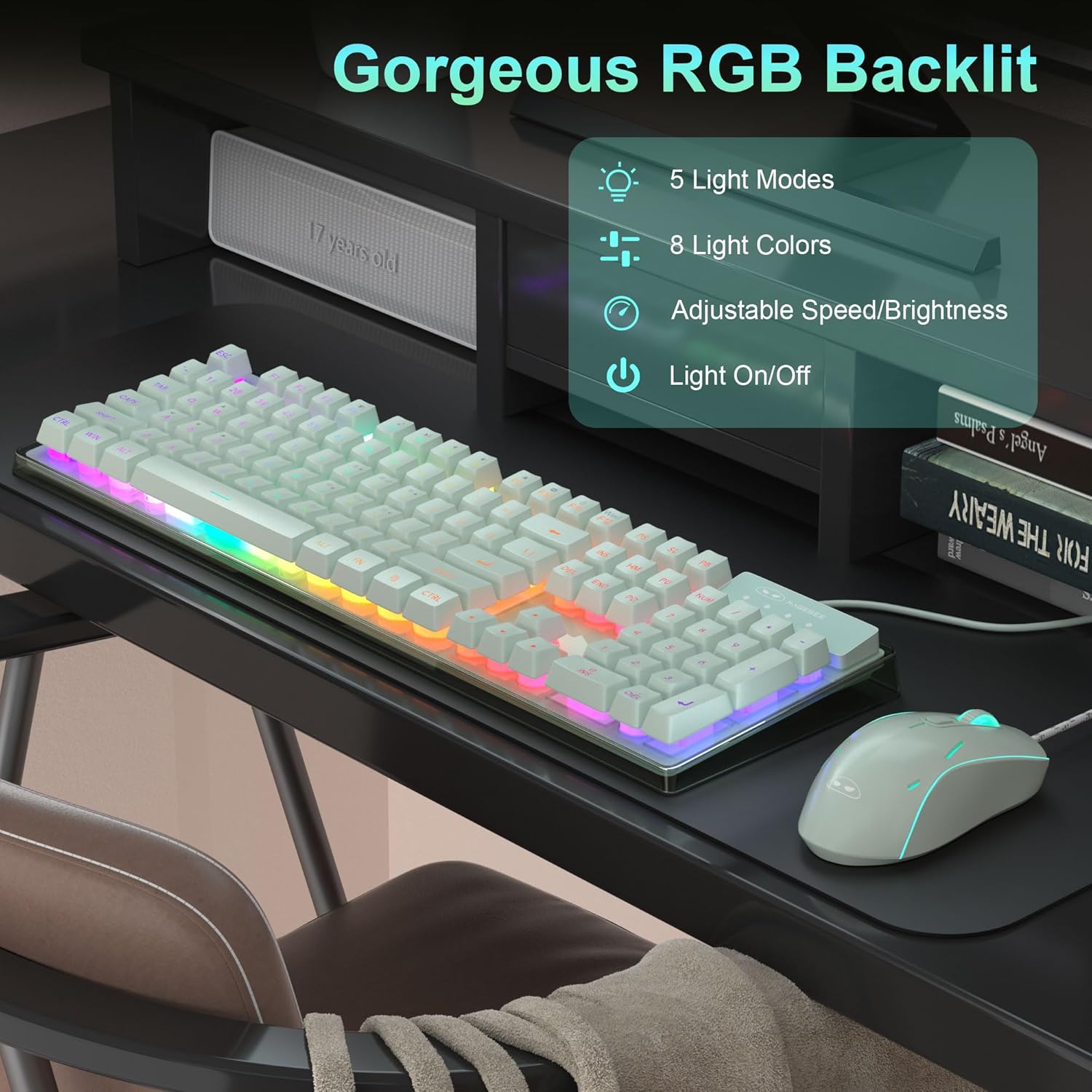
Image: The Camiysn K1 keyboard and mouse combo displayed on a desk, showcasing the vibrant RGB backlighting effects.

Image: A diagram illustrating the multimedia functions accessible via the FN key combinations on the Camiysn K1 keyboard.

Image: The Camiysn K1 gaming mouse, demonstrating its 7-color cycled breathing LED lighting in various hues.
دستورالعمل های راه اندازی
- باز کردن بستهی کمبو: کیبورد و ماوس را با دقت از بستهبندی خود خارج کنید.
- اتصال کیبورد: Locate an available USB port on your computer or laptop. Plug the USB connector of the keyboard into the USB port.
- ماوس را وصل کنید: Locate another available USB port on your computer or laptop. Plug the USB connector of the mouse into the USB port.
- نصب خودکار: The operating system will automatically detect and install the necessary drivers. No additional software or drivers are required.
- بررسی عملکرد: پس از نصب، صفحه کلید را با تایپ کردن و ماوس را با حرکت دادن مکان نما و کلیک کردن آزمایش کنید.
The Camiysn K1 combo is designed for plug-and-play functionality, making setup quick and straightforward.
دستورالعمل های عملیاتی
عملکرد صفحه کلید:
- کنترل نور پس زمینه RGB:
- تغییر حالت های نور: Use specific key combinations (refer to keyboard markings or product details for exact keys, typically FN + a function key like INS, HOME, PGUP, PGDN, DEL, END) to cycle through 5 different lighting modes.
- تغییر رنگ نور: Cycle through 8 available light colors.
- تنظیم روشنایی: Increase or decrease the backlight brightness.
- تنظیم سرعت: سرعت جلوههای نورپردازی پویا را تغییر دهید.
- روشن/خاموش کردن چراغ: The backlight can be completely turned off if desired.
- توابع چند رسانه ای: The keyboard includes dedicated multimedia keys or FN key combinations for quick access to functions such as:
- افزایش/کاهش صدا/بیصدا کردن صدا
- پخش/مکث، آهنگ قبلی/بعدی
- Web Browser, Email, Calculator
- Win Lock (disables Windows key during gaming)
Refer to the keyboard's keycap legends for specific FN key combinations (e.g., FN+F1 for Mute, FN+F12 for Win Lock).
عملکرد ماوس:
- تنظیم DPI: Use the DPI button (usually located below the scroll wheel) to cycle through the 6 available DPI settings (600/800/1200/1600/2400/3200). Each setting typically corresponds to a different LED color flash for easy identification.
- کنترل نور پس زمینه LED: The mouse features a 7-color breathing LED backlight. To lock the current color, press the side button (forward or back button) and the middle button (scroll wheel click) simultaneously.
تعمیر و نگهداری
- تمیز کردن صفحه کلید:
- کیبورد را از کامپیوتر خود جدا کنید.
- برای پاک کردن سطح کیبورد از یک پارچه نرم و خشک استفاده کنید.
- برای گرد و غبار و خرده ریزهای بین کلیدها، از هوای فشرده استفاده کنید.
- Keycaps are removable for deeper cleaning if necessary. Use a keycap puller (not included) to gently remove them.
- تمیز کردن ماوس:
- ماوس را از رایانه خود جدا کنید.
- سطح را با یک پارچه نرم و کمی زبر پاک کنیدamp پارچه. از رطوبت بیش از حد خودداری کنید.
- Clean the optical sensor area on the bottom of the mouse with a cotton swab if tracking issues occur.
- ذخیره سازی: Store the keyboard and mouse in a dry, cool place away from direct sunlight and extreme temperatures.
- اجتناب از مایعات: While the keyboard cable is waterproof, avoid spilling liquids directly onto the keyboard or mouse to prevent damage to internal components.
عیب یابی
| مشکل | علت احتمالی | راه حل |
|---|---|---|
| صفحه کلید/ماوس پاسخ نمیدهد | اتصال USB شل، پورت USB معیوب، مشکل درایور. |
|
| نور پس زمینه کیبورد کار نمی کند | Backlight turned off, brightness set to minimum, software glitch. |
|
| Mouse tracking is erratic or not smooth | حسگر نوری کثیف، سطح نامناسب پد ماوس، تنظیم نادرست DPI. |
|
| Mouse LED color not changing or stuck | Color lock activated. |
|
مشخصات
| ویژگی | جزئیات |
|---|---|
| نام تجاری | Camiysn |
| مدل | K1 |
| کلیدهای صفحه کلید | ۱۰۴ کلید (اندازه کامل) |
| نور پس زمینه صفحه کلید | RGB LED (8 colors, 5 modes) |
| سطوح DPI ماوس | 600/800/1200/1600/2400/3200 |
| نور پس زمینه ماوس | الایدی هفت رنگ با قابلیت تنفس |
| قابلیت اتصال | USB 2.0 سیمی |
| دستگاه های سازگار | PC, Laptop, Gaming Console, Tablet |
| سیستم عامل ها | Windows XP/Vista/7/8/10, MAC, Linux |
| مواد | پلاستیک مهندسی ABS |
| Item Weight (Mouse) | 3.53 اونس |
| ابعاد بسته بندی | 5.12 x 3.15 x 3.15 اینچ |

Image: Diagram showing the physical dimensions of the Camiysn K1 keyboard and mouse.
گارانتی و پشتیبانی
For warranty information and customer support, please refer to the documentation included with your purchase or visit the official Camiysn store page on Amazon. The manufacturer strives to provide a good purchase experience and prompt after-sales support.
فروشگاه آنلاین: Camiysn Store on Amazon
Protection plans may be available for purchase separately to extend coverage beyond the standard warranty period. Please check the product listing for details on available protection plans.


