مقدمه
This manual provides essential information for the safe and efficient operation of your VEVOR 130W CO2 Laser Engraver. Please read all instructions carefully before setup, operation, and maintenance to ensure proper use and to prevent damage or injury. This machine is designed for engraving and cutting various non-metal materials such as wood, acrylic, and glass, and also for engraving coated metals.
دستورالعمل های ایمنی
Operating a laser engraver requires adherence to strict safety protocols. Failure to follow these instructions can result in serious injury or equipment damage.
- محافظت از چشم: Always wear appropriate laser safety glasses when the machine is in operation. The laser beam is invisible and can cause permanent eye damage.
- تهویه: Ensure adequate ventilation to remove smoke and fumes generated during engraving and cutting. Use the built-in air-assist system and an external exhaust system.
- سازگاری مواد: Only engrave or cut materials specified as safe for CO2 lasers. Avoid materials that produce toxic fumes or are highly flammable. Do not engrave or cut PVC, vinyl, or materials containing chlorine.
- ایمنی آتش نشانی: Keep a fire extinguisher nearby. Never leave the machine unattended during operation. Flammable materials can ignite.
- ایمنی برق: مطمئن شوید که دستگاه به درستی به زمین متصل شده است. با دستهای خیس یا در حالت خیس کار نکنید.amp شرایط. قبل از انجام هرگونه تعمیر و نگهداری یا تنظیمات، برق را قطع کنید.
- توقف اضطراری: با محل و نحوه عملکرد دکمه توقف اضطراری آشنا شوید.
- Enclosure Safety: The machine features an auto power-off function when the lid is open. Do not bypass this safety mechanism.
محصول تمام شده استview
The VEVOR 130W CO2 Laser Engraver is a high-performance machine designed for precision engraving and cutting. Key features include a 130W CO2 laser tube, a large 55 x 35 inch work area, autofocus capability, and a 2-way pass-through design for processing larger materials.
اجزای اصلی:
- سر لیزری: Delivers the laser beam to the material. Equipped with autofocus.
- Work Beds: Includes both a honeycomb bed (for general cutting and engraving) and an aluminum blade bed (suitable for hard material cutting).
- کنترل پنل: For machine operation, settings adjustment, and job management.
- لوله لیزر: 130W CO2 laser tube with an expected lifespan of 8,000+ hours.
- Water Chiller System: Essential for cooling the laser tube during operation to maintain performance and extend lifespan.
- سیستم کمک هوایی: Clears smoke and debris from the cutting path, improving cut quality and reducing flare-ups.
- سیستم اگزوز: Removes fumes and smoke from the work area.
- دکمه توقف اضطراری: Immediately halts all machine operations.
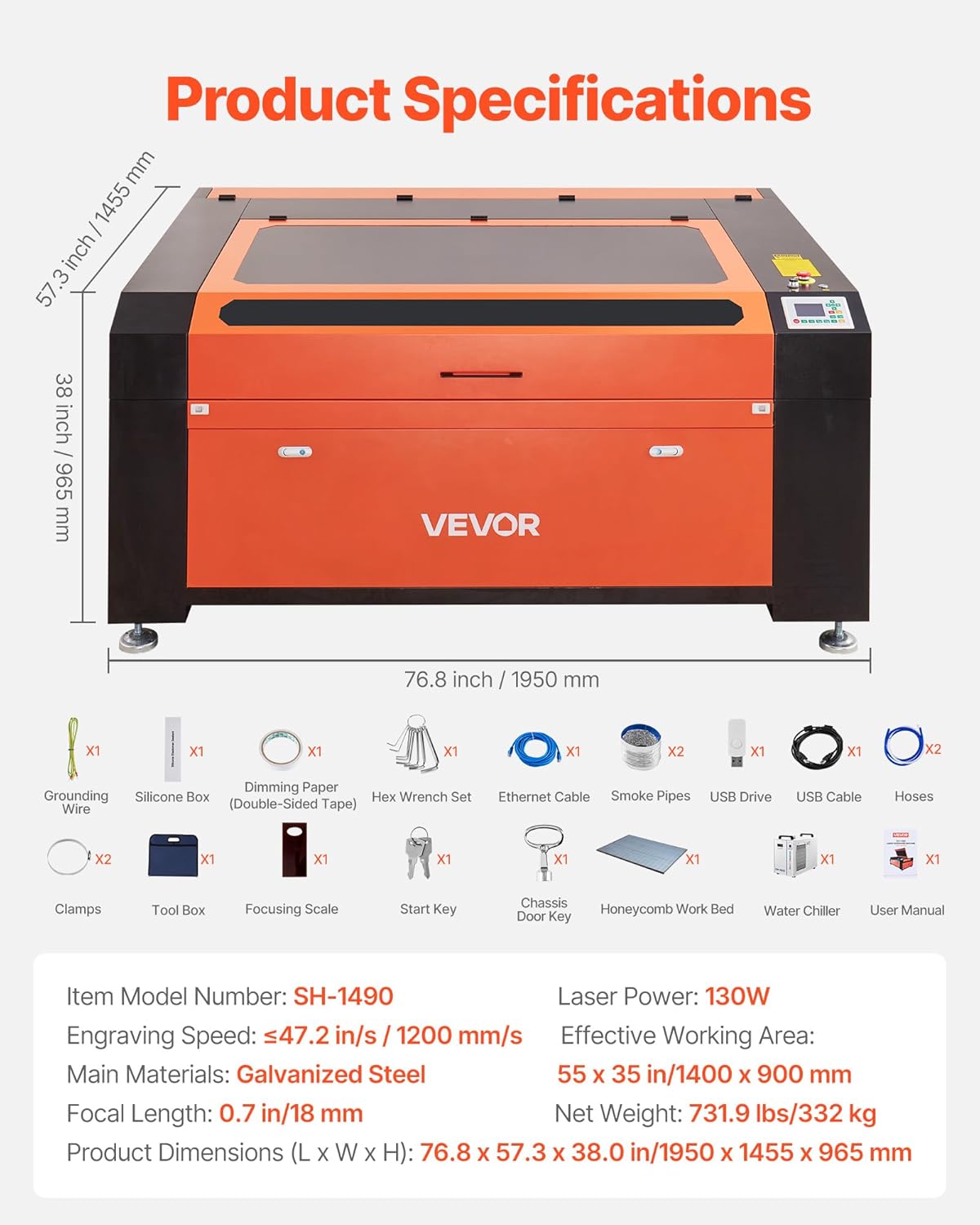
تصویر: تمام شدview of the VEVOR 130W CO2 Laser Engraver, showing its main dimensions and included accessories.
راه اندازی
Before operating the laser engraver, ensure it is properly set up and all connections are secure.
- باز کردن و قرار دادن: Carefully unpack the machine. Place it on a stable, level surface capable of supporting its weight (736 lbs / 332 kg). Ensure sufficient space around the machine for ventilation and access.
- اتصال برق: Connect the machine to a grounded power outlet. Verify the voltage با الزامات دستگاه مطابقت دارد.
- Water Chiller Setup: Connect the water chiller to the laser tube according to the chiller's instructions. Fill the chiller with distilled water or recommended coolant. Ensure the chiller is operating correctly to provide continuous cooling to the laser tube.
- Air Assist and Exhaust System: Connect the air assist pump to the laser head and the exhaust fan/system to the machine's exhaust port. Ensure proper ducting to vent fumes safely outdoors or to a filtration system.
- نصب نرم افزار: Install the necessary software (e.g., LightBurn, RDWorks) on your computer. The machine is compatible with Windows, macOS, and Linux systems.
- اتصال به کامپیوتر: Connect the laser engraver to your computer via USB or Ethernet cable.
- روشن کردن اولیه: Power on the water chiller first, then the laser engraver. Observe for any unusual noises or error messages.
دستورالعمل های عملیاتی
Follow these steps for safe and effective engraving and cutting operations.
- محل قرارگیری مواد: Place your material on the appropriate work bed (honeycomb for general use, blade for hard materials). Ensure the material is flat and secure.
- فوکوس خودکار: Utilize the autofocus function. Input the material thickness via the control panel or software, and the laser head will automatically adjust to the optimal focal length (0.7 in / 18 mm). This ensures precise engraving and cutting.
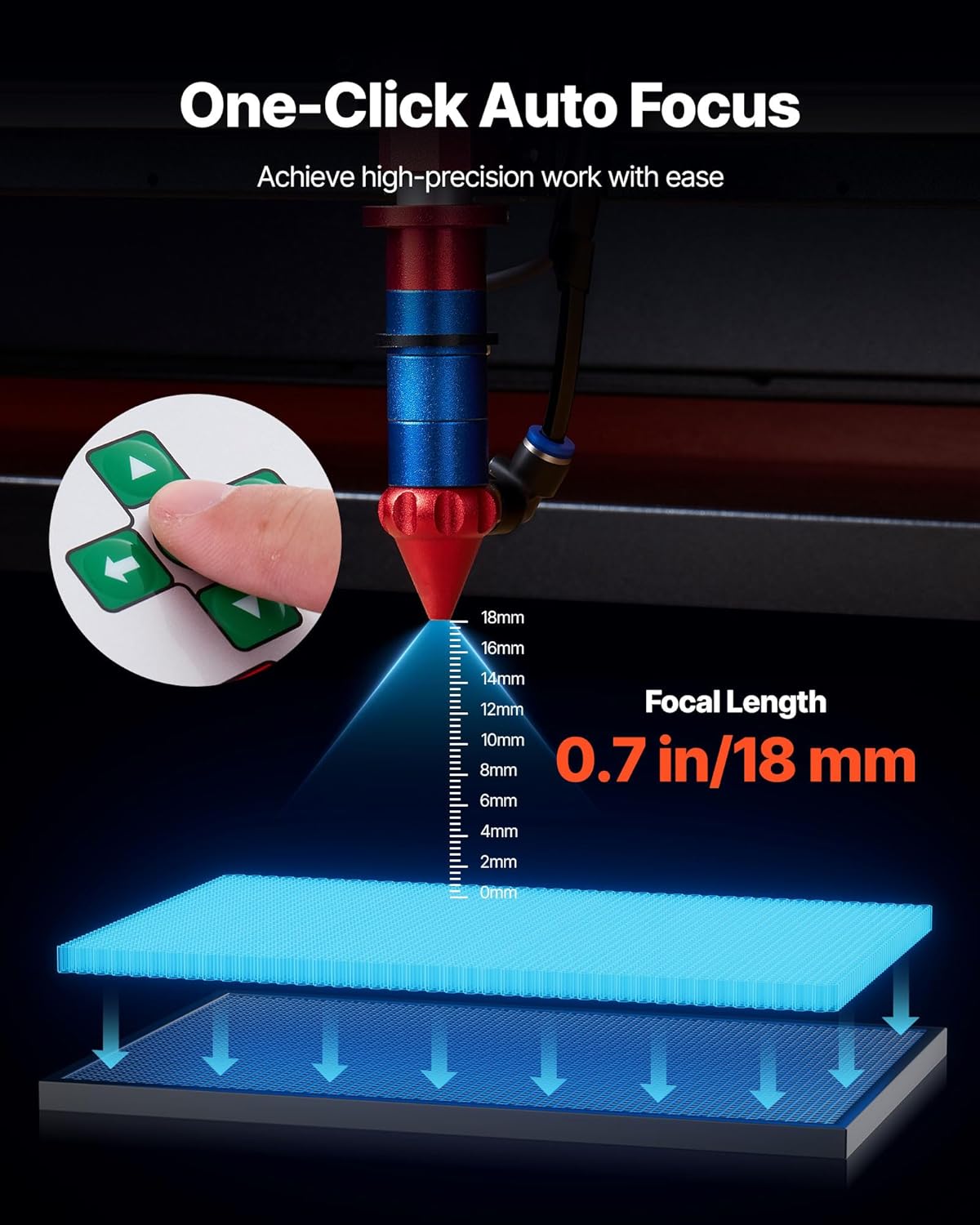
Image: The autofocus system automatically adjusts the laser head to the correct focal length for precise work.
- آماده سازی طرح: Create or import your design in the compatible software (LightBurn, RDWorks, CorelDraw, AutoCAD, Photoshop). Set appropriate power and speed settings for your material. Recommended maximum cutting thickness is 0.4 in / 10 mm.
- Job Transfer: Transfer your design to the laser engraver via USB, Ethernet, or USB drive.
- قبلview and Positioning: Use the control panel to preview the job area and ensure correct material positioning.
- شروع عملیات: Close the lid, ensure all safety measures are in place, and press the start button on the control panel or software. Monitor the process closely.
- Two-Way Pass-Through: For materials longer than the work area, utilize the front and rear pass-through doors. Manually feed the material through the machine as needed, ensuring continuous alignment.

Image: The 2-way pass-through design allows for processing oversized materials by feeding them through the machine.
- تکمیل: پس از اتمام کار، قبل از باز کردن درب و خارج کردن مواد، صبر کنید تا سیستم اگزوز هرگونه دود باقی مانده را پاک کند.
تعمیر و نگهداری
Regular maintenance is crucial for the longevity and optimal performance of your laser engraver.
- اپتیک تمیز: Regularly clean the laser lens and mirrors with specialized optical cleaning solutions and wipes. Dust and debris can degrade laser performance.
- Work Bed Cleaning: Clean the honeycomb and blade beds frequently to remove debris and residue, which can affect material flatness and cut quality.
- تعمیر و نگهداری چیلر آبی: Check the water level in the chiller regularly and refill with distilled water or coolant as needed. Periodically flush and replace the coolant to prevent algae growth and maintain cooling efficiency.
- سیستم اگزوز: Inspect and clean the exhaust fan and ducts to ensure proper airflow and efficient fume extraction.
- روغن کاری: Lubricate the guide rails and moving parts of the laser head assembly as recommended by the manufacturer to ensure smooth operation.
- Laser Tube Inspection: Periodically inspect the laser tube for any signs of damage or degradation. A well-maintained tube can last 8,000+ hours.

تصویر: جزئیات view of the long-lasting CO2 laser tube, designed for high-intensity workloads.
عیب یابی
این بخش به مشکلات رایجی که ممکن است در حین کار با آنها مواجه شوید، میپردازد.
| مشکل | علت احتمالی | راه حل |
|---|---|---|
| لیزر روشن نمیشود یا خروجی ضعیفی دارد |
|
|
| Poor cut quality or uneven engraving |
|
|
| دستگاه به کامپیوتر وصل نمیشه |
|
|
| Excessive smoke or fumes |
|
|
مشخصات
Technical specifications for the VEVOR 130W CO2 Laser Engraver.
| ویژگی | جزئیات |
|---|---|
| شماره مدل | 130W- Autofocus- 2 Way Pass Through |
| قدرت لیزر | 130W CO2 Laser |
| منطقه کاری موثر | 55 x 35 اینچ (1400 x 900 میلیمتر) |
| سرعت حکاکی | Up to 1200 mm/s (47.2 in/s) |
| فاصله کانونی | 0.7 اینچ (18 میلی متر) |
| Recommended Max Cutting Thickness | 0.4 inches (10 mm) for most materials |
| Laser Tube Lifespan | 8,000+ ساعت |
| فوکوس خودکار | بله |
| Pass-Through Design | 2-Way (front and rear) |
| Work Beds Included | Honeycomb bed, Aluminum blade bed |
| مواد اصلی | فولاد گالوانیزه |
| ابعاد محصول (L x W x H) | 76.8 x 57.3 x 38.0 اینچ (1950 x 1455 x 965 میلیمتر) |
| وزن خالص | 736 پوند (332 کیلوگرم) |
| سازگاری | LightBurn, RDWorks, CorelDraw, AutoCAD, Photoshop |
| سیستم عامل ها | ویندوز، macOS، لینوکس |
گارانتی و پشتیبانی
برای اطلاعات گارانتی و پشتیبانی فنی، لطفاً به وبسایت رسمی VEVOR مراجعه کنید. website or contact VEVOR customer service directly. Keep your purchase receipt and model number handy for faster service.
پشتیبانی آنلاین: بازدید کنید www.vevor.com برای سوالات متداول، راهنماهای عیبیابی و اطلاعات تماس.
خدمات مشتری: Contact details are typically provided in the packaging or on the official product page.


