1. مقدمه
Thank you for choosing the GOBOULT Z40 V2.0 True Wireless Earbuds. These earbuds are designed to provide a high-quality audio experience with features such as extended playtime, clear call quality, and low-latency gaming. This manual provides instructions for setup, operation, maintenance, and troubleshooting to ensure optimal use of your device.

Image 1.1: GOBOULT Z40 V2.0 True Wireless Earbuds and Charging Case.
2. محصول تمام شدview
۲.۲ اجزای موجود
بسته شامل موارد زیر است:
- GOBOULT Z40 V2.0 Earbuds
- کیس شارژ
- کابل شارژ USB
- سرگوشی (اندازههای مختلف)
- راهنمای کاربر
- کارت گارانتی
2.2 ویژگی های کلیدی
- تا 70 ساعت کل زمان پخش
- Quad Mic Environmental Noise Cancellation (ENC) for clear calls
- 13mm Bass Drivers for enhanced audio
- 45ms Low Latency Gaming Mode
- Bluetooth v5.4 for stable connectivity
- IPX5 مقاومت در برابر آب
- Smart Touch Controls with Voice Assistant support
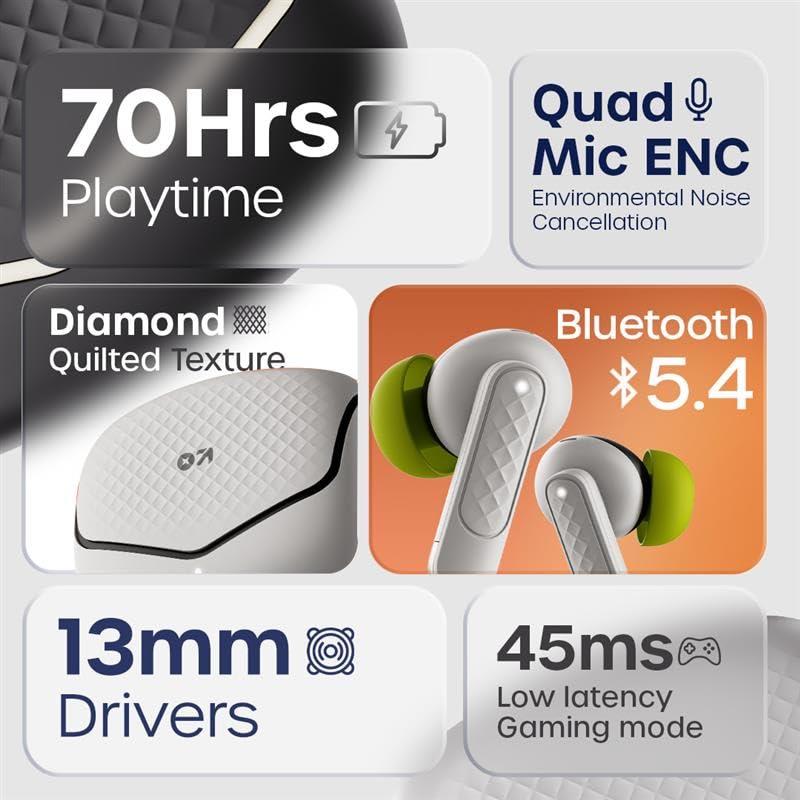
تصویر 2.1: تمام شدview of GOBOULT Z40 V2.0 key features.
۱. دستورالعملهای راهاندازی
۴.۱ شارژ کردن ایربادها و قاب آنها
قبل از اولین استفاده، ایربادها و محفظه شارژ را کاملاً شارژ کنید.
- هدفون ها را داخل جعبه شارژ قرار دهید.
- کابل شارژ USB را به پورت شارژ روی کیس و به منبع تغذیه وصل کنید.
- چراغ نشانگر روی کیس، وضعیت شارژ را نشان میدهد.
- A 10-minute charge provides approximately 120 minutes of playtime. The case offers up to 70 hours of total battery life for the earbuds.

Image 3.1: Charging and battery life details.
3.2 جفت شدن بلوتوث
The GOBOULT Z40 V2.0 earbuds utilize Bluetooth v5.4 for quick and reliable pairing.
- Open the charging case. The earbuds will automatically enter pairing mode (Blink&Pair™ Tech).
- در دستگاه خود (گوشی هوشمند، تبلت، لپتاپ)، بلوتوث را فعال کنید.
- جستجو برای available Bluetooth devices and select "GOBOULT Z40 V2.0" from the list.
- پس از اتصال، ایربادها جفتسازی موفقیتآمیز را نشان میدهند.
- وقتی ایربادها از قاب خارج شوند، بهطور خودکار به آخرین دستگاه جفتشده متصل میشوند.

Image 3.2: Bluetooth 5.4 and Blink&Pair™ technology.
4. دستورالعمل های عملیاتی
4.1 کنترل ها را لمس کنید
The earbuds feature intuitive touch controls for managing various functions:
- پخش/مکث: یک ضربه روی هر یک از هدفون ها.
- آهنگ بعدی: روی ایرباد سمت راست دو بار ضربه بزنید.
- آهنگ قبلی: روی ایرباد سمت چپ دو بار ضربه بزنید.
- پاسخ/پایان تماس: یک ضربه روی هر یک از هدفون ها.
- رد تماس: یکی از هدفون ها را به مدت 2 ثانیه فشار داده و نگه دارید.
- دستیار صوتی را فعال کنید: سه بار روی هر یک از ایربادها ضربه بزنید.
- Toggle Gaming Mode: Press and hold the right earbud for 2 seconds (specific gesture may vary, refer to quick start guide).

Image 4.1: Hands-free control and voice assistant activation.
4.2 برقراری و دریافت تماس
The Quad Mic ENC system ensures clear voice transmission during calls by reducing environmental noise.
- مطمئن شوید که هدفونهای توگوشی به دستگاه شما متصل هستند.
- از کنترلهای لمسی برای پاسخ دادن، پایان دادن یا رد تماسها استفاده کنید.

Image 4.2: Quad Mic ENC for clear calls.
۳.۳ حالت بازی
Activate Combat™ Gaming Mode for a low-latency audio experience, ideal for gaming and video playback.
- Refer to the touch control section for activating Gaming Mode (typically a press and hold gesture).
- This mode reduces audio latency to 45ms, providing synchronized sound with on-screen action.

Image 4.3: Low Latency Gaming Mode.
5. تعمیر و نگهداری
5.1 تمیز کردن
تمیز کردن منظم به حفظ عملکرد و طول عمر ایربادهای شما کمک میکند.
- برای پاک کردن ایربادها و محفظه شارژ، از یک پارچه نرم، خشک و بدون پرز استفاده کنید.
- Gently remove any earwax or debris from the eartips and speaker mesh using a small brush or cotton swab.
- از استفاده از مواد ساینده، الکل یا پاککنندههای شیمیایی خودداری کنید.
۵.۳ مقاومت در برابر آب (IPX5)
The earbuds are rated IPX5 water-resistant, meaning they can withstand sweat and light splashes.
- هدفونهای داخل گوشی را در آب فرو نکنید.
- Avoid exposing them to heavy rain or strong water jets.
- قبل از قرار دادن مجدد ایربادها در محفظه شارژ، مطمئن شوید که خشک هستند تا از آسیب دیدن آنها جلوگیری شود.
Image 5.1: IPX5 Water Resistance.
6 عیب یابی
If you encounter any issues with your GOBOULT Z40 V2.0 earbuds, please refer to the following common solutions:
- بدون صدا: مطمئن شوید که ایربادها شارژ شده و به درستی با دستگاه شما جفت شدهاند. میزان صدا را هم در ایربادها و هم در دستگاه خود بررسی کنید.
- مشکلات جفت شدن: Make sure Bluetooth is enabled on your device and the earbuds are in pairing mode. Try unpairing and re-pairing the earbuds.
- اتصال متناوب: مطمئن شوید که در محدوده بلوتوث 10 متری هستید. از موانع بین ایربادها و دستگاه خود دوری کنید.
- مشکلات شارژ: مطمئن شوید که کابل شارژ محکم وصل شده و منبع تغذیه فعال است. اتصالات شارژ را هم روی ایربادها و هم روی قاب تمیز کنید.
- میکروفون کار نمی کند: Ensure the earbuds are properly seated in your ears. Check if any debris is blocking the microphone ports.
If the problem persists, please contact GOBOULT customer support for further assistance.
7. مشخصات
Detailed technical specifications for the GOBOULT Z40 V2.0 True Wireless Earbuds:
| ویژگی | مشخصات |
|---|---|
| نام مدل | Z40 V2.0 (Airbass Earbuds) |
| فناوری اتصال | بی سیم (بلوتوث) |
| نسخه بلوتوث | 5.4 |
| محدوده بلوتوث | 10 متر |
| اندازه درایور صوتی | 13 میلی متر |
| نوع درایور صوتی | درایور پویا |
| پاسخ فرکانس | 20 هرتز |
| حساسیت | 115 دسی بل |
| عمر باتری (ایرباد) | تا ۴۲ ساعت (با جعبه شارژ) |
| زمان شارژ | 10 Minutes for 120 minutes playtime |
| میکروفون | میکروفون چهارگانه با ENC |
| تأخیر صوتی | ۶۰ میلیثانیه (حالت بازی) |
| مقاومت در برابر آب | IPX5 |
| نوع کنترلر | لمس کنید |
| رابط سخت افزار | USB نوع C |
| قرار دادن گوش | در گوش |
| ابعاد محصول | 5.8 × 4 × 4.9 سانتی متر |
| وزن مورد | ۷۵۰ گرم (وزن کل بستهبندی) |

Image 7.1: 13mm Bass Drivers for enhanced audio.
8. گارانتی و پشتیبانی
۷.۱ ضمانت سازنده
The GOBOULT Z40 V2.0 True Wireless Earbuds come with a 1-year manufacturer’s warranty. This warranty covers manufacturing defects and ensures product quality and durability.
8.2 پشتیبانی مشتری
For any product-related queries, technical assistance, or warranty claims, please contact GOBOULT customer support. Refer to the warranty card included in your package for contact details or visit the official GOBOULT webسایت


