1. مقدمه
The Fender Mustang LTX100 is a 100-watt modeling combo amplifier designed for guitarists seeking versatile tone and performance. This ampویژگی های زنده تر 25 amp models, 25 studio-quality effects, and 100 preset slots for extensive sound customization. It is equipped with a 12-inch Celestion G12FSD-100 speaker, an integrated color display with a chromatic tuner, Bluetooth audio streaming, and USB-C connectivity for recording and app control. This manual provides essential information for the proper setup, operation, and maintenance of your Mustang LTX100 ampزنده تر

Figure 1.1: Fender Mustang LTX100 Ampتقویت کننده با لوازم جانبی موجود.
2. اطلاعات ایمنی
Please read and understand all safety instructions before operating your Fender Mustang LTX100 ampاین دفترچه راهنما را برای مراجعات بعدی نگه دارید.
- هشدار: To reduce the risk of fire or electric shock, do not expose this appliance to rain or moisture. Do not remove the cover. Refer servicing to qualified personnel only.
- احتیاط: برای جلوگیری از برق گرفتگی، از این دوشاخه (پلاریزه) با سیم کششی، پریز یا خروجی دیگر استفاده نکنید، مگر اینکه بتوان تیغه ها را به طور کامل وارد کرد تا از قرار گرفتن در معرض تیغه ها جلوگیری شود.
- هشدار: این محصول حاوی مواد شیمیایی شناخته شده در ایالت کالیفرنیا است که باعث سرطان و نقایص مادرزادی یا سایر آسیب های تولید مثل می شود.
- اطمینان حاصل کنید ampتقویت کننده به پریز برق دارای اتصال زمین متصل است.
- Do not block ventilation openings. Maintain adequate space around the ampلیفایر برای جریان هوای مناسب
- از قرار دادن آن خودداری کنید amplifier near heat sources such as radiators, heat registers, stoves, or other apparatus (including ampزنده کننده ها) که گرما تولید می کنند.
- سیم برق را از راه رفتن یا نیشگون گرفتن، به ویژه در دوشاخه ها، پریزهای راحتی و نقطه ای که از دستگاه خارج می شوند، محافظت کنید.
- در هنگام طوفان های رعد و برق یا زمانی که برای مدت طولانی از آن استفاده نمی کنید، این دستگاه را از برق بکشید.
3. راه اندازی
3.1 باز کردن بسته بندی و قرار دادن
با دقت حذف کنید amplifier and all accessories from the packaging. Inspect the unit for any signs of damage. Place the amplifier on a stable, level surface, ensuring adequate space for ventilation.
3.2 اتصال برق
- اطمینان حاصل کنید ampکلید برق دستگاه در وضعیت خاموش (OFF) باشد.
- Connect the provided power cord to the INPUT POWER receptacle on the rear panel of the ampزنده تر
- سر دیگر سیم برق را به یک پریز برق متناوب دارای اتصال زمین مناسب وصل کنید.
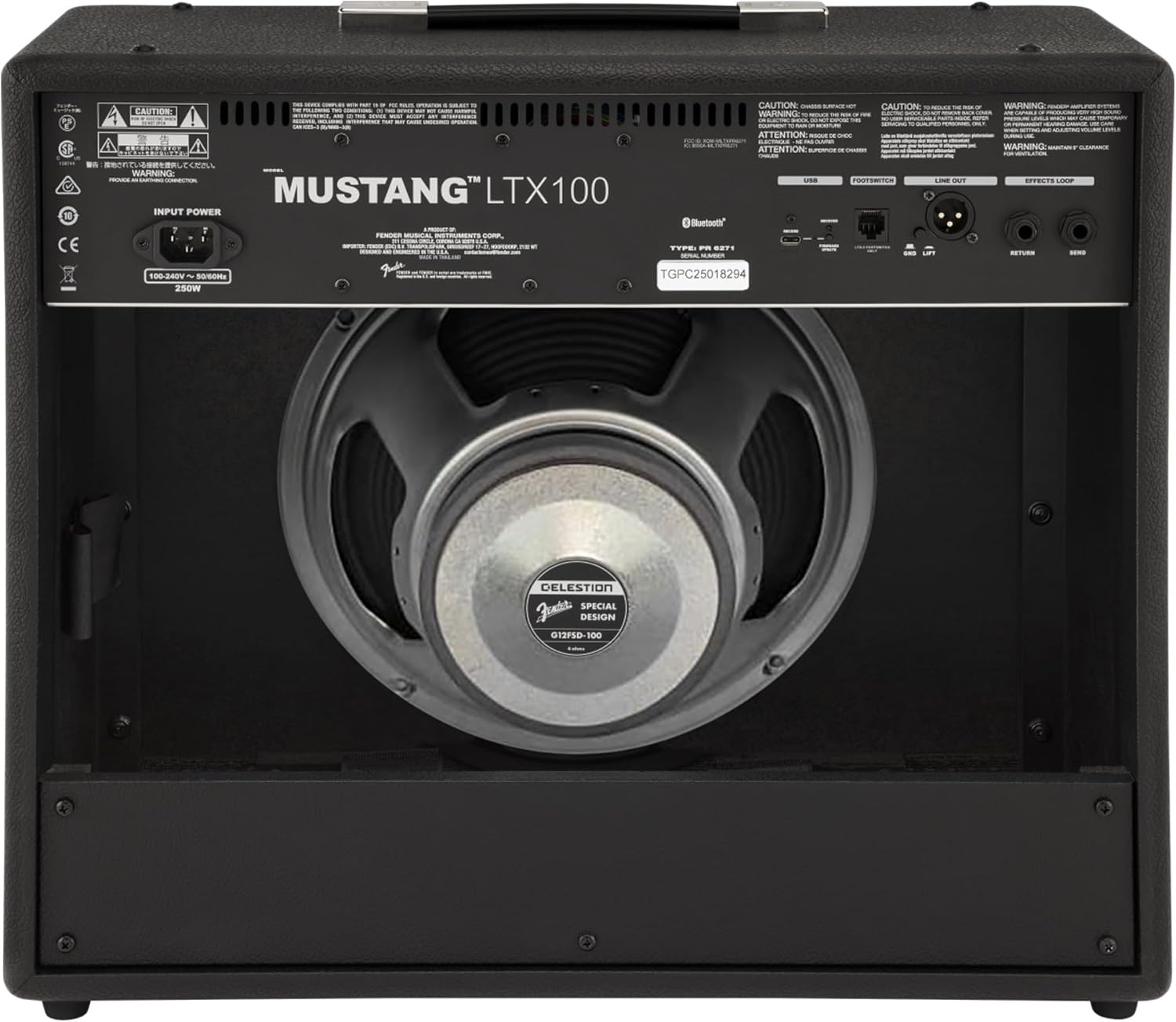
شکل ۲: اتصالات پنل پشتی
3.3 Instrument and Accessory Connections
- ورودی ابزار: Connect your guitar using a standard 1/4-inch instrument cable to the INPUT jack on the front panel.
- ورودی کمکی: For connecting external audio devices (e.g., MP3 player, phone), use a 3.5mm stereo cable to the AUX input on the front panel.
- خروجی هدفون: For silent practice, connect headphones to the HEADPHONE OUT jack on the rear panel.
- خروجی خط XLR: For connecting to a PA system or recording interface, use XLR cables to the LINE OUT jacks on the rear panel. A ground lift switch is provided to eliminate hum.
- حلقه جلوه ها: External effects pedals can be connected via the SEND and RETURN jacks on the rear panel.
- USB-C: Connect to a computer for recording, firmware updates, and Fender Tone 3.0 app control.
4. دستورالعمل های عملیاتی
۴.۱ کنترلهای پنل جلوییview

شکل ۱: کنترلهای پنل جلویی
- ورودی: جک ۱/۴ اینچی برای اتصال گیتار شما.
- AUX: ورودی استریو 3.5 میلیمتری برای دستگاههای صوتی خارجی
- کسب کردن: Controls the input level and amount of overdrive/distortion for the selected amp مدل
- جلد: Adjusts the output level of the selected amp مدل
- سه بعدی: پاسخ فرکانس بالا را تنظیم میکند.
- وسط: پاسخ فرکانس میانی را تنظیم میکند.
- باس: پاسخ فرکانس پایین را تنظیم میکند.
- استاد: حجم کلی خروجی را کنترل می کند ampزنده تر
- نمایش دادن: Color LCD screen for navigating menus, selecting amp models, effects, and viewing tuner.
- ENCODER KNOB: Used to scroll through menus and adjust parameters on the display. Press to select.
- بازگشت: به منو یا صفحه قبلی برمی گردد.
- ذخیره: Stores current settings as a preset.
- منو: Accesses the main menu for system settings, global parameters, and more.
- ضربه زدن: Used for setting delay and modulation effect tempos. Hold to activate the chromatic tuner.
- روشن/خاموش: کلید برق برای ampزنده تر
۴.۱ روشن کردن و عملیات اولیه
- Ensure all connections are secure and the MASTER volume is set to a low level.
- Press the ON/OFF switch to power on the amplifier. The display will illuminate.
- یک را انتخاب کنید amp model and effect using the encoder knob and display.
- Adjust the GAIN, VOLUME, TREBLE, MIDDLE, and BASS knobs to shape your desired tone.
- Gradually increase the MASTER volume to achieve the desired listening level.
4.3 با استفاده از Amp مدل ها و جلوه ها
The Mustang LTX100 offers 25 distinct amp models and 25 studio-quality effects. Use the encoder knob to browse through the available options on the display. Once an amp model or effect is selected, its parameters can be adjusted using the encoder knob or the dedicated tone knobs (Treble, Middle, Bass) if applicable.
4.4 ایستگاه از پیش تنظیم
را amplifier comes with 70 factory presets and allows for 100 user-defined presets. To save your custom settings:
- Dial in your desired amp model, effects, and tone settings.
- دکمه SAVE را فشار دهید.
- Use the encoder knob to select a user preset slot.
- Press the encoder knob to confirm and save your preset.
۴.۳ پخش صوتی بلوتوث
To stream audio from a mobile device:
- بلوتوث را در دستگاه تلفن همراه خود فعال کنید.
- در amplifier, navigate to the Bluetooth menu via the display.
- Select "Pair New Device" and choose "Mustang LTX100" from your device's Bluetooth list.
- Once paired, you can play audio through the ampزنده تر
4.6 Fender Tone 3.0 App
The Fender Tone 3.0 app (available for iOS and Android) provides wireless control over your amplifier. It allows you to edit, save, and share presets, as well as access additional features. Connect your amplifier to your mobile device via Bluetooth to use the app.
5. تعمیر و نگهداری
5.1 تمیز کردن
- همیشه اتصال را قطع کنید ampقبل از تمیز کردن، دستگاه را از پریز برق جدا کنید.
- از یک پارچه نرم و خشک برای تمیز کردن سطوح بیرونی استفاده کنید.
- از پاککنندههای ساینده، حلالها یا واکسها استفاده نکنید، زیرا میتوانند به روکش آسیب بزنند.
- Avoid spraying liquids directly onto the ampزنده تر
5.2 ذخیره سازی
- ذخیره کنید amplifier in a dry, cool environment, away from direct sunlight and extreme temperatures.
- If storing for an extended period, cover the ampیک لایه محافظ برای محافظت از آن در برابر گرد و غبار.
6 عیب یابی
| مشکل | علت احتمالی | راه حل |
|---|---|---|
| بدون قدرت | سیم برق وصل نیست؛ پریز برق فعال نیست؛ Ampخاموش کردن برق تقویت کننده | Check power cord connection; Test outlet with another device; Ensure power switch is ON |
| صدا نداره | Instrument cable faulty/disconnected; Guitar volume off; Amplifier volume/master low; Headphones connected | Check/replace instrument cable; Turn up guitar volume; Increase amplifier volume/master; Disconnect headphones |
| صدای مخدوش | Gain too high; Master volume too high; Faulty cable/instrument | Reduce GAIN; Reduce MASTER volume; Test with different cable/instrument |
| مشکلات اتصال بلوتوث | Device not in pairing mode; Amplifier not discoverable; Interference | Ensure device is in pairing mode; Re-initiate pairing on amplifier; Move closer to amplifier; Restart both devices |
7. مشخصات
| ویژگی | جزئیات |
|---|---|
| نام مدل | Mustang LTX100 |
| شماره مدل | 2311800000 |
| توان خروجی | 100 وات |
| بلندگو | 1 x 12″ Celestion G12FSD-100 |
| Amp مدل ها | 25 |
| جلوه ها | 25 (distortion, overdrive, compression, modulation, delay, reverb, octave, etc.) |
| تنظیمات از پیش تعیین شده | 70 factory presets + 100 user slots |
| نمایش | Color LCD with onboard chromatic tuner |
| قابلیت اتصال | Bluetooth audio, USB-C bidirectional audio |
| خروجی ها | XLR line out (with ground lift), headphone out |
| ورودی ها | 1/4″ instrument input, 3.5 mm aux input |
| پشتیبانی برنامه | Fender Tone 3.0 app (iOS/Android) |
| ساخت و ساز | ترکیبی amplifier, rugged build |
| وزن مورد | 26.4 پوند |
| ابعاد محصول | 22.3 x 19.9 x 12.3 اینچ |
| مواد | فلز |
| منبع تغذیه | سیم برقی |
8. گارانتی و پشتیبانی
For detailed warranty information, product registration, and technical support, please visit the official Fender website. You can also find FAQs, software updates, and additional resources there.
Official Fender Store: فروشگاه فندر در آمازون


