1. مقدمه
Thank you for choosing the Nuwave Smart Heated Coffee Mug. This innovative mug is designed to keep your beverages at your preferred temperature for extended periods, offering convenience and a consistent drinking experience. Please read this manual thoroughly before use to ensure proper operation and maintenance.

Image 1: Nuwave Smart Heated Coffee Mug on its charging base, with a separate tea filter.
2. محصول تمام شدview
The Nuwave Smart Heated Coffee Mug combines advanced technology with durable design to enhance your beverage enjoyment. Key features include:
- عمر باتری 5 ساعته: A powerful 5000mAh rechargeable battery maintains your beverage temperature for up to 5 hours at maximum setting (135°F), and longer at lower settings.
- کنترل دقیق دما: Set your ideal temperature from 70°F to 205°F when on the charging base, or 70°F to 150°F when off the base.
- Preset Brew Modes: Dedicated settings for Coffee, Green Tea, and Black Tea, automatically adjusting temperature and time for optimal brewing.
- LED Display with Touch Controls: Intuitive display on the mug shows real-time temperature, timers, and battery life.
- Double-Wall Vacuum Insulation: 18/10 stainless steel interior and insulated exterior keep drinks hot while ensuring a comfortable grip.
- Auto Shut-Off & Empty Detection: Smart sensors prevent overheating and preserve battery life by shutting off when the mug is empty.
- Integrated Tea/Coffee Filter: Allows for direct brewing of loose leaf tea or ground coffee within the mug.
ویدئو ۱: نمایش ویدئویی مقدماتیasing the Nuwave Smart Mug's features and design.
۲. چه چیزهایی در جعبه است؟
Your Nuwave Smart Heated Coffee Mug package includes the following components:
- 16oz Mug (14oz with lid on or when brewing)
- Tritan Plastic Lid
- Premium 18/10 Stainless Steel Filter & Filter Lid
- Fast USB-C Charging Base
- آداپتور برق جهانی
- کابل USB-C

Image 2: All components included in the Nuwave Smart Mug set, clearly labeled.
4. راه اندازی
4.1 شارژ اولیه
- Connect the USB-C cable to the charging base and the universal power adapter.
- آداپتور برق را به پریز برق وصل کنید.
- Place the Nuwave Smart Mug onto the charging base. The LED display on the mug will show a battery icon indicating charging status.
- Allow the mug to fully charge before first use (approximately 2-3 hours).

Image 3: The Nuwave Smart Mug resting on its sleek black charging base.
4.2 تمیز کردن اولیه
Before first use, hand-wash the mug body and base with warm, soapy water. The lid, filter, and filter lid are top-rack dishwasher safe. Ensure all parts are thoroughly dry before assembly.
5. دستورالعمل های عملیاتی
5.1 Powering On/Off & Basic Controls
- To power on, press and hold the Nuwave logo on the mug's display for 2 seconds. The display will show "HELLO".
- To power off, press and hold the Nuwave logo again for 2 seconds.
- Use the up/down arrows on the display to adjust the temperature.
- The mug will automatically detect when it's empty and shut off to prevent overheating and save battery.

Image 4: Visual guide for simple smart control of the mug.
5.2 Setting Temperature & Brew Modes
The charging base features touch-sensitive buttons for various modes:
- حالت گرم: Maintains 135°F.
- حالت داغ: Maintains 150°F.
- حالت قهوه: Maintains 200°F.
- Green Tea Mode: Maintains 175°F.
- Black Tea Mode: Maintains 205°F.
- حالت دم کردن: Customizable for specific brewing needs.
When the mug is on the charging base, simply tap the desired mode button. The mug's display will show the target temperature. You can fine-tune the temperature using the up/down arrows on the mug's display.
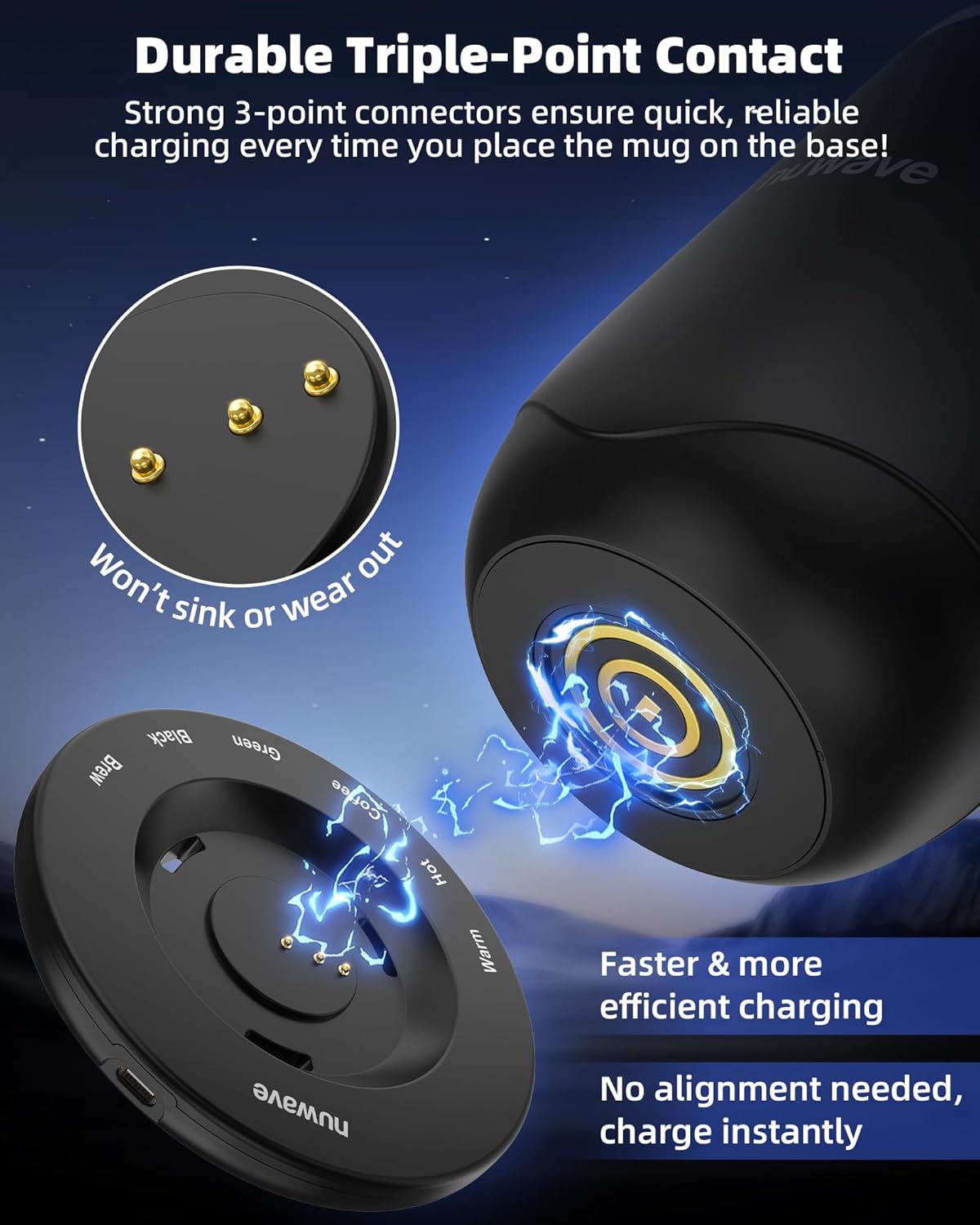
Image 5: The LED display and touch controls for various temperature and brew modes.
Video 2: A demonstration of the precise temperature control features of the Nuwave Smart Mug.
5.3 Brewing Coffee or Tea
To brew directly in the mug:
- Remove the mug lid and insert the stainless steel filter.
- Add your desired amount of coffee grounds or loose leaf tea into the filter.
- Slowly pour hot water over the grounds/tea, stirring gently to ensure even saturation and prevent overflow.
- Place the filter lid on top of the filter.
- Place the mug on the charging base and select the appropriate brew mode (Coffee, Green Tea, Black Tea, or Custom Brew). The mug will maintain the optimal temperature for brewing.
- Once brewing is complete, carefully remove the filter and discard the used grounds/leaves.

Image 6: The Nuwave Smart Mug demonstrating its direct brewing capability with a tea filter.

Image 7: Highlighting the use of a stainless steel filter for brewing without microplastics.
6. ویژگی های ایمنی
- Auto Shut-Off & Empty Detection: The mug's smart sensors detect when the liquid level is low or empty, automatically shutting off the heating element to prevent dry heating and conserve battery life.
- Double-Wall Vacuum Insulation: This design keeps the exterior of the mug cool to the touch, minimizing the risk of burns while handling hot beverages.
- Durable Triple-Point Contact: The charging base features a secure three-point contact system for reliable and safe charging, preventing sparks or overloads.
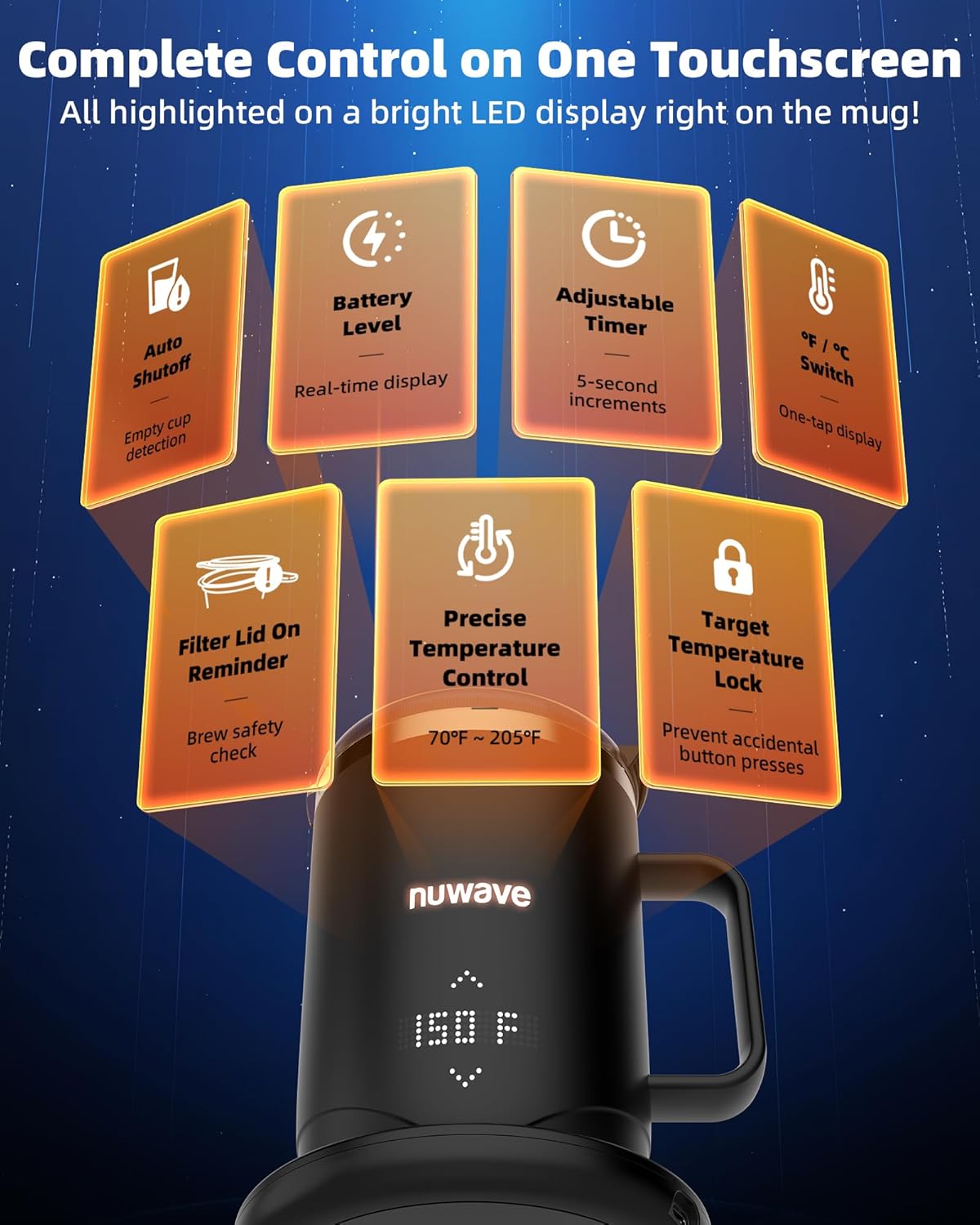
Image 8: The mug's display indicating an empty state, triggering auto shut-off.

Image 9: The secure triple-point contact design on the mug's base for charging.
7. نگهداری و تمیز کردن
- Mug Body & Base: Hand-wash only. Do not immerse the mug base in water. Use a soft cloth and mild detergent.
- Lid, Filter, & Filter Lid: These accessories are top-rack dishwasher safe for convenient cleaning.
- قبل از مونتاژ مجدد یا ذخیره سازی، اطمینان حاصل کنید که تمام قطعات کاملاً خشک شده اند.
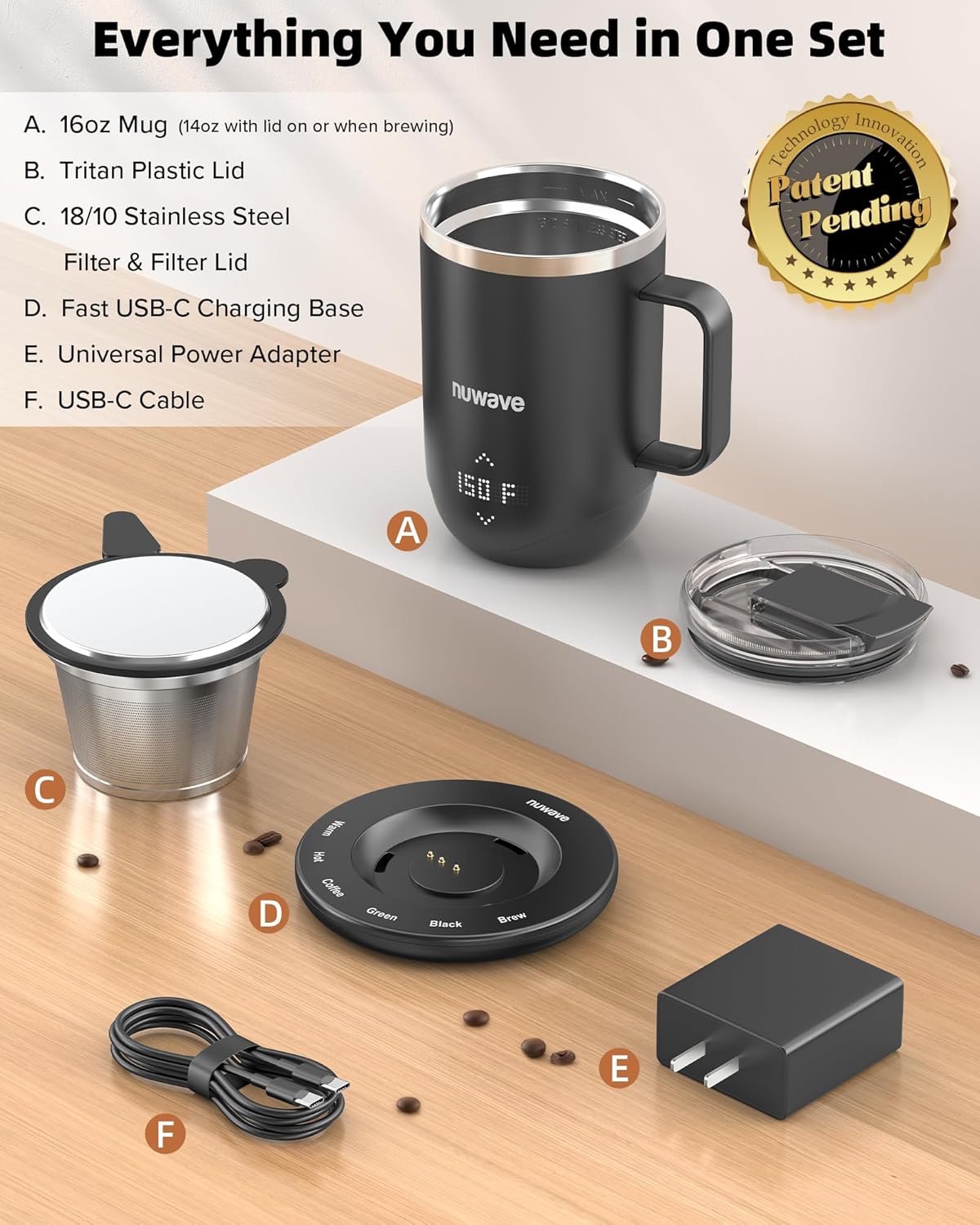
Image 10: The mug is shown being hand-washed, highlighting its IPX7 waterproof rating.

Image 11: The stainless steel interior is designed for durability and easy cleaning, resisting peeling and staining.
8 عیب یابی
- لیوان گرم نمیشود: Ensure the mug is properly placed on the charging base (if heating above 150°F) or that the battery is charged (if off-base). Check for any "EMPTY" messages on the display.
- نمایشگر کار نمیکند: Ensure the mug is powered on. If the issue persists, try fully charging the mug.
- باتری شارژ نمی شود: Verify the USB-C cable and power adapter are securely connected and plugged into a working outlet. Ensure the mug is correctly seated on the charging base.
- اندازهگیری نادرست دما: Ensure the mug is clean and free of residue that might interfere with sensors.
9. مشخصات
| ویژگی | مشخصات |
|---|---|
| نام تجاری | نوویو |
| شماره مدل | Nuwave Smart Mug |
| ظرفیت | 16 ounces (14oz with lid/brewing) |
| رنگ | مشکی |
| مواد | فولاد ضد زنگ 18/10 |
| وزن مورد | 4 پوند |
| عمر باتری | Up to 5 hours (at 135°F) |
| Temperature Range (on base) | 70 درجه فارنهایت تا 205 درجه فارنهایت |
| Temperature Range (off base) | 70 درجه فارنهایت تا 150 درجه فارنهایت |
10. گارانتی و پشتیبانی
For warranty information or technical support, please refer to the warranty card included in your product packaging or visit the official Nuwave webسایت. همچنین میتوانید برای دریافت کمک مستقیماً با خدمات مشتریان تماس بگیرید.
تماس با خدمات مشتری: Please refer to your product documentation for the most up-to-date contact information.


