مقدمه
The XIAOMI Smart Camera C302 is an indoor security camera designed to provide comprehensive home monitoring. It features 2K UHD resolution, full-color night vision, and advanced AI detection capabilities for humans, pets, and baby cries. The camera offers 360° panoramic viewing, Wi-Fi 6 connectivity, and two-way audio communication. Enhanced privacy is ensured through a physical lens shield and a financial-grade security chip. This manual provides instructions for setting up, operating, maintaining, and troubleshooting your camera.
آنچه در جعبه است
بررسی کنید که آیا همه اجزا در بسته شما موجود است یا خیر:
- XIAOMI Smart Camera C302
- راهنمای دستورالعمل
- آداپتور برق
محصول تمام شده استview
با اجزای دوربین آشنا شوید.
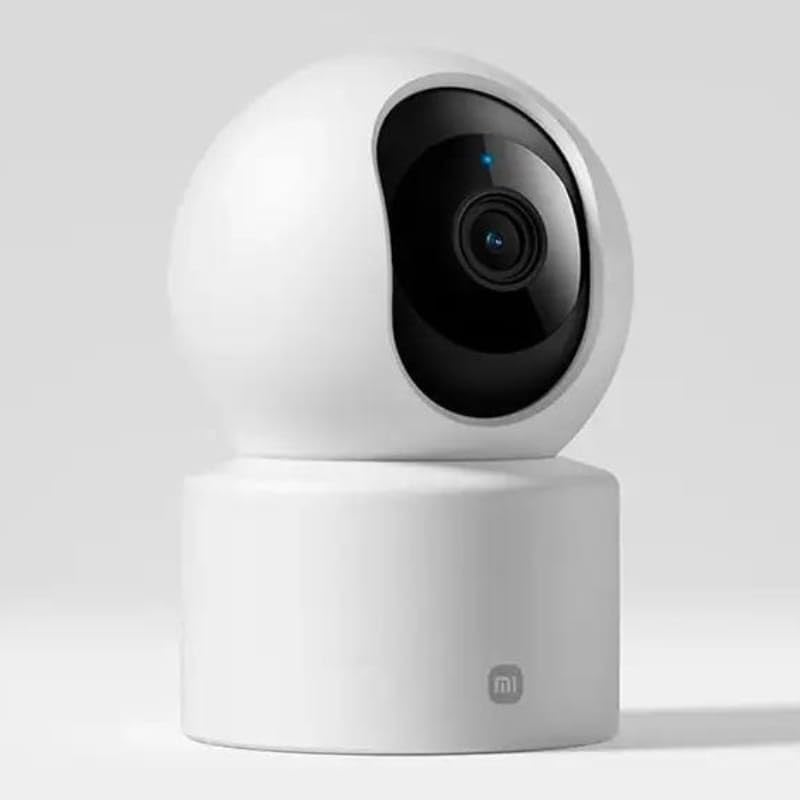
شکل 1: جلو view of the camera, highlighting the lens.
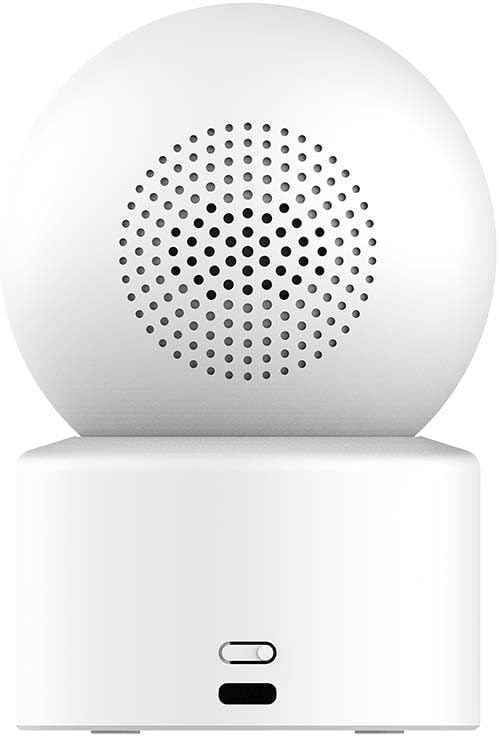
شکل 2: پشت view of the camera, showing the speaker and power input.

Figure 3: The camera's physical lens shield mechanism.
راه اندازی
- روشن کردن: Connect the provided power adapter to the camera's power port and plug it into an electrical outlet. The camera will power on and initiate its startup sequence.
- اپلیکیشن شیائومی هوم را دانلود کنید: Download and install the "Xiaomi Home" app on your smartphone from your device's app store.
- افزودن دستگاه: Open the Xiaomi Home app, log in or create an account, and follow the in-app instructions to add the XIAOMI Smart Camera C302. This typically involves scanning a QR code on the camera or selecting it from a list of nearby devices.
- اتصال وای فای: Connect the camera to your home Wi-Fi network (2.4GHz or 5GHz, Wi-Fi 6 compatible) through the app. Ensure your Wi-Fi signal is strong in the camera's intended location.
- نصب کارت حافظه microSD (اختیاری): For local storage, insert a compatible MicroSD card (8GB to 256GB, not included) into the designated slot on the camera. Format the card via the Xiaomi Home app if prompted.
- قرار دادن: Place the camera on a flat surface such as a tabletop. Ensure it has a clear view منطقه ای که می خواهید نظارت کنید
دستورالعمل های عملیاتی
Using the Xiaomi Home App
The Xiaomi Home app is the primary interface for controlling and managing your camera.
- زندگی کنید View: Access real-time video feed from your camera.
- Pan-Tilt Control: Use the app to remotely rotate the camera 360° horizontally and 107° vertically to adjust the viewزاویه
- صوتی دو طرفه: Utilize the built-in microphone and speaker for two-way communication.
- ضبط و پخش: View Foo ضبط شدهtage stored on the MicroSD card or cloud service (subscription may be required).
- سپر حریم خصوصی: Activate the physical lens shield through the app to retract the lens into the camera body, blocking the view برای حفظ حریم خصوصی.
ویژگی های تشخیص هوشمند
The camera utilizes local AI for various detection functions:
- Human Detection & Tracking: Receive alerts when a human is detected and the camera can track their movement.
- تشخیص حیوانات خانگی: Get notifications for pet activity (cats/dogs).
- Baby Cry Detection: Alerts are sent when a baby's cry is detected.
- Virtual Fence & Custom Zones: Define specific areas for monitoring and receive alerts when activity occurs within these zones.
- Abnormal Sound Detection: The camera can detect unusual sounds like glass breaking.
دید در شب
این دوربین دو حالت دید در شب ارائه میدهد:
- دید در شب تمام رنگی: In low-light conditions, the high-sensitivity sensor enables extended full-color imaging.
- Black & White Night Vision: In complete darkness, six non-glow infrared illuminators provide clear black and white footage.
ادغام کنترل صدا
The camera is compatible with Amazon Alexa and Google Assistant. Link your Xiaomi Home account to these services to control the camera using voice commands, such as viewing live footage on compatible smart displays.
تعمیر و نگهداری
- تمیز کردن: برای تمیز کردن لنز و بدنه دوربین از یک پارچه نرم و خشک استفاده کنید. از استفاده از پاک کننده های مایع یا مواد ساینده خودداری کنید.
- به روز رسانی سیستم عامل: Regularly check for and install firmware updates through the Xiaomi Home app to ensure optimal performance and security.
- مدیریت کارت MicroSD: به صورت دوره ای دوبارهview and manage recordings on your MicroSD card. Format the card through the app if performance degrades or storage is full.
عیب یابی
- دوربین به وای فای وصل نمیشه:
- Ensure the camera is within range of your Wi-Fi router. Verify your Wi-Fi password is correct. Try restarting both the camera and your router. Ensure your Wi-Fi network is 2.4GHz or 5GHz and compatible with Wi-Fi 6 standards.
- کیفیت تصویر ضعیف:
- Check the camera lens for dirt or smudges and clean it gently. Ensure adequate lighting in the monitored area. Verify your internet connection speed is sufficient for streaming 2K video.
- No detection alerts:
- Confirm that detection settings (human, pet, baby cry, virtual fence) are enabled in the Xiaomi Home app. Adjust sensitivity settings if necessary. Ensure the camera's view مانعی ندارد
- صدای دو طرفه کار نمیکند:
- Check microphone and speaker permissions for the Xiaomi Home app on your smartphone. Ensure the camera's volume is not muted in the app.
- دوربین پاسخگو نیست:
- Unplug the power adapter, wait 10 seconds, and plug it back in to restart the camera. If the issue persists, a factory reset may be required (refer to the Xiaomi Home app for instructions).
مشخصات
| نام مدل | دوربین هوشمند شیائومی C302 |
| شماره مدل | MBC28 |
| استفاده در فضای باز/داخلی | سرپوشیده |
| وضوح تصویربرداری | 2K (وضوح تصویر مؤثر 3 مگاپیکسل) |
| پروتکل اتصال | Wi-Fi (Wi-Fi 6 compatible) |
| منبع تغذیه | برق سیمی (5 ولت، 5 وات) |
| نوع نصب | پایه روی میز |
| محدوده حرکت / شیب | 360 درجه افقی، 107 درجه عمودی |
| دید در شب | Full-Color (low light), Black & White (IR) |
| گزینه های ذخیره سازی | MicroSD Card (8-256GB, not included), Cloud Service |
| سازگاری خانه هوشمند | آمازون الکسا، دستیار گوگل |
| ابعاد (L x W x H) | 3.07 x 2.99 x 4.53 اینچ |
| وزن مورد | 0.34 کیلوگرم (12 اونس) |
اطلاعات گارانتی
Warranty terms and conditions for the XIAOMI Smart Camera C302 are typically provided with your purchase documentation or can be found on the official XIAOMI webلطفاً رسید خرید خود را برای استفاده در گارانتی نگه دارید.
پشتیبانی کنید
For further assistance, please refer to the help section within the Xiaomi Home app or visit the official XIAOMI support website. You may also find frequently asked questions and additional resources there.


