
1. Introduction
Thank you for choosing the VEVOR 16-inch Exhaust Fan. This manual provides essential information for the safe and efficient operation of your new fan. Please read it thoroughly before installation and use, and retain it for future reference.
Product Features:
- Rapid Venting: Delivers 3000 CFM for quick expulsion of stale air, floating dirt, heat, and odors, ensuring fresh indoor air. Suitable for sheds and workshops.
- Smart Programming: Features an intelligent controller with temperature and humidity triggers, offering up to 10 speed settings that automatically adjust to changing conditions. Includes multiple modes, timer, and alarm functions for comprehensive control.
- Premium EC Motor: Operates at 1400 RPM with 98W power, providing up to 9 m/s airflow. Designed for smooth, low-noise, efficient, and stable performance, ideal for year-round attic ventilation.
- Tough Build: Constructed from all-metal steel for high rigidity and deformation resistance. More sturdy than plastic, it is designed to withstand damp conditions and harsh weather.
- Rain Guard: Automatic shutters open when powered for ventilation and deodorizing, and close when off to block rain and small debris, providing reliable protection.
2. Safety Instructions
Always follow basic safety precautions when using electrical appliances to reduce the risk of fire, electric shock, and personal injury.
- Read all instructions before operating the fan.
- Ensure the power supply matches the voltage specified on the fan's rating label.
- Disconnect power before servicing or cleaning the fan.
- Do not operate the fan with a damaged cord or plug.
- Keep hands, hair, and loose clothing away from moving parts.
- Install the fan securely according to the installation instructions to prevent it from falling.
- Do not use this fan in areas where flammable liquids or gases are stored.
- Ensure proper grounding to prevent electrical shock.
- Keep children and pets away from the fan during operation.
3. Package Contents
Verify that all items are present and undamaged upon unpacking:
- 1 x Shutter Exhaust Fan (16-inch)
- 1 x Controller
- 1 x Temperature & Humidity Sensor Cable (2.5 m)
- 1 x Audio Cable (3 m)
- 4 x Screws
- 4 x Rubber Plugs
4. Setup and Installation
The VEVOR 16-inch Exhaust Fan is designed for wall-mounted installation. Proper installation is crucial for optimal performance and safety.
4.1 Pre-Installation Checks
- Ensure the mounting surface is sturdy enough to support the fan's weight (approximately 15 lbs).
- Verify that the wall opening size is adequate for the fan's dimensions (18.9"D x 8.7"W x 18.9"H) to allow free movement of the louvers. Insufficient space can prevent shutters from opening or closing completely.
- Confirm access to a suitable power outlet (240V) within reach of the fan's power cord.
4.2 Installation Steps
- Prepare the Opening: Create a precise opening in the wall that accommodates the fan's frame. Ensure the opening is slightly larger than the fan''s body to prevent interference with the shutters.
- Mount the Fan: Insert the fan into the prepared opening. Secure it using the provided screws and rubber plugs. Ensure the fan is level and firmly attached to the wall.
- Connect the Controller: Connect the audio cable from the fan to the controller. Plug the temperature and humidity sensor cable into the controller.
- Power Connection: Plug the fan's power cord into a grounded electrical outlet.

Image: Easy two-step installation process of the VEVOR exhaust fan.

Image: Exterior view of the VEVOR exhaust fan installed on a building, demonstrating its robust, weather-resistant construction.
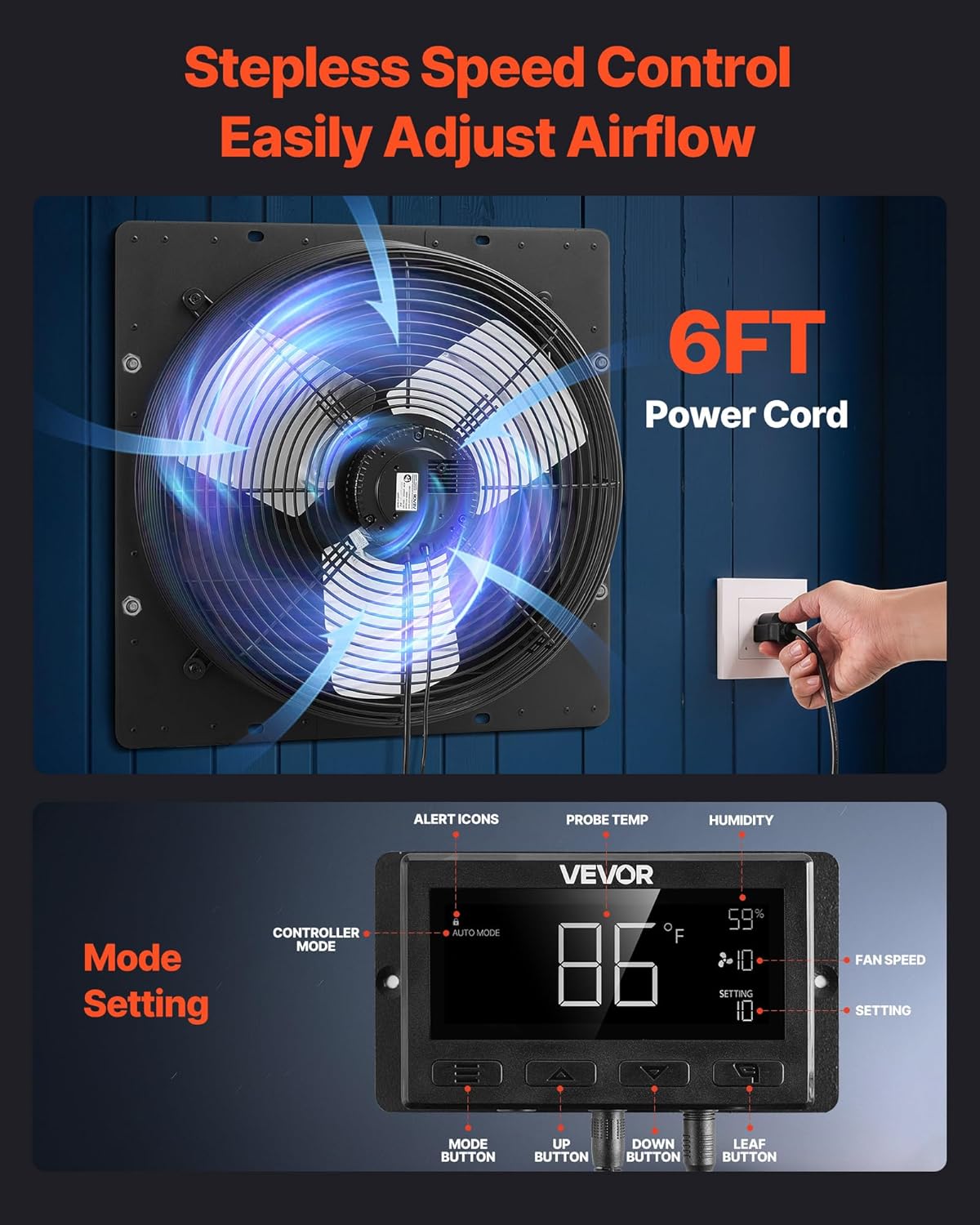
Image: The fan's automatic shutters, shown both open for ventilation and closed for protection against rain and debris.
5. Operating Instructions
The VEVOR exhaust fan features a smart controller for precise environmental management.
5.1 Controller Overview
The digital controller allows you to monitor temperature and humidity, and adjust fan settings. It includes buttons for mode selection, increasing/decreasing values, and a leaf button for additional functions.

Image: The smart controller for the VEVOR exhaust fan, displaying temperature, humidity, and fan speed settings.
5.2 Basic Operation
- Power On/Off: The fan will activate when plugged in and the controller is set to an active mode.
- Mode Selection: Use the 'Mode Button' to cycle through various operating modes, including Auto Mode, High Temp, Low Temp, High Humid, and Low Humid.
- Adjusting Settings: Use the 'Up' and 'Down' buttons to adjust target temperature, humidity levels, or fan speed (1-10 settings) within the selected mode.
- Automatic Shutters: The fan's shutters will automatically open when the fan is operating and close when it is off, providing weather protection.
5.3 Smart Programming
The controller allows you to set specific temperature and humidity thresholds. When these thresholds are met, the fan will automatically adjust its speed or activate/deactivate to maintain desired environmental conditions.
Video: This video demonstrates the smart thermostat control features of the VEVOR Shutter Exhaust Fan, showing how to set temperature and humidity thresholds for automatic operation.
6. Maintenance
Regular maintenance ensures the longevity and efficient operation of your VEVOR exhaust fan.
- Cleaning: Periodically clean the fan blades and shutters to prevent dust and debris buildup, which can reduce airflow and efficiency. Use a soft cloth and mild detergent. Ensure the fan is disconnected from power before cleaning.
- Inspection: Annually inspect the fan for any signs of wear, damage, or loose connections. Check the power cord and sensor cables for integrity.
- Lubrication: The EC motor is designed for maintenance-free operation and does not require lubrication.
7. Troubleshooting
Refer to this section for common issues and their solutions.
| Problem | Possible Cause | Solution |
|---|---|---|
| Fan does not turn on. | No power, faulty connection, or controller setting. | Check power outlet, ensure all cables are securely connected, verify controller mode and settings. |
| Louvers do not open/close completely. | Obstruction, incorrect installation, or mechanical issue. | Ensure the wall opening provides sufficient clearance for louver movement. Check for debris. If issue persists, inspect for mechanical damage. |
| Fan is excessively noisy. | Loose mounting, debris in fan blades, or motor issue. | Check mounting screws for tightness. Disconnect power and inspect blades for obstructions. If noise persists, contact support. |
| Controller display is blank or erratic. | Power issue or cable disconnection. | Ensure the controller is properly connected to the fan and power source. Restart the system by unplugging and re-plugging. |
8. Specifications
Detailed technical specifications for the VEVOR 16-inch Exhaust Fan:
| Feature | Specification |
|---|---|
| Brand | VEVOR |
| Model Number | HA-400ME |
| Size | 16 Inch |
| Air Flow Capacity | 3000 CFM |
| RPM | 1400 rpm |
| Wattage | 98 watts |
| Noise Level | 70 dB |
| Voltage | 240 volts |
| Material | Metal |
| Product Dimensions (D x W x H) | 18.9" x 8.7" x 18.9" (480 x 220 x 480 mm) |
| Number of Speeds | 10 |
| Motor Type | EC Motor |
| Installation Type | Wall Mount |

Image: Detailed diagram showing the dimensions of the 16-inch exhaust fan and its components.
9. Warranty and Support
VEVOR products are designed for durability and performance. For warranty information, please refer to the warranty card included with your product or visit the official VEVOR website.
Customer Support:
If you encounter any issues or have questions regarding your VEVOR 16-inch Exhaust Fan, please contact VEVOR customer support through their official channels. Have your model number (HA-400ME) and purchase details ready for faster service.
For more information and to explore other VEVOR products, visit the VEVOR Store.


