1. مقدمه
This manual provides essential information for the installation, operation, and maintenance of your GIGABYTE GeForce RTX 5060 WINDFORCE MAX OC 8G Graphics Card. This high-performance graphics card is powered by the NVIDIA Blackwell architecture and DLSS 4, featuring 8GB of 128-bit GDDR7 memory and a PCIe 5.0 interface. It incorporates the WINDFORCE cooling system, a Hawk fan, server-grade thermal conductive gel, and a reinforced structure for optimal performance and durability. Please read this manual thoroughly before installation and use.
2. اطلاعات ایمنی
- قبل از نصب یا جدا کردن هرگونه قطعه سختافزاری، همیشه منبع تغذیه را از رایانه خود جدا کنید.
- برای جلوگیری از آسیب تخلیه الکترواستاتیکی (ESD) به کارت گرافیک و سایر قطعات، از مچبند ضد الکتریسیته ساکن استفاده کنید یا مرتباً یک جسم فلزی متصل به زمین را لمس کنید.
- برای جلوگیری از تماس با اجزای حساس، کارت گرافیک را از لبههای آن بگیرید.
- برای جلوگیری از گرمای بیش از حد، تهویه مناسب را در کیس کامپیوتر خود تضمین کنید.
- سعی نکنید خودتان کارت گرافیک را تعمیر کنید. برای کمک به پرسنل خدمات واجد شرایط مراجعه کنید.
3. محتویات بسته
بررسی کنید که همه اقلام در بسته شما موجود باشد:
- GIGABYTE GeForce RTX 5060 WINDFORCE MAX OC 8G Graphics Card
- راهنمای دستورالعمل
Note: Additional accessories may vary by region or retailer.
۴. راهاندازی (نصب)
4.1 نصب سخت افزار
Before proceeding, ensure your system meets the minimum requirements, including a 450W power supply and a compatible PCI Express graphics slot.
- سیستم خود را آماده کنید: Turn off your computer and disconnect the power cable from the wall outlet. Open your computer case.
- اسلات PCI Express را پیدا کنید: یک اسلات PCI Express 5.0 x8 موجود روی مادربرد خود را شناسایی کنید.
- پوششهای شیار را بردارید: Remove the metal slot covers from the back of your computer case corresponding to the graphics card's size.
- نصب کارت گرافیک: Carefully align the graphics card with the PCI Express slot and press it firmly until it is securely seated. Ensure the retention clip on the motherboard clicks into place.
- Secure Graphics Card: کارت گرافیک را با پیچ به کیس کامپیوتر محکم کنید.
- اتصال برق: Connect the required 1x 8-pin PCIe power connector from your power supply to the graphics card.
- بستن پرونده: کیس کامپیوتر خود را ببندید و کابل برق را دوباره وصل کنید.

شکل 1: جلو view of the GIGABYTE GeForce RTX 5060 WINDFORCE MAX OC 8G Graphics Card.

شکل 2: سمت view of the GIGABYTE GeForce RTX 5060 WINDFORCE MAX OC 8G Graphics Card, showing the heatsink and power connector.
4.2 نصب درایور
After hardware installation, you need to install the latest drivers for optimal performance.
- روشن کردن: کامپیوتر خود را روشن کنید.
- دانلود درایورها: از وبسایت رسمی گیگابایت دیدن کنید webسایت (www.gigabyte.com) or NVIDIA webسایت (www.nvidia.com) to download the latest drivers for your GeForce RTX 5060 graphics card.
- نصب درایورها: Follow the on-screen instructions to install the drivers. Restart your computer if prompted.
۳.۲ بصریسازیview و جعبهگشایی
Watch this official GIGABYTE video for a visual overview of the RTX 50 Series graphics cards and an unboxing experience.
Video 1: GIGABYTE GeForce RTX 50 Series - Official Trailer. This video provides a general overview of the RTX 50 series, highlighting key features and design elements.
Video 2: Gigabyte RTX 5060 8gb OC unboxing review by 'Remember This Tech'. This video demonstrates the unboxing process and initial impressions of the Gigabyte RTX 5060 graphics card, including its physical appearance and included accessories.
5. عملیاتی
۵.۲ اتصال نمایشگرها
The GIGABYTE GeForce RTX 5060 graphics card supports multiple display outputs for a versatile setup.
- DisplayPort: Connect up to three DisplayPort 2.1 compatible monitors using DisplayPort cables.
- HDMI: Connect one HDMI 2.1 compatible monitor or TV using an HDMI cable.
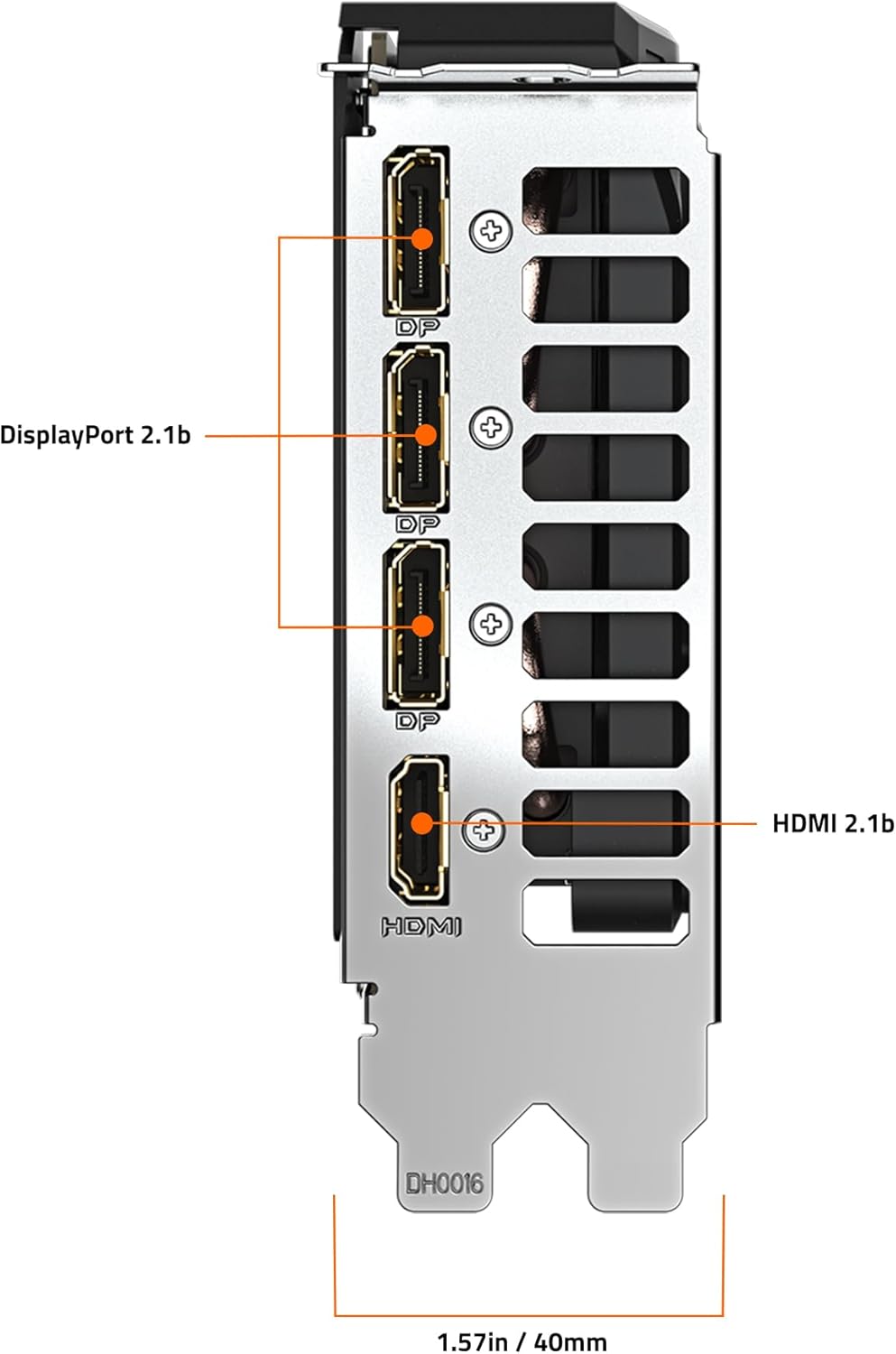
شکل 3: عقب view of the GIGABYTE GeForce RTX 5060 WINDFORCE MAX OC 8G Graphics Card, highlighting the DisplayPort and HDMI output connectors.
۵.۳ ابزارهای نرمافزاری
Utilize GIGABYTE and NVIDIA software for enhanced control and customization:
- GIGABYTE Control Center: Download from the GIGABYTE website to monitor GPU status, adjust fan speeds, and customize RGB lighting (if applicable).
- کنترل پنل انویدیا: Access advanced display settings, manage 3D settings, and configure features like DLSS and Ray Tracing.
6. تعمیر و نگهداری
6.1 تمیز کردن
تمیز کردن منظم به حفظ عملکرد بهینه و افزایش طول عمر کارت گرافیک شما کمک میکند.
- خاموش: همیشه قبل از تمیز کردن، کامپیوتر خود را خاموش کنید و آن را از منبع تغذیه جدا کنید.
- حذف گرد و غبار: Use compressed air to gently blow dust from the fans, heatsink fins, and other components. Hold the fans in place to prevent over-spinning.
- تمیز کردن سطح: از پارچه نرم و بدون پرز به آرامی استفاده کنیدampened with isopropyl alcohol to clean the exterior surfaces of the card. Avoid harsh chemicals.
۷.۳ بهروزرسانیهای درایور
Keep your graphics drivers updated to ensure compatibility with the latest games and applications, and to benefit from performance improvements and bug fixes.
- Periodically check the GIGABYTE or NVIDIA website for new driver releases.
- Follow the provided instructions for driver installation.
7 عیب یابی
اگر با کارت گرافیک خود با مشکل مواجه شدید، به مشکلات و راهحلهای رایج زیر مراجعه کنید:
| مشکل | علت احتمالی | راه حل |
|---|---|---|
| عدم نمایش تصویر روی مانیتور | Incorrect cable connection, loose card, power issue, driver problem. | Ensure display cables are securely connected. Re-seat the graphics card. Verify power connectors are attached. Reinstall or update drivers. |
| Low performance in games/applications | Outdated drivers, incorrect settings, insufficient power. | Update graphics drivers. Adjust in-game graphics settings. Ensure adequate power supply. Check for background applications consuming resources. |
| Overheating or loud fan noise | Dust accumulation, poor case airflow, high load. | Clean fans and heatsink. Improve case airflow. Monitor temperatures with GIGABYTE Control Center. Adjust fan curves if necessary. |
| ناپایداری یا از کار افتادن سیستم | Driver conflicts, overheating, faulty hardware. | Perform a clean driver installation. Monitor temperatures. Check other system components. |
8. مشخصات
| ویژگی | جزئیات |
|---|---|
| واحد پردازش گرافیک | NVIDIA GeForce RTX 5060 (Blackwell architecture) |
| حافظه ویدیویی | 8 گیگابایت GDDR7 |
| رابط حافظه | 128 بیتی |
| سرعت حافظه | 28000 مگاهرتز |
| سرعت ساعت GPU | 2512 MHz (Boost Clock) |
| PCI Express | PCIe 5.0 x8 |
| سیستم خنک کننده | WINDFORCE cooling system with Hawk fan |
| رابط خروجی ویدیو | 3x DisplayPort 2.1، 1x HDMI 2.1 |
| حداکثر وضوح صفحه نمایش | 3840x2160 |
| کانکتور برق | 1×8 پین |
| PSU توصیه شده | ۷۵۰ وات یا بالاتر |
| ابعاد (LxWxH) | 7.83 x 4.57 x 1.57 اینچ (199 x 116 x 40 میلیمتر) |
| وزن مورد | 1.1 پوند |
| ویژگی های کلیدی | DLSS 4, AI Cores, 4th Gen Ray Tracing Cores, Reinforced structure, Server-grade Thermal conductive gel |
9. گارانتی و پشتیبانی
GIGABYTE products are covered by a limited warranty. For detailed warranty information, technical support, and service inquiries, please visit the official GIGABYTE support webسایت:
پشتیبانی گیگابایت: https://www.gigabyte.com/Support
لطفاً مدرک خرید خود را برای ادعاهای گارانتی نگه دارید.


