1. محصول تمام شدview
The Cudy AC1200 Outdoor Wireless Access Point (AP1200 Outdoor) is designed to provide reliable and high-speed Wi-Fi connectivity in outdoor environments. It supports the latest 802.11ac Wave 2 technology, offering dual-band Wi-Fi speeds up to 867 Mbps on 5 GHz and 300 Mbps on 2.4 GHz. Key features include MU-MIMO, Beamforming, IP65 waterproof rating, 4KV lightning protection, and flexible Power over Ethernet (PoE) options.

Figure 1: Cudy AP1200 Outdoor Wireless Access Point Overview
2. محتویات بسته
مطمئن شوید که بسته شما شامل تمام موارد ذکر شده در زیر است:
- AP1200 Outdoor Wireless Access Point
- آداپتور برق
- آنتنهای جداشدنی (۲ واحد)
- سیم برق
- نصب کیت
- کابل اترنت
- راهنمای نصب (این راهنما)
3. سخت افزار تمام شدview
3.1 ظاهر فیزیکی
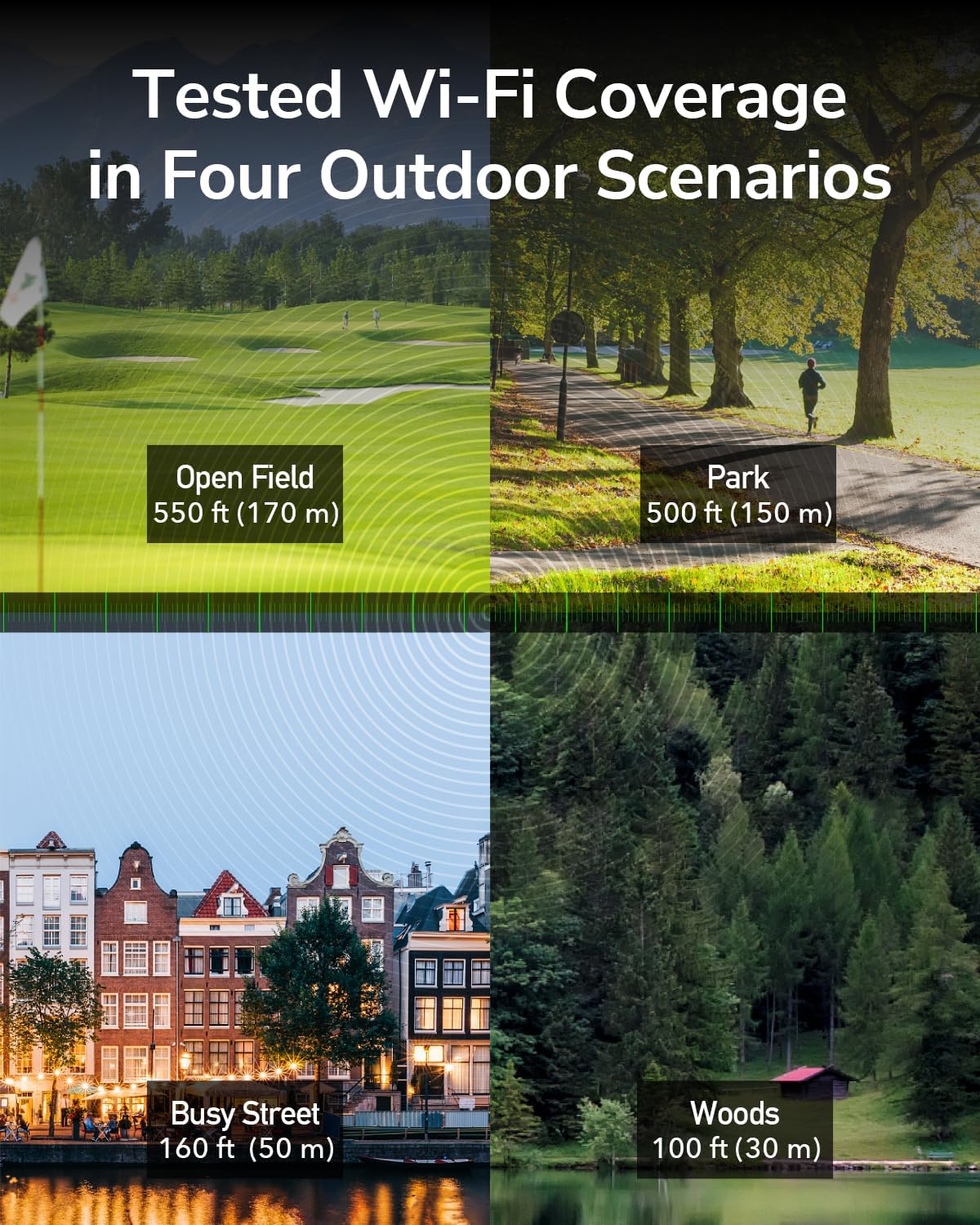
Figure 2: Cudy AP1200 Outdoor Access Point
3.2 نشانگرهای LED
این دستگاه دارای چندین نشانگر LED برای نمایش وضعیت خود است:
- LED قدرت: وضعیت قدرت را نشان می دهد.
- LAN LED: Indicates Ethernet connection status.
- 2.4GHz Wi-Fi LED: Indicates 2.4GHz wireless activity.
- 5GHz Wi-Fi LED: Indicates 5GHz wireless activity.
۳.۲ پورتها و دکمهها
The device includes the following ports and buttons:
- RJ45 Port (PoE-IN): Used for both data and power input via Power over Ethernet.
- دکمه تنظیم مجدد: برای بازیابی تنظیمات پیشفرض کارخانه استفاده میشود.
- اتصالات آنتن: Two RP-SMA connectors for detachable antennas.

Figure 3: RJ45 Port with PoE-IN
4. راه اندازی و نصب
۴.۲ اتصال آنتنها
Carefully screw the two detachable 5dBi antennas onto the RP-SMA connectors on the device. Ensure they are securely fastened but do not overtighten.

Figure 4: Antennas Attached to AP1200 Outdoor
۳.۳ اتصال برق از طریق اترنت (PoE)
The AP1200 Outdoor supports 802.3at/af PoE or 24~50V passive power supply. Use the included PoE adapter to power the device and connect it to your network.
- Connect one end of an Ethernet cable to the LAN port of your router or network switch.
- Connect the other end of this Ethernet cable to the 'LAN' port on the PoE adapter.
- Connect one end of the included Ethernet cable to the 'PoE' port on the PoE adapter.
- Open the protective cover on the AP1200 Outdoor and connect the other end of the Ethernet cable from the PoE adapter to the RJ45 (PoE-IN) port on the AP.
- Plug the PoE adapter into a power outlet. The device will power on, and the Power LED will illuminate.
4.3 گزینه های نصب
The AP1200 Outdoor can be mounted on a pole or a wall using the provided mounting kit. Choose a location that offers optimal Wi-Fi coverage and is protected from direct impact.
- نصب قطب: Use the straps and brackets to secure the device to a pole.
- نصب دیواری: Use screws and anchors to attach the device to a wall.

Figure 5: Mounting Options (Wall and Pole)
5. حالت های عملیاتی
The Cudy AP1200 Outdoor supports multiple operating modes to suit various network requirements:
- حالت نقطه دسترسی (AP): Connects to a wired network and transforms it into a wireless network, allowing multiple Wi-Fi devices to connect.
- حالت توسعه دهنده: پوشش شبکه بیسیم موجود را گسترش میدهد.
- حالت روتر: به عنوان یک روتر اصلی عمل میکند و دسترسی به اینترنت را برای دستگاههای متصل فراهم میکند.
- حالت WISP: Connects wirelessly to an Internet Service Provider (ISP) network and shares the connection with local devices.
- حالت روتر مش: Creates a seamless mesh Wi-Fi network with other compatible devices.

حالت دسترسی به نقطه

حالت روتر

حالت تکرار

حالت WISP
6. پیکربندی
To configure the AP1200 Outdoor, connect a computer to the device via Ethernet or Wi-Fi. Access the webرابط مدیریت مبتنی بر استفاده از a web مرورگر.
- Ensure your computer is connected to the AP1200 Outdoor (either directly via Ethernet or to its default Wi-Fi network).
- a را باز کنید web مرورگر را باز کنید و آدرس IP پیشفرض (معمولاً) را وارد کنید.
192.168.10.1or refer to the Quick Installation Guide) in the address bar. - نام کاربری و رمز عبور پیشفرض را وارد کنید (معمولاً
adminبرای هر دو). - Follow the on-screen wizard to set up your desired operating mode, Wi-Fi name (SSID), and password.
- تنظیمات خود را ذخیره کنید و در صورت درخواست، دستگاه را مجدداً راه اندازی کنید.
7. تعمیر و نگهداری
7.1 به روز رسانی سیستم عامل
Regularly check for and install firmware updates to ensure optimal performance, security, and access to new features. Visit the Cudy official website for the latest firmware for your AP1200 Outdoor model.
7.2 تمیز کردن
As an outdoor device with an IP65 rating, the AP1200 Outdoor is protected against dust and water. However, periodic cleaning can help maintain its appearance and prevent excessive buildup. Use a soft, damp از پارچه برای پاک کردن قسمت بیرونی استفاده نکنید. از مواد شیمیایی قوی یا پاک کننده های ساینده استفاده نکنید.
7.3 ملاحظات زیست محیطی
The device is designed to operate in a wide range of outdoor temperatures (-40°C to 65°C). Ensure proper ventilation and avoid placing it in direct sunlight for prolonged periods if possible, to maximize lifespan.

Figure 6: Weather-Proof Design
8 عیب یابی
If you encounter issues with your AP1200 Outdoor, refer to the following common troubleshooting steps:
- بدون برق: Ensure the PoE adapter is correctly plugged into a power outlet and the Ethernet cable is securely connected to the AP's PoE-IN port. Check the power LED.
- بدون دسترسی به اینترنت: Verify that your main router has internet access. Check the Ethernet cable connections between the router, PoE adapter, and AP. Ensure the AP is configured in the correct operating mode.
- سیگنال ضعیف وایفای: Adjust the antenna orientation. Relocate the AP to a more central position or higher elevation. Check for physical obstructions.
- دسترسی امکان پذیر نیست Web صفحه مدیریت: Ensure your device is connected to the AP's network. Verify the IP address entered in the browser is correct. Try clearing your browser's cache or using a different browser.
- تنظیم مجدد کارخانه: If problems persist, you may need to perform a factory reset. With the device powered on, use a paperclip to press and hold the Reset button for approximately 5-10 seconds until the LEDs flash. The device will restart with factory default settings.
9. مشخصات
| ویژگی | توضیحات |
|---|---|
| نام مدل | AP1200 فضای باز |
| ابعاد محصول | 9.45 x 3.94 x 2.11 اینچ |
| وزن مورد | 14.6 اونس |
| استاندارد بی سیم | 802.11ac موج 2 |
| کلاس باند فرکانس | دو بانده (۲.۴ گیگاهرتز و ۵ گیگاهرتز) |
| Wi-Fi Speed (5 GHz) | تا 867 مگابیت بر ثانیه |
| Wi-Fi Speed (2.4 GHz) | تا 300 مگابیت بر ثانیه |
| آنتن ها | 2 external 5dBi detachable antennas |
| پورت ها | 1x RJ45 (PoE-IN) |
| منبع تغذیه | 802.3at/af PoE or 24~50V Passive PoE (adapter included) |
| حفاظت از آب و هوا | IP65 rated waterproof housing, 4KV lightning protection |
| دمای عملیاتی | -40 تا 65 درجه سانتی گراد |
| دستگاه های سازگار | کامپیوتر شخصی، دوربین امنیتی، تلویزیون هوشمند، گوشی هوشمند، تبلت |
10. اطلاعات گارانتی
Cudy products are backed by a limited warranty. For detailed warranty terms and conditions, please refer to the warranty card included with your product or visit the official Cudy webرسید خرید خود را به عنوان مدرک خرید برای درخواستهای گارانتی نگه دارید.
11. پشتیبانی فنی
If you require further assistance or have questions not covered in this manual, please contact Cudy Technical Support. You can find contact information, FAQs, and additional resources on the official Cudy webسایت:
- Webسایت: www.cudy.com
- ایمیل: رجوع به webسایتی برای آدرسهای ایمیل پشتیبانی.