1. محصول تمام شدview
The CUBOT GT 3 Smartwatch is a robust and feature-rich device designed for active lifestyles. It integrates advanced GPS positioning, comprehensive health monitoring, and a wide array of sports modes, all housed within a durable, water-resistant design.
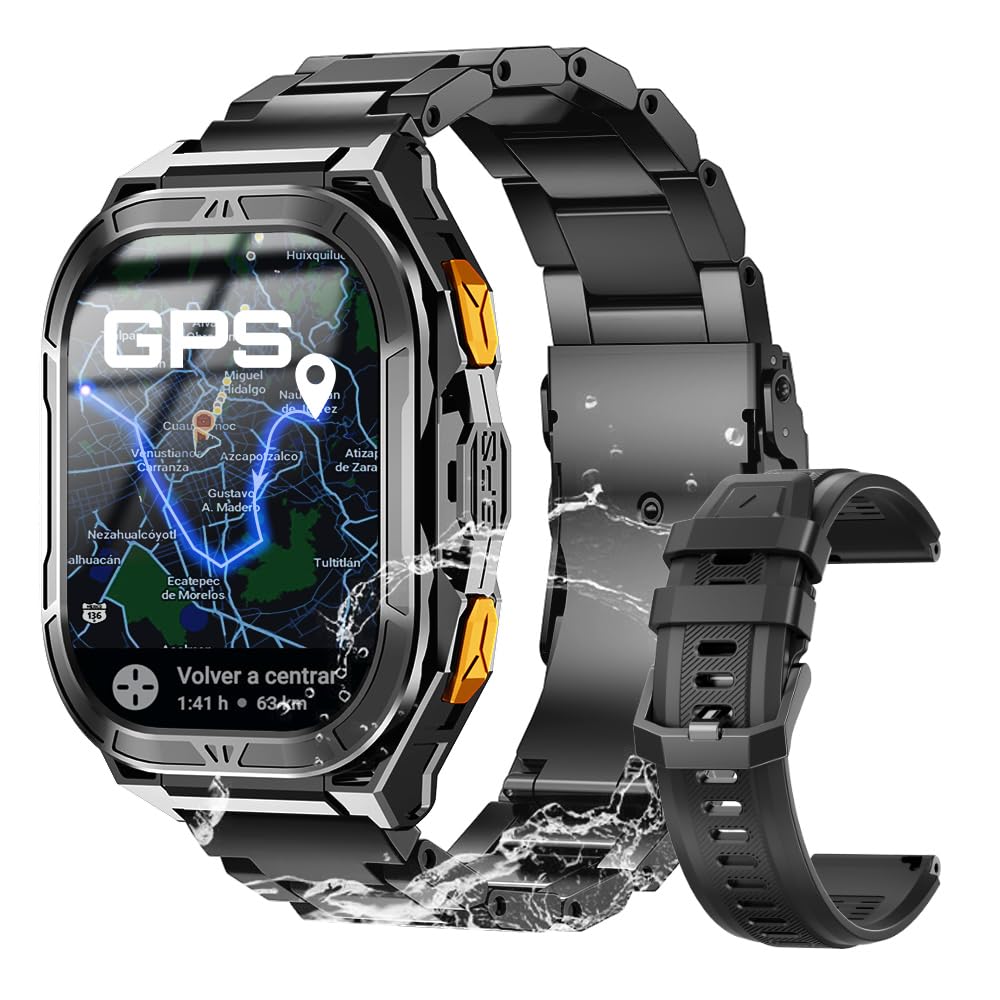
شکل 1: اصلی view of the CUBOT GT 3 Smartwatch.
۴. راهاندازی و استفاده اولیه
۱.۱ جعبهگشایی و قطعات
پس از باز کردن بسته، مطمئن شوید که همه اجزا وجود دارند:
- CUBOT GT 3 Smartwatch
- کابل شارژ
- راهنمای کاربر
- Additional strap (if included)
ویدیوی ۱: جعبهگشایی و راهاندازی اولیهview of a similar smartwatch model.
۱.۳ شارژ کردن ساعت هوشمند
Before first use, fully charge the smartwatch. Connect the magnetic charging cable to the charging points on the back of the watch and plug the USB end into a power adapter (not included) or a computer's USB port. A full charge typically takes approximately 2 hours.

Figure 2: The smartwatch displaying battery information and charging status.
۲.۴ نصب و جفتسازی برنامه
To unlock the full potential of your CUBOT GT 3, download and install the companion app on your smartphone. Scan the QR code displayed on the watch or in the manual to find the correct app (e.g., GloryFitPro or FitCloudPro, depending on the specific version). Follow the on-screen instructions to create an account and pair your smartwatch via Bluetooth.
Video 2: Tutorial on connecting a smartwatch via Bluetooth on iOS.
Video 3: Demonstrates Bluetooth connection steps for a smartwatch.
۲.۴ تنظیم بند
The smartwatch comes with interchangeable straps. To adjust or change the strap, use the provided tool to remove the pins holding the strap in place. Insert the new strap and secure it with the pins. Ensure the strap is comfortably snug on your wrist for accurate health monitoring.
Video 4: Shows unboxing, strap adjustment, and app connection for a smartwatch.
۳. کار با ساعت هوشمند
3.1 ناوبری اولیه
The CUBOT GT 3 features a 1.96" HD AMOLED touchscreen display. Swipe left/right, up/down to navigate through menus and functions. Use the physical buttons for quick access to specific features or to return to the home screen.

Figure 3: The smartwatch display showing resolution and AMOLED screen type, along with button functions.
3.2 برقراری و دریافت تماس
Once connected to your phone via Bluetooth, you can make and receive calls directly from your smartwatch. Access the call function from the main menu, dial numbers, or select contacts. The watch also supports SOS calls by pressing a designated button in emergencies, provided emergency contacts are set up in the companion app.

Figure 4: The smartwatch demonstrating Bluetooth call functionality and SOS feature.
Video 5: Shows Bluetooth calling features on a smartwatch.
3.3 اطلاعیه ها
Receive notifications for calls, messages, and various apps directly on your watch. Ensure notification permissions are enabled in the companion app settings on your smartphone.
۶.۲ شخصیسازی واچ فیسها
Personalize your smartwatch with a variety of pre-installed watch faces or download more from the companion app. You can also set custom wallpapers using your own photos.

Figure 5: The smartwatch showing various customizable watch faces and themes.
3.5 Smart Tools
The CUBOT GT 3 includes several smart tools for daily convenience:
- زنگ هشدار: زنگ هشدار را مستقیماً از ساعت تنظیم کنید.
- کنترل موسیقی: پخش موسیقی را در گوشی هوشمند خود کنترل کنید.
- کنترل دوربین: دوربین گوشی خود را از راه دور فعال کنید.
- پیش بینی آب و هوا: بهروزرسانیهای آب و هوا را به صورت لحظهای دریافت کنید.
- چراغ قوه: از صفحه ساعت به عنوان چراغ قوه استفاده کنید.
- ماشین حساب: محاسبات اولیه را انجام دهید.
- پیدا کردن تلفن: گوشی هوشمند جفتشده خود را پیدا کنید.
- دستیار صوتی: با دستیار صوتی گوشی خود تعامل داشته باشید.

شکل 6: تمام شده استview of various smart tools available on the smartwatch.
۳. نظارت بر سلامت
The CUBOT GT 3 provides 24-hour health monitoring using bio-optical sensors.

Figure 7: The smartwatch displaying various health metrics including heart rate, blood oxygen, and stress levels.
4.1 پایش ضربان قلب
در طول روز به طور مداوم ضربان قلب شما را کنترل میکند. View real-time data and historical trends in the companion app.
۷.۲ پایش اکسیژن خون (SpO2)
Measures your blood oxygen saturation levels. This feature helps you understand your body's oxygen absorption capacity.
4.3 نظارت بر خواب
Automatically tracks your sleep patterns, including deep sleep, light sleep, and REM cycles. Provides insights into your sleep quality and helps set sleep goals.

Figure 8: The smartwatch illustrating automatic sleep monitoring and sleep stagتحلیل الکترونیکی.
4.4 Stress Test and Breathing Training
The watch offers stress level assessments and guided breathing exercises to help manage stress and promote relaxation.
Video 6: Demonstrates health monitoring features including heart rate, SpO2, and blood pressure on a smartwatch.
۵. حالتهای ورزشی و GPS
The CUBOT GT 3 supports over 100 sports modes and features advanced GPS capabilities.

Figure 9: The smartwatch displaying various sports modes and activity tracking.
۵.۴ موقعیتیابی با GPS
Equipped with dual-band L1 and L5 GPS for precise and rapid positioning. Features include real-time route tracking, return planning, and automatic return reminders, ideal for outdoor sports.

شکل ۲: نمایشگر ساعت هوشمندasing its dual-band GPS positioning system for accurate outdoor tracking.
Video 7: Highlights GPS tracking and route monitoring for outdoor activities.
۲.۴ پایش محیطی
Features a built-in compass for real-time navigation, and measures altitude and atmospheric pressure. This provides crucial environmental data for outdoor enthusiasts.

Figure 11: The smartwatch displaying environmental data such as compass, altitude, and barometer readings.
۲.۷ مقاومت در برابر آب
With IP68 and 5ATM water resistance, the watch can be used for swimming and diving up to 50 meters. It includes a drainage function to remove water from the microphone and speaker after water exposure.

Figure 12: The smartwatch highlighting its 5ATM water resistance and swimming features.
6. عمر باتری
The CUBOT GT 3 is equipped with a 480 mAh battery, offering up to 30 days of standby time and 15 days of daily use, depending on usage patterns and feature activation.

Figure 13: The smartwatch emphasizing its 480 mAh battery capacity and extended usage times.
7. مشخصات
| ویژگی | مشخصات |
|---|---|
| نام تجاری | CUBOT |
| نام مدل | GT 3 |
| اندازه صفحه نمایش | 1.96 اینچ |
| نوع نمایشگر | AMOLED |
| جی پی اس | Integrated GPS (Dual-band L1+L5) |
| مقاومت در برابر آب | IP68، 5ATM (تا 50 متر) |
| ظرفیت باتری | 480 میلی آمپر ساعت |
| میانگین عمر باتری | 15 days (daily use), 30 days (standby) |
| قابلیت اتصال | بلوتوث |
| ویژگی های خاص | SOS Button, GPS, Weather Forecast, Compass, Altimeter, Barometer, Health Monitoring (HR, SpO2, Sleep, Stress), 100+ Sports Modes |
| ظرفیت ذخیره سازی حافظه | 256 مگابایت |
8. تعمیر و نگهداری
To ensure the longevity and optimal performance of your CUBOT GT 3 Smartwatch, follow these maintenance guidelines:
- تمیز کردن: مرتباً ساعت و بند آن را با یک پارچه نرم و لطیف پاک کنید.amp cloth. For water-resistant models, ensure the drainage function is used after exposure to water.
- شارژ کردن: Use only the provided charging cable. Avoid exposing the charging contacts to water or corrosive liquids.
- ذخیره سازی: ساعت را در جای خشک و خنک و دور از نور مستقیم خورشید و دمای بالا نگهداری کنید.
- اجتناب از مواد شیمیایی: ساعت را در معرض مواد شیمیایی قوی، شویندهها یا حلالها قرار ندهید، زیرا این مواد میتوانند به مواد تشکیلدهنده آسیب برسانند.
- تاثیر: While durable, avoid unnecessary drops or impacts to prevent damage to the screen or internal components.
9 عیب یابی
If you encounter issues with your CUBOT GT 3 Smartwatch, try the following steps:
- ساعت روشن نمیشود: مطمئن شوید که ساعت کاملاً شارژ شده است. آن را حداقل به مدت 30 دقیقه به شارژر وصل کنید.
- نمیتوان با تلفن جفتسازی کرد: Make sure Bluetooth is enabled on your phone and the watch. Ensure the watch is within range and not paired with another device. Restart both the watch and phone.
- دادههای نادرست سلامت: مطمئن شوید که ساعت به طور محکم روی مچ دستتان بسته شده است، نه خیلی تنگ و نه خیلی گشاد. حسگر پشت ساعت را تمیز کنید.
- اعلانهایی که دریافت نشدند: Check app permissions on your phone to ensure the companion app has access to notifications. Verify that notifications are enabled within the companion app settings.
- جی پی اس وصل نمیشه: مطمئن شوید که در یک فضای باز و با تهویه مناسب هستید view of the sky. Wait a few minutes for the watch to acquire a GPS signal.
If the issue persists, consult the detailed troubleshooting section in the full user manual or contact customer support.
10. گارانتی و پشتیبانی
Your CUBOT GT 3 Smartwatch comes with a standard manufacturer's warranty. Please refer to the warranty card included in your product packaging for specific terms and conditions. For technical support, product inquiries, or warranty claims, please visit the official CUBOT website or contact their authorized customer service channels.


