1. مقدمه
The Hama WM-450 Multi-Device Wireless Mouse is an optical mouse designed for versatile use across multiple devices. It features 7 buttons, a scroll wheel, and supports wireless connectivity via Bluetooth (two channels) and a 2.4 GHz radio frequency (one channel) using a USB-A receiver. This allows simultaneous connection to up to three devices, with quick switching between them. An integrated AI Assist button enhances productivity by activating an inter-program AI assistant. The mouse is designed for comfortable and silent operation.

تصویر 1.1: تمام شدview of the Hama WM-450 mouse highlighting its key features: Bluetooth connectivity, 10-meter wireless range, USB-A receiver, and battery power.
2. راه اندازی
2.1 نصب باتری
- محفظه باتری را در قسمت زیرین ماوس قرار دهید.
- درپوش محفظه باتری را باز کنید.
- Insert the two AAA batteries (included) according to the polarity markings (+/-) inside the compartment.
- درپوش محفظه باتری را محکم ببندید.
2.2 روشن/خاموش کردن
Slide the ON/OFF switch, located on the underside of the mouse, to the 'ON' position to power on the mouse. Slide it to 'OFF' when not in use to conserve battery life.
2.3 Connecting via USB-A Receiver (2.4 GHz Radio)
- Remove the USB-A receiver from its storage slot on the underside of the mouse.
- Plug the USB-A receiver into an available USB-A port on your computer, laptop, or compatible device.
- The mouse should be automatically recognized and ready for use. This connection uses the 2.4 GHz radio channel.
2.4 اتصال از طریق بلوتوث
The mouse supports two Bluetooth channels for connecting to different devices.
- مطمئن شوید که ماوس روشن است.
- Press the channel switch button (usually on the underside or top of the mouse) to select either Bluetooth Channel 1 or Bluetooth Channel 2. The corresponding indicator light will flash.
- On your device (PC, tablet, smartphone), go to Bluetooth settings and enable Bluetooth.
- جستجو برای new devices. The mouse should appear as 'Hama WM-450' or similar.
- ماوس را برای جفت شدن انتخاب کنید. هرگونه دستورالعمل روی صفحه را دنبال کنید.
- Once paired, the indicator light will stop flashing and remain solid for a few seconds, indicating a successful connection.

Image 2.1: The underside of the Hama WM-450 mouse, illustrating the battery compartment, the ON/OFF switch, and the integrated storage for the USB-A receiver.
3. عملیاتی
3.1 توابع اساسی
- کلیک چپ: انتخاب اولیه و فعالسازی
- کلیک راست: Accesses context menus.
- چرخ اسکرول: در اسناد پیمایش میکند و web pages. The high-quality aluminum scroll wheel provides precise control.
- دکمههای بیصدا: The left and right click buttons are designed for silent operation, reducing noise in quiet environments.
۳.۴ سوئیچینگ چند دستگاهی
To switch between connected devices (USB-A, Bluetooth 1, Bluetooth 2), press the dedicated channel switch button on the mouse. The mouse will instantly connect to the selected device.
3.3 Side Navigation Buttons
The mouse features two practical side buttons. These buttons typically function as 'Back' and 'Forward' for easier navigation in web مرورگرها، file explorers, and applications like Outlook.

تصویر ۲: نمای نزدیک view of the two side navigation buttons on the Hama WM-450 mouse, used for 'Back' and 'Forward' functions.
3.4 تنظیم DPI
The mouse includes a DPI switch button, usually located near the scroll wheel. Press this button to cycle through different sensitivity settings: 800, 1200, and 1600 DPI (Dots Per Inch). Choose the DPI setting that best suits your preference and task.
3.5 AI Assist Button
The dedicated AI Assist button activates an inter-program AI assistant, designed to enhance productivity. Refer to your device's software documentation for specific functionalities enabled by this feature.
4. تعمیر و نگهداری
4.1 تمیز کردن
برای تمیز کردن ماوس، از یک پارچه نرم، خشک و بدون پرز استفاده کنید. برای آلودگیهای سرسخت، کمی ...ampen the cloth with water or a mild cleaning solution. Avoid using harsh chemicals, abrasive cleaners, or excessive moisture, as these can damage the mouse.
4.2 تعویض باتری
When the mouse performance degrades or the indicator light signals low battery, replace the two AAA batteries. Always use fresh batteries of the same type.
4.3 USB Receiver Storage
When transporting the mouse or not using the 2.4 GHz radio connection, store the USB-A receiver in its dedicated slot on the underside of the mouse to prevent loss.
5 عیب یابی
- ماوس پاسخ نمیدهد:
- مطمئن شوید که ماوس روشن است.
- سطح باتری را بررسی کنید و در صورت لزوم تعویض کنید.
- For USB-A connection, ensure the receiver is securely plugged into a working USB port. Try a different USB port.
- برای اتصال بلوتوث، مطمئن شوید که بلوتوث روی دستگاه شما فعال است و ماوس جفت شده است. دوباره ماوس را جفت کنید.
- Ensure the correct channel (USB-A, BT1, BT2) is selected on the mouse.
- اتصال متناوب:
- Move the mouse closer to the receiver/device. The effective range is up to 10 meters, but obstacles can reduce this.
- از استفاده از ماوس در نزدیکی سایر دستگاههای بیسیم که ممکن است باعث تداخل شوند، خودداری کنید.
- حرکت مکان نما نامنظم یا کند است:
- حسگر نوری زیر ماوس را تمیز کنید.
- Ensure you are using the mouse on a suitable surface. Highly reflective or transparent surfaces may affect performance.
- اگر مکاننما خیلی کند است، تنظیمات DPI را روی مقدار بالاتری تنظیم کنید.
- Side buttons or AI Assist button not working:
- Ensure your operating system or application supports these functions.
- Check for any specific software or driver requirements for your device.
6. مشخصات
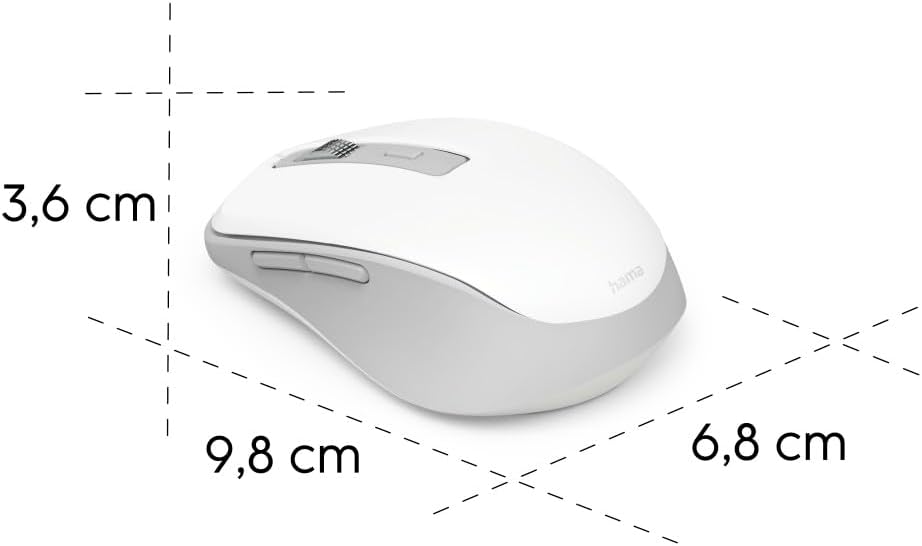
Image 6.1: Dimensional diagram of the Hama WM-450 mouse, indicating its length, width, and height.
| نام تجاری | حما |
| نام مدل | WM-450 |
| شماره مدل | 00173080 |
| فناوری اتصال | Bluetooth, 2.4 GHz Radio (USB-A) |
| محدوده بی سیم | تا 10 متر |
| فناوری سنسور | نوری |
| تنظیمات DPI | 800، 1200، 1600 |
| تعداد دکمه ها | 7 (including scroll wheel click) |
| منبع تغذیه | 2 عدد باتری قلمی (شامل) |
| ابعاد (L x W x H) | ۱۲۰ × ۳۰ × ۳۰ سانتیمتر (تقریبی) |
| وزن | 140 گرم |
| دستگاه های سازگار | PC, Tablet, Laptop, Smartphone, iPad |
| ویژگی های خاص | Multi-device connectivity (3 devices), AI Assist button, Silent click buttons, Side navigation buttons, Retractable USB receiver, Polymer-coated mouse feet, High-quality aluminum scroll wheel. |
| ترکیب مواد | At least 20% recycled materials |
| بسته بندی | 100% plastic-free |
7. گارانتی و پشتیبانی
For warranty information, technical support, or service inquiries, please refer to the warranty card included with your product or visit the official Hama webاطلاعات تماس برای پشتیبانی مشتری معمولاً در وبسایت سازنده موجود است. webسایت


