1. اطلاعات ایمنی
Please read all safety instructions carefully before using your iFFALCON TV. Retain this manual for future reference.
- ایمنی برق: Do not expose the TV to rain or moisture. Ensure the power cord is securely plugged into a grounded outlet. Do not overload electrical outlets.
- قرار دادن: Place the TV on a stable, level surface or mount it securely to a wall. Ensure adequate ventilation around the TV to prevent overheating. Do not block ventilation openings.
- تمیز کردن: قبل از تمیز کردن، تلویزیون را از برق بکشید. از یک پارچه نرم و خشک استفاده کنید. از پاک کننده های مایع یا پاک کننده های آئروسل استفاده نکنید.
- کودکان: Supervise children to prevent them from climbing on the TV or stand. Small parts can be a choking hazard.
- سرویس دهی: خودتان اقدام به سرویس تلویزیون نکنید. تمام مراحل سرویس را به پرسنل خدمات واجد شرایط ارجاع دهید.
۲. چه چیزهایی در جعبه است؟
هنگام باز کردن بستهبندی، از وجود همه اجزا اطمینان حاصل کنید:
- iFFALCON 85-Inch U85 Series QD-Mini LED 4K UHD Google Smart TV
- کابل برق
- 2 عدد باتری AAA برای ریموت
- 6 عدد پیچ پایه
- Table stands (2 pieces)
- ۵ عدد گیره کابل
- راهنمای شروع سریع
- ریموت تلویزیون
3. راه اندازی
۲.۲ تنظیمات فیزیکی
Before powering on, ensure the TV is securely placed or mounted.
- نصب پایه: If using the table stands, carefully attach them to the designated slots at the bottom of the TV using the provided stand screws. Ensure they are tightened securely.
- نصب دیواری: If wall mounting, follow the instructions provided with your wall mount kit. Ensure the mount is compatible with VESA standards for the 85U85 model.
- اتصال برق: کابل برق را به ورودی برق تلویزیون و سپس به پریز برق وصل کنید.
- دستگاه های خارجی: Connect any external devices (e.g., cable box, gaming console, Blu-ray player) to the appropriate HDMI or other input ports on the TV.

Image: The iFFALCON 85-Inch U85 Series TV, showcasinطراحی باریک و صفحه نمایش پر جنب و جوش آن.
۳.۳ روشن کردن اولیه و تنظیم تلویزیون گوگل
After connecting power, press the power button on the remote control or TV to turn it on.
- جفت کردن کنترل از راه دور: If the remote does not respond, insert the AAA batteries and follow on-screen instructions to pair it via Bluetooth.
- انتخاب زبان: زبان مورد نظر خود را انتخاب کنید
- اتصال شبکه: Select your Wi-Fi network and enter the password. A stable internet connection is required for Google TV features.
- ورود به حساب گوگل: Sign in with your Google account to access Google TV features, personalized recommendations, and app downloads.
- تنظیمات دستیار گوگل: Follow prompts to set up Google Assistant for voice control.

Image: A user interacting with the iFFALCON TV using hands-free voice control, demonstrating the integrated Google TV interface.
4. عملکرد تلویزیون خود
4.1 عملکردهای کنترل از راه دور
The provided remote control allows full navigation and control of your iFFALCON TV.
- دکمه پاور: تلویزیون را روشن یا خاموش می کند.
- پد ناوبری: برای حرکت در منوها از دکمههای جهتدار و برای انتخاب از دکمه تأیید استفاده کنید.
- دوره +/-: سطح صدا را تنظیم می کند.
- کانال +/-: کانالهای تلویزیون را عوض میکند.
- ورودی: منبع ورودی (HDMI 1، HDMI 2 و غیره) را انتخاب میکند.
- دکمه دستیار گوگل: Activates voice control. Press and speak your command.
- دکمه خانه: به صفحه اصلی گوگل تیوی برمیگردد.
- دکمههای میانبر برنامه: دسترسی سریع به سرویسهای پخش محبوب.
4.2 Smart Features and Google TV
Your iFFALCON U85 Series TV runs on Google TV, offering a personalized and integrated smart experience.
- Google TV Home Screen: Provides access to movies, shows, and apps from all your subscriptions, organized for easy discovery.
- کنترل صدا: Use Google Assistant or Alexa (via compatible devices) to search for content, control smart home devices, and manage TV settings hands-free.
- کتابخانه برنامه: طیف گستردهای از برنامهها را از فروشگاه گوگل پلی دانلود و نصب کنید.
- Chromecast داخلی: محتوا را از تلفن هوشمند، تبلت یا رایانه سازگار خود مستقیماً به تلویزیون منتقل کنید.
۴.۳ تنظیمات تصویر و صدا
خود را سفارشی کنید viewتجربه شنیداری و شنیداری را از طریق منوی تنظیمات تلویزیون تجربه کنید.
- حالت های تصویر: از بین حالتهای تصویر از پیش تعیینشده مختلف (مثلاً استاندارد، واضح، فیلم، بازی) انتخاب کنید یا تنظیماتی مانند روشنایی، کنتراست، رنگ و وضوح را سفارشی کنید.
- Mini LED Precision: The TV features 352 local dimming zones and 1000 nits peak brightness for enhanced contrast and detail.
- IQ Dolby Vision: Automatically adjusts HDR brightness based on the room's ambient light for optimal viewing.
- حالت های صدا: از بین تنظیمات پیشفرض صدا (مثلاً استاندارد، موسیقی، فیلم، گفتار) یکی را انتخاب کنید یا تنظیمات اکولایزر را تنظیم کنید.
- دالبی اتموس و DTS Virtual X: Experience immersive spatial audio with the integrated 2.1-channel 50W sound system.

Image: Visual comparison illustrating the superior contrast and detail of Mini LED technology compared to conventional TVs.

Image: Depiction of the immersive audio experience with the TV's 2.1 speaker system and Dolby Atmos technology.
۵.۳ ویژگیهای بازی
The iFFALCON U85 Series TV is equipped with features designed for an enhanced gaming experience.
- حالت بازی حرفهای ۱۴۴ هرتز: Provides a high refresh rate for smooth, responsive gameplay.
- 288Hz DLG Acceleration: Further enhances motion clarity for competitive gaming.
- FreeSync Premium Pro: Reduces screen tearing and stuttering for fluid visuals.
- حالت تأخیر کم خودکار (ALLM): Automatically switches to a low-latency mode when a gaming console is detected.
- نوار بازی: Access and adjust key gaming settings quickly during gameplay.
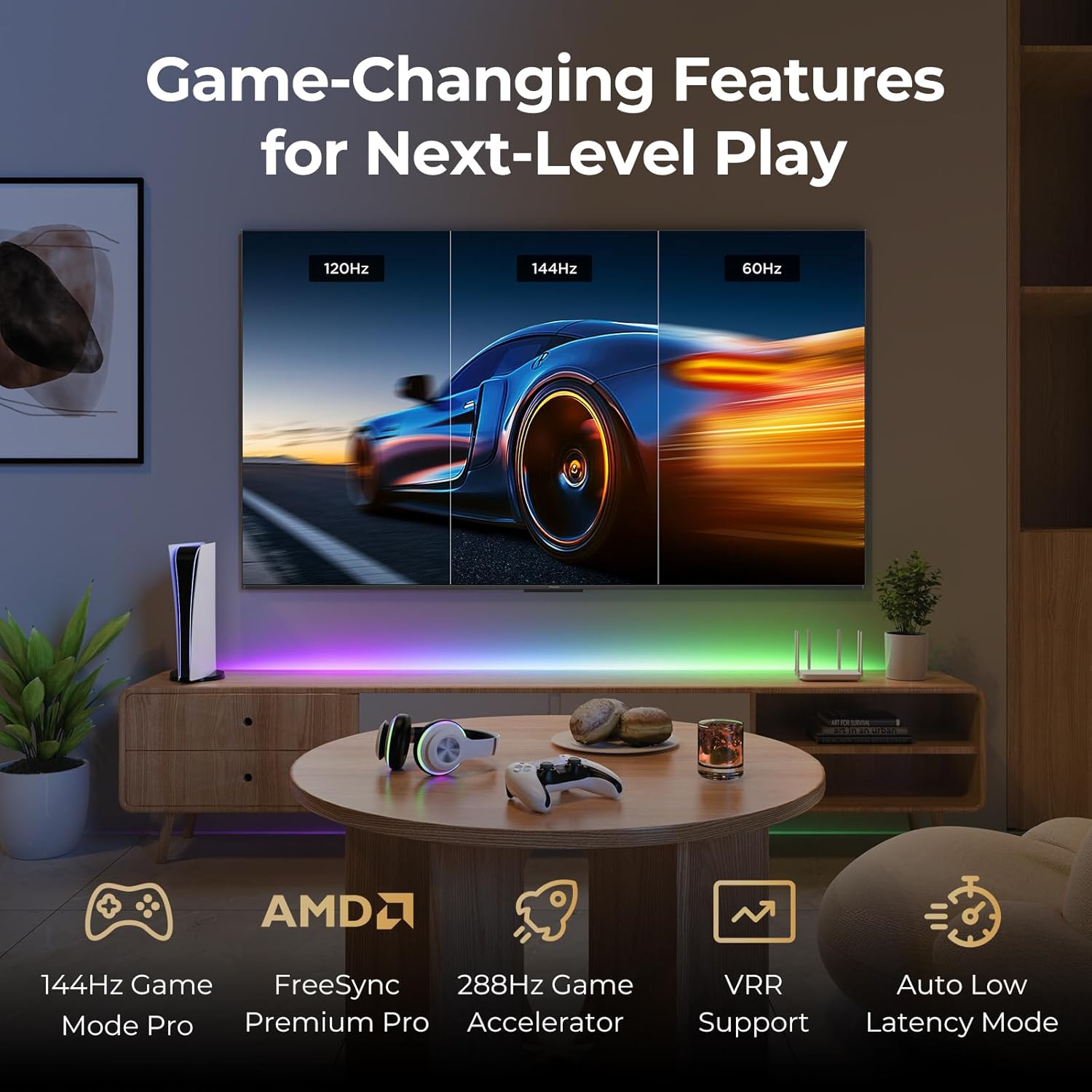
Image: A gaming setup featuring the iFFALCON TV, illustrating its high refresh rate and gaming-specific features for an optimized experience.
5. تعمیر و نگهداری
۴.۱ تمیز کردن تلویزیون
تمیز کردن منظم به حفظ ظاهر و عملکرد تلویزیون کمک میکند.
- صفحه نمایش: صفحه نمایش را به آرامی با یک پارچه نرم و بدون پرز پاک کنید. برای لکههای سرسخت، به آرامی ...ampپارچه را با آب یا محلول تمیزکننده مخصوص صفحه نمایش آغشته کنید (مستقیماً روی صفحه نمایش اسپری نکنید).
- بدن: Use a soft, dry cloth to wipe the TV's frame and back panel. Avoid abrasive materials or harsh chemicals.
- پورت ها: Ensure ports are free of dust. Use compressed air if necessary, holding the can upright.
5.2 به روز رسانی نرم افزار
Your TV may receive automatic software updates to improve performance and add new features. Ensure your TV is connected to the internet for these updates.
- You can check for updates manually in the TV's settings menu under System > About > System update.
6 عیب یابی
If you encounter issues, try these common solutions before contacting support.
- بدون برق: Ensure the power cable is securely plugged into both the TV and the wall outlet. Test the outlet with another device.
- تصویر/صدا ندارد: Check the selected input source. Ensure all cables to external devices are connected correctly. Restart the TV and connected devices.
- ریموت کار نمی کند: باتریها را تعویض کنید. مطمئن شوید که هیچ مانعی بین کنترل از راه دور و تلویزیون وجود ندارد. اگر کنترل از راه دور از بلوتوث استفاده میکند، آن را دوباره جفت کنید.
- مشکلات اتصال شبکه: Restart your Wi-Fi router. Check TV network settings to ensure correct Wi-Fi password and connection.
- مشکلات کیفیت تصویر: تنظیمات تصویر (روشنایی، کنتراست، رنگ) را تنظیم کنید. مطمئن شوید که منبع محتوا کیفیت بالایی دارد.
- تنظیم مجدد کارخانه: If problems persist, a factory reset can resolve many software-related issues. Navigate to Settings > System > About > Reset. هشدار: این کار تمام اطلاعات شخصی و تنظیمات را پاک میکند.
7. مشخصات
| ویژگی | توضیحات |
|---|---|
| نام تجاری | آیفالکون |
| شماره مدل | 85U85 |
| اندازه صفحه نمایش | 85 اینچ |
| فناوری نمایش | QD-Mini LED |
| قطعنامه | 4K UHD (3840 2160 XNUMX) |
| نرخ تازه سازی | 144 Hz (Native), 288Hz DLG |
| اوج روشنایی | تا ۸۵۰۰ نیت |
| نسبت کنتراست | تا 6500:1 |
| مناطق کم نور محلی | 352 |
| پردازنده | پردازنده AiPQ Pro |
| سیستم عامل | Google TV |
| دستیار صوتی | دستیار گوگل، سازگار با الکسا |
| سیستم صوتی | 2.1-channel 50W, Dolby Atmos, DTS Virtual X |
| پشتیبانی از HDR | HDR10+, Dolby Vision IQ |
| ویژگی های بازی | 144Hz VRR, FreeSync Premium Pro, ALLM, Game Bar |
| قابلیت اتصال | بلوتوث ، Wi-Fi |
| ابعاد محصول (D x W x H) | 15.2 x 74.4 x 45.5 اینچ |
| وزن مورد | 76.7 پوند |
8. گارانتی و پشتیبانی
Your iFFALCON U85 Series TV is covered by a manufacturer's warranty. Please refer to the warranty card included with your product for specific terms and conditions.
For technical support, service inquiries, or additional information, please visit the official iFFALCON support website or contact their customer service. Keep your purchase receipt and product serial number handy for warranty claims.
شما میتوانید با مراجعه به وبسایت، اطلاعات بیشتر و منابع پشتیبانی را پیدا کنید. iFFALCON Store on Amazon.


