1. مقدمه
This manual provides essential information for the setup, operation, and maintenance of your TCL 50C7K QD-Mini LED TV. Please read this manual thoroughly before using the television and retain it for future reference.
2. اطلاعات ایمنی
هنگام استفاده از این تلویزیون، همیشه اقدامات احتیاطی ایمنی اولیه زیر را رعایت کنید:
- برای جلوگیری از آتشسوزی یا برقگرفتگی، تلویزیون را در معرض باران یا رطوبت قرار ندهید.
- در کابینت را باز نکنید. سرویس دهی فقط به افراد واجد شرایط.
- از تهویه مناسب اطمینان حاصل کنید. منافذ تهویه را مسدود نکنید.
- تلویزیون را روی یک سطح صاف و پایدار قرار دهید تا از افتادن آن جلوگیری شود.
- در هنگام رعد و برق یا زمانی که برای مدت طولانی از تلویزیون استفاده نمیشود، آن را از برق بکشید.
- تلویزیون را از نور مستقیم خورشید، منابع گرما و میدانهای مغناطیسی قوی دور نگه دارید.
۲. چه چیزهایی در جعبه است؟
هنگام باز کردن بستهبندی، از وجود همه اجزا اطمینان حاصل کنید:
- TCL 50C7K QD-Mini LED TV
- کنترل از راه دور
- کابل برق
- راهنمای کاربر (این سند)
- TV Stand and Support Screws
4. راه اندازی
4.1 نصب فیزیکی
You can install your TV using the included stand or by wall-mounting it (wall mount sold separately).

تصویر: عقب view of the TV with the stand. Ensure the stand is securely fastened to the TV and placed on a stable surface.

Image: Illustration of seamless wall mounting and integrated cable management for a clean installation.
4.2 اتصال دستگاه ها
Connect your external devices to the appropriate ports on the TV. The TCL 50C7K features multiple connectivity options.
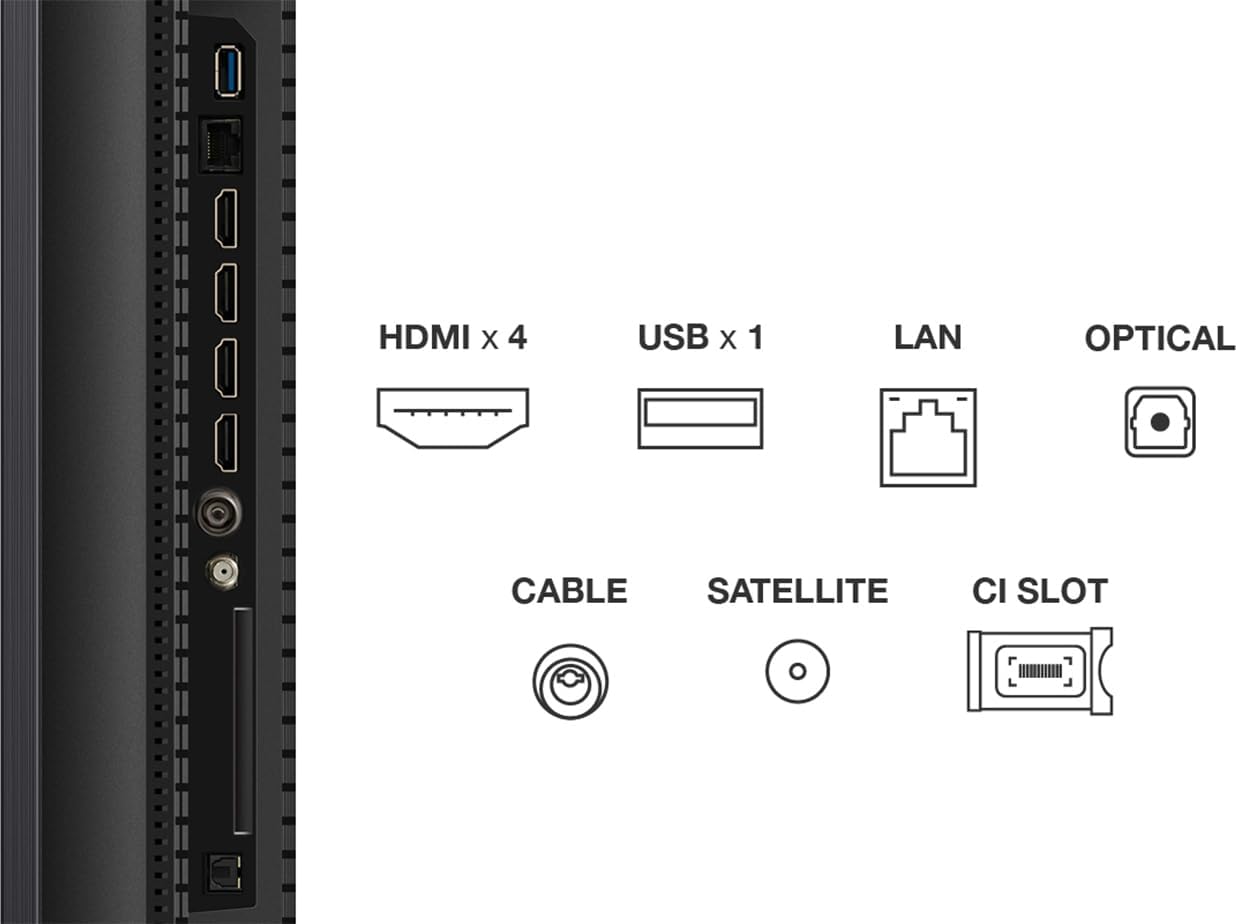
تصویر: دقیق view of the TV's connectivity panel, showing 4 HDMI ports, 1 USB port, LAN, Optical audio out, Cable input, Satellite input, and a CI Slot.
- HDMI: پخشکنندههای بلو-ری، کنسولهای بازی و سایر دستگاههای دارای پورت HDMI را به آن متصل کنید.
- USB: برای اتصال دستگاههای ذخیرهسازی USB برای پخش رسانه files.
- LAN: برای اتصال به اینترنت سیمی.
- اپتیکال: برای خروجی صدای دیجیتال به ساندبارها یا سیستمهای سینمای خانگی.
- CABLE/SATELLITE: For connecting antenna or satellite feeds.
۴.۱ روشن کردن اولیه و تنظیم تلویزیون گوگل
After connecting the power cable and any desired devices, press the power button on the remote control. Follow the on-screen instructions to complete the initial setup of Google TV, including network connection, Google account login, and channel scanning.
۵. کار با تلویزیون
5.1 عملکردهای کنترل از راه دور

Image: The TCL 50C7K television alongside its remote control (RC833A), highlighting the layout of buttons for navigation, volume, channel selection, and smart features.
The remote control (RC833A) allows you to navigate the TV's interface and control various functions:
- دکمه پاور: تلویزیون را روشن یا خاموش می کند.
- پد ناوبری (بالا/پایین/چپ/راست/تایید): برای پیمایش و انتخاب منو.
- افزایش/کاهش صدا: سطح صدا را تنظیم می کند.
- کانال بالا/پایین: کانالهای تلویزیون را عوض میکند.
- دکمه دستیار گوگل: Activates voice control for Google TV.
- دکمههای میانبر برنامه: دسترسی سریع به سرویسهای پخش محبوب.
۴.۴ ویژگیهای تلویزیون هوشمند (گوگل تیوی)
Your TCL 50C7K is equipped with Google TV, providing access to a vast library of apps, movies, and shows. Use the Google Assistant for hands-free voice control to search for content, control smart home devices, and more.
۴.۳ تنظیمات تصویر و صدا
Access the TV's settings menu to customize picture and sound. The TV supports various HDR formats including HDR10, HDR HLG, HDR10+, Dolby Vision, and Dolby Vision IQ, ensuring optimal visual quality for compatible content. For audio, Dolby Atmos provides an immersive sound experience.
5.4 Gaming Features (Game Master)
The Game Master feature optimizes your gaming experience. With HDMI 2.1 support, Automatic Low Latency Mode (ALLM), 144Hz Variable Refresh Rate (VRR), and FreeSync Premium Pro certification, the TV delivers smooth, responsive gameplay with minimal input lag.
6. تعمیر و نگهداری
۴.۱ تمیز کردن تلویزیون
- صفحه نمایش: صفحه نمایش را به آرامی با یک پارچه نرم و بدون پرز پاک کنید. برای لکههای سرسخت، از محلول تمیزکننده صفحه نمایش که مخصوص تلویزیونها طراحی شده است، استفاده کنید و آن را روی پارچه بمالید، نه مستقیماً روی صفحه نمایش.
- کابینه: برای پاک کردن بدنه تلویزیون از یک پارچه نرم و خشک استفاده کنید. از پاک کننده ها یا حلال های ساینده استفاده نکنید.
6.2 به روز رسانی نرم افزار
Ensure your TV's software is up-to-date for optimal performance and new features. You can check for updates through the Google TV settings menu. The TV will typically notify you when updates are available.
7 عیب یابی
اگر با تلویزیون خود با مشکلاتی مواجه شدید، به مشکلات و راهحلهای رایج زیر مراجعه کنید:
| مشکل | راه حل ممکن |
|---|---|
| بدون قدرت | Check if the power cable is securely connected to the TV and the power outlet. Ensure the outlet is functional. |
| تصویر ندارد، اما صدا دارد | تأیید کنید که منبع ورودی صحیح انتخاب شده است. اتصالات کابل به دستگاههای خارجی را بررسی کنید. |
| صدا نداره ولی تصویر داره | Check volume level and mute settings. Ensure external audio systems are properly connected and powered on. |
| کنترل از راه دور کار نمی کند | باتریها را تعویض کنید. مطمئن شوید که هیچ مانعی بین کنترل از راه دور و حسگر IR تلویزیون وجود ندارد. |
| مشکلات اتصال شبکه | روتر/مودم خود را مجدداً راه اندازی کنید. رمز عبور Wi-Fi را بررسی کنید. برای اتصالات سیمی، مطمئن شوید که کابل اترنت به درستی وصل شده است. |
8. مشخصات
Key technical specifications for the TCL 50C7K QD-Mini LED TV:
- برند: TCL
- شماره مدل: 50C7K
- اندازه صفحه نمایش: 50 اینچ
- فناوری نمایش: مینی ال ای دی
- رزولوشن: 4K (3840 x 2160)
- نرخ تازه سازی بومی: 144 Hz (with Motion Clarity Pro)
- ویژگی های خاص: QD-Mini LED, HDR Premium 2000, 144 Hz Motion Clarity Pro, Game Master, Google TV with Google Assistant built-in
- قابلیت اتصال: Bluetooth, Wi-Fi, Ethernet, HDMI (x4), USB (x1), Optical Audio Out
- ابعاد (W x D x H): ۱۲۳.۱۹ سانتیمتر × ۷۷.۲۲ سانتیمتر × ۲۲.۶۱ سانتیمتر (با پایه)
تصویر: جلو view of the TCL 50C7K TV with its remote control, illustrating key dimensions including width (1111.2 mm), height (710.04 mm with stand, 645.82 mm without), and thickness (66.72 mm).
9. گارانتی و پشتیبانی
برای اطلاعات گارانتی، لطفاً به کارت گارانتی همراه محصول خود مراجعه کنید یا از وبسایت رسمی TCL دیدن کنید. website. Specific details regarding spare parts availability and guaranteed software updates are not available in this document.
For technical support or service inquiries, please contact TCL customer service through their official channels.


