1. مقدمه
ممنون از خریدتونasing the iFFALCON 40S55T 40-inch Full HD Google TV. This manual provides essential information for the safe and efficient use of your television. Please read it thoroughly before operating the device and retain it for future reference.
The iFFALCON 40S55T is a tunerless smart TV designed for streaming content, offering a Full HD display, Google TV operating system, Chromecast built-in, and Dolby Audio for an immersive entertainment experience.
2. اطلاعات ایمنی
هنگام استفاده از این تلویزیون، همیشه اقدامات احتیاطی اولیه ایمنی را رعایت کنید تا خطر آتشسوزی، برقگرفتگی و آسیبدیدگی کاهش یابد.
- تلویزیون را در معرض باران یا رطوبت قرار ندهید.
- تلویزیون را باز نکنیدasinز؛ تمام خدمات را به پرسنل واجد شرایط ارجاع دهید.
- از تهویه مناسب اطراف تلویزیون اطمینان حاصل کنید.
- تلویزیون را از نور مستقیم خورشید، منابع گرما و میدانهای مغناطیسی قوی دور نگه دارید.
- Use only the power cord and accessories supplied by the manufacturer.
- در هنگام رعد و برق یا زمانی که برای مدت طولانی از تلویزیون استفاده نمیشود، آن را از برق بکشید.
3. محتویات بسته
بررسی کنید که همه موارد در جعبه موجود باشند:
- iFFALCON 40S55T 40-inch Full HD Google TV
- کنترل از راه دور
- میز تلویزیون (۲ عدد)
- پیچهای پایه تلویزیون
- کابل برق
- کارت گارانتی
- راهنمای دستورالعمل (این سند)
4. راه اندازی
۴.۱ وصل کردن پایه تلویزیون
- برای جلوگیری از آسیب دیدن صفحه نمایش، تلویزیون را با احتیاط و رو به پایین روی یک سطح نرم و صاف قرار دهید.
- هر قطعه پایه را با شیارهای مربوطه در پایین تلویزیون تراز کنید.
- پایهها را با استفاده از پیچهای ارائه شده محکم کنید. مطمئن شوید که محکم بسته شدهاند.
4.2 اتصال برق
کابل برق را به ورودی برق تلویزیون وصل کنید و سپس آن را به پریز برق وصل کنید. تلویزیون وارد حالت آماده به کار میشود.
4.3 Initial Setup (Google TV & Network)
پس از اولین روشن شدن، تلویزیون شما را در مراحل اولیه راهاندازی Google TV راهنمایی میکند. این مراحل شامل موارد زیر است:
- انتخاب زبان.
- اتصال به شبکه Wi-Fi.
- Signing in with your Google account to access personalized content and apps.
- پذیرش شرایط و ضوابط.
4.4 قابلیت اتصال
The iFFALCON 40S55T offers various connection options for external devices.

تصویر: تمام شدview of the TV's connectivity options, including HDMI, USB, Bluetooth, and Wi-Fi.
- پورت های HDMI: دستگاههای خارجی مانند کنسولهای بازی، پخشکنندههای بلو-ری یا گیرندههای دیجیتال را به آن متصل کنید.
- پورت USB: برای اتصال دستگاههای ذخیرهسازی USB برای پخش رسانه files.
- وای فای: For wireless internet connection to access streaming services and online features.
- بلوتوث: For connecting wireless headphones, speakers, or other Bluetooth-enabled accessories.
4.5 Tunerless Operation
This TV is designed as a tunerless model, meaning it does not have a built-in tuner for terrestrial (over-the-air) broadcasts. To watch terrestrial, BS, or CS broadcasts, an external tuner is required and must be purchased separately.

Image: The iFFALCON 40S55T TV showcasing its smart features, highlighting its tunerless design and ability to enjoy internet video content without an antenna connection.
۵. کار با تلویزیون
5.1 کنترل از راه دورview
The remote control provides access to all TV functions, including power, volume, channel navigation, and smart TV features. It also supports voice search via 'Hey Google'.

Image: The TV remote control, featuring quick access buttons for popular streaming services and a dedicated microphone button for voice commands.
- دکمه پاور: تلویزیون را روشن یا خاموش می کند.
- دکمه های ناوبری: برای پیمایش منوها از پد جهتدار و دکمه تأیید استفاده کنید.
- دکمههای تنظیم صدا/کانال: Adjust volume and change channels (if an external tuner is connected).
- دکمههای میانبر برنامه: Direct access to popular streaming services like Netflix, YouTube, etc.
- دکمه میکروفون: Press and hold to activate 'Hey Google' voice search.
۵.۲ ویژگیهای گوگل تیوی
Your iFFALCON TV runs on Google TV, providing a personalized and integrated entertainment experience.
- تجمیع محتوا: Google TV organizes movies, shows, and live TV from all your apps and subscriptions into one place.
- توصیههای شخصیسازیشده: بر اساس نظر شما viewing history and preferences, Google AI suggests content you might enjoy.
- جستجوی صوتی: Use the 'Hey Google' feature on your remote to quickly find content, get information, or control smart home devices.
- Chromecast داخلی: Easily cast content from your smartphone, tablet, or computer directly to your TV screen.

Image: A smartphone screen mirroring content to the iFFALCON TV, demonstrating the Chromecast built-in feature for enjoying mobile content on a larger display.
5.3 تنظیمات تصویر
The TV incorporates advanced image processing technologies to deliver a superior viewتجربه کردن
- AI PQ Processor: TCL's proprietary AiPQ Processor intelligently adjusts image quality at the pixel level, enhancing clarity, color, and contrast for a vivid and realistic picture.
- Full HD (FHD): Experience sharp and detailed images with Full High Definition resolution, offering 200% more detail than standard HD screens.

Image: A visual comparison illustrating the enhanced detail and clarity provided by Full HD resolution compared to standard HD.
- HDR10/HLG Support: Enjoy a wider range of colors and contrast with HDR10 and HLG compatibility, revealing stunning detail in both bright and dark scenes.

تصویر: نمایش صفحه تلویزیونasing the vibrant and detailed picture quality achieved with HDR10/HLG technology.
- Micro Dimming: This technology analyzes the image in hundreds of separate zones to adjust brightness and darkness independently, enhancing contrast and picture quality.

Image: A visual representation of Micro Dimming technology, illustrating how it enhances contrast and picture depth by adjusting brightness in specific areas of the screen.
5.4 Sound Settings (Dolby Audio)
The TV features Dolby Audio for clear, rich, and immersive sound.
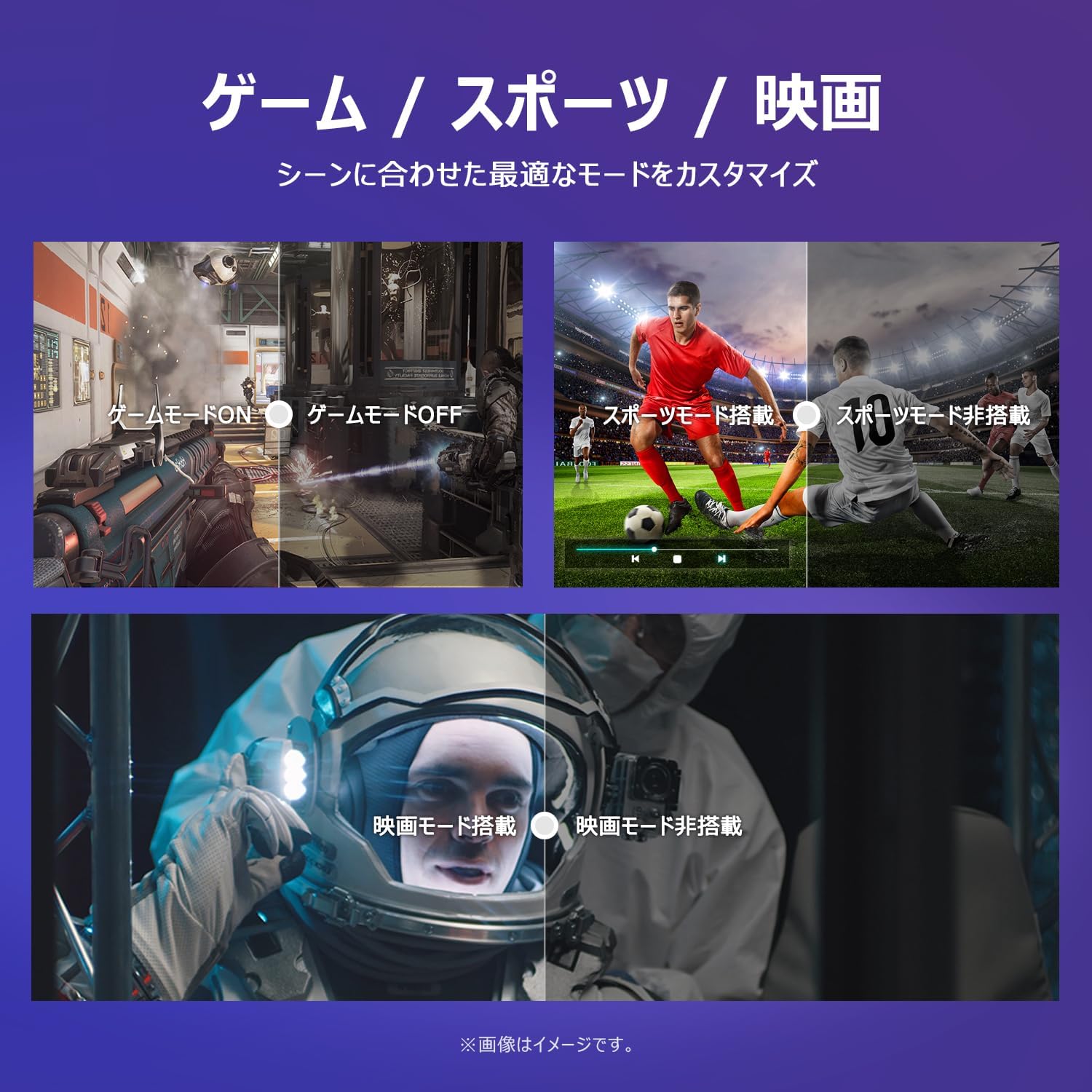
Image: The TV screen with a visual representation of sound, highlighting the immersive audio experience provided by Dolby Audio.
Access the sound settings menu to adjust modes like Standard, Music, Movie, or Custom to suit your preferences.
5.5 حالت بازی
Activate Game Mode for an optimized gaming experience with reduced input lag.
Image: Visual comparisons demonstrating the optimized settings for Game Mode, Sports Mode, and Movie Mode, adapting the TV's performance to different content types.
The TV also offers dedicated Sports Mode and Movie Mode to enhance viewing for specific content types.
5.6 تنظیمات سیستم
The quick settings menu allows you to customize frequently used system settings and rearrange their order for intuitive and convenient access.

تصویر: A view of the TV's quick system settings interface, illustrating how users can easily access and customize various functions like brightness, picture mode, and network settings.
6. تعمیر و نگهداری
مراقبت و نگهداری مناسب، عمر تلویزیون شما را افزایش میدهد.
- تمیز کردن صفحه نمایش: صفحه نمایش را به آرامی با یک پارچه نرم و بدون پرز پاک کنید. برای لکههای سرسخت، از پاککننده صفحه نمایشی که مخصوص تلویزیون طراحی شده است استفاده کنید و آن را روی پارچه بمالید، نه مستقیماً روی صفحه نمایش.
- تمیز کردن سیasing: برای پاک کردن تلویزیون از یک پارچه نرم و خشک استفاده کنید.asinز. از پاککنندهها یا حلالهای ساینده استفاده نکنید.
- تهویه: مطمئن شوید که منافذ تهویه در پشت تلویزیون مسدود نشده باشند تا از گرم شدن بیش از حد جلوگیری شود.
- سیم برق: مرتباً سیم برق را از نظر هرگونه آسیب بررسی کنید. در صورت آسیب، برای تعویض با پشتیبانی مشتری تماس بگیرید.
7 عیب یابی
اگر با تلویزیون خود با مشکلاتی مواجه شدید، به مشکلات و راهحلهای رایج زیر مراجعه کنید. اگر مشکل همچنان ادامه داشت، با پشتیبانی مشتری تماس بگیرید.
| مشکل | علت احتمالی | راه حل |
|---|---|---|
| بدون قدرت | کابل برق وصل نیست؛ پریز برق کار نمیکند | Ensure power cable is securely plugged in; Test outlet with another device |
| تصویر ندارد، اما صدا دارد | منبع ورودی نادرست؛ مشکل دستگاه خارجی | برای انتخاب منبع صحیح، دکمه «ورودی» را روی کنترل از راه دور فشار دهید؛ اتصالات دستگاه خارجی را بررسی کنید |
| صدا نداره ولی تصویر داره | صدا قطع یا خیلی کم است؛ مشکل سیستم صوتی خارجی | Unmute or increase volume; Check audio cable connections to external sound system |
| کنترل از راه دور کار نمی کند | باتریها تمام شدهاند؛ مانعی بین کنترل از راه دور و تلویزیون وجود دارد | باتریها را تعویض کنید؛ هرگونه مانع را بردارید؛ مطمئن شوید که کنترل از راه دور به سمت حسگر مادون قرمز تلویزیون نشانه رفته است. |
| نمی توان به وای فای متصل شد | رمز عبور نادرست؛ مشکل روتر؛ تلویزیون خیلی از روتر دور است | رمز عبور وایفای را تأیید کنید؛ روتر را مجدداً راهاندازی کنید؛ تلویزیون را به روتر نزدیکتر کنید یا از یک توسعهدهنده وایفای استفاده کنید |
8. مشخصات
Detailed technical specifications for the iFFALCON 40S55T TV:

Image: Dimensional drawing of the iFFALCON 40S55T TV, indicating its physical measurements.
| ویژگی | مشخصات |
|---|---|
| اندازه صفحه نمایش | 40 اینچ |
| نوع نمایشگر | VA Liquid Crystal |
| قطعنامه | Full HD (1920 x 1080) |
| نرخ تازه سازی | 60 هرتز |
| نسبت تصویر | 16:9 |
| نسبت کنتراست | 1000:1 |
| سیستم عامل | Google TV |
| خروجی صدا | ۱۸۰ وات (۴ کانال) |
| پورت های HDMI | 2 |
| پورت های USB | 1 |
| اتصال بی سیم | وای فای، بلوتوث |
| ابعاد محصول (W x H x D) | ۱۴۵.۱۷ × ۲۹.۰۲ × ۸۹.۷۵ سانتیمتر (با پایه) |
| وزن محصول | 4.63 کیلوگرم |
| سازگار با نصب دیواری | بله |
| لوازم جانبی شامل | Stand, Remote Control, Warranty Card, Power Cable |
9. گارانتی و پشتیبانی
Your iFFALCON 40S55T TV comes with a manufacturer's warranty. Please refer to the included warranty card for specific terms, conditions, and duration of coverage.
For technical support, troubleshooting assistance beyond this manual, or warranty claims, please contact iFFALCON customer service. Contact information can typically be found on the warranty card or the official iFFALCON webسایت
Please have your model number (40S55T) and purchase date ready when contacting support.


