1. مقدمه
This manual provides essential instructions for the installation, operation, and maintenance of your Shelly X Smart Thermostat ST1820 PBS. Please read this guide thoroughly before using the device to ensure proper function and safety.
2. ویژگی های محصول
The Shelly X Smart Thermostat ST1820 PBS is designed for intelligent climate control within your home. Key features include:
- Precise control of floor heating valves, supporting up to 2A ohmic or 1A inductive loads.
- Integrated potential-free relay for controlling external heat sources such as gas boilers or pellet stoves.
- Communication capabilities with other Shelly relays for automated heating adjustments based on temperature settings.
- Built-in anti-freeze function to protect your system.
- Integrated humidity sensor for optimized heating performance.
- Adjustable temperature and humidity offsets for calibration.
- No central hub required; features direct Wi-Fi and Bluetooth connectivity.
- Functions as a Wi-Fi range extender and BLE gateway.
- رابط کاربر پسند برای عملیات آسان.
- Control via the Shelly Smart Control application, various smart home platforms, and voice assistants.
3. محتویات بسته
بسته محصول معمولاً شامل موارد زیر است:
- Shelly X Smart Thermostat ST1820 PBS unit
- راهنمای کاربر
4. راه اندازی
Follow these general steps for initial setup. Consult a qualified electrician for electrical installation if you are unsure.
4.1. نصب فیزیکی
Mount the thermostat in a suitable location, away from direct sunlight, drafts, or heat sources that could affect temperature readings. Connect the device to your heating system and power supply according to the wiring diagram provided in the separate installation guide.
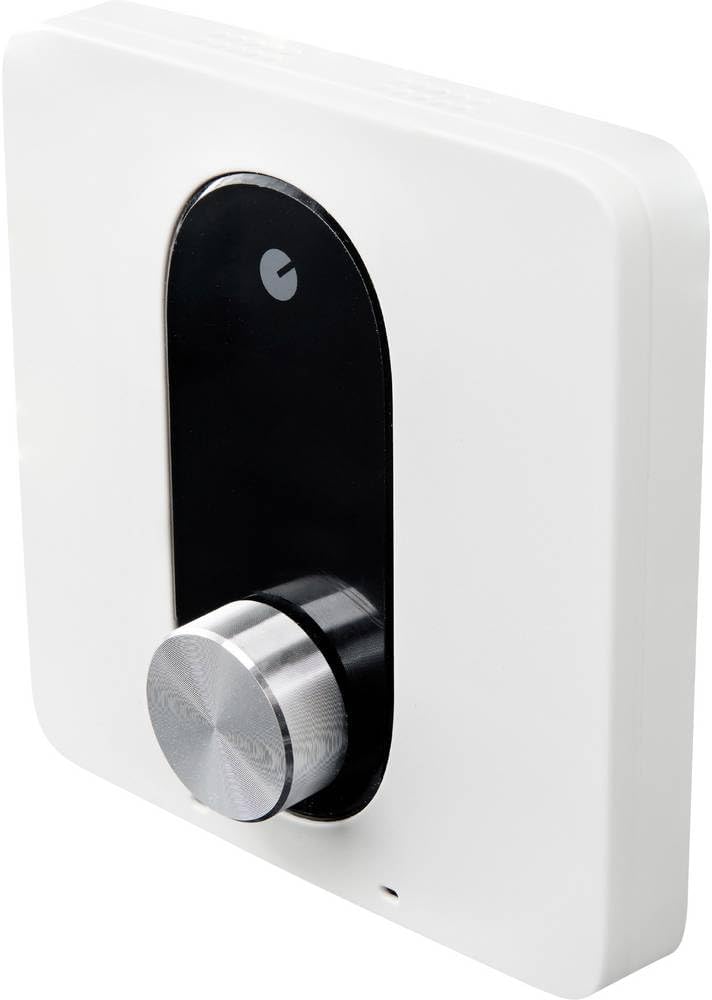
This image displays the Shelly X Smart Thermostat ST1820 PBS. It is a white, square-shaped device featuring a prominent black vertical panel on its front. A silver, textured rotary knob is positioned at the bottom of this black panel, used for adjusting settings. A small indicator light or sensor is visible at the bottom edge of the white casing.
4.2. اتصال به شبکه
- ترموستات را روشن کنید.
- Download the Shelly Smart Control application from your device's app store.
- Follow the in-app instructions to add your new device. This typically involves connecting to the thermostat's Wi-Fi hotspot and then configuring it to join your home Wi-Fi network.
- Ensure the device is successfully connected and visible in the app.
5. دستورالعمل های عملیاتی
The Shelly X Smart Thermostat ST1820 PBS offers multiple ways to control your heating system.
5.1. کنترل دستی
Use the rotary knob on the device to manually adjust the target temperature. The display will show the current and target temperatures.
5.2. کنترل برنامه
The Shelly Smart Control app provides comprehensive control over your thermostat:
- تنظیم دما: Set desired temperatures remotely.
- زمان بندی: Create custom heating schedules for different times of the day and week.
- انتخاب حالت: Switch between heating, anti-freeze, or off modes.
- نظارت بر رطوبت: View current humidity levels and configure settings related to humidity.
- Temperature/Humidity Offsets: Calibrate sensor readings if necessary.
5.3. کنترل صدا
Integrate your thermostat with compatible voice assistants (e.g., Amazon Alexa, Google Assistant) to control settings using voice commands.
6. تعمیر و نگهداری
To ensure optimal performance and longevity of your Shelly X Smart Thermostat ST1820 PBS:
- تمیز کردن: دستگاه را به آرامی با یک پارچه نرم و خشک پاک کنید. از پاک کننده ها یا حلال های ساینده استفاده نکنید.
- به روز رسانی نرم افزار: Regularly check for and install firmware updates via the Shelly Smart Control app to benefit from new features and security enhancements.
- محل قرارگیری سنسور: Ensure the thermostat's location remains free from obstructions that could impede accurate temperature or humidity readings.
7 عیب یابی
If you encounter issues with your thermostat, refer to the following common solutions:
| مشکل | علت / راه حل احتمالی |
|---|---|
| دستگاه به وای فای وصل نمیشود | Ensure your Wi-Fi network is 2.4GHz. Check Wi-Fi signal strength. Restart your router and the thermostat. Verify Wi-Fi password. |
| خوانش دما نادرست | The thermostat may require calibration. Use the temperature offset feature in the Shelly app (typically between -5/+5°C) to adjust readings. Ensure the device is not exposed to external heat/cold sources. |
| Thermostat feels warm to the touch or reads high temperatures (e.g., above 24°C) | Some internal components may generate minor heat during operation, which can slightly influence the internal temperature sensor. If readings are consistently high and cannot be corrected with the offset, ensure proper ventilation around the device and consider its placement relative to heat-generating equipment. If the issue persists, contact support. |
| سیستم گرمایشی پاسخگو نیست | Check wiring connections. Verify the thermostat is in heating mode and the target temperature is set above the current room temperature. Ensure the external heat source (boiler, etc.) is powered on and functional. |
8. مشخصات
| صفت | جزئیات |
|---|---|
| نام تجاری | شلی |
| شماره مدل | Shelly_PbS_ST_ST1820 |
| رنگ | سفید |
| ابعاد (L x W x H) | 9.8 × 5.7 × 9.8 سانتی متر |
| وزن | 115 گرم |
| ویژگی خاص | سنسور رطوبت |
| فناوری اتصال | بلوتوث ، Wi-Fi |
| نوع کنترلر | برنامه، کنترل صوتی |
| نوع کنترل دما | هوشمند/کنترل از راه دور |
| منبع تغذیه | کابل برق |
| اجزای شامل | ترموستات، دفترچه راهنما |
| شماره مدل سازنده | 3800235260630 |
9. گارانتی و پشتیبانی
For detailed warranty information, please refer to the official documentation provided with your product or visit the manufacturer's website. If you require technical assistance or have questions not covered in this manual, please contact Shelly customer support through their official channels.


