مقدمه
Thank you for choosing the Macap MI40 Touch Instant Burr Coffee Grinder. This manual provides essential information for the safe and efficient operation, maintenance, and troubleshooting of your new coffee grinder. Please read this manual thoroughly before using the appliance and retain it for future reference.
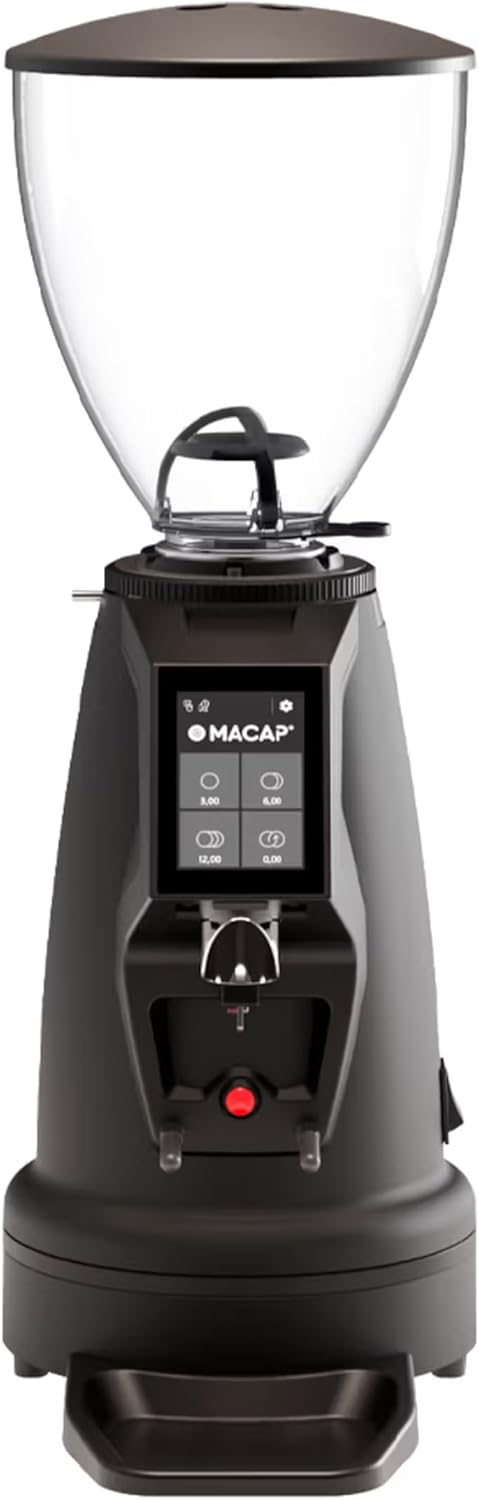
شکل 1: جلو view of the Macap MI40 Touch Instant Burr Coffee Grinder, showcasinطراحی جمع و جور و رابط کاربری صفحه لمسی آن.
دستورالعمل های ایمنی مهم
هنگام استفاده از وسایل برقی، همیشه اقدامات احتیاطی ایمنی اولیه را رعایت کنید تا خطر آتشسوزی، برقگرفتگی و/یا آسیبدیدگی افراد کاهش یابد، از جمله موارد زیر:
- تمام دستورالعمل ها را بخوانید.
- دستگاه، سیم، یا دوشاخه را در آب یا مایعات دیگر فرو نکنید.
- هنگام استفاده از هر وسیله ای توسط کودکان یا نزدیک آنها، نظارت دقیق ضروری است.
- در صورت عدم استفاده، قبل از گذاشتن یا خارج کردن قطعات و قبل از تمیز کردن، از پریز برق جدا کنید.
- از تماس با قطعات متحرک خودداری کنید.
- بعد از سو mal عملکرد دستگاه ، هیچ دستگاهی را با سیم یا شاخه آسیب دیده کار نکنید ، یا به هر روشی افتاده یا آسیب دیده است.
- استفاده از ضمیمه هایی که توسط سازنده توصیه یا فروخته نمی شود ممکن است باعث آتش سوزی، برق گرفتگی یا آسیب شود.
- در فضای باز استفاده نکنید.
- اجازه ندهید بند ناف روی لبه میز یا پیشخوان آویزان شود یا به سطوح داغ برخورد کند.
- قبل از استفاده، قیف را از نظر وجود اجسام خارجی بررسی کنید.
- این دستگاه فقط برای مصارف خانگی است.
اجزای محصول
Familiarize yourself with the main components of your MI40 Touch coffee grinder:
- هاپر باقلا: Transparent container for whole coffee beans (1.2 kg capacity).
- درب قیف: محفظه دانههای لوبیا را میپوشاند تا دانهها تازه بمانند.
- یقه تنظیم آسیاب: Stepless micrometric adjustment for precise grind size control.
- 3.5'' Touchscreen Display: User interface with programmable doses and built-in LED light.
- خروجی آسیاب: جایی که قهوه آسیاب شده توزیع میشود.
- Portafilter Fork: Adjustable support for holding portafilters during grinding, with anti-vibration coating.
- سینی قطره ای: Removable tray to catch excess coffee grounds.
- سوئیچ قدرت: Located on the side/rear of the unit.
- 65mm Flat Burrs: High-efficiency burrs for consistent grinding.

شکل 2: سمت view illustrating the hopper, grind adjustment collar, and portafilter fork.

Figure 3: Close-up of the bean hopper interior, showing the bean flow mechanism.
راهاندازی و اولین استفاده
- باز کردن بسته بندی: تمام قطعات را با دقت از بستهبندی خارج کنید. بستهبندی را برای حمل و نقل یا نگهداری در آینده نگه دارید.
- قرار دادن: دستگاه سنگزنی را روی یک سطح صاف، پایدار و خشک قرار دهید. از تهویه مناسب در اطراف دستگاه اطمینان حاصل کنید.
- قیف را مونتاژ کنید: Securely place the bean hopper onto the grinder body. Ensure it clicks into place if applicable.
- اتصال برق: سیم برق را به یک پریز برق متصل به زمین وصل کنید.
- تمیز کردن اولیه: قبل از اولین استفاده، قسمت بیرونی را با چسب پاک کنیدamp cloth. The burrs and grind path are typically clean from the factory, but a small amount of sacrificial coffee can be ground through to season the burrs.
دستورالعمل های عملیاتی
The MI40 Touch offers intuitive operation through its 3.5'' touchscreen and multiple grinding modes.
۱. پر کردن قیف
Lift the hopper lid and pour whole coffee beans into the hopper. Replace the lid securely.
۴.۱ تنظیم اندازه آسیاب
The MI40 Touch features stepless micrometric grind adjustment. To adjust, rotate the grind adjustment collar located below the hopper. Rotate clockwise for finer grinds and counter-clockwise for coarser grinds. Make small adjustments and test the grind to achieve the desired consistency for your brewing method (e.g., espresso, drip, moka pot, cold brew).

Figure 4: Grind adjustment collar for stepless precision control, allowing fine-tuning of particle size.
۴.۲. استفاده از رابط صفحه لمسی
The 3.5'' touchscreen allows for programming up to 4 doses and selecting operating modes. The built-in LED light improves visibility in low-light conditions.

Figure 5: Close-up of the 3.5'' touchscreen display, showing programmable dose options.
Dose Programming:
- From the home screen, tap on a dose button (e.g., single shot, double shot) to select it.
- To program a dose, press and hold the desired dose button until the programming interface appears.
- Adjust the grinding time using the '+' and '-' buttons.
- Press the checkmark or save icon to confirm and save the new dose setting.
4. حالت های عملیاتی
The MI40 Touch supports three primary operating modes, automating workflow for various needs:
- حالت استاندارد: Select a pre-programmed dose, place your portafilter on the fork, and press the corresponding dose button to start grinding. The grinder will stop automatically after the set time.
- حالت فشار و آسیاب: Place your portafilter on the fork. The grinder will start grinding when the portafilter activates the switch and will continue as long as the portafilter is held in place. Release the portafilter to stop grinding.
- Barista Hands-Free Mode: Designed for continuous grinding without holding the portafilter. The grinder will start when the portafilter is inserted and stop when removed. This mode is ideal for high-volume use in cafes or busy home settings.
Refer to the video below for a visual guide on the interface and operating modes:
Video 1: MACAP MI Series Interface Specifications. This video demonstrates the touchscreen interface, dose customization, and different operating modes (Standard, Push and Grind, Barista) for the MI series grinders, providing a comprehensive overview of user interaction.
نگهداری و نظافت
Regular cleaning and maintenance ensure optimal performance, consistent grind quality, and longevity of your grinder.
نظافت روزانه
- سینی قطره ای: Empty and wipe the drip tray daily to remove accumulated coffee grounds and maintain cleanliness.
- نمای بیرونی: قسمت بیرونی آسیاب را با یک پارچه نرم و لطیف پاک کنید.amp cloth. Do not use abrasive cleaners or immerse the unit in water, as this can damage electronic components.
- خروجی آسیاب: Use a brush or vacuum to clear any visible coffee grounds from the grind outlet to prevent blockages.
Weekly / Bi-Weekly Cleaning (Burr Cleaning)
To maintain grind consistency and prevent clogging, clean the burrs regularly. Frequency depends on usage and coffee bean oiliness.
- برق را جدا کنید: Always unplug the grinder from the power outlet before performing any cleaning or maintenance on the burrs.
- Remove Hopper: Empty the bean hopper and remove it from the grinder body.
- برداشتن تیغه بالایی: Carefully unscrew or unlock the upper burr assembly according to the grinder's design. Refer to specific diagrams in the full product manual if available.
- تمیز کردن با برس: Use a stiff brush (a dedicated grinder brush is recommended) to brush away all coffee grounds and oils from both the upper and lower burrs, as well as the burr chamber.
- مونتاژ مجدد: Reassemble the burr components and hopper, ensuring all parts are securely in place. Test the grind adjustment after reassembly.
- Grinder Cleaning Tablets (Optional): For a deeper clean, you can use specialized grinder cleaning tablets (e.g., Grindz). Follow the product instructions for these tablets, typically by grinding them through the machine.
عیب یابی
This section addresses common issues you might encounter with your MI40 Touch grinder and provides potential solutions.
| مشکل | علت احتمالی | راه حل |
|---|---|---|
| آسیاب روشن نمیشود. | Not plugged in; Power switch off; Circuit breaker tripped; Internal fuse. | Ensure power cord is securely plugged in; Turn power switch to ON; Reset circuit breaker; If problem persists, contact support. |
| تفاله قهوه ریخته نشد. | Hopper empty; Grind chute clogged; Burrs jammed by foreign object (e.g., stone). | Fill hopper with beans; Clean grind chute thoroughly; Unplug and inspect burrs for obstructions, then carefully remove. |
| اندازه آسیاب ناهمگون. | Burrs are dirty or worn; Grind setting too coarse/fine for desired brew method; Beans are stale or oily. | Clean burrs thoroughly; Adjust grind setting incrementally; Use fresh, quality beans. Consider burr replacement if wear is evident. |
| Grinder is unusually loud or makes grinding noise without beans. | Foreign object in burrs; Loose components; Burrs misaligned. | Unplug and inspect burrs for foreign objects; Ensure all components are securely fastened; Contact customer support if noise persists or burrs seem misaligned. |
| Touchscreen unresponsive or displaying errors. | Temporary software glitch; Power fluctuation. | Unplug the grinder for 30 seconds, then plug back in and restart. If the issue persists, contact customer support. |
If the problem persists after attempting these solutions, please contact Macap customer support for further assistance.
مشخصات
| ویژگی | جزئیات |
|---|---|
| مدل | MI40 Touch |
| نام تجاری | Macap |
| نوع بر | 65mm Flat Burrs |
| تنظیم آسیاب | میکرومتر پلهای |
| ظرفیت قیف | 1.2 کیلوگرم |
| نمایش | 3.5'' Touchscreen with LED Light |
| حالت های عملیاتی | Standard, Push and Grind, Barista Hands-Free |
| ابعاد محصول (L x W x H) | 12 اینچ طول × 7.63 اینچ عرض × 22 اینچ ارتفاع |
| وزن مورد | 19.58 پوند |
| رنگ | مشکی |
| سازنده | MACAP |
| اولین تاریخ در دسترس | 19 مارس 2025 |
گارانتی و پشتیبانی
For detailed warranty information and customer support, please refer to the official documentation included with your purchase or visit the official Macap website. Ensure you have your product's model number (MI40 Touch) and purchase date available when contacting support for efficient service.
سازنده: MACAP
Official U.S. Branch: Pro Coffee Gear LLC


