1. مقدمه
This manual provides essential information for the safe and efficient operation of your DOOGEE V40 Pro 5G Rugged Smartphone. Please read it thoroughly before using your device to ensure proper setup, usage, and maintenance. The DOOGEE V40 Pro is designed for durability and high performance, featuring a Dimensity 7300 4nm 5G processor, a 200MP AI camera, an 8680mAh battery, and a 1.47-inch multi-functional rear screen.
۲. چه چیزهایی در جعبه است؟
بررسی کنید که همه اقلام در بستهبندی محصول موجود باشند:
- 1 x DOOGEE V40 Pro Rugged Phone
- 1 عدد کابل USB Type-C
- 1 عدد شارژر
- 1 x Packing Box/ 1 x Manual
توضیحات ویدیو: An unboxing video of the DOOGEE V40 Pro, showing the phone and its included accessories such as the charger and USB cable.
3. محصول تمام شدview
The DOOGEE V40 Pro features a robust design with advanced functionalities. It includes a large main display and an innovative rear screen for quick access to information and controls.
3.1 جلو و عقب Views
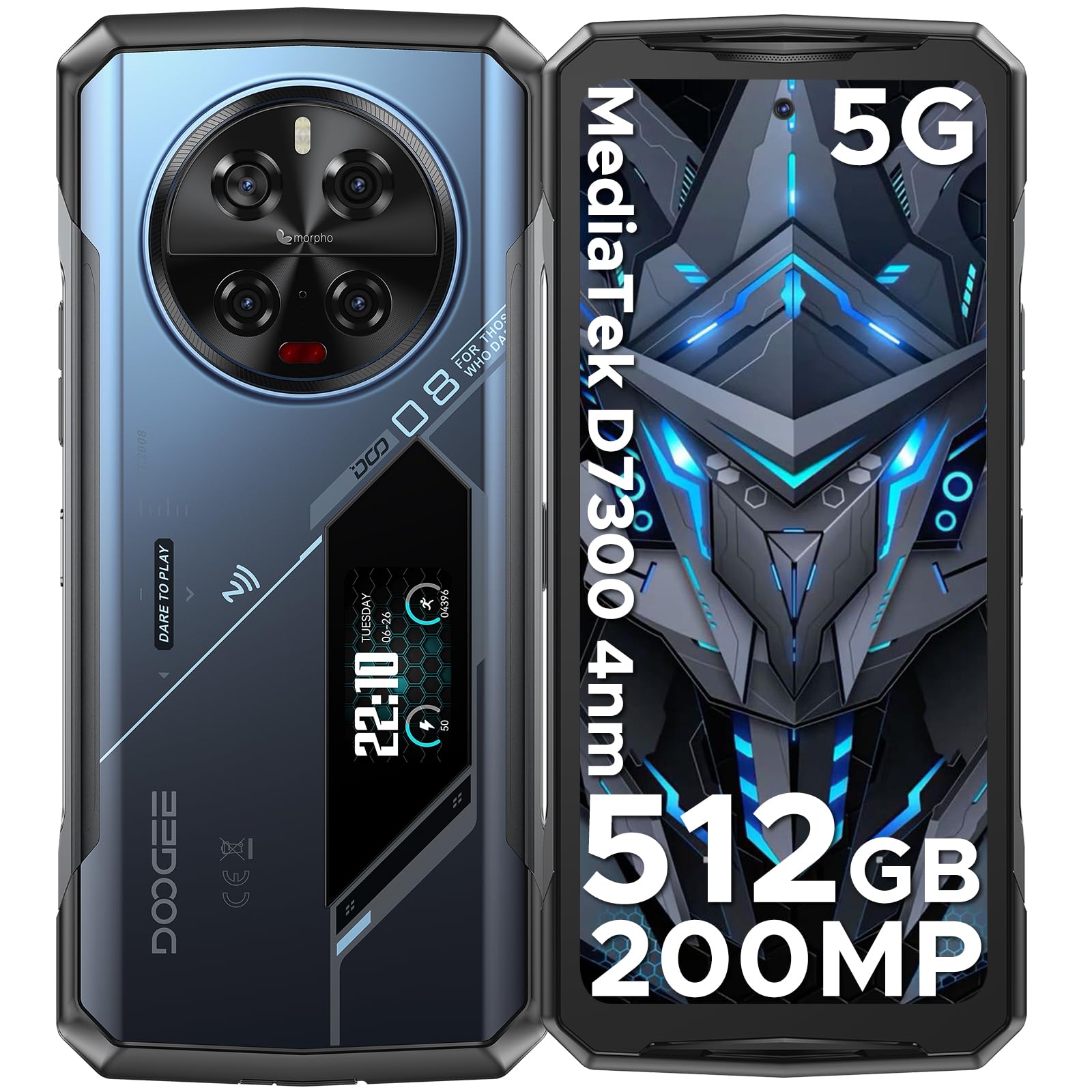
توضیحات تصویر: جامع view of the DOOGEE V40 Pro, showcasing its front display and the unique rear panel with the camera module and secondary screen.
3.2 صفحه نمایش اصلی
The device is equipped with a 6.78-inch FHD+ display offering a 120Hz dynamic refresh rate for smooth visuals and efficient power consumption.

توضیحات تصویر: The DOOGEE V40 Pro's main 6.78-inch FHD+ display, illustrating its vibrant screen quality.
3.3 Multi-functional Rear Display
A 1.47-inch secondary display on the rear provides quick access to essential information and controls without needing to activate the main screen. Functions include time, date, notifications, music control, and battery level.

توضیحات تصویر: A close-up of the DOOGEE V40 Pro's 1.47-inch rear display, showing various customizable widgets and information displays.
3.4 سیستم دوربین
The device features a versatile camera setup, including a 200MP AI main camera with OIS, a 20MP night vision camera, an 8MP telephoto camera, an 8MP macro camera, and a 32MP front-facing camera.

توضیحات تصویر: مفصل view of the DOOGEE V40 Pro's circular rear camera module, highlighting its multiple lenses and flash.
4. راه اندازی
۲.۳ نصب سیم کارت و کارت TF
To install your SIM card(s) and/or TF card (microSD card for expandable storage), locate the SIM tray on the side of the device. Use the provided SIM ejector tool to open the tray. Carefully place your nano-SIM cards and/or TF card into the designated slots, ensuring correct orientation. Close the tray securely.
4.2 روشن شدن اولیه
Press and hold the Power button located on the side of the device until the DOOGEE logo appears. Follow the on-screen instructions to complete the initial setup, including language selection, network connection, and account configuration.
5. دستورالعمل های عملیاتی
۴.۱ عملکردهای اساسی تلفن
Navigate the Android 14 operating system using touch gestures. Swipe down from the top for notifications and quick settings. Use the volume buttons on the side to adjust audio levels. The power button can be configured for various actions, including screen lock/unlock and power options.
۴.۲ استفاده از نمایشگر پشتی
The 1.47-inch rear display offers quick access to information and controls. Swipe left or right to cycle through different widgets such as time, date, battery status, music playback controls, and notification alerts. This display can also be used for enhanced selfie previews.

توضیحات تصویر: A person holding the DOOGEE V40 Pro, demonstrating the visibility and utility of the rear display.
5.3 عملکرد دوربین
Open the Camera application to access the 200MP AI main camera, 20MP night vision camera, 8MP telephoto, 8MP macro, and 32MP front camera. Select different modes for photos, videos (including 4K recording), and special features like anti-shake and night vision. The rear display can assist with framing selfies using the main camera.
توضیحات ویدیو: یک نمایش ویدیویی تبلیغاتیasing the DOOGEE V40 Pro's features, including its camera capabilities and rugged design.
۳.۳ عملکرد و بازی
The Dimensity 7300 4nm 5G processor and 36GB RAM (16GB physical + 20GB virtual) provide smooth performance for demanding applications and games. The DOOGEE OS 4.0 includes features like Game Mode Without Disturb for an uninterrupted gaming experience.
توضیحات ویدیو: A video highlighting the DOOGEE V40 Pro's e-sports design and performance, suitable for gaming enthusiasts.
5.5 DOOGEE OS 4.0 Features
Experience enhanced user interface and features with DOOGEE OS 4.0, including App Cloning, Drama Mode (Video), and Dynamic Capsule for improved multitasking and user interaction.
6. قابلیت اتصال
The DOOGEE V40 Pro supports a range of connectivity options:
- شبکه: 5G connectivity. Supports AT&T, Verizon, T-Mobile. Not compatible with CDMA carriers such as Cricket, Sprint, Boost Mobile, Straight Talk, or U.S. Cellular.
- وای فای: Wi-Fi 6 for fast and stable wireless internet.
- بلوتوث: بلوتوث ۴.۲ برای اتصال لوازم جانبی بیسیم
- NFC: Near Field Communication for contactless payments and data exchange.
- GPS: Integrated GPS with Beidou, Galileo, and Glonass support for accurate navigation.
7. مدیریت باتری
The DOOGEE V40 Pro is equipped with an 8680mAh battery, providing extended usage times. It supports 33W fast charging to quickly replenish power.

توضیحات تصویر: An illustration highlighting the large 8680mAh battery capacity of the DOOGEE V40 Pro.
۷.۳ شارژ معکوس OTG
Utilize the OTG (On-The-Go) function to use your V40 Pro as a power bank to charge other compatible devices.
۵.۳ مدیریت هوشمند باتری
The device features an intelligent battery management system with Ultra Power Saving mode to extend battery life when needed and an option to display battery percentage در نوار وضعیت
۴.۱ ویژگیهای مقاوم
The DOOGEE V40 Pro is built to withstand harsh environments, certified with IP68, IP69K, and MIL-STD-810H ratings.
- IP68: Dust and water resistant up to 1.5 meters for 30 minutes.
- IP69K: مقاوم در برابر جتهای آب با فشار و دمای بالا.
- MIL-STD-810H: دوام درجه نظامی در برابر سقوط، ضربه و دمای شدید.
- مقاومت در برابر دما: Operates reliably in temperatures ranging from -40°C (-40°F) to +70°C (158°F).

توضیحات تصویر: The DOOGEE V40 Pro submerged in water and being dropped, illustrating its IP68/IP69K and MIL-STD-810H ruggedness ratings.
9. مشخصات
| ویژگی | جزئیات |
|---|---|
| ابعاد محصول | 7.2 x 3.3 x 0.6 اینچ |
| وزن مورد | 12.8 اونس (0.8 پوند) |
| سیستم عامل | اندروید 14 |
| مدل CPU | Dimensity 7300 4nm 5G Octa-core Processor |
| سرعت CPU | 2.5 گیگاهرتز |
| اندازه حافظه رم نصب شده | 36 GB (16GB + 20GB virtual) |
| ظرفیت ذخیره سازی حافظه | ۲۵۶ گیگابایت (قابل ارتقا تا ۱ ترابایت با کارت حافظه TF) |
| اندازه صفحه نمایش ایستاده | 6.78 اینچ |
| قطعنامه | ۱۰۸۰ در ۲۳۴۰ (فول اچدی پلاس) |
| نرخ تازه سازی | 120 هرتز |
| نمایشگر عقب | 1.47" All-Purpose Secondary Display |
| دوربین اصلی | 200MP AI Main Camera with OIS |
| دوربین دید در شب | دوربین دید در شب ۲ مگاپیکسلی |
| Other Rear Cameras | 8MP Telephoto Camera, 8MP Macro Camera |
| دوربین جلو | دوربین جلو 32 مگاپیکسلی |
| ظرفیت باتری | 8680 میلیونamp ساعت |
| شارژ کردن | شارژ سریع ۳۳ واتی، شارژ معکوس OTG |
| فن آوری های اتصال | Bluetooth 5.2, NFC, WiFi 6 |
| جی پی اس | بیدو، گالیله، گلوناس، جیپیاس |
| ناهمواری | IP68، IP69K، MIL-STD-810H |
| جک صوتی | نوع C |
| بلندگو | 1216 Super-linear Waterproof 121dB 1.5W BOX Speaker with SMART PA chip |
| ورودی رابط انسانی | صفحه لمسی |
| رنگ | آبی |
10 عیب یابی
If you encounter issues with your DOOGEE V40 Pro, try the following steps:
- روشن نشدن دستگاه: مطمئن شوید که باتری شارژ دارد. تلفن را به شارژر وصل کنید و قبل از تلاش دوباره برای روشن کردن، چند دقیقه صبر کنید.
- صفحه نمایش بدون پاسخ: برای ریستارت اجباری، دکمه پاور را حدود ۱۰ تا ۱۵ ثانیه فشار داده و نگه دارید.
- مشکلات اتصال به شبکه: Check if your SIM card is correctly inserted. Verify that mobile data or Wi-Fi is enabled. Restart the device.
- اشکالات برنامه: Close and reopen the problematic application. If the issue persists, clear the app's cache and data in Settings > Apps.
- عملکرد آهسته: Close unnecessary background applications. Clear cache regularly. Consider a factory reset as a last resort (back up your data first).
11. گارانتی و پشتیبانی
DOOGEE provides comprehensive support for your V40 Pro smartphone:
- ضمانت بازگشت وجه ۳۰ روزه: If you are not satisfied with your purchase, you may be eligible for a full refund within 30 days.
- 2 سال گارانتی محدود: Your device is covered by a 2-year limited warranty against manufacturing defects. Please refer to the warranty card included in the box for detailed terms and conditions.
- پشتیبانی آنلاین 24/7: For any technical assistance or inquiries, contact DOOGEE customer service available 24 hours a day, 7 days a week.