1. محصول تمام شدview
The Plaud Note is a compact AI voice recorder designed for capturing audio, transcribing it into text, and generating summaries using advanced AI technology. It features 64GB of internal memory and supports various recording modes.

۲. چه چیزهایی در جعبه است؟
Upon unboxing your Plaud Note, verify that all components are present:
- Plaud Note AI Voice Recorder
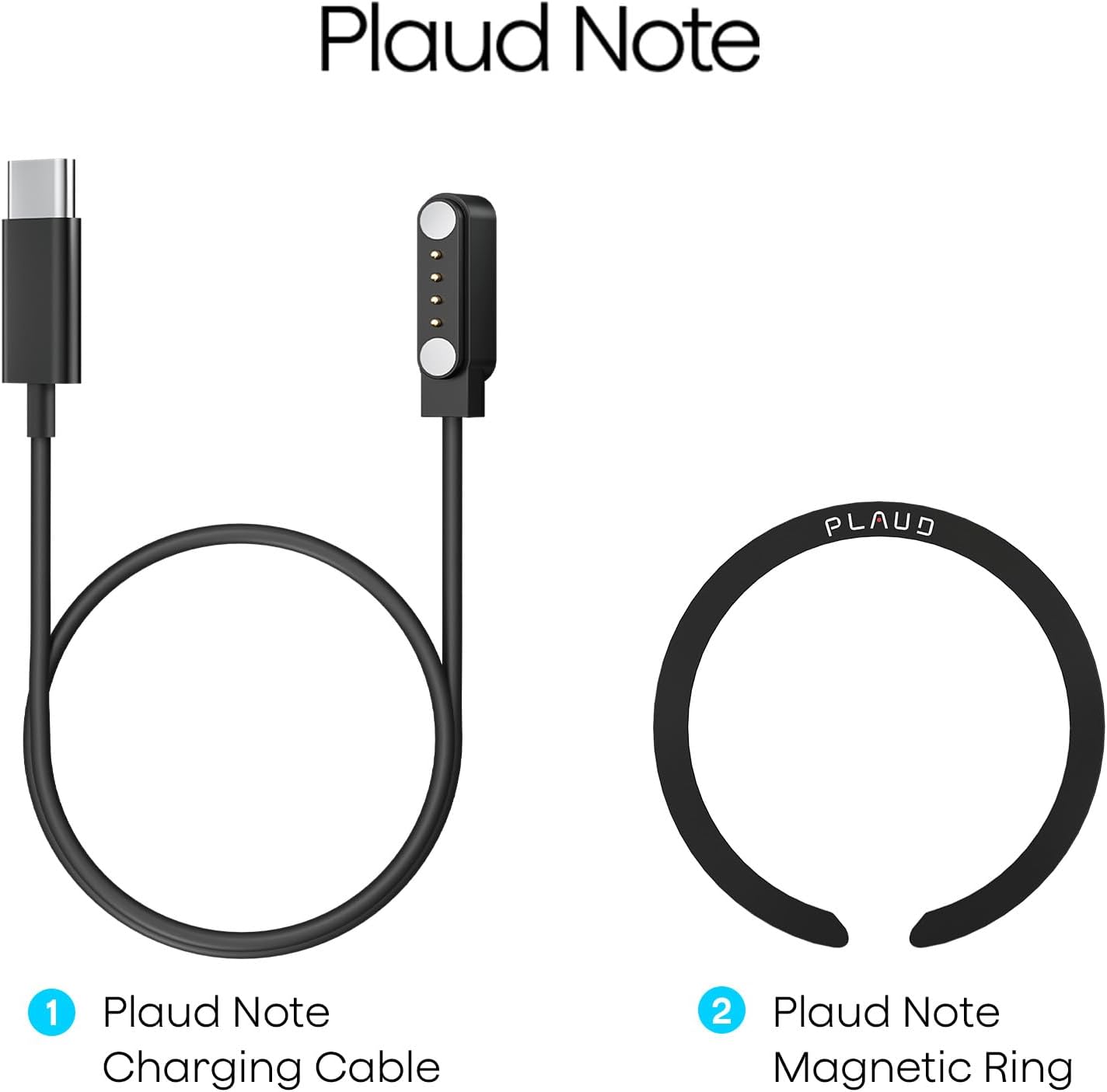
- کابل شارژ مغناطیسی USB-C
- Magnetic Ring (for phone attachment)
- راهنمای شروع سریع
جعبه گشایی ویدیو
Video 2.1: This video demonstrates the unboxing process of the Plaud Note AI Voice Recorder, showing all included items and initial presentation.
3. راه اندازی
3.1 شارژ کردن دستگاه
Before first use, fully charge your Plaud Note. Connect the magnetic charging cable to the charging port on the back of the device and plug the USB-C end into a power source. A full charge typically takes approximately 2 hours.

3.2 Installing the Magnetic Ring (Optional)
The included magnetic ring allows the Plaud Note to securely attach to your smartphone, facilitating call recording and convenient placement. Follow the instructions provided with the magnetic ring for proper installation on your phone or phone case.

۲.۳ دانلود و اتصال برنامه
Download the official Plaud app from your smartphone's app store (iOS or Android). Once installed, open the app and follow the on-screen instructions to bind and connect your Plaud Note via Bluetooth. The device's indicator light will flash white during the binding process.
4. Operating the Plaud Note
۶.۲ حالتهای ضبط
The Plaud Note supports two primary recording modes:
- حالت ضبط تماس: Attach the Plaud Note to the back of your smartphone using the magnetic ring. Ensure the device is positioned near the phone's speaker for optimal audio capture during calls.
- Note Recording Mode: For in-person meetings, lectures, or personal notes, the Plaud Note can be placed independently on a surface to capture ambient audio.

۴.۱ شروع و توقف ضبط
There are two ways to initiate recording:
- دکمه دستگاه: Long-press the designated record button on the Plaud Note. A solid red light indicates that recording has started.
- Plaud App: Open the Plaud app and tap the 'Start Recording' option.
To stop recording, long-press the record button on the device again or tap 'Stop Recording' in the app.
4.3 Transcription and Summarization
After recording, sync your audio files to the Plaud app. The app utilizes advanced AI (GPT-4o & Claude 3.5 Sonnet) to:
- Transcribe: Convert audio into text in 112 languages with high accuracy.
- خلاصه کردن: Generate concise summaries, meeting minutes, and to-do lists from your transcriptions.
- Speaker Labels: Automatically identify and label different speakers in your recordings.
- Audio Trimming: Edit and remove unwanted segments from your audio files.
- Audio Import: Import external audio files for transcription and summarization.
All transcribed and summarized data can be managed within the Plaud App and Web portal, with unlimited cloud storage available.
5. تعمیر و نگهداری
5.1 تمیز کردن
Wipe the Plaud Note with a soft, dry cloth. Avoid using harsh chemicals or abrasive materials, which can damage the device's surface.
5.2 ذخیره سازی
Store the device in a cool, dry place away from direct sunlight and extreme temperatures. When storing for extended periods, ensure the battery is partially charged (around 50%) to prolong its lifespan.
5.3 عمر باتری
The Plaud Note offers up to 30 hours of continuous recording and up to 60 days of standby time on a full charge. Battery performance may vary based on usage patterns and environmental conditions.
5.4 مدیریت داده ها
The device includes 64GB of local memory. For additional storage and accessibility, utilize the unlimited cloud storage provided through the Plaud App and Web portal. Regularly back up important recordings.
6 عیب یابی
6.1 معانی چراغ نشانگر
- چشمک زدن سفید: Ready to Connect / Binding
- قرمز جامد: در حال ضبط
- بنفش چشمک زن: باتری کم
- بنفش جامد: شارژ کردن
- سبز جامد: کاملا شارژ شده
- زرد جامد: خارج از فضای ذخیره سازی
6.2 مسائل رایج
- دستگاه وصل نمیشود: Ensure Bluetooth is enabled on your phone and the Plaud Note is in binding mode (flashing white light). Restart both devices if necessary.
- کیفیت صدای ضعیف: Check the placement of the Plaud Note. For call recording, ensure it's close to the phone's speaker. For in-person recording, place it on a stable surface in the center of the conversation.
- Transcription errors: Ensure clear audio input. Background noise or multiple overlapping speakers can affect accuracy. Utilize the speaker labeling feature for better organization.
- برنامه همگامسازی نمیشود: Verify your internet connection and ensure the Plaud app is updated to the latest version.
For further assistance, refer to the official Plaud support webسایت یا با خدمات مشتری تماس بگیرید.
7. مشخصات
| ویژگی | جزئیات |
|---|---|
| نام تجاری | Plaud |
| مدل | Plaud Note |
| رابط سخت افزار | USB نوع C |
| ضریب فرم میکروفون | ساخته شده در |
| فرمت صوتی | صوتی MP3 |
| جک هدفون | No headphones jack |
| زمان ضبط دیجیتال | 120 hours (total capacity) |
| حالت عملکرد میکروفون | Speech Recognition, Stereo |
| حافظه داخلی | 64 گیگابایت |
| ضبط مداوم | تا 30 ساعت |
| زمان آماده به کار | تا 60 روز |
8. گارانتی و پشتیبانی
Plaud products are covered by a limited warranty. For specific warranty terms and conditions, please refer to the warranty card included with your product or visit the official Plaud website. For technical support, troubleshooting, or customer service inquiries, please contact Plaud customer support through their official channels.
پشتیبانی آنلاین: بازدید کنید www.plaud.ai for FAQs, user guides, and contact information.
9. اطلاعات ایمنی
Please read and follow these safety guidelines to ensure safe operation of your Plaud Note:
- دستگاه را در معرض آب، رطوبت یا دمای بسیار بالا قرار ندهید.
- از افتادن یا قرار دادن دستگاه در معرض ضربه های شدید خودداری کنید.
- فقط از کابل شارژ ارائه شده یا کابل USB-C دارای گواهینامه برای شارژ استفاده کنید.
- Do not attempt to disassemble, repair, or modify the device yourself. Contact authorized service personnel for any repairs.
- دستگاه را دور از دسترس کودکان قرار دهید.


