1. اطلاعات ایمنی مهم
لطفاً قبل از استفاده از این تلویزیون، تمام دستورالعملهای ایمنی و عملیاتی را با دقت مطالعه کنید. این دستورالعملها را برای مراجعات بعدی نگه دارید.
- منبع تغذیه: تلویزیون را فقط به منبع تغذیه مشخص شده وصل کنید.
- تهویه: از تهویه مناسب اطمینان حاصل کنید. منافذ تهویه را مسدود نکنید.
- آب و رطوبت: تلویزیون را در معرض باران یا رطوبت قرار ندهید. اشیاء پر از مایعات را روی تلویزیون قرار ندهید.
- تمیز کردن: قبل از تمیز کردن، تلویزیون را از پریز برق جدا کنید. از یک پارچه نرم و خشک استفاده کنید. از پاک کننده های مایع یا اسپری استفاده نکنید.
- قرار دادن: تلویزیون را روی یک سطح صاف و پایدار قرار دهید. از قرار دادن آن در معرض نور مستقیم خورشید یا نزدیک منابع گرما خودداری کنید.
- رعد و برق: در هنگام رعد و برق یا زمانی که برای مدت طولانی از تلویزیون استفاده نمیشود، آن را از برق بکشید.
- سرویس دهی: سعی نکنید خودتان این محصول را سرویس دهید. کلیه خدمات را به پرسنل خدمات واجد شرایط ارجاع دهید.
۲. چه چیزهایی در جعبه است؟
هنگام باز کردن بستهبندی، لطفاً مطمئن شوید که تمام اقلام ذکر شده در زیر موجود و بدون آسیب هستند:
- Telefunken 40DTFV725 Smart TV
- کنترل از راه دور
- باتری برای کنترل از راه دور
- راهنمای دستورالعمل (این سند)
3. محصول تمام شدview
The Telefunken 40DTFV725 is a 40-inch Full HD Smart TV designed for an immersive viewing experience. It features a frameless design and integrates Dolby Audio for enhanced sound quality.
ویژگی های کلیدی:
- 40-inch Full HD Screen: 1920 x 1080 resolution for clear and detailed images.
- عملکرد تلویزیون هوشمند: Direct access to various content applications via the VIDAA operating system.
- HDR10 (محدوده دینامیکی بالا): Improved contrast and color for enhanced realism.
- صدای دالبی: Quality surround sound experience.
- اتصال جامع: Includes Wi-Fi, HDMI, and USB ports.
- طراحی بدون قاب: Modern aesthetic with minimal bezels.
- USB Recording (DVR): Ability to record programs via USB.
- سازگاری با دستیار صوتی: Works with Alexa and OK Google.

تصویر 3.1: جلو view of the Telefunken 40DTFV725 Smart TV, showcasing طراحی و صفحه نمایش بدون قاب آن.

تصویر ۳: زاویهدار view of the Telefunken 40DTFV725 Smart TV, highlighting its slim profile.

تصویر ۵.۱: کنار view of the Telefunken 40DTFV725 Smart TV, illustrating its thin profile.
4. راه اندازی
4.1 چسباندن پایه
برای اتصال پایه تلویزیون:
- برای جلوگیری از آسیب دیدن صفحه نمایش، تلویزیون را با احتیاط و رو به پایین روی یک سطح نرم و تمیز قرار دهید.
- پایههای پایه را با شیارهای مربوطه در پایین تلویزیون تراز کنید.
- پایهها را با استفاده از پیچهای ارائه شده محکم کنید. مطمئن شوید که محکم بسته شدهاند.
Alternatively, the TV supports VESA wall mounting. Refer to your wall mount's instructions for installation.

Image 4.1: The Telefunken 40DTFV725 Smart TV displayed on its stand in a typical room environment.
۳.۲ اتصال دستگاههای خارجی
The TV offers various ports for connecting external devices. Ensure the TV is powered off before making any connections.

تصویر 4.2: عقب view of the Telefunken 40DTFV725 Smart TV, illustrating the available input and output ports for connectivity.
- پورت های HDMI: پخشکنندههای بلو-ری، کنسولهای بازی یا گیرندههای دیجیتال را وصل کنید.
- پورت USB 2.0: Connect USB storage devices for media playback or DVR functionality.
- ورودی آنتن/کابل: یک آنتن یا کابل برای پخش تلویزیونی وصل کنید.
- درگاه اترنت: برای دسترسی به اینترنت سیمی، یک کابل اترنت وصل کنید.
- خروجی صدا 3.5 میلی متر: سیستمهای صوتی خارجی یا هدفون را وصل کنید.
۱.۴ روشن کردن اولیه و راهاندازی اولیه
- سیم برق را به تلویزیون و سپس به پریز برق وصل کنید.
- دکمه روشن/خاموش را روی کنترل از راه دور یا روی تلویزیون فشار دهید.
- برای تکمیل تنظیمات اولیه، دستورالعملهای روی صفحه را دنبال کنید، که معمولاً شامل موارد زیر است:
- انتخاب زبان.
- اتصال به شبکه (وایفای یا اترنت).
- اسکن کانال
- تنظیمات منطقه زمانی.
۵. کار با تلویزیون
5.1 عملکردهای کنترل از راه دور
The included remote control allows you to navigate the TV's features. Familiarize yourself with the buttons for power, volume, channel, input selection, and smart TV navigation.
5.2 ویژگی های تلویزیون هوشمند (سیستم عامل VIDAA)
Your Telefunken 40DTFV725 runs on the VIDAA operating system, providing access to a variety of streaming services and applications.
- دسترسی به اپلیکیشن ها: Use the remote's home button to access the main Smart TV interface, where you can launch pre-installed applications.
- اتصال شبکه: Ensure your TV is connected to the internet via Wi-Fi or Ethernet to use Smart TV features. Navigate to تنظیمات > شبکه برای پیکربندی اتصال خود.
- کنترل صدا: This TV is compatible with Alexa and OK Google. Follow the on-screen instructions or refer to the Smart TV's help section to set up voice control features.
5.3 USB Recording (DVR)
To record TV programs, connect a USB storage device (e.g., a USB flash drive or external hard drive) to the USB 2.0 port. The TV's DVR function allows you to schedule and record broadcasts. Consult the on-screen menu for detailed instructions on using the DVR feature.
6. تعمیر و نگهداری
۴.۱ تمیز کردن تلویزیون
برای تمیز کردن صفحه تلویزیون و کابینت:
- سیم برق را از پریز جدا کنید.
- صفحه نمایش را به آرامی با یک پارچه نرم و بدون پرز پاک کنید. برای لکههای سرسخت، به آرامی ...ampپارچه را با آب یا یک پاککننده مخصوص صفحه نمایش بپوشانید (مستقیماً روی صفحه نمایش اسپری نکنید).
- کابینت را با یک پارچه نرم و خشک پاک کنید. از استفاده از پاک کننده های ساینده یا حلال ها خودداری کنید.
6.2 به روز رسانی نرم افزار
The TV may receive software updates to improve performance and add new features. It is recommended to keep your TV connected to the internet to receive these updates automatically. You can also check for updates manually via the TV's settings menu (e.g., تنظیمات > سیستم > به روز رسانی نرم افزار).
7 عیب یابی
اگر با تلویزیون خود با مشکلاتی مواجه شدید، به راهحلهای رایج زیر مراجعه کنید:
| مشکل | راه حل ممکن |
|---|---|
| بدون قدرت | Ensure the power cord is securely plugged into both the TV and a working wall outlet. Check if the power outlet is functional. |
| تصویر ندارد، اما صدا دارد | Check the input source. Press the "Input" or "Source" button on your remote to cycle through inputs. Ensure external devices are powered on and connected correctly. |
| صدا نداره ولی تصویر داره | Check the volume level. Ensure the TV is not muted. If using external audio, check its connections and volume. |
| کنترل از راه دور کار نمی کند | باتریهای کنترل از راه دور را تعویض کنید. مطمئن شوید که هیچ مانعی بین کنترل از راه دور و حسگر مادون قرمز تلویزیون وجود ندارد. |
| نمیتوان به وایفای وصل شد | مطمئن شوید که روتر وایفای شما روشن و کار میکند. رمز عبور وایفای را دوباره با دقت وارد کنید. تلویزیون و روتر خود را مجدداً راهاندازی کنید. |
| برنامههای تلویزیون هوشمند بارگیری نمیشوند | اتصال اینترنت خود را بررسی کنید. تلویزیون را مجدداً راهاندازی کنید. مطمئن شوید که نرمافزار تلویزیون بهروز است. |
8. مشخصات
Detailed technical specifications for the Telefunken 40DTFV725 Smart TV:
| ویژگی | جزئیات |
|---|---|
| نام تجاری | TELEFUNKEN |
| نام مدل | 40DTFV725 |
| اندازه صفحه نمایش | 40 اینچ |
| فناوری نمایش | پنل LED، VA |
| قطعنامه | Full HD (1920 x 1080) |
| نرخ تازه سازی | 60 هرتز |
| نسبت تصویر | 16:9 |
| Viewing angle | 178 درجه |
| سیستم عامل | VIDAA |
| فناوری تیونر | DVB-T2/C/S2 |
| رمزگذاری صدا | DTS, Dolby Digital Plus |
| پیکربندی صدای فراگیر | 5.1 |
| فناوری اتصال | اترنت، HDMI، USB، وایفای |
| پورت های HDMI | (Number not specified, but typically 2-3 for Smart TVs) |
| مجموع پورت های USB | 1 (USB 2.0) |
| ویژگی های اضافی | Frameless Design, VESA Wall Mount Compatible, USB Recording (DVR) |
| لوازم جانبی سازگار | Works with Alexa, Works with OK Google |
| ابعاد محصول (LxWxH) | 90.2 × 16.7 × 55.3 سانتی متر |
| وزن مورد | 6 کیلوگرم |
| جلدtage | 220 ولت |
| باتری های گنجانده شده است | بله (برای ریموت) |
| پشتیبانی از بلوتوث | خیر |
| کلاس بهره وری انرژی | E |
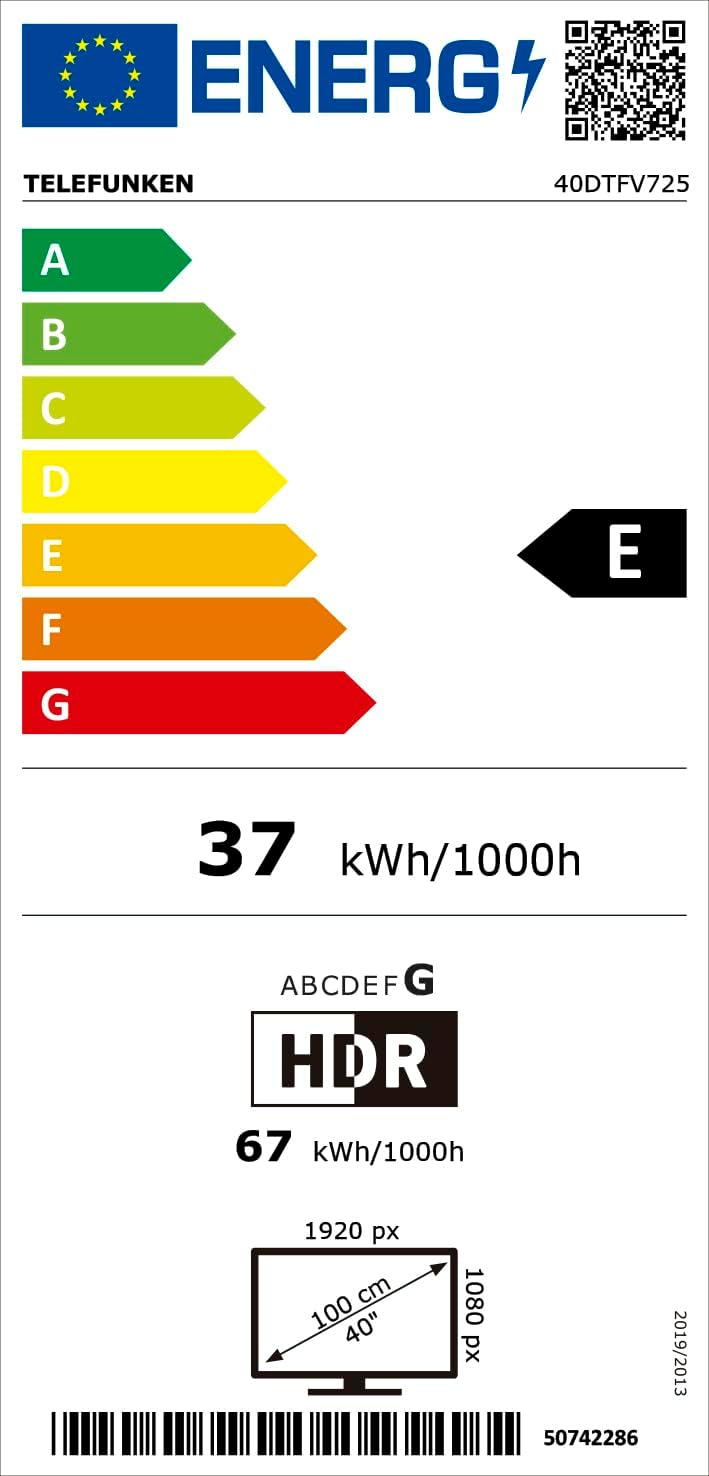
Image 8.1: Energy efficiency label for the Telefunken 40DTFV725, indicating an 'E' rating and power consumption details. For more information, visit the پایگاه داده EPREL.
9. گارانتی و پشتیبانی
Your Telefunken 40DTFV725 Smart TV comes with a standard manufacturer's warranty. Please refer to the warranty card included with your purchase for specific terms and conditions.
For technical support, troubleshooting beyond this manual, or warranty claims, please contact Telefunken customer service. Contact information can typically be found on the official Telefunken webسایت یا در مستندات خرید شما.
The package includes the manual, remote control, and batteries. Ensure you retain your proof of purchase for warranty purposes.


