1. مقدمه
This instruction manual provides comprehensive guidance for the installation, operation, and maintenance of your Atcall Fast Link Cell Phone Booster. This device is designed to enhance cellular signal strength within your home or office, supporting all major U.S. carriers across multiple frequency bands. Please read this manual thoroughly before installation to ensure optimal performance and safe operation.
2. محتویات بسته
مطمئن شوید که تمام موارد ذکر شده در زیر در بسته شما موجود است:
- 1 x Signal Booster (with built-in indoor antenna)
- ۱ عدد آنتن جهتدار بیرونی
- 2 x 30ft RG6 Cables
- 1 عدد آداپتور برق
- Mounting Kits (for roof/pole mount)
- F Female to F Female Connector
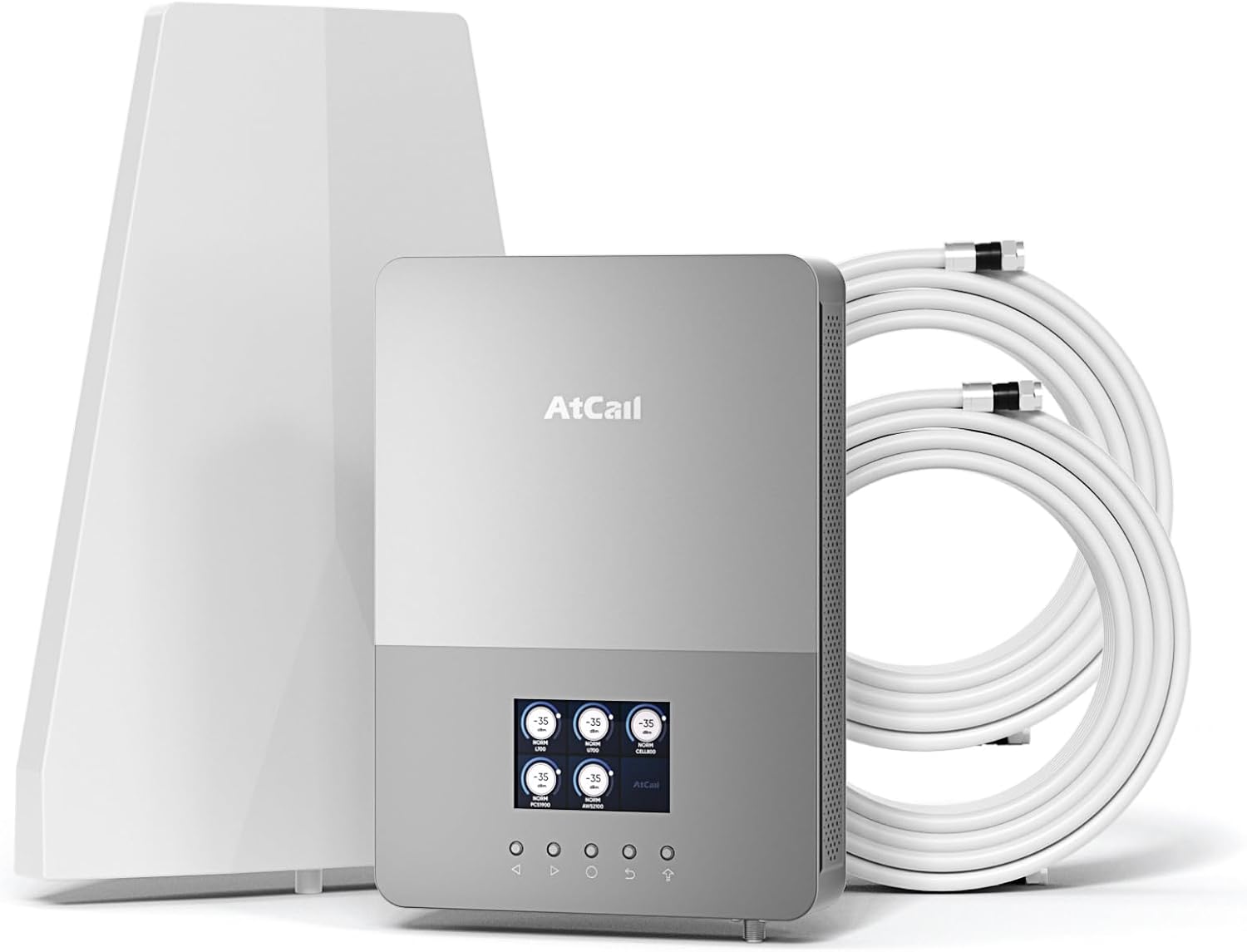
شکل 2.1: Components included in the Atcall Fast Link Cell Phone Booster package. This image displays the main booster unit with its built-in indoor antenna, the separate outdoor directional antenna, two 30-foot coaxial cables, the power adapter, and mounting hardware.

شکل 2.2: Detailed diagram showing the package contents and approximate dimensions of the booster unit (8.35 x 11.81 inches) and outdoor antenna (8.2 x 11.6 inches). Also shown are the two 30ft RG6 cables, power supply, F female to F female connector, and roof/pole mount bracket.
3. محصول تمام شدview
The Atcall Fast Link Cell Phone Booster is designed to improve cellular signal strength for various U.S. carriers. It features a real-time LCD monitor for easy setup and troubleshooting.
3.1 ویژگی های کلیدی
- پشتیبانی پنج باند: Works on bands 12/17, 13, 5, 2/25, and 4/66.
- مانیتور LCD در زمان واقعی: Displays working status, signal strength (dBm), uplink/downlink gain, and frequency band.
- Wide Carrier Compatibility: Supports Verizon, AT&T, T-Mobile, Sprint, Straight Talk, U.S. Cellular, and other U.S. carriers.
- پوشش: Up to 5,000 sq ft, suitable for homes, offices, warehouses, and rural areas.
- 5G Compatible: Enhances signal for 5G devices.
- Built-in Indoor Antenna: نصب را ساده میکند.
- FCC Approved: Complies with FCC regulations (FCC ID: 2A34B-SFZN005).
3.2 عملکرد صفحه نمایش LCD
The integrated LCD screen provides critical information for monitoring and optimizing the booster's performance.

شکل 3.1: The Smart LCD Display provides a clear view of signal strength. It shows real-time downlink signal strength (dBm), uplink and downlink gain, the working status of each band, and allows for frequency band switching. This visual feedback aids in installation and troubleshooting.
- Real Time Downlink Signal Strength (dBm): Indicates the strength of the signal received by the booster.
- وضعیت کار: Shows if a particular frequency band is active and boosting.
- باند فرکانس: Identifies the specific cellular band being boosted (e.g., Band 12/17, Band 13).
- Uplink Gain / Downlink Gain: را نمایش می دهد amplification level for signals transmitted from your phone (uplink) and received by your phone (downlink).
- سوئیچ باند: Allows selection or deselection of specific frequency bands.
4. راهنمای راه اندازی
نصب صحیح برای عملکرد بهینه بسیار مهم است. این مراحل را با دقت دنبال کنید.
4.1 بررسی قبل از نصب
- Check Outdoor Signal Strength: Before installation, ensure you have at least 1-2 bars of existing outdoor signal. The booster amplifies existing signal; it does not create signal where none exists.
- Identify Your Carrier's Frequency Band: Use your cell phone to determine the frequency band your carrier uses.
- برای آیفون: Dial *3001#12345#* then press the call button. Click "All Metrics," then "Serving Cell Info," and check "Band Info."
- برای گوشی اندروید: Download "Network Cell Info Lite" from your app store. Choose "GAUGE" and then check "BAND."

شکل 4.1: Visual guide demonstrating how to check the frequency band on both iPhone and Android devices. This step is important to confirm compatibility and optimize booster settings.
4.2 مراحل نصب
- نصب آنتن بیرونی:
- Choose a location on your roof or an exterior wall that has the strongest existing cellular signal.
- Mount the directional outdoor antenna using the provided mounting kit. Ensure it is pointed towards the nearest cell tower.
- Maintain a minimum horizontal distance of 20 feet (6 meters) and a vertical distance of 20 feet (6 meters) between the outdoor antenna and the indoor booster unit. A straight-line distance of over 30 feet (9 meters) is recommended.
- Install the Indoor Booster Unit:
- Place the booster unit (with built-in indoor antenna) in a central location within your desired coverage area.
- Ensure the unit is positioned away from metal objects and other electronic devices that may cause interference.
- کابل ها را وصل کنید:
- Connect one end of a 30ft RG6 cable to the outdoor antenna.
- Route the cable indoors and connect the other end to the "Outdoor" port on the booster unit.
- مطمئن شوید که همه اتصالات با انگشت محکم شدهاند.
- اتصال برق:
- Connect the power adapter to the booster unit's power input.
- آداپتور برق را به یک پریز برق استاندارد وصل کنید.
- روشن و مانیتور:
- The booster will power on, and the LCD screen will display real-time signal information.
- Adjust the outdoor antenna's direction slightly while monitoring the LCD display to achieve the highest possible downlink signal strength (dBm) and gain.

شکل 4.2: Installation instruction diagram showing the recommended minimum separation distances: greater than 20 feet (6m) horizontally and vertically, and greater than 30 feet (9m) in a straight line between the outdoor antenna and the indoor booster unit to prevent oscillation.
5. دستورالعمل های عملیاتی
Once installed and powered on, the Atcall Fast Link Cell Phone Booster operates automatically. The LCD display provides continuous feedback on its performance.
۵.۳ نظارت بر عملکرد
- The LCD screen will show the signal strength (dBm) for each supported band. A higher (less negative) dBm value indicates a stronger signal.
- Observe the uplink and downlink gain values. These indicate the amplification provided by the booster.
- If a band is not showing activity or has low signal, ensure the outdoor antenna is correctly aimed and there is sufficient isolation between the indoor and outdoor antennas.
5.2 Band Selection (if applicable)
The booster typically operates on all supported bands simultaneously. If you need to disable a specific band, use the "Band Switch" function on the LCD display as indicated in Figure 3.1.
6 عیب یابی
If you experience issues with your cell phone booster, refer to the following common problems and solutions.
| مشکل | علت احتمالی | راه حل |
|---|---|---|
| بهبود سیگنال وجود ندارد یا سیگنال ضعیف است. |
|
|
| Booster LCD shows "OSC" or oscillation warning. | Feedback loop between indoor and outdoor antennas (antennas are too close). | Increase the physical separation between the outdoor and indoor antennas. Ensure they are not facing each other directly. |
| Power light is off. | بدون منبع تغذیه | Check power adapter connection and wall outlet. Ensure the power adapter is functioning. |
| Specific band not boosting. |
|
|
If problems persist after attempting these solutions, please contact Atcall customer support for assistance.
7. مشخصات
| ویژگی | جزئیات |
|---|---|
| مدل | SFZN005 |
| باندهای پشتیبانی شده | Band 12/17, Band 13, Band 5, Band 2/25, Band 4/66 |
| مکس گین | 68 دسی بل |
| منطقه تحت پوشش | تا 5,000 فوت مربع |
| نمایش | Real-Time LCD Monitor |
| آنتن داخلی | Built-in Panel Antenna |
| آنتن فضای باز | آنتن مسیریابی |
| نوع کابل | کابل کواکسیال RG6 |
| شناسه FCC | 2A34B-SFZN005 |
| وزن مورد | 6.8 پوند |
| ابعاد بسته بندی | 13.8 x 9.5 x 5.5 اینچ |
8. مطابقت با FCC
این دستگاه با قسمت 15 قوانین FCC مطابقت دارد. عملکرد مشروط به دو شرط زیر است: (1) این دستگاه ممکن است تداخل مضر ایجاد نکند و (2) این دستگاه باید هرگونه تداخل دریافتی را بپذیرد، از جمله تداخلی که ممکن است باعث عملکرد ناخواسته شود.
شناسه FCC: 2A34B-SFZN005
نکته مهم: This is a CONSUMER device. Before use, you باید این دستگاه را ثبت کنید with your wireless provider and have your provider's consent. Most wireless providers consent to the use of signal boosters. Some providers may not consent to the use of this device on their network. If you are unsure, contact your provider. You MUST OPERATE this device with approved antennas and cables as specified by the manufacturer. Antennas نباید be installed within 20 centimeters (8 inches) of any person. You باید در صورت درخواست FCC یا ارائه دهنده خدمات بی سیم دارای مجوز، فوراً کار این دستگاه را متوقف کنید.

شکل 8.1: عقب view of the Atcall booster unit displaying the FCC compliance label. The label includes the HVIN, IC, and FCC ID, along with important consumer device registration and operation warnings.
9. گارانتی و پشتیبانی
Atcall provides a limited warranty for this product. For detailed warranty information, please refer to the warranty card included in your package or visit the official Atcall webسایت
For technical support, troubleshooting assistance, or any questions regarding your Atcall Fast Link Cell Phone Booster, please contact our customer service team:
- ایمیل: [ایمیل پشتیبانی مشتری را اینجا وارد کنید]
- تلفن: [شماره تلفن پشتیبانی مشتری را اینجا وارد کنید]
- Webسایت: Visit the Atcall Store on Amazon
Our professional tech-support team is available to assist you.
