مقدمه
Welcome to the GOBOULT Mirage Smart Watch user manual. This guide provides detailed instructions on how to set up, operate, and maintain your new smartwatch. Please read this manual thoroughly to ensure optimal performance and longevity of your device.
محصول تمام شده استview
The GOBOULT Mirage Smart Watch is a feature-rich device designed to enhance your daily life with advanced health monitoring, communication, and fitness tracking capabilities. It features a vibrant 1.39-inch HD display, Bluetooth calling, and a durable zinc alloy frame.
ویژگی های کلیدی:
- نمایشگر ۱۰.۲۵ اینچی اچدی: Bright and clear screen with 500 nits brightness and 360x360 pixel resolution.
- تماس بلوتوثی: Make and receive calls directly from your wrist with a built-in speaker and microphone.
- پایش جامع سلامت: Includes SpO2, heart rate, blood pressure, sleep tracking, breath training, and menstrual cycle tracking.
- 120+ حالت ورزشی: Track a wide range of physical activities with detailed metrics.
- دستیار صوتی هوش مصنوعی: Hands-free control and access to features.
- مقاومت در برابر آب IP67: Designed to withstand splashes and dust.
- صفحه های ساعت قابل تنظیم: Over 300 cloud-based watch faces to personalize your device.
- اعلام های هوشمند: دریافت هشدار برای تماسها، پیامها و اعلانهای برنامه.
- عمر طولانی باتری: حداکثر 7 روز استفاده معمولی.
آنچه در جعبه وجود دارد:
- GOBOULT Mirage Smart Watch (Coal Black)
- کابل شارژ
- راهنمای کاربر
- کارت گارانتی

تصویر: تمام شدview of the GOBOULT Mirage Smart Watch highlighting its main features.
راهنمای راه اندازی
۱. شارژ کردن ساعت هوشمند
- کابل شارژ مغناطیسی را به پینهای شارژ پشت ساعت هوشمند خود وصل کنید.
- سر USB کابل را به یک آداپتور برق USB استاندارد (5 ولت/1 آمپر توصیه میشود) یا پورت USB کامپیوتر وصل کنید.
- The watch display will show a charging indicator. A full charge takes approximately 120 minutes.
- قبل از شارژ، مطمئن شوید که پینهای شارژ تمیز و خشک هستند تا از خوردگی جلوگیری شود.
2. روشن/خاموش کردن
- روشن کردن: Press and hold the side button (digital crown) for a few seconds until the GOBOULT logo appears.
- خاموش: From the watch face, swipe down to access quick settings, or navigate to the settings menu. Select "Power Off" and confirm. Alternatively, press and hold the side button until the power off option appears.
۳.۲. جفت شدن با تلفن هوشمند شما
- Download the official GOBOULT companion app from your smartphone's app store (available for iOS and Android).
- اطمینان حاصل کنید که بلوتوث در گوشی هوشمند شما فعال است.
- Open the GOBOULT app and follow the on-screen instructions to create an account or log in.
- In the app, select "Add Device" or a similar option to search for your smartwatch.
- Select "GOBOULT Mirage" from the list of available devices.
- درخواست جفتسازی را هم در گوشی هوشمند و هم در ساعت هوشمند خود تأیید کنید.
- Once paired, the watch will synchronize data with your phone, and you can customize settings through the app.
دستورالعمل های عملیاتی
ناوبری پایه:
- صفحه لمسی: برای پیمایش در منوها و اعلانها، انگشت خود را به چپ/راست، بالا/پایین بکشید. برای انتخاب موارد، ضربه بزنید.
- Digital Crown (Side Button):
- یک بار فشار دهید: Return to the watch face from any screen, or wake the screen.
- فشار دهید و نگه دارید: Power on/off, or access the AI Voice Assistant (configurable).
- چرخش: در منوها، لیستها حرکت کنید یا تنظیمات را تنظیم کنید.
- دکمه میانبر: The second physical button on the side can be customized for quick access to specific functions, such as launching sports modes.

Image: Digital crown and button functionalities for navigation and quick access.
پایش سلامت
The GOBOULT Mirage Smart Watch offers a comprehensive suite of health tracking features. For accurate readings, ensure the watch is worn snugly on your wrist, about one finger's width from your wrist bone.
- پایش ضربان قلب: این ساعت به طور مداوم ضربان قلب شما را ردیابی میکند. View دادههای لحظهای روی ساعت یا روندهای دقیق در برنامه.
- نظارت بر SpO2 (اکسیژن خون): Measure your blood oxygen levels on demand. Navigate to the SpO2 function on your watch and remain still for accurate results.
- مانیتورینگ فشار خون: Access the blood pressure feature on your watch for readings.
- نظارت بر خواب: Wear your watch to bed to track your sleep patterns, including deep sleep, light sleep, and awake times. Data is available in the app.
- Breath Training Mode: Follow guided breathing exercises to help reduce stress and improve relaxation.
- پیگیری فعالیت: Monitors steps, distance, and calories burned throughout the day.
- یادآوری نوشیدن آب: Set reminders in the app to ensure you stay hydrated.
- یادآوری کم تحرک: Receive alerts when you've been inactive for too long, encouraging you to move.
- ردیابی چرخه قاعدگی: For female users, track and predict menstrual cycles through the companion app.

Image: The watch's health sensors and a summary of its health monitoring capabilities.
حالت های ورزشی
The GOBOULT Mirage Smart Watch supports over 120 sports modes to accurately track your workouts. From running to yoga, you can monitor your performance and progress.
Using Sports Modes:
- Access the sports mode menu from the watch's main interface or by using the dedicated shortcut button.
- Scroll through the list and select your desired activity (e.g., Running, Cycling, Yoga, Cricket, Badminton, Basketball).
- Tap to start the activity. The watch will begin recording data such as duration, heart rate, calories burned, and distance (where applicable).
- To pause or end an activity, swipe right or press the side button and follow the on-screen prompts.
- Review your workout summaries on the watch or in detail within the companion app.

Image: The watch interface showing various sports modes and quick access options.
تماس بلوتوث و اعلانهای هوشمند
With Bluetooth 5.3 connectivity, your GOBOULT Mirage Smart Watch allows you to manage calls and receive notifications directly on your wrist.
تماس بلوتوثی:
- مطمئن شوید که ساعت شما از طریق بلوتوث با گوشی شما جفت شده است.
- برقراری تماس: برای شروع تماس، به صفحه شماره گیری یا لیست مخاطبین روی ساعت خود دسترسی پیدا کنید.
- دریافت تماس: When a call comes in, the watch will display the caller ID. You can answer or reject the call directly from your wrist using the built-in speaker and microphone.
- Contact Sync: Synchronize your phone contacts with the watch through the companion app for easy access.
اعلام های هوشمند:
- Enable app notifications in the GOBOULT companion app on your smartphone.
- Your watch will display incoming messages, social media alerts, and other app notifications.
- Swipe up or down on the watch face to view تاریخچه اعلانهای شما

Image: Bluetooth calling features and interface on the smartwatch.

Image: Smart notifications and other quick access features like calculator and voice assistant.
سفارشی سازی
چهره های تماشا:
Personalize your GOBOULT Mirage Smart Watch with over 300 cloud-based watch faces. You can change the watch face directly from the device or through the companion app.
- در دیده بان: از صفحه ساعت، صفحه را فشار داده و نگه دارید. برای مرور صفحههای ساعت موجود، انگشت خود را به چپ یا راست بکشید و برای انتخاب، ضربه بزنید.
- از طریق اپلیکیشن: Open the GOBOULT app, navigate to the watch face section, and explore a wider selection of designs. Download and apply your preferred watch face.

تصویر: مثالamples of customizable watch faces available for the smartwatch.
ویژگی های اضافی
دستیار صوتی هوش مصنوعی:
Activate the AI Voice Assistant (compatible with Hey Siri and Ok Google) by long-pressing the digital crown or through a dedicated menu option. Use voice commands to perform various tasks hands-free.
تلفن من را پیدا کن:
If your paired smartphone is misplaced, use the "Find My Phone" feature on your watch to make it ring or vibrate, helping you locate it quickly.
- Go to the watch menu.
- Select the "Find Phone" option.
- The connected phone will ring or vibrate.
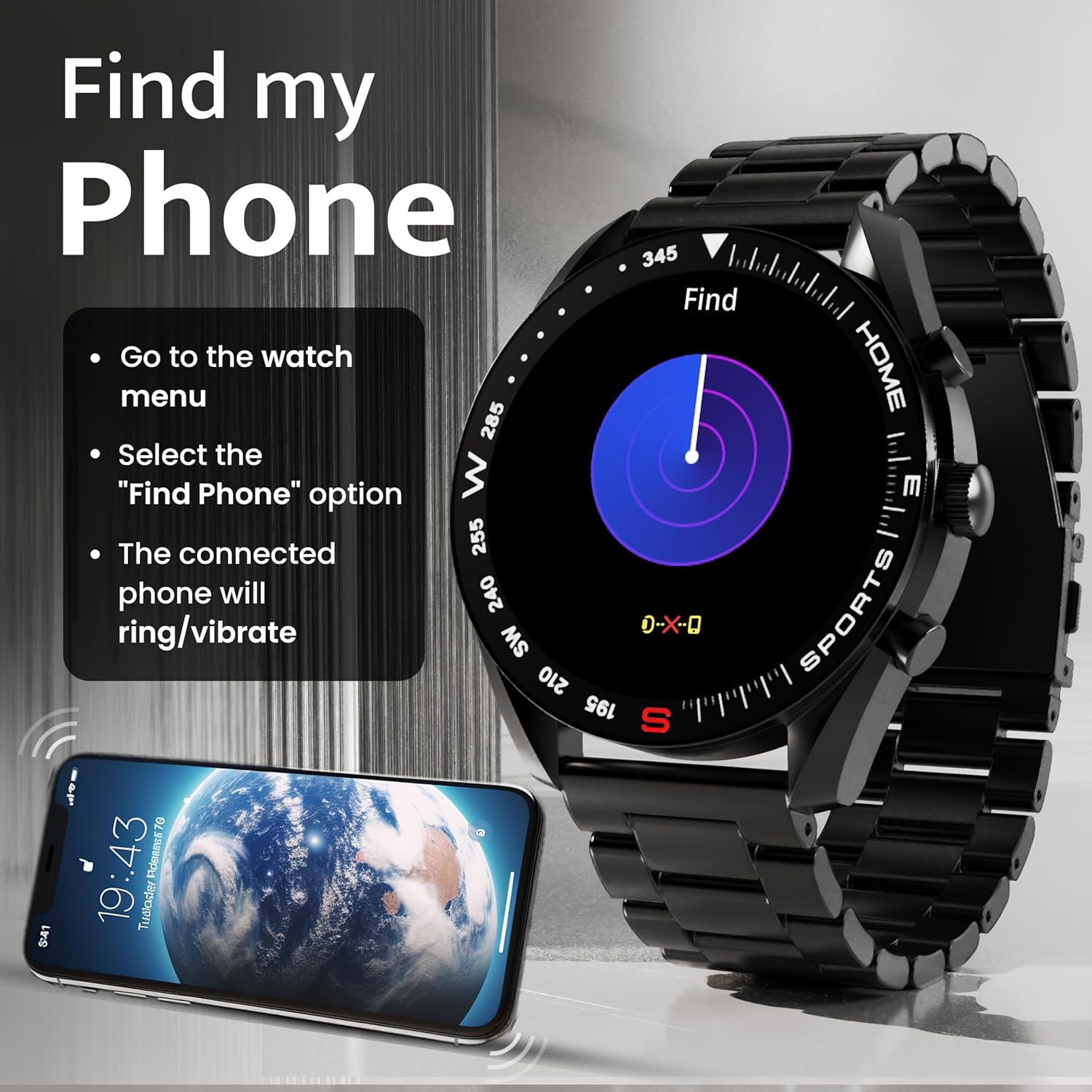
Image: How to use the 'Find My Phone' feature on the smartwatch.
بازی های کوچک:
The watch includes several mini-games for entertainment, such as 2048, Battleship, Hamster, and Young Bird.

تصویر: مثالamples of mini-games available on the smartwatch.
تعمیر و نگهداری
Cleaning Your Smart Watch:
- صفحه نمایش و بدنه ساعت را با یک پارچه نرم و بدون پرز پاک کنید.
- برای کثیفیهای سرسخت، کمی dampپارچه را با آب بشویید. از استفاده از مواد شیمیایی قوی یا مواد ساینده خودداری کنید.
- Clean the charging pins regularly with a dry cloth or cotton swab to ensure proper charging.
مقاومت در برابر آب (IP67):
The GOBOULT Mirage Smart Watch is IP67 water-resistant, meaning it is protected against dust ingress and can withstand immersion in water up to 1 meter for up to 30 minutes. However, it is not suitable for swimming, showering with hot water, or diving. Avoid exposure to high-pressure water or corrosive liquids.

Image: Information regarding the IP67 water and dust resistance of the smartwatch.
تنظیم بند:
The watch comes with a metallic strap adjustment tool. Refer to the included instructions or a professional for adjusting the strap length to ensure a comfortable and secure fit.

Image: The watch's zinc alloy frame and the metallic strap adjustment tool.
عیب یابی
- ساعت روشن نمیشود: مطمئن شوید که ساعت کاملاً شارژ شده است. آن را به کابل شارژ وصل کنید و اجازه دهید حداقل 30 دقیقه شارژ شود، سپس دوباره آن را روشن کنید.
- جفت شدن با تلفن امکانپذیر نیست:
- مطمئن شوید که بلوتوث روی گوشی و ساعت شما فعال است.
- Ensure the watch is within the Bluetooth range (up to 10 meters).
- هم گوشی و هم ساعت هوشمند خود را ریستارت کنید.
- حافظه پنهان بلوتوث را در تلفن خود پاک کنید یا دستگاه را فراموش کنید و دوباره جفتسازی را امتحان کنید.
- Ensure the GOBOULT companion app is updated to the latest version.
- دادههای نادرست سلامت: مطمئن شوید که ساعت به طور محکم روی مچ دست شما بسته شده است، نه خیلی تنگ و نه خیلی گشاد. حسگرهای پشت ساعت را تمیز کنید. در حین اندازهگیری از حرکت بیش از حد خودداری کنید.
- اعلانها نمایش داده نمیشوند:
- Check if notifications are enabled for the specific apps in the GOBOULT companion app.
- Ensure your phone's notification settings allow the GOBOULT app to display alerts.
- مطمئن شوید که ساعت به درستی از طریق بلوتوث به گوشی شما متصل شده است.
- عمر باتری کوتاه: Reduce screen brightness, disable unnecessary features like continuous heart rate monitoring if not needed, and limit the number of active notifications. Ensure the watch is fully charged.
- صفحه لمسی پاسخگو نیست: ساعت را مجدداً راه اندازی کنید. اگر مشکل همچنان ادامه داشت، مطمئن شوید که صفحه نمایش تمیز و خشک است.
مشخصات
| ویژگی | جزئیات |
|---|---|
| نام مدل | سراب |
| اندازه نمایشگر | 1.39 اینچ HD |
| وضوح نمایش | 360 x 360 پیکسل |
| روشنایی | 500 Nits Peak Brightness |
| قابلیت اتصال | بلوتوث 5.3 |
| مقاومت در برابر آب | IP67 |
| مواد قاب | آلیاژ روی |
| نوع باتری | لیتیوم پلیمر |
| میانگین عمر باتری | تا 7 روز |
| زمان شارژ | حدودا 120 دقیقه |
| سازگاری سیستم عامل | iOS، اندروید |
| وزن مورد | 106 گرم |
| اجزای شامل | Smart Watch, Charging Cable, User Manual, Warranty Card |
گارانتی و پشتیبانی
اطلاعات گارانتی:
Your GOBOULT Mirage Smart Watch comes with a manufacturer's warranty. Please refer to the included Warranty Card for specific terms, conditions, and duration of the warranty. Keep your purchase receipt as proof of purchase.
پشتیبانی مشتری:
If you encounter any issues or have questions not covered in this manual, please contact GOBOULT customer support. Contact details can typically be found on the Warranty Card or the official GOBOULT webسایت


