1. محصول تمام شدview
The TRYX Panorama 360 White is an advanced all-in-one (AIO) liquid cooling system designed for high-performance computing. It features a unique 6.5-inch curved screen on the pump block, offering a 2K display with a 60Hz refresh rate for dynamic content display. This AIO cooler is equipped with an Asetek 8th generation pump for efficient heat dissipation and comes with three pre-installed ROTA PRO 120 fans, known for their high airflow and static pressure, utilizing Liquid Crystal Polymer (LCP) blades for durability and quiet operation. The system is highly customizable via the TRYX KANALI software, allowing for screen content management and comprehensive fan control.

Image 1.1: The TRYX Panorama 360 White AIO liquid cooler with its included ROTA PRO 120 fan.
2. ویژگی های کلیدی
- 6.5-inch Curved Screen: Features a 6.5-inch curved display with 2K resolution and 60Hz refresh rate, providing an anamorphic view for various content types. The L-shaped screen design ensures full visibility from multiple angles.
- Asetek 8th Gen Pump: Optimized pump design with a strong, stable 3-phase motor, supporting up to 320W TDP. Includes 40% thicker tubing and a 30mm high-density fin radiator for efficient heat transfer.
- TRYX KANALI Software: Enables ultimate customization with features like Instant Screen Content Switching, Split-Screen Display Capability, Quick Recording, and Comprehensive Fan Control. Supports PNG/JPG/GIF/MP4/AVI media (1080P, 500MB maximum).
- ROTA PRO 120 Fans: Three pre-installed 120mm fans with LCP (Liquid Crystal Polymer) material blades, offering 81.32 CFM airflow, 3.66 mmAq static pressure, and low noise levels under 30.97 dB(A) at full load. Features FDB bearing for stability and quiet operation.
- سازگاری بالا: Includes all-metal mounting hardware for reliable installation on Intel LGA 1851/1700/1200/1151/1150/1155 and AMD AM4/AM5 sockets.

تصویر 2.1: تمام شدview of key features including the 6.5-inch AMOLED display, Asetek 8th Gen cooling, and KANALI software customization.

Image 2.2: Details on the anti-glare tempered glass cover and full adhesion technology for the display.
۱. راهاندازی و نصب
3.1 محتویات بسته
بررسی کنید که آیا همه اجزا در بسته موجود هستند یا خیر:
- TRYX Panorama 360 White AIO Liquid Cooler Unit (Pump with integrated screen, Radiator with pre-attached tubing)
- 3 x ROTA PRO 120 White High Performance LCP Case Fans (pre-installed on radiator)
- All-metal Mounting Hardware Kit (for Intel and AMD sockets)
- USB Cable for KANALI Software Connectivity
- Fan and Pump Power Cables
- راهنمای کاربر (این سند)
3.2 سیستم مورد نیاز
Ensure your system meets the following compatibility requirements:
- سازگاری با سوکت CPU: Intel LGA 1851, 1700, 1200, 1151, 1150, 1155; AMD AM4, AM5.
- سازگاری کیس: Sufficient space for a 360mm radiator (typically top or front mounting).
- منبع تغذیه: Adequate power connectors for pump and fans.
- سیستم عامل: Windows 10/11 for KANALI software functionality.
3.3 مراحل نصب
Follow these general steps for installation. Refer to the detailed diagrams in the physical manual for precise instructions for your specific CPU socket type.
- مادربرد را آماده کنید: صفحه پشتی و پایههای مناسب برای سوکت CPU خود (اینتل یا AMD) را نصب کنید.
- Mount Pump Block: Apply thermal paste to the CPU (if not pre-applied on the cold plate). Position the pump block onto the CPU and secure it with the provided mounting screws, ensuring even pressure.
- نصب رادیاتور: Mount the 360mm radiator with the pre-installed fans to an available fan mounting location in your PC case (e.g., top or front panel). Ensure proper airflow direction.
- کابل های اتصال:
- کابل برق پمپ را به هدر CPU_FAN یا AIO_PUMP روی مادربرد خود وصل کنید.
- Connect the fan power cables (from the ROTA PRO 120 fans) to available fan headers on your motherboard or a fan controller.
- Connect the USB cable from the pump block to an available internal USB 2.0 header on your motherboard. This is essential for KANALI software functionality.
- مدیریت کابل: Route all cables neatly to ensure proper airflow within the case.

Image 3.1: Diagram illustrating the components of the Asetek 8th Gen pump, including the micro-convex copper base and metal fitting.
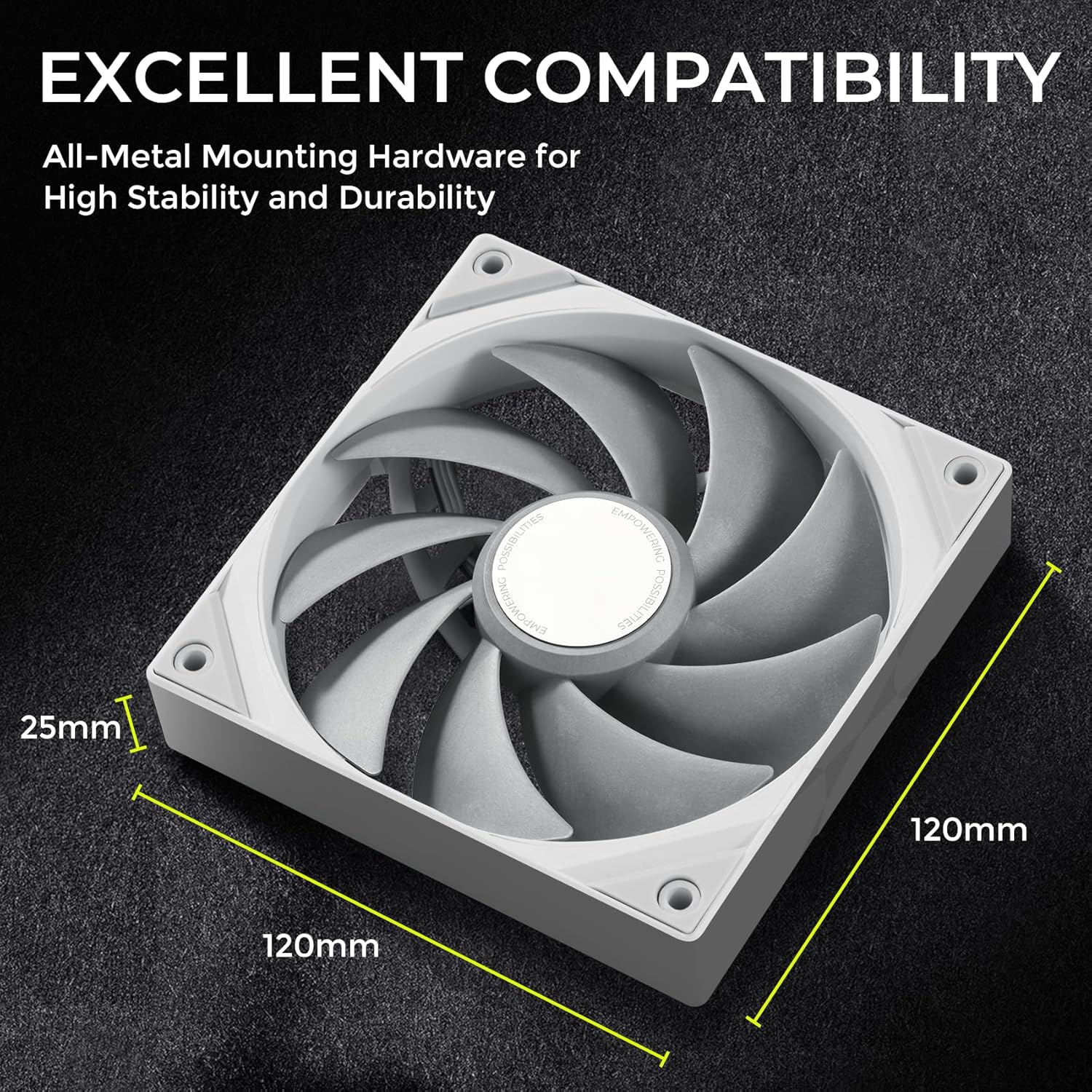
Image 3.2: Dimensions of the ROTA PRO 120 fan, important for case compatibility.
4. دستورالعمل های عملیاتی
4.1 KANALI Software Installation
To unlock the full potential of your TRYX Panorama 360 AIO, download and install the TRYX KANALI software from the official TRYX webبرای نصب، دستورالعملهای روی صفحه را دنبال کنید.
4.2 Screen Customization
The KANALI software provides extensive options for customizing the 6.5-inch curved screen:
- Instant Screen Content Switching: Easily switch between various pre-set displays or your custom content.
- نمایشگر تقسیم صفحه: Utilize the L-shaped screen to display two different pieces of content simultaneously.
- Media Upload: Upload your own PNG, JPG, GIF images, or MP4, AVI videos (up to 1080P resolution, 500MB file size) to personalize the display.
- ضبط سریع: Record screen content directly from the software.
- System Information Display: Monitor CPU/GPU temperatures, fan speeds, and other system metrics directly on the screen.
- Interactive Filters: Apply visual effects like 'Rain' or 'Smoky' to the screen content for enhanced interaction.

Image 4.1: KANALI software interface showing options for screen content, including full/splitting screen modes and media compatibility.

Image 4.2: KANALI software demonstrating screen splitting and system information display capabilities.

Image 4.3: KANALI software showcasing interactive screen filters like 'Rain' and 'Smoky'.
4.3 کنترل فن
The KANALI software also provides comprehensive control over the ROTA PRO 120 fans and the integrated VRM fan:
- تنظیم سرعت فن: Set fan speeds manually or choose from pre-defined profiles (e.g., Low Speed, Mid Speed, High Speed).
- حالت هوشمند: Configure custom fan curves based on CPU temperature for optimal cooling performance and noise levels.
- VRM Fan Control: Manage the integrated 60mm VRM fan with four-speed modes and custom speed curves to efficiently cool the motherboard's Voltagماژولهای تنظیمکننده الکترونیکی.

Image 4.4: KANALI software interface for controlling the VRM fan, including smart mode and custom speed curves.
5. تعمیر و نگهداری
Regular maintenance ensures optimal performance and longevity of your TRYX Panorama 360 AIO:
- تمیز کردن گرد و غبار: به طور دورهای گرد و غبار را از روی پرههای رادیاتور و پرههای فن با استفاده از هوای فشرده یا یک برس نرم تمیز کنید. تجمع گرد و غبار میتواند جریان هوا را مختل کرده و راندمان خنکسازی را کاهش دهد.
- بازرسی فن: پرههای فن را از نظر هرگونه مانع یا نشانههایی از فرسودگی بررسی کنید. مطمئن شوید که فنها آزادانه و بیصدا میچرخند.
- لوله و اتصالات: Inspect the tubing for any kinks, leaks, or damage. Ensure all connections (power, USB) are secure.
- به روز رسانی نرم افزار: Keep the KANALI software updated to the latest version to benefit from performance improvements, new features, and bug fixes.
6 عیب یابی
If you encounter issues with your TRYX Panorama 360 AIO, refer to the following common problems and solutions:
- Screen Not Displaying Content:
- Ensure the USB cable from the pump block is securely connected to an internal USB 2.0 header on your motherboard.
- Verify that the KANALI software is installed and running.
- Check for any driver conflicts or software updates. Try reinstalling the KANALI software.
- دمای بالای پردازنده:
- Confirm the pump power cable is connected to the correct motherboard header (CPU_FAN or AIO_PUMP) and receiving power.
- Ensure the pump block is properly seated on the CPU with adequate thermal paste and even mounting pressure.
- Check that the radiator fans are spinning and oriented correctly for optimal airflow (pushing or pulling air through the radiator).
- هرگونه گرد و غبار جمع شده روی پرههای رادیاتور را تمیز کنید.
- Fans Not Spinning or Making Unusual Noise:
- Verify fan power cables are securely connected to motherboard headers or a fan controller.
- Check fan speed settings in the KANALI software or BIOS to ensure they are not set to 0 RPM.
- Inspect fans for any physical obstructions.
- If a fan is making excessive noise, it may indicate a bearing issue. Contact support if the noise persists.
- KANALI Software Not Detecting Device:
- Ensure the USB cable from the pump block is connected to an active internal USB 2.0 header.
- سعی کنید کامپیوتر خود را مجددا راه اندازی کنید.
- Reinstall the KANALI software.
- Check your motherboard's BIOS settings for USB port configuration.
7. مشخصات
| ویژگی | مشخصات |
|---|---|
| نام محصول | TRYX Panorama 360 White Curved Screen 360mm AIO |
| شماره مدل | Panorama 360 White AIO |
| روش خنک کننده | خنک کننده مایع |
| TDP Max | 320 وات |
| نوع پمپ | Asetek 8th Gen, 3-phase motor |
| اندازه رادیاتور | 360mm (30mm thick with high-density fins) |
| لوله | 40% thicker compared to previous generation |
| اندازه نمایشگر | 6.5 اینچ |
| وضوح نمایش | 2K |
| نمایش نرخ تازه سازی | 60 هرتز |
| نوع نمایشگر | صفحه نمایش منحنی |
| مدل پنکه | ROTA PRO 120 White |
| تعداد فن | 3 |
| اندازه فن | 120mm x 120mm x 25mm |
| جریان هوا فن | 81.32 CFM |
| فشار استاتیک فن | ۲.۰۴ میلیمتر آکر |
| سطح صدای فن | Under 30.97 dB(A) |
| نوع بلبرینگ فن | FDB (بلبرینگ دینامیک سیال) |
| جنس تیغه فن | LCP (پلیمر کریستال مایع) |
| نوع اتصال برق | 4-پین |
| جلدtage | 12 ولت (DC) |
| دستگاه های سازگار | کامپیوترهای رومیزی |
| تاریخ برای اولین بار در دسترس است | 30 اکتبر 2024 |
8. ضمانت و پشتیبانی
TRYX products are manufactured to high-quality standards and are backed by a manufacturer's warranty. For specific warranty terms and conditions, please refer to the warranty card included with your product or visit the official TRYX website. If you require technical assistance, troubleshooting, or have questions regarding your product, please contact TRYX customer support through their official channels. Ensure you have your product model number and purchase information ready when contacting support.
For more information and support, visit the official TRYX store: TRYX Amazon Store


