محصول تمام شده استview
The CPVAN CP10 Pro Home Alarm System is a comprehensive security solution designed to protect your home. It features dual connectivity with Wi-Fi and GSM, allowing for flexible control and reliable alerts. The system includes a 7-inch touchscreen host, supports up to 200 accessories, and provides loud alarm notifications.
ویژگی های کلیدی عبارتند از:
- GSM + Wi-Fi connectivity for versatile control via app, calls, and SMS.
- No monthly fees, a one-time purchase with a built-in 5000 mAh battery.
- Door/window opening reminder function for enhanced security awareness.
- Integrated 110 dB siren to deter intruders effectively.
- Easy installation and expansion with support for up to 200 accessories.
اجزای سیستم
The CPVAN CP10 Pro Home Alarm System typically includes the following components:
- CPVAN CP10 Pro Host (Main Control Panel with 7-inch Touchscreen)
- آداپتور برق
- راهنمای کاربر (این سند)
- Additional accessories such as door/window sensors, motion detectors, and remote controls may be included depending on the purchased kit.
راهنمای راه اندازی
۱. جعبهگشایی و قرارگیری اولیه
Carefully unpack all components. Place the CP10 Pro Host in a central location within your home, ensuring it is within Wi-Fi range and accessible for daily operation. The host can be mounted on a wall or placed on a flat surface.
2. روشن کردن
Connect the provided power adapter to the host and plug it into a standard electrical outlet. The system has a built-in 5000 mAh battery for backup power during outages
۵. نصب برنامه و اتصال Wi-Fi
- دانلود کنید زندگی هوشمند برنامه از فروشگاه برنامه تلفن هوشمند شما (موجود برای iOS و اندروید).
- ثبت نام کنید یا وارد حساب کاربری SmartLife خود شوید.
- On the CP10 Pro Host, navigate to the Wi-Fi settings.
- Select your 2.4GHz Wi-Fi network and enter the password. The system only supports 2.4GHz Wi-Fi.
- Follow the on-screen prompts on the host and in the SmartLife app to connect the host to your Wi-Fi network.
۳. نصب سیمکارت (اختیاری)
If you wish to use the GSM function for calls and SMS alerts, insert a compatible SIM card into the designated slot on the host. Ensure the SIM card has an active plan for calls and SMS.
۴.۴ جفت کردن لوازم جانبی
The system supports the addition of up to 200 accessories. Refer to the individual accessory manuals for specific pairing instructions. Generally, you will put the host into pairing mode and then activate the accessory to link them.
عملکرد سیستم
رابط اصلی به پایان رسیدview
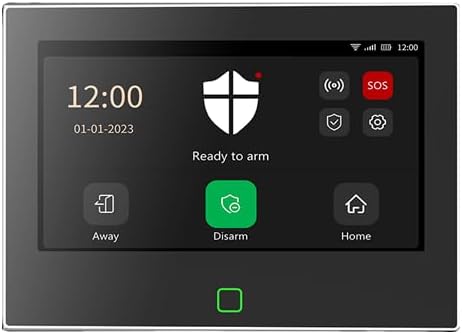
This image displays the main touchscreen interface of the CPVAN CP10 Pro Home Alarm System. The screen shows the current time (12:00) and date (01-01-2023). A large shield icon indicates the system is 'Ready to arm'. Below this, there are three main control buttons: 'Away' for full arming, 'Disarm' to deactivate the system, and 'Home' for partial arming. On the right side, smaller icons for 'SOS', settings, and status indicators are visible. A green square button is present at the bottom of the physical device.
تسلیح و خلع سلاح
- حالت دور: Activates all sensors. Ideal when no one is home. Select 'Away' on the touchscreen or via the app/remote.
- حالت خانه: Activates perimeter sensors (e.g., door/window sensors) while allowing movement inside. Select 'Home' on the touchscreen or via the app/remote.
- حالت خلع سلاح: Deactivates all sensors. Select 'Disarm' on the touchscreen or via the app/remote.
- عملکرد SOS: In case of emergency, press the 'SOS' button on the touchscreen or remote control to trigger an immediate alarm and notify preset contacts.
Door/Window Opening Reminder
Enable the "Warning when sensor has been opened" option in the settings for door/window sensors. When this feature is active, the system will provide an audible chime if a door or window is open when you attempt to arm the system, preventing accidental arming with open entry points.
اعلان های هشدار
When an alarm is triggered, the host will emit a loud 110 dB siren. If a SIM card is installed and configured, the system will also make phone calls and send SMS alerts to your preset emergency contacts.
تعمیر و نگهداری
مدیریت باتری
The CP10 Pro Host has a built-in 5000 mAh lithium-ion battery. Ensure the host is regularly connected to power to keep the battery charged. The battery provides backup power during power outages. Accessory sensors typically use their own batteries; monitor their battery levels via the SmartLife app and replace them as needed.
تمیز کردن
Wipe the touchscreen and host exterior with a soft, dry, lint-free cloth. Avoid using abrasive cleaners or solvents that could damage the surface.
عیب یابی
| مشکل | علت احتمالی | راه حل |
|---|---|---|
| سیستم به وای فای وصل نمیشه. | Incorrect Wi-Fi password; 5GHz network selected; host too far from router. | Verify password; ensure you are connecting to a 2.4GHz network; move host closer to router or use a Wi-Fi extender. |
| No SMS/Call alerts. | SIM card not installed or active; incorrect emergency numbers; poor GSM signal. | Check SIM card installation and activation; verify preset numbers in app/host settings; ensure good GSM signal strength. |
| سنسور آلارم را فعال نمیکند. | Sensor battery low; sensor not paired; sensor faulty; system disarmed. | Replace sensor battery; re-pair sensor with host; contact support if faulty; ensure system is armed in appropriate mode. |
| آلارمهای کاذب. | Improper sensor placement; sensitivity too high (for motion sensors); environmental factors. | Adjust sensor placement; reduce motion sensor sensitivity; identify and mitigate environmental triggers (e.g., pets, drafts). |
مشخصات
- شماره مدل: CP10 Pro
- ابعاد: 18.3 × 13.8 × 1.8 سانتی متر
- وزن: 1.46 کیلوگرم
- منبع تغذیه: Battery Powered (Built-in 5000 mAh Lithium Ion battery)
- سطح صدا: 110 dB (integrated siren)
- روش نصب: خودتان انجام دهید (خودتان انجام دهید) بیسیم
- دستگاه های سازگار: Smartphone (via SmartLife App)
- قابلیت اتصال: Wi-Fi (2.4GHz only), GSM
- Max Accessories: تا 200
گارانتی و پشتیبانی
The CPVAN CP10 Pro Home Alarm System comes with a 2 سال گارانتی سازنده. CPVAN also offers پشتیبانی مادام العمر از مشتری برای این محصول
For technical assistance, troubleshooting, or warranty claims, please refer to the contact information provided on the official CPVAN website or your purchase documentation. When contacting support, please have your product model number (CP10 Pro) and purchase details ready.


