مقدمه
Thank you for choosing the Grundig Wireless Bluetooth Open-Ear Earbuds. These earbuds are designed to provide a comfortable listening experience with an open-ear design, allowing you to stay aware of your surroundings while enjoying your audio. This manual provides essential information on how to set up, operate, and maintain your earbuds.
آنچه در جعبه است
- Grundig Wireless Bluetooth Open-Ear Earbuds
- کابل شارژ USB-C
- راهنمای کاربر
محصول تمام شده استview
Familiarize yourself with the components of your earbuds:
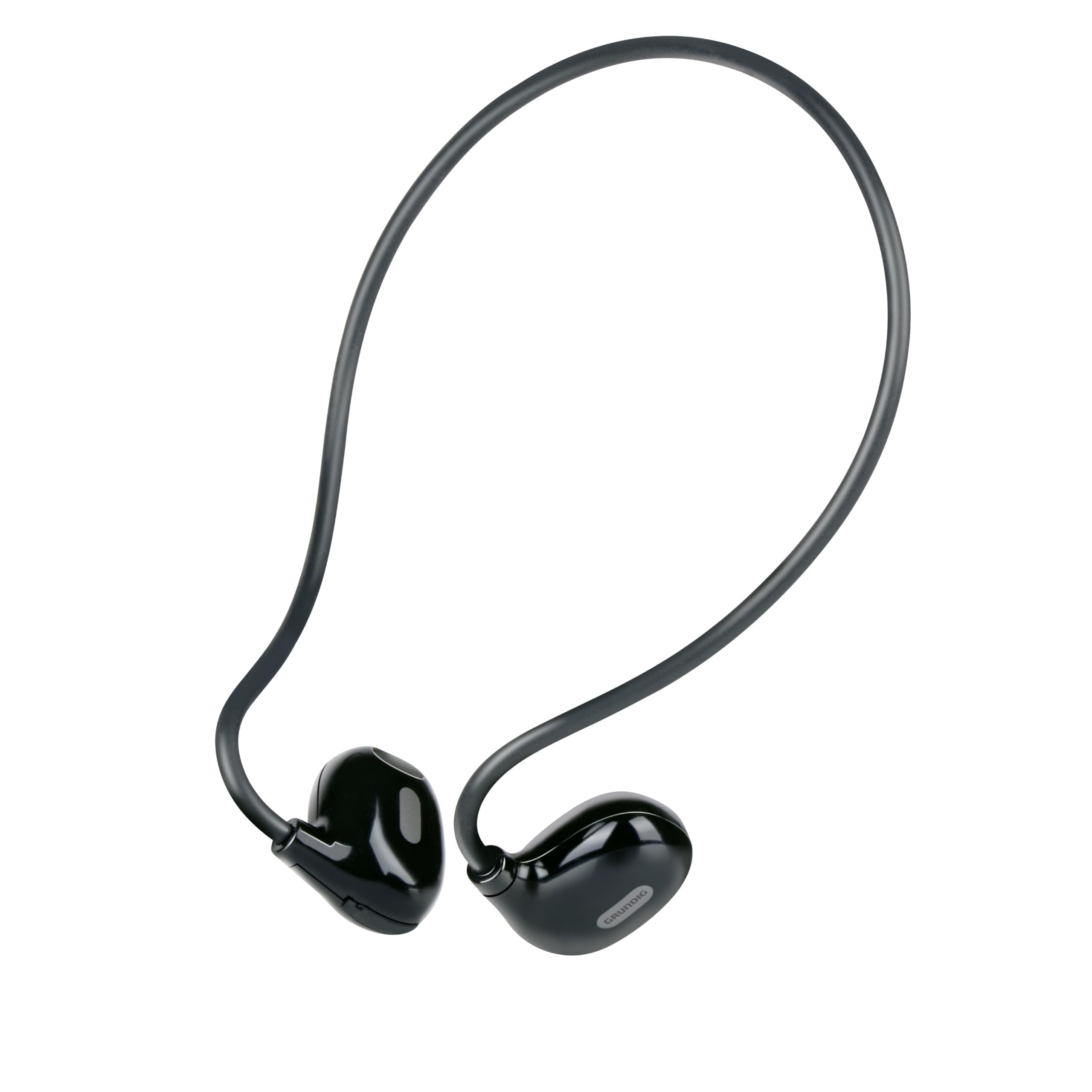
Figure 1: Close-up of a single earbud, highlighting the speaker and flexible ear hook.
- Earbud Unit: Contains the speaker and internal electronics.
- قلاب گوش انعطافپذیر: Designed to fit securely around your ear.
- میکروفون: برای تماس های هندزفری
- ناحیه کنترل لمسی: For managing music and calls.
- پورت شارژ USB-C: Located on one of the earbuds for power input.
راه اندازی
1. شارژ کردن هدفون
- Connect the supplied USB-C charging cable to the charging port on the earbuds.
- سر دیگر کابل USB-C را به یک منبع تغذیه USB سازگار (مثلاً آداپتور دیواری، پورت USB کامپیوتر) وصل کنید.
- The indicator light on the earbuds will show the charging status. A full charge takes approximately 1.5 hours.
- پس از شارژ کامل، کابل شارژ را جدا کنید.
2. جفت شدن با یک دستگاه
برای اتصال هدفونهایتان به دستگاهی که بلوتوث دارد:
- Ensure the earbuds are charged and powered off.
- Press and hold the touch control area on one earbud until the indicator light flashes, indicating pairing mode.
- On your device (phone, tablet, laptop), enable Bluetooth and search for available devices.
- Select "Grundig Earbuds" (or similar name) from the list of found devices.
- Once connected, the indicator light on the earbuds will change, usually to a slow flash or off, and you will hear an audible confirmation.
- ایربادها هنگام روشن شدن، بهطور خودکار سعی میکنند دوباره به آخرین دستگاه جفتشده متصل شوند.
۳. استفاده از ایرباد
For optimal comfort and sound, wear the earbuds as shown:

Figure 2: Proper placement of the earbuds with the ear hook.
- Place the earbud unit near your ear canal, ensuring the speaker is positioned to direct sound into your ear.
- Gently hook the flexible ear hook behind your ear to secure the earbud in place.
- Adjust for a comfortable and stable fit.
کار با ایربادها
روشن/خاموش برق
- روشن کردن: Press and hold the touch control area for a few seconds until you hear a power-on prompt.
- خاموش: Press and hold the touch control area for a few seconds until you hear a power-off prompt.
پخش موسیقی
- پخش/مکث: یک بار روی ناحیه کنترل لمسی ضربه بزنید.
- آهنگ بعدی: Double-tap the right earbud's touch control area.
- آهنگ قبلی: Double-tap the left earbud's touch control area.
مدیریت تماس
- پاسخ/پایان تماس: Tap the touch control area once during an incoming call or an active call.
- رد تماس: Press and hold the touch control area for 2 seconds during an incoming call.
کنترل صدا
Volume control is typically managed directly from your connected device. The earbuds support media control functions for play/pause and track skipping.
تعمیر و نگهداری
- تمیز کردن: Use a soft, dry cloth to clean the earbuds. Do not use abrasive cleaners or immerse them in water.
- ذخیره سازی: Store the earbuds in a cool, dry place away from direct sunlight and extreme temperatures.
- مراقبت از باتری: To prolong battery life, charge the earbuds regularly, even if not in frequent use. Avoid fully discharging the battery for extended periods.
عیب یابی
| مشکل | راه حل |
|---|---|
| ایربادها روشن نمیشوند. | Ensure the earbuds are fully charged. Connect them to the USB-C charging cable and allow 1.5 hours for a full charge. |
| نمیتوان با دستگاه جفتسازی کرد. | Make sure Bluetooth is enabled on your device. Ensure the earbuds are in pairing mode (indicator light flashing). Move the earbuds closer to your device. Forget previous pairings on your device and try again. |
| صدا نداره یا صداش کمه. | Check the volume level on both your connected device and the earbuds. Ensure the earbuds are properly seated on your ears. Reconnect the earbuds to your device. |
| تماسها مبهم هستند. | Ensure the microphone is not obstructed. Move to an area with less background noise. Check your device's call settings. |
| هدفونهای توگوشی مرتباً قطع و وصل میشوند. | Ensure the earbuds are within the Bluetooth range of your device. Avoid obstacles between the earbuds and your device. Charge the earbuds if the battery is low. |
مشخصات
| شماره مدل | 8711252259871 |
| نام تجاری | گروندیگ |
| فناوری اتصال | بیسیم (بلوتوث ۵.۳) |
| قرار دادن گوش | گوش باز |
| روش کنترل | کنترل را لمس کنید |
| عمر باتری | تا 5 ساعت |
| زمان شارژ | تقریبا 1.5 ساعت |
| پورت شارژ | USB-C |
| مواد | پلاستیک و سیلیکون |
| سطح مقاومت در برابر آب | ضد آب نیست |
| دستگاه های سازگار | Mobile phones, tablets, laptops, game consoles, desktop computers, smart speakers |
| ویژگی های خاص | Fast charging, Hands-free calls |
اطلاعات ایمنی
- برای جلوگیری از آسیب شنوایی، از هدفونها با صدای بلند و به مدت طولانی استفاده نکنید.
- در موقعیتهایی که عدم شنیدن صداهای محیط میتواند خطرناک باشد (مثلاً رانندگی، دوچرخهسواری، پیادهروی در ترافیک) از هدفون استفاده نکنید.
- گوشگیرها را از آب و رطوبت دور نگه دارید.
- Do not attempt to disassemble or modify the earbuds.
- دور از دسترس کودکان نگهداری شود.
- طبق مقررات محلی، مسئولانه محصول را دور بریزید.
گارانتی و پشتیبانی
Grundig products are designed for reliability and performance. For warranty information and customer support, please refer to the documentation provided with your purchase or visit the official Grundig webلطفاً رسید خرید خود را برای هرگونه ادعای گارانتی نگه دارید.


