1. مقدمه
This manual provides detailed instructions for the safe and efficient operation of your AIWA RCP3 Portable Radio Cassette Player. Please read this manual thoroughly before using the product and retain it for future reference.
The AIWA RCP3 is a versatile audio device featuring an AM/FM radio, a cassette tape player/recorder, Bluetooth 5.0 connectivity, and USB/microSD playback and recording capabilities. It also includes a microphone input and a 3.5mm stereo earphone jack for personal listening.
2. محتویات بسته
مطمئن شوید که تمام اقلام ذکر شده در زیر در بسته شما موجود است. در صورت مفقود شدن یا آسیب دیدن هر یک از اقلام، لطفاً با فروشنده خود تماس بگیرید.
- AIWA RCP3 Portable Radio Cassette Player (Pastel Green)
- D-size Alkaline Batteries (4-pack)
- 60-minute Cassette Tapes (5-pack)
- راهنمای کاربر (این سند)

شکل ۲.۱: محتویات بستهی شامل شده
3. محصول تمام شدview
Familiarize yourself with the main components and controls of your AIWA RCP3 unit.

شکل 3.1: جلو View of the AIWA RCP3
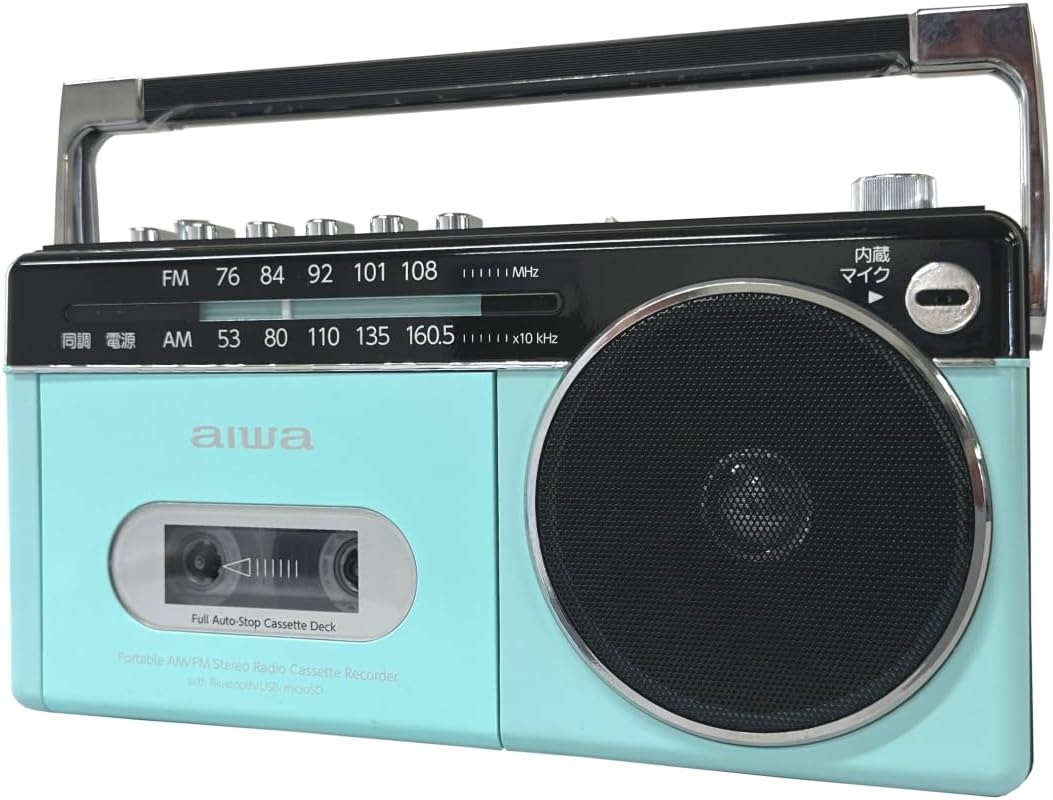
Figure 3.2: Top Controls and Rear View
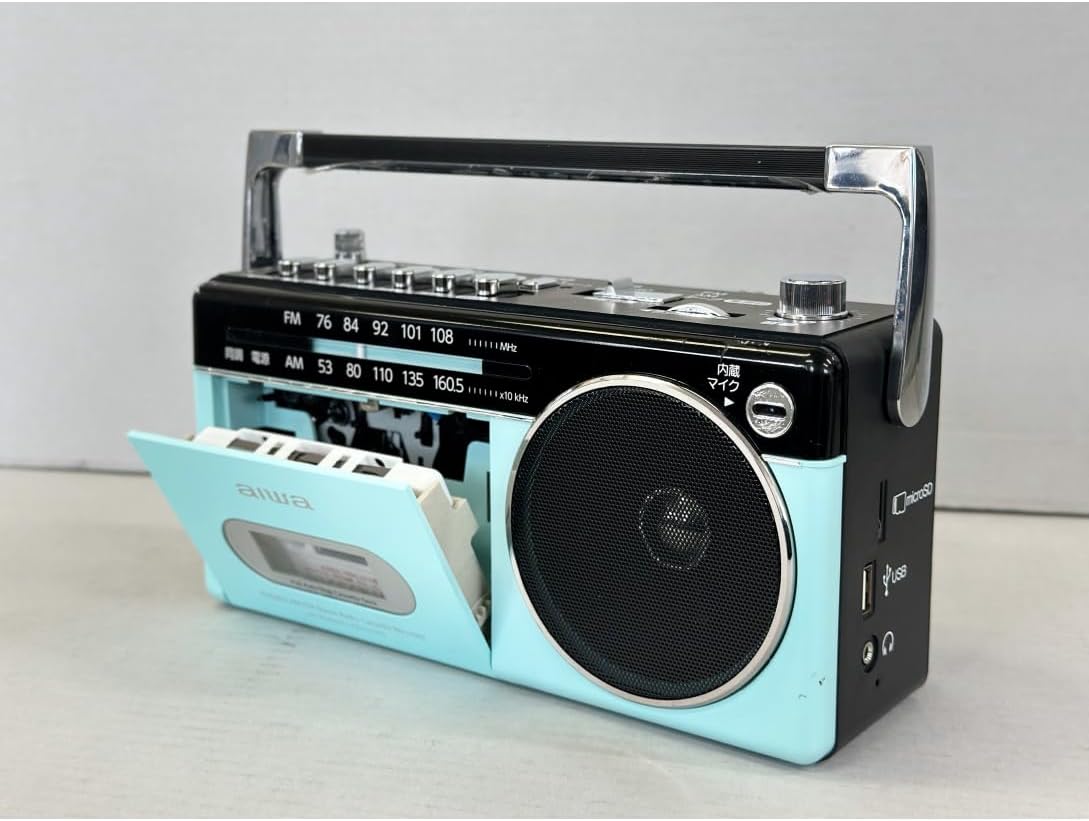
Figure 3.3: Side Ports (USB, MicroSD, Headphone)
4. راه اندازی
۴.۱ تغذیه واحد
The AIWA RCP3 can be powered using D-size batteries or an AC power adapter (not included).
4.1.1 نصب باتری
- Locate the battery compartment on the bottom or rear of the unit.
- درپوش محفظه باتری را باز کنید.
- Insert four (4) D-size alkaline batteries, ensuring correct polarity (+/-) as indicated inside the compartment.
- درپوش محفظه باتری را محکم ببندید.
4.1.2 AC Power (Adapter not included)
To use AC power, connect a compatible AC adapter (DC 6V, 1A, center positive) to the DC IN jack on the unit. Plug the adapter into a standard wall outlet. Batteries will be bypassed when AC power is connected.
5. دستورالعمل های عملیاتی
5.1 عملیات اساسی
- را بچرخانید قدرت / حجم knob clockwise to turn on the unit and adjust the volume.
- استفاده کنید سوئیچ to select your desired mode: FM, AM, نوار, بلوتوث, USB، یا microSD.
۴.۴ عملیات رادیویی (AM/FM)
- را تنظیم کنید سوئیچ به FM or AM.
- Extend the telescopic FM antenna for better FM reception. For AM, rotate the unit for optimal reception.
- را بچرخانید تنظیم رادیو knob to select your desired station. The frequency scale will indicate the current station.
5.3 Cassette Tape Operation
- را تنظیم کنید سوئیچ به نوار.
- را فشار دهید توقف/خارج کردن دکمه برای باز کردن محفظه کاست.
- یک نوار کاست را طوری قرار دهید که لبه باز آن رو به بالا باشد.
- درب محفظه کاست را ببندید.
- را فشار دهید بازی کنید دکمه شروع پخش
- استفاده کنید سریع به جلو or عقب دکمههایی برای پیمایش نوار.
- را فشار دهید مکث کنید برای توقف موقت پخش. برای ادامه، دوباره فشار دهید.
- را فشار دهید توقف/خارج کردن برای متوقف کردن پخش و خارج کردن نوار.

Figure 5.1: Cassette Compartment Open
5.3.1 Recording to Cassette Tape
- یک نوار کاست قابل ضبط را وارد کنید.
- Select the audio source you wish to record (e.g., AM, FM, بلوتوث, USB, microSD، یا میکروفون).
- را فشار دهید ضبط کنید دکمه این بازی کنید button will also engage simultaneously. Recording will begin.
- برای ضبط از میکروفون داخلی، مطمئن شوید که سوئیچ تنظیم شده است نوار و فشار دهید ضبط کنید. تنظیم کنید صدای میکروفون در صورت نیاز
- را فشار دهید توقف/خارج کردن برای پایان ضبط
5.4 عملکرد بلوتوث
- را تنظیم کنید سوئیچ به بلوتوث. The unit will enter pairing mode, indicated by a flashing LED.
- در دستگاه بلوتوثدار خود (گوشی هوشمند، تبلت و غیره)، دستگاههای موجود را جستجو کنید.
- Select "AIWA RCP3" from the list to pair. Once paired, the LED will stop flashing.
- You can now play audio from your device through the AIWA RCP3.
5.5 USB/MicroSD Playback and Recording
- یک درایو فلش USB را در آن قرار دهید USB port or a microSD card into the microSD شکاف.
- را تنظیم کنید سوئیچ به USB or microSD.
- The unit will automatically begin playing compatible audio fileها (مثلاً MP3).
- Use the playback control buttons (Play, Pause, Fast Forward, Rewind) for navigation.
- To record to USB/microSD, select the desired input source (e.g., Radio, Cassette, Bluetooth, Microphone) and then press the ضبط کنید button. The recording will be saved to the inserted USB drive or microSD card.
6. کنترل ها و توابع
| کنترل کنید | تابع |
|---|---|
| کلید پاور/ولوم | Turns the unit ON/OFF and adjusts the audio output volume. |
| سوئیچ | Selects operating mode: FM, AM, Tape, Bluetooth, USB, microSD. |
| دکمه تنظیم رادیو | Tunes to desired AM or FM radio frequency. |
| آنتن FM تلسکوپی | برای بهبود دریافت رادیو FM، آن را گسترش دهید. |
| Cassette Playback Buttons | Play, Pause, Fast Forward, Rewind, Stop/Eject. |
| دکمه ضبط | Initiates recording to cassette tape or USB/microSD. |
| ورودی میکروفون | Connect an external microphone for recording. |
| دکمه صدای میکروفون | Adjusts the input level of the microphone. |
| پورت USB | For USB flash drive playback and recording. |
| حافظه microSD | For microSD card playback and recording. |
| جک هدفون 3.5 میلی متری | Connect stereo earphones for private listening. |
7. تعمیر و نگهداری
- تمیز کردن: برای تمیز کردن قسمت بیرونی دستگاه از یک پارچه نرم و خشک استفاده کنید. از پاک کننده ها یا حلال های ساینده استفاده نکنید.
- مراقبت از عرشه کاست: Regularly clean the tape head, pinch roller, and capstan with a cotton swab lightly dampبا الکل ایزوپروپیل آغشته شده تا کیفیت صدای مطلوب تضمین شود و از آسیب دیدن نوار جلوگیری شود.
- ذخیره سازی: وقتی برای مدت طولانی از دستگاه استفاده نمیکنید، باتریها را برای جلوگیری از نشتی خارج کنید. دستگاه را در جای خشک و خنک و دور از نور مستقیم خورشید و دمای بسیار بالا نگهداری کنید.
- آنتن: آنتن تلسکوپی را به آرامی حمل کنید تا از خم شدن یا شکستن آن جلوگیری شود.
8 عیب یابی
| مشکل | علت احتمالی | راه حل |
|---|---|---|
| دستگاه روشن نمی شود. | باتریها خراب شدهاند یا به درستی در دستگاه قرار نگرفتهاند. برق AC وجود ندارد. | Replace batteries or check polarity. Ensure AC adapter is properly connected (if used). |
| صدایی از بلندگو نمیاد. | Volume is too low. Earphones connected. Function mode incorrect. | Increase volume. Disconnect earphones. Select correct function mode. |
| دریافت ضعیف رادیو | Antenna not extended. Weak signal. Interference. | Extend FM antenna. Rotate unit for AM. Move away from electronic devices. |
| نوار کاست پخش/ضبط نمیشود. | Tape inserted incorrectly. Tape damaged. Function mode incorrect. | Re-insert tape correctly. Try a different tape. Ensure 'Tape' function is selected. |
| جفت شدن بلوتوث ناموفق است. | Unit not in pairing mode. Device too far. | Ensure 'Bluetooth' function is selected and LED is flashing. Move device closer. |
| USB/microSD not recognized. | Incorrect format. Drive/card damaged. | اطمینان حاصل کنید files are compatible (e.g., MP3). Try a different USB drive/microSD card. |
9. مشخصات
- مدل: GAA4-RCP0003
- منبع تغذیه: DC 6V (4 x D-size batteries) or AC adapter (DC 6V, 1A, center positive, not included)
- مواد: رزین ABS
- ابعاد (LxWxH): ۲۰ × ۵ × ۲ سانتیمتر (تقریباً ۷.۸۷ × ۱.۹۷ × ۰.۷۹ اینچ)
- وزن: تقریباً 2.1 کیلوگرم (4.6 پوند)
- فرکانس های رادیویی:
- صبح: ۵۲۰ تا ۱۷۱۰ کیلوهرتز
- افام: ۸۷.۰ - ۱۰۸ مگاهرتز
- دک کاست: ضبط/پخش
- رسانههای دیجیتال: USB Port, microSD Card Slot (Playback & Recording)
- بلوتوث: Version 5.0 Receiver Function
- ورودی ها: ترمینال ورودی میکروفون
- خروجی ها: 3.5mm Stereo Earphone Terminal
10. اطلاعات ایمنی
- دستگاه را در معرض باران، رطوبت یا دمای بسیار بالا قرار ندهید.
- از قرار دادن دستگاه در نزدیکی منابع گرما یا در معرض نور مستقیم خورشید خودداری کنید.
- خودتان دستگاه را باز نکنید یا سعی در تعمیر آن نداشته باشید. تمام مراحل سرویس را به پرسنل واجد شرایط ارجاع دهید.
- دور از دسترس کودکان نگهداری شود.
- باتری ها را طبق مقررات محلی به درستی دور بیندازید.
11. گارانتی و پشتیبانی
This product comes with a standard manufacturer's warranty. Please refer to the warranty card included in your package for specific terms and conditions. For technical support, troubleshooting assistance, or warranty claims, please contact your retailer or the AIWA customer service department.
رسید خرید خود را به عنوان مدرک خرید برای استفاده از گارانتی نگه دارید.


