1. مقدمه
This manual provides essential information for the safe and efficient operation, installation, and maintenance of the ABB Main Computer M2004HW 3HAC020929-006/01. This industrial computer is designed for robust performance in various control system applications. Please read this manual thoroughly before attempting any installation or operation.
2. راه اندازی و نصب
Proper installation is crucial for the reliable operation of the M2004HW computer. Follow these guidelines carefully.
2.1 باز کردن و بازرسی
- Carefully remove the computer from its packaging.
- Inspect the unit for any signs of physical damage that may have occurred during transit. Report any damage to the supplier immediately.
- مطمئن شوید که تمام اجزای ذکر شده در برگه بستهبندی موجود هستند.
2.2 نصب
The M2004HW is designed for secure mounting within an industrial enclosure or rack. Use appropriate fasteners and ensure adequate ventilation space around the unit, especially near the cooling fans.
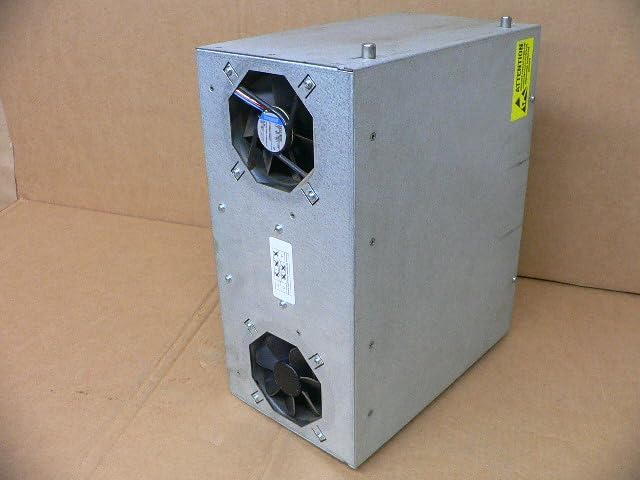
شکل 2.1: سمت view of the ABB M2004HW computer, illustrating the location of the two cooling fans for proper airflow and heat dissipation.
2.3 اتصال برق
The computer requires a 24 ولت DC power supply with a maximum current draw of 7A. Connect the power cable to the designated terminal block on the rear panel. Ensure correct polarity (+ and -) to prevent damage.

شکل 2.2: Product label indicating model number M2004HW, power requirements (24VDC, max 7A), and part numbers 3HAC020929-006/01 and 2-D150-0006.
۴.۳ اتصالات جانبی
Connect necessary peripherals to the rear panel ports:
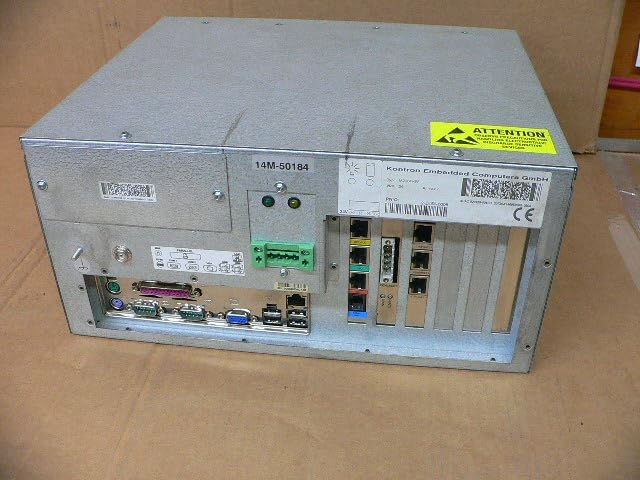
شکل 2.3: Rear panel of the ABB M2004HW computer, displaying a range of input/output ports including VGA, USB, Ethernet, and serial connections, along with the power input terminal.
- خروجی ویدیو: Connect a monitor to the VGA port.
- پورت های USB: برای کیبورد، ماوس و سایر دستگاههای USB
- پورت های اترنت: برای اتصال به شبکه.
- پورت های سریال: For communication with industrial devices.
- Other I/O: Utilize specialized industrial I/O as required by your application.
3. دستورالعمل های عملیاتی
3.1 روشن کردن
- Ensure all necessary cables are securely connected.
- Apply 24V DC power to the unit. The system should initiate its boot sequence.
- Observe the status indicator LEDs on the front or rear panel for system status.
3.2 تعامل سیستم
Once the operating system has loaded, interact with the computer using the connected keyboard, mouse, and monitor. Refer to the operating system's documentation for specific usage instructions.
3.3 خاموش کردن
Always shut down the operating system gracefully before removing power to prevent data corruption or system damage. After the OS has shut down, disconnect the 24V DC power supply.
4. تعمیر و نگهداری
Regular maintenance ensures the longevity and optimal performance of your ABB Main Computer.
4.1 تمیز کردن
- Periodically clean the exterior of the unit with a soft, dry cloth.
- Ensure cooling fan vents are free from dust and debris to maintain proper airflow. Use compressed air if necessary, ensuring the system is powered off during cleaning.
- Do not use liquid cleaners directly on the unit.
4.2 ملاحظات زیست محیطی
Operate the computer within its specified temperature and humidity ranges. Avoid exposure to excessive dust, moisture, or corrosive environments.
5 عیب یابی
این بخش به مشکلات رایجی که ممکن است با آنها مواجه شوید میپردازد.
5.1 بدون برق
- Verify the 24V DC power supply is active and correctly connected to the terminal block.
- قطبیت اتصال برق را بررسی کنید.
- کابل برق را از نظر آسیب دیدگی بررسی کنید.
۷.۲ خروجی نمایشگر وجود ندارد
- Ensure the monitor is powered on and correctly connected to the VGA port.
- Check the monitor's input selection.
- Try a different monitor or VGA cable if available.
5.3 System Not Responding
- If the system is unresponsive, perform a controlled shutdown if possible. If not, disconnect power, wait 30 seconds, and then reconnect.
- Check for any error indicators or messages on the display.
6. مشخصات
| ویژگی | جزئیات |
|---|---|
| نام تجاری | شکل |
| شماره مدل | M2004HW |
| شماره قطعه | 3HAC020929-006/01, 2-D150-0006 |
| ابعاد محصول (L x W x H) | 11.02 x 6.69 x 13.78 اینچ (28 x 17 x 35 سانتیمتر) |
| وزن مورد | 12.79 پوند (5.8 کیلوگرم) |
| ورودی برق | 24V DC, max 7A |
| سازنده | اب |
| ASIN | B0DCW2R6ZN |
| تاریخ برای اولین بار در دسترس است | 15 ژانویه 2024 |
7. گارانتی و پشتیبانی
This product is listed as a used item. Therefore, any original manufacturer's warranty may no longer be applicable. For warranty information specific to your purchase, please refer to the terms and conditions provided by the seller (Rylan-MRO).
For general product information or technical documentation from the manufacturer, you may visit the official ABB webسایت یا فروشگاه آنها در آمازون: فروشگاه ABB در آمازون.


