1. مقدمه
The Camiysn Moon104 is a versatile 104-key wireless RGB mechanical keyboard designed for various computing environments. It offers triple-mode connectivity, including 2.4GHz wireless, Bluetooth, and USB-C wired options, providing flexibility for different devices and usage scenarios. Featuring low-profile brown mechanical switches, the keyboard delivers a responsive and tactile typing experience with reduced noise. Its ergonomic design aims to minimize wrist fatigue during extended use, and the adjustable RGB backlighting allows for personalization of the visual experience.

Image 1.1: Camiysn Moon104 Wireless RGB Mechanical Keyboard, showcasinطرح و طراحی کامل آن.
2. محتویات بسته
لطفاً بررسی کنید که تمام موارد ذکر شده در زیر در بسته شما موجود باشد:
- Camiysn Moon104 Wireless RGB Mechanical Keyboard
- کابل USB-C به USB-A
- گیرنده USB 2.4 گیگاهرتز
- ابزار کشش کلید
- Additional Red Keycaps (for customization)
- راهنمای کاربر (این سند)

Image 2.1: Contents of the Camiysn Moon104 keyboard package, including the keyboard, cable, keycap puller, and extra keycaps.
3. راه اندازی
3.1 روشن/خاموش کردن
Locate the power toggle switch on the keyboard. Slide it to the 'ON' position to power on the keyboard. Slide it to 'OFF' to power off the keyboard and conserve battery.
3.2 حالت های اتصال
The Camiysn Moon104 keyboard supports three connection modes: 2.4GHz wireless, Bluetooth, and USB-C wired.

Image 3.1: Visual representation of the three connection modes available on the Camiysn Moon104 keyboard.
۳.۲.۲ اتصال بیسیم ۲.۴ گیگاهرتز
- Insert the 2.4GHz USB receiver into an available USB port on your computer or device.
- Ensure the keyboard's power switch is ON.
- را طولانی فشار دهید fn+4 keys for 3 seconds to enter 2.4GHz pairing mode. The indicator light will flash, then remain solid once connected.
3.2.2 اتصال بلوتوث
این کیبورد میتواند به حداکثر سه دستگاه بلوتوث متصل شود.
- Ensure the keyboard's power switch is ON.
- فشار طولانی fn+1, fn+2، یا fn+3 for 3 seconds to enter Bluetooth pairing mode for the corresponding slot. The indicator light will flash rapidly.
- در دستگاه خود (رایانه، تبلت، تلفن هوشمند)، بلوتوث را فعال کنید و دستگاههای جدید را جستجو کنید.
- Select "Camiysn Moon104" (or similar name) from the list of available devices to pair. The indicator light will become solid once connected.
- برای جابجایی بین دستگاههای بلوتوث جفتشده، فشار کوتاه دهید fn+1, fn+2، یا fn+3.
۳.۲.۱ اتصال سیمی USB-C
- یک سر کابل USB-C ارائه شده را به پورت USB-C کیبورد وصل کنید.
- سر دیگر کابل USB-C را به یک پورت USB موجود در رایانه یا دستگاه خود وصل کنید.
- Ensure the keyboard's power switch is in the 'OFF' position for wired mode. The keyboard will automatically switch to wired mode.

Image 3.2: The Camiysn Moon104 keyboard demonstrating its ability to connect to a laptop, monitor, and tablet using its three distinct connection modes.
4. دستورالعمل های عملیاتی
4.1 کنترل نور پس زمینه
The Camiysn Moon104 keyboard features adjustable RGB backlighting. Use the following Fn key combinations to control the lighting effects:

Image 4.1: A guide to Fn key combinations for adjusting the RGB backlight effects and colors.
- Fn + Ins: Switch between various backlight effects.
- Fn + Del: Select backlight color (for static color modes).
- Fn + ↑ (فلش بالا): Increase backlight luminance.
- Fn + ↓ (فلش پایین): Decrease backlight luminance.
- Fn + ← (فلش چپ): Decrease backlight circulation speed.
- Fn + → (فلش راست): Increase backlight circulation speed.
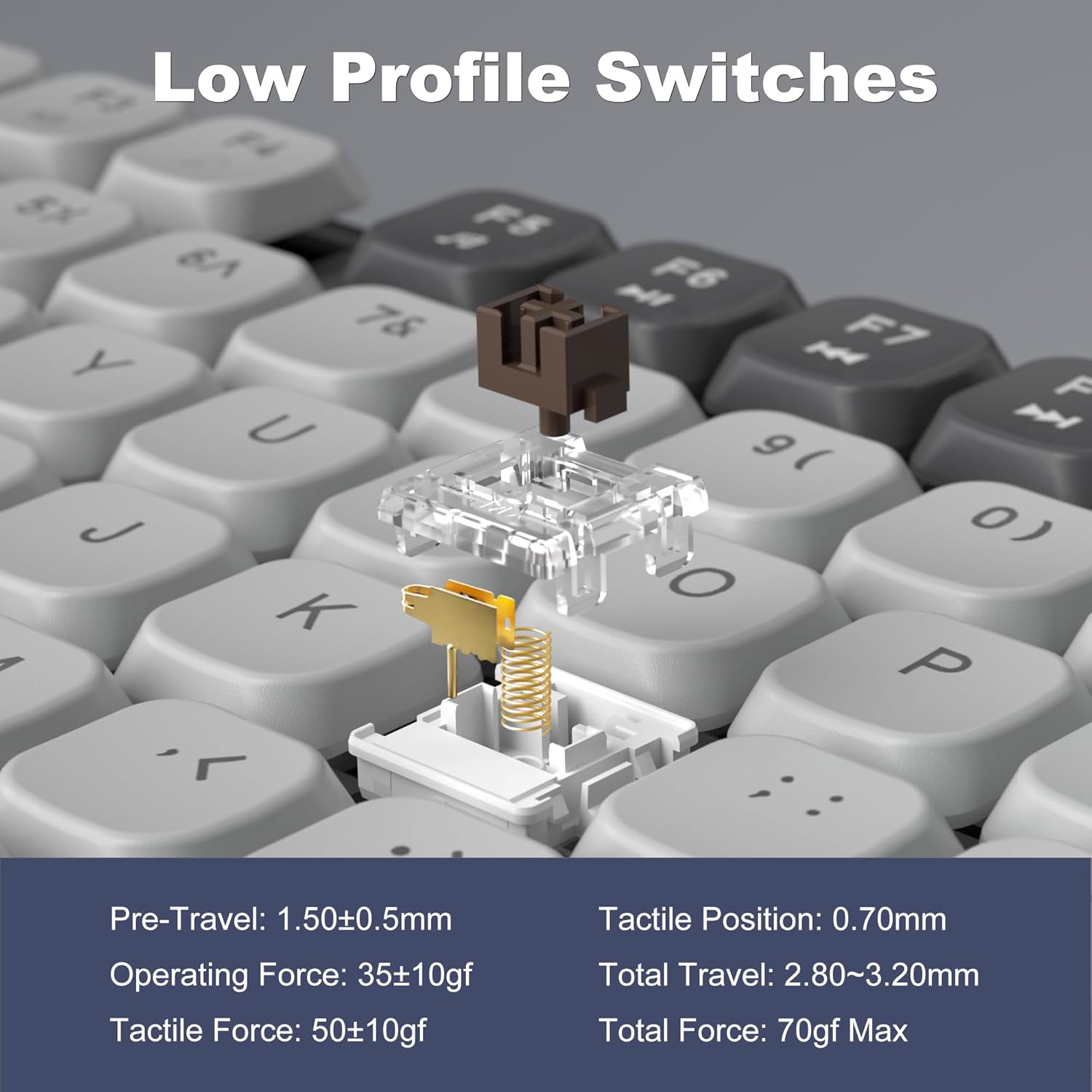
Image 4.2: The Camiysn Moon104 keyboard illuminated with its customizable RGB backlighting.
۴.۴ طراحی ارگونومیک
The keyboard features adjustable tilting feet on the underside. Extend these feet to adjust the typing angle for improved comfort and to reduce wrist strain during prolonged use.

Image 4.3: Detail of the keyboard's ergonomic design, highlighting the adjustable feet for comfortable typing angles.
4.3 Low-Profile Brown Tactile Switches
The Moon104 keyboard is equipped with low-profile brown tactile mechanical switches. These switches are characterized by a noticeable bump in the middle of the keypress, providing tactile feedback without the loud click of blue switches. They offer a balance between typing and gaming performance, with a relatively quiet operation compared to other mechanical switch types.

Image 4.4: Detailed specifications and force curve for the low-profile brown tactile switches used in the Moon104 keyboard.
۵.۴ تغییر کلید N
The keyboard supports N-key rollover, meaning that every keypress is registered independently, regardless of how many keys are pressed simultaneously. This feature is beneficial for fast typists and gamers, ensuring accuracy and preventing ghosting or missed inputs.
4.5 سازگاری
The Camiysn Moon104 keyboard is compatible with a wide range of operating systems, including:
- Windows (Win2000, Win XP, Win ME, Vista, Win7, Win8, Win10)
- اندروید
- لینوکس
- سیستم عامل مک
The keyboard is plug-and-play, requiring no additional drivers for basic functionality.

Image 4.5: The keyboard's automatic recognition feature for both Windows and Mac operating systems.
5. تعمیر و نگهداری
۷.۱ تمیز کردن صفحه کلید
برای حفظ ظاهر و عملکرد صفحهکلید:
- Disconnect the keyboard from all devices before cleaning.
- کمی d از یک پارچه نرم و بدون پرز استفاده کنیدampبا آب یا یک محلول تمیزکننده ملایم، کلاهک کلیدها و سطح آن را پاک کنید.
- برای گرد و غبار و خرده ریزهای بین کلیدها، از هوای فشرده یا یک برس کوچک استفاده کنید.
- از استفاده از مواد شیمیایی قوی، پاککنندههای ساینده یا رطوبت بیش از حد خودداری کنید، زیرا این موارد میتوانند به صفحه کلید آسیب برسانند.
5.2 شارژ باتری
The keyboard has a built-in rechargeable battery. When the battery is low, the indicator light may flash. Connect the keyboard to a USB power source using the provided USB-C cable to charge. The indicator light will typically show charging status and turn off or change color when fully charged.
6 عیب یابی
If you encounter issues with your Camiysn Moon104 keyboard, please refer to the following common solutions:
- صفحه کلید پاسخ نمیدهد:
Ensure the keyboard is powered on. Check the connection mode (2.4GHz, Bluetooth, or wired) and ensure it matches your device's connection. For wireless modes, ensure the battery is charged. For wired mode, ensure the USB-C cable is securely connected and the power switch is OFF. - مشکلات اتصال بیسیم ۲.۴ گیگاهرتز:
Ensure the USB receiver is properly inserted. Try plugging the receiver into a different USB port. Re-enter pairing mode by long pressing fn+4 به مدت 3 ثانیه - مشکلات اتصال بلوتوث:
Ensure Bluetooth is enabled on your device. Delete previous pairings for the keyboard on your device and attempt to pair again. Try a different Bluetooth slot (Fn + 1/2/3). Ensure the keyboard is not too far from the device. - نور پس زمینه کار نمیکند یا گیر کرده است:
Check backlight luminance with Fn + ↑. Try cycling through effects with Fn + Ins. Some users have reported that pressing Fn + PrintScreen can resolve backlight issues. - Volume control keys (Fn+F10/F11/F12) not working:
Please note that while some keyboards may feature these key combinations, the Camiysn Moon104 keyboard may not support dedicated multimedia volume control functions as indicated by user feedback. Volume control may need to be managed directly through your operating system. - Keys feeling sticky or inconsistent:
Ensure no debris is lodged under the keycaps. Use the provided keycap puller to carefully remove the keycap and clean the switch area.
7. مشخصات
| شماره مدل | Moon104 |
| فناوری اتصال | بلوتوث، بیسیم ۲.۴ گیگاهرتز، سیمی USB-C |
| توضیحات صفحه کلید | Mechanical (Low-Profile Brown Tactile Switches) |
| نور پس زمینه صفحه کلید | RGB |
| دستگاه های سازگار | Laptop, PC, Smart TV, Tablet (Windows, Android, Linux, Mac OS) |
| مواد | پلاستیک |
| وزن مورد | ۳.۷۴ پوند (تقریباً ۱.۷ کیلوگرم) |
| ابعاد بسته بندی | ۱۸.۵ در ۶.۸۱ در ۱.۱۸ اینچ (تقریباً ۴۷ در ۱۷.۳ در ۳ سانتیمتر) |
8. گارانتی و پشتیبانی
For warranty information and technical support, please refer to the documentation provided at the time of purchase or visit the official Camiysn webشرایط و ضوابط خاص گارانتی ممکن است بسته به منطقه و فروشگاه متفاوت باشد.


