مقدمه
This manual provides comprehensive instructions for the HP 255 Dual Wireless Mouse (Model 8R3U1UT). This device offers dual-mode connectivity via 2.4 GHz wireless (USB-A dongle) and Bluetooth 5.0, ensuring compatibility with Windows, ChromeOS, and macOS. It features a 1600 DPI optical sensor for precise control and is designed for comfortable, ambidextrous use.
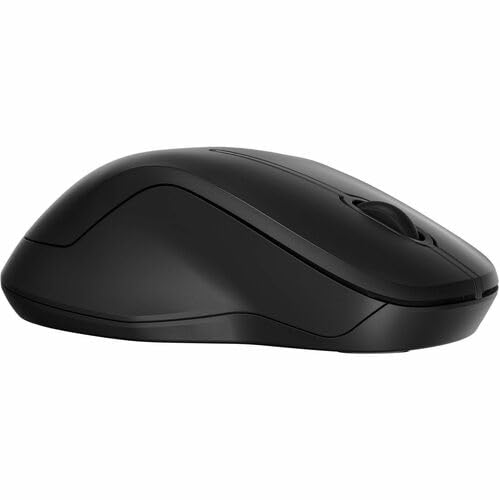
تصویر: از بالا به پایین view of the HP 255 Dual Wireless Mouse, showcasing its symmetrical black design.
محتویات بسته
بررسی کنید که آیا همه اقلام در بسته موجود است یا خیر:
- HP 255 Dual Wireless Mouse
- USB-A Wireless Dongle (typically stored inside the mouse)
- راهنمای شروع سریع (در صورت وجود)
- توجه: 1 AA battery is required and not included.
راه اندازی
1. نصب باتری
- پوشش محفظه باتری را در قسمت زیرین ماوس پیدا کنید.
- برای باز کردن محفظه، درپوش را بلغزانید یا بلند کنید.
- یک باتری قلمی (AA) را وارد کنید و از قطبیت صحیح (+/-) اطمینان حاصل کنید.
- درپوش محفظه باتری را محکم ببندید.
The mouse requires one AA battery for operation. Batteries are not included with the product.
2. Connecting via 2.4 GHz Wireless (USB-A Dongle)
- Remove the USB-A wireless dongle from its storage slot, typically located inside the battery compartment or near it.
- Plug the USB-A dongle into an available USB-A port on your computer (Windows, ChromeOS, or macOS).
- ماوس را با استفاده از کلید پاور که در زیر آن قرار دارد، روشن کنید.
- The mouse should automatically connect to your computer. No additional drivers are typically required for this plug-and-play connection.
۴.۴ اتصال از طریق بلوتوث ۵.۰
- مطمئن شوید که بلوتوث کامپیوتر شما فعال است.
- ماوس را با استفاده از کلید پاور که در زیر آن قرار دارد، روشن کنید.
- Press and hold the Bluetooth pairing button (often located on the underside of the mouse, or combined with the mode switch) until the indicator light starts blinking, indicating pairing mode.
- در رایانه خود، به تنظیمات بلوتوث بروید:
- ویندوز: تنظیمات > دستگاهها > بلوتوث و سایر دستگاهها > افزودن بلوتوث یا دستگاه دیگر.
- سیستم عامل مکینتاش: System Settings > Bluetooth.
- ChromeOS: Quick Settings panel > Bluetooth.
- Select "HP 255 Mouse" or a similar name from the list of available devices and follow any on-screen prompts to complete pairing.
- The indicator light on the mouse will stop blinking and remain solid (or turn off) once successfully paired.
دستورالعمل های عملیاتی
دکمه های ماوس
The HP 255 Dual Wireless Mouse features 3 buttons:
- دکمه کلیک چپ: Primary function for selecting items, opening links, etc.
- دکمه کلیک راست: Secondary function for context menus and additional options.
- چرخ اسکرول / دکمه وسط: برای پیمایش اسناد و مدارک استفاده میشود web pages. Pressing it down often acts as a middle-click button for specific functions.
DPI (نقاط در اینچ)
The mouse operates at a fixed resolution of 1600 DPI, providing smooth and precise cursor control across various surfaces.
مدیریت نیرو
- سوئیچ قدرت: Use the ON/OFF switch on the underside of the mouse to conserve battery life when not in use.
- حالت خواب خودکار: The mouse enters a low-power sleep mode after a period of inactivity to extend battery life. Move the mouse or click a button to wake it up.
- عمر باتری: A single AA battery can provide up to 12 months of usage, depending on usage patterns.
تعمیر و نگهداری
- تمیز کردن: برای تمیز کردن ماوس از یک پارچه نرم و خشک استفاده کنید. برای آلودگیهای سرسخت، کمی ...ampپارچه را با آب بشویید. از مواد شیمیایی قوی یا پاککنندههای ساینده خودداری کنید.
- تمیز کردن سنسور: Periodically clean the optical sensor on the underside of the mouse with a soft, lint-free cloth to ensure optimal tracking performance.
- تعویض باتری: Replace the AA battery when the mouse performance degrades or the low battery indicator (if present) illuminates.
- ذخیره سازی: When not in use for extended periods, turn off the mouse and consider removing the battery to prevent leakage. Store the USB dongle inside the mouse for safekeeping.
عیب یابی
ماوس پاسخ نمیدهد
- بررسی باتری: مطمئن شوید که باتری قلمی (AA) به درستی نصب شده و شارژ کافی دارد. در صورت لزوم آن را تعویض کنید.
- سوئیچ قدرت: Verify the mouse is turned ON.
- USB Dongle (2.4 GHz):
- Ensure the dongle is securely plugged into a working USB-A port.
- Try plugging the dongle into a different USB-A port.
- Ensure the dongle is within range (typically up to 10 meters) and not obstructed.
- Bluetooth (Bluetooth 5.0):
- مطمئن شوید که بلوتوث کامپیوتر شما فعال است.
- Re-attempt the pairing process as described in the "Connecting via Bluetooth 5.0" section.
- Ensure the mouse is within Bluetooth range (typically up to 10 meters).
- ماوس را از لیست دستگاههای بلوتوث رایانه خود حذف کرده و دوباره آن را جفت کنید.
- سطح: Ensure you are using the mouse on a suitable surface. Highly reflective or transparent surfaces may affect optical tracking.
حرکت نامنظم مکاننما
- حسگر نوری زیر ماوس را تمیز کنید.
- سعی کنید از ماوس روی سطح دیگری استفاده کنید.
- مطمئن شوید که هیچ تداخل الکترومغناطیسی قوی در نزدیکی وجود ندارد.
مشخصات
| نام مدل | HP 255 Dual Wireless Mouse (8R3U1UT) |
| فناوری اتصال | Wireless (2.4 GHz via USB-A dongle), Bluetooth 5.0 |
| تشخیص حرکت | نوری |
| قطعنامه حرکت | 1600 DPI |
| تعداد دکمه ها | ۳ (چپ، راست، چرخ اسکرول/وسط) |
| جهت گیری دست | دوسویه |
| منبع تغذیه | 1 عدد باتری AA (شامل نمی شود) |
| عمر باتری | تا 12 ماه |
| سیستم عامل های سازگار | Windows, ChromeOS, macOS |
| مواد | ۶۵٪ پلاستیکهای بازیافتی پس از مصرف |
| ابعاد (L x W) | 5.3 اینچ طول × 3.4 اینچ عرض (تقریبی) |
گارانتی و پشتیبانی
برای اطلاعات گارانتی و پشتیبانی فنی، لطفاً به مستندات همراه محصول خود مراجعه کنید یا از پشتیبانی رسمی HP دیدن کنید. webسایت:
Keep your purchase receipt and product model number (8R3U1UT) handy when contacting support.