مقدمه
The HP Envy 6155e is a versatile All-in-One printer designed for home use, offering color printing, scanning, and copying functionalities. It features wireless connectivity, mobile printing capabilities, and an intuitive color touchscreen for easy navigation. This manual provides essential information for setting up, operating, maintaining, and troubleshooting your printer.
ویژگی های کلیدی
- عملکرد همه در یک: Print, scan, and copy with a single device.
- اتصال بی سیم: Dual-band Wi-Fi with self-healing capabilities for reliable connection.
- چاپ سیار: Print directly from your smartphone or tablet using the HP Smart app.
- چاپ دورو اتوماتیک: Save paper with automatic two-sided printing for documents and photos.
- صفحه نمایش لمسی بصری: Easy navigation and control via the 2.4-inch color touchscreen.
- خروجی با کیفیت بالا: Produces vibrant color documents and true-to-screen photos.
- ظرفیت کاغذ: Features a 100-sheet input tray and a 25-sheet output tray.
- طراحی پایدار: Made with at least 60% recycled plastic.

Figure 1: HP Envy 6155e All-in-One Printer, highlighting the included 3 months of Instant Ink.

شکل 2: تمام شده استview of key features including print/copy/scan, print speeds, touchscreen, and Wi-Fi.

Figure 3: Printer dimensions: 17.05 inches (W), 14.21 inches (D), 5.35 inches (H).
راهنمای راه اندازی
Follow these steps to set up your HP Envy 6155e printer for the first time. For detailed visual instructions, refer to the included setup guide.
۱. جعبهگشایی و آمادهسازی اولیه
- چاپگر را از بسته بندی آن خارج کنید.
- تمام مواد بستهبندی، نوارها و فیلمهای محافظ را از قسمت بیرونی و داخلی چاپگر جدا کنید.
- مطمئن شوید که تمام اجزای ذکر شده در بخش «آنچه در جعبه است» موجود است.

Figure 4: Included components: HP Envy 6155e printer, power cord, and HP 68 Setup ink cartridges.
2. برق را وصل کنید
- سیم برق را به پشت چاپگر و سپس به پریز برق وصل کنید.
- دکمه پاور را فشار دهید تا چاپگر روشن شود.

شکل 5: عقب view of the printer, showing the power input and USB 2.0 port for PC connection.
۲. کارتریجهای جوهر را نصب کنید
- درب دسترسی کارتریج جوهر را باز کنید.
- صبر کنید تا کالسکه به مرکز حرکت کند.
- Unpack the HP 68 Setup Black and Tri-Color cartridges.
- Insert the cartridges into their respective slots until they click into place.
- درب دسترسی کارتریج جوهر را ببندید.
۳. کاغذ را بارگذاری کنید
- سینی ورودی را بیرون بکشید.
- یک دسته کاغذ سفید ساده را در سینی قرار دهید، طوری که سمت چاپ رو به پایین باشد.
- راهنماهای کاغذ را متناسب با اندازه کاغذ تنظیم کنید.
- سینی ورودی را دوباره به داخل چاپگر فشار دهید.
5. Connect to Network and Install Software
- On the printer's 2.4-inch color touchscreen, follow the prompts to select your language and country/region.
- Select your Wi-Fi network from the list and enter the password. The printer features self-healing Wi-Fi to maintain a stable connection.
- دانلود کنید برنامه هوشمند HP on your smartphone, tablet, or computer from your device's app store or hpsmart.com.
- Open the HP Smart app and follow the on-screen instructions to add your printer and complete the setup. This includes activating your 3-month Instant Ink trial if desired.

Figure 6: Seamless wireless printing and self-healing Wi-Fi connectivity.
کار با چاپگر
The HP Envy 6155e offers intuitive controls through its touchscreen and the HP Smart app.
با استفاده از صفحه لمسی
The 2.4-inch color touchscreen allows you to easily access print, copy, and scan functions, check ink levels, and manage settings.

Figure 7: Navigating printer functions using the intuitive color touchscreen.
چاپ اسناد و عکسها
- از یک کامپیوتر: Select your HP Envy 6155e from your computer's print dialog. Adjust settings like paper type, size, and print quality.
- از دستگاههای همراه (برنامه هوشمند HP): Open the HP Smart app, select "Print Documents" or "Print Photos," choose your file, and adjust print settings before sending to the printer.
- چاپ دو رو: The printer supports automatic two-sided printing. Select the duplex option in your print settings to save paper.
- چاپ بدون حاشیه: Print photos without borders for a professional finish.

Figure 8: The printer produces high-quality documents and vibrant photos.
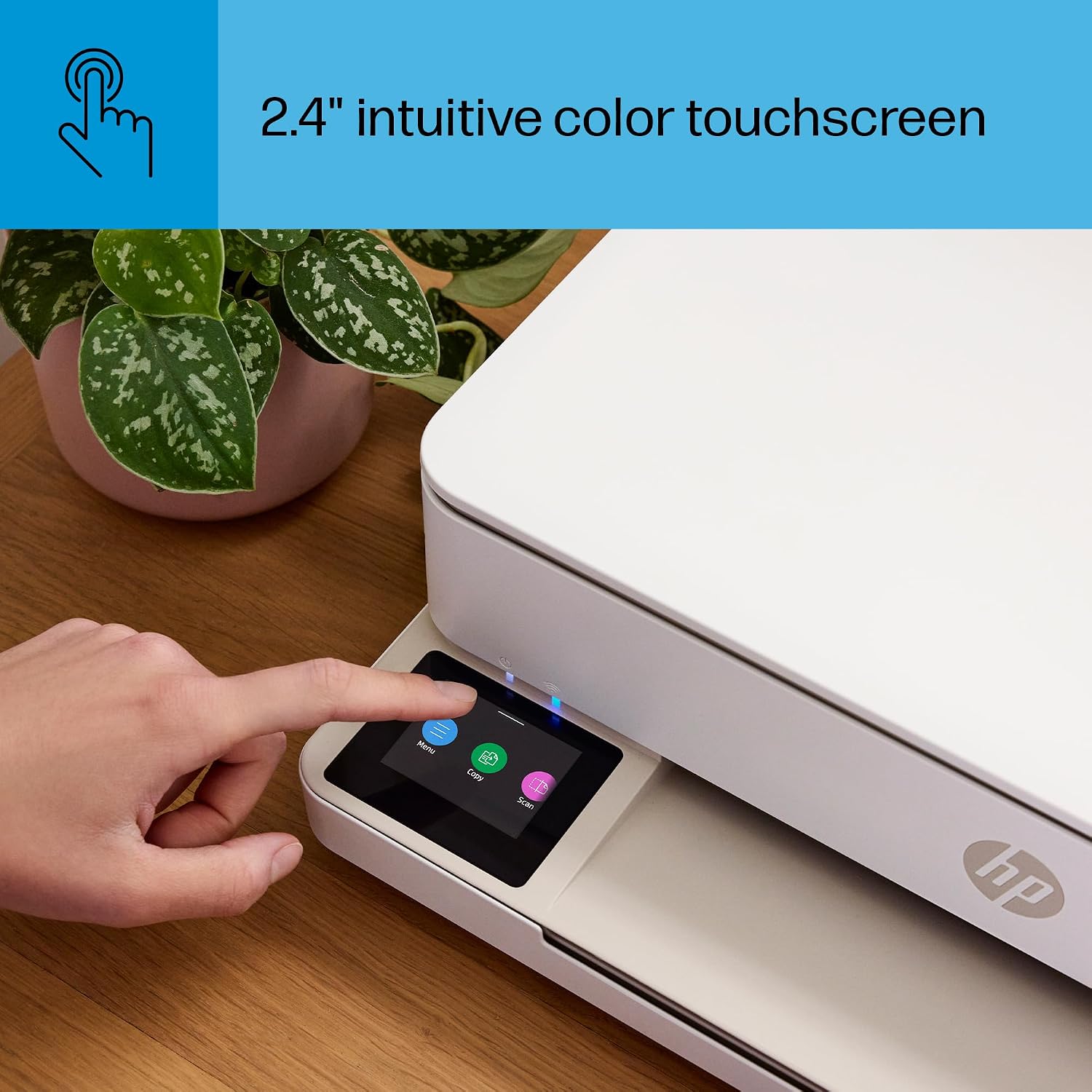
Figure 9: Print photos that look as vibrant as they do on your screen with HP's P3 technology.

Figure 10: Automatic two-sided printing for both photos and documents.
اسکن اسناد
- استفاده از اسکنر تخت: Lift the scanner lid, place your document or photo face down on the glass, close the lid, and initiate the scan from the printer's touchscreen or the HP Smart app.
- استفاده از تغذیه کننده خودکار اسناد (ADF): For multi-page documents, load them into the ADF tray. The printer will automatically feed and scan each page.
- HP Smart App Scan: The app allows you to scan directly to your phone, email, or cloud services.

Figure 11: The printer features a flatbed scanner for single pages and an automatic document feeder for multiple pages.

Figure 12: The HP Smart app enables remote printing, scanning, and monitoring ink levels.
کپی کردن اسناد
- سند اصلی را روی شیشه اسکنر یا در ADF قرار دهید.
- On the printer's touchscreen, select "Copy."
- Choose the number of copies and whether you want color or black and white.
- Press "Start Copy" to begin.
تعمیر و نگهداری
Regular maintenance ensures optimal performance and longevity of your HP Envy 6155e printer.
تعویض کارتریج جوهر
When an ink cartridge is low or empty, the printer will notify you. Replace cartridges with genuine HP 68 ink cartridges.
- مطمئن شوید که چاپگر روشن است.
- درب دسترسی کارتریج جوهر را باز کنید.
- صبر کنید تا حرکت دستگاه چاپ متوقف شود.
- کارتریج قدیمی را فشار دهید تا آزاد شود، سپس آن را بیرون بکشید.
- کارتریج جدید را از بستهبندی خارج کنید، نوار محافظ را بردارید و آن را در شیار صحیح قرار دهید تا صدای کلیک بدهد.
- درب دسترسی کارتریج جوهر را ببندید.
Note: If you are enrolled in HP Instant Ink, replacement cartridges will be shipped to you automatically before you run out.
تمیز کردن چاپگر
- نمای بیرونی: سطوح خارجی را با یک پارچه نرم و بدون پرز پاک کنید. از پاک کننده های ساینده استفاده نکنید.
- شیشه اسکنر: به آرامی از پارچه نرم استفاده کنیدampبرای تمیز کردن شیشه اسکنر، آن را با شیشه پاک کن (غیر ساینده) آغشته کنید. از اسپری کردن مستقیم شیشه پاک کن روی شیشه خودداری کنید.
- تمیز کردن هد چاپ: If print quality issues occur (streaks, faded colors), use the printhead cleaning utility available through the printer's touchscreen or the HP Smart app.
عیب یابی مسائل رایج
This section addresses common problems you might encounter with your HP Envy 6155e printer.
Printer Not Responding or Offline
- بررسی قدرت: مطمئن شوید که چاپگر به برق وصل و روشن است.
- بررسی اتصال Wi-Fi: Verify that the printer is connected to your Wi-Fi network. On the touchscreen, navigate to the wireless settings. If disconnected, reconnect. The printer's self-healing Wi-Fi should automatically attempt to resolve connection issues.
- راه اندازی مجدد دستگاه ها: چاپگر، روتر و رایانه/دستگاه همراه خود را مجدداً راهاندازی کنید.
- برنامه هوشمند اچپی: Use the HP Smart app's diagnostic tools to identify and resolve connectivity issues.
کیفیت چاپ ضعیف
- بررسی سطح جوهر: Ensure cartridges are not empty. Replace if necessary.
- Run Printhead Cleaning: Access this utility from the printer's touchscreen or HP Smart app.
- نوع کاغذ چک: Ensure you are using the correct paper type for your print job (e.g., photo paper for photos).
- Align Printhead: Perform a printhead alignment from the printer's maintenance menu.
جم کاغذ
- مسیر پاک: Carefully remove any jammed paper from the input tray, output tray, or inside the printer. Refer to the printer's internal diagrams for access points.
- کاغذ را به درستی بارگذاری کنید: Ensure paper is loaded correctly and the paper guides are adjusted to the paper size. Do not overload the tray.
به روزرسانی های میان افزار
HP periodically releases firmware updates to improve printer performance and add new features. You can check for and install updates via the HP Smart app or the printer's touchscreen menu.
مشخصات فنی
| ویژگی | مشخصات |
|---|---|
| نام مدل | HP Envy 6155e (New) |
| شماره مدل | 714L5A#B1H |
| توابع | چاپ، اسکن، کپی |
| فناوری چاپ | جوهر افشان |
| سرعت چاپ (سیاه) | تا 10 برگ در دقیقه (ppm) |
| سرعت چاپ (رنگی) | تا 7 برگ در دقیقه (ppm) |
| حداکثر وضوح چاپ (رنگی) | حداکثر 4800 x 1200 نقطه در اینچ بهینه شده |
| حداکثر وضوح چاپ (مشکی) | حداکثر 1200 x 1200 dpi رندر شده |
| چاپ دورو | خودکار (استاندارد) |
| نوع اسکنر | تخت تخت |
| حداکثر ظرفیت برگه ورودی | 100 برگ |
| ظرفیت ورق خروجی | 25 برگ |
| نوع نمایشگر | صفحه نمایش لمسی رنگی 2.4 اینچی |
| قابلیت اتصال | 802.11a/b/g/n/ac Wi-Fi, USB 2.0 |
| کارتریج های سازگار | HP 68 Black, HP 68 Tri-Color |
| ابعاد محصول (عرض D ارتفاع H ارتفاع) | ۵.۹ اینچ در ۱۱.۸ اینچ در ۱۴.۶ اینچ |
| وزن مورد | 11.28 پوند |
| مصرف برق (در حالت روشن) | 4.25 وات |
| محتوای پلاستیکی بازیافتی | حداقل 60% |
گارانتی و پشتیبانی
اطلاعات گارانتی
The HP Envy 6155e comes with a One-Year limited hardware warranty. There is an option to extend this warranty to two years with the acceptance of the HP+ Offer during setup. For complete warranty terms and conditions, please visit the official HP support webسایت
پشتیبانی مشتری
For further assistance, technical support, or to access drivers and software, please visit the official HP support webسایت:
همچنین میتوانید منابع مفید، سوالات متداول و انجمنهای گفتگو را در پورتال پشتیبانی HP پیدا کنید.